
Linsoul Hidizs MP145
Linsoul Hidizs MP145 In-Ear Monitor User Manual
Model: Hidizs MP145 | Brand: Linsoul
Introduction
Thank you for choosing the Linsoul Hidizs MP145 In-Ear Monitors. These high-fidelity earphones are engineered with a 14.5mm planar magnetic driver to deliver exceptional audio clarity and immersive sound. This manual provides essential information for the proper setup, operation, maintenance, and troubleshooting of your MP145 IEMs to ensure optimal performance and longevity.

Figure 1: Linsoul Hidizs MP145 In-Ear Monitors.
Product Overview
Components
- Hidizs MP145 In-Ear Monitors (Left and Right earpieces)
- Detachable 2-pin OFC (Oxygen-Free Copper) Cable (3.5mm or 4.4mm termination, depending on model)
- Various sizes of Liquid Silicone Ear Tips
- Customized Pouch for storage
- Sound Tuning Filters (often included, though not explicitly listed in "whats_in_the_box", but mentioned in feature bullets)

Figure 2: Exploded view of the MP145 IEM, illustrating its internal structure.
Key Features
- 14.5mm Planar Magnetic Driver: Delivers rich, clear, and detailed audio across the frequency spectrum.
- Fully Symmetrical Magnetic Circuit: Features 7+7 N52H magnets for reduced harmonic distortion and improved magnetic circuit efficiency.
- High-Purity OFC Silver-Plated Cable: Minimizes resistance for enhanced resolution in mid-to-high frequencies and clear vocals.
- Detachable 0.78mm 2-Pin Connector: Ensures durability and broad compatibility with various earphone sockets.
- Ergonomic Design: Lightweight and inspired by whale tail aesthetics for comfortable extended wear.
- High Sensitivity (104dB): Compatible with a wide range of devices, from mobile phones to dedicated music players and DACs.
- Liquid Silicone Ear Tips: Designed for a secure fit, lossless bass, and enhanced audio quality.
Setup
1. Attaching the Cable
The Hidizs MP145 features a detachable 2-pin cable. Identify the left (blue dot) and right (red dot) connectors on the cable and match them to the corresponding IEM earpieces. Gently align the pins with the sockets and push firmly until they are securely connected. Do not force the connection to avoid damaging the pins or sockets.

Figure 3: Proper connection of the detachable 2-pin cable to the IEMs.
2. Selecting and Installing Ear Tips
The package includes various sizes of liquid silicone ear tips. Experiment with different sizes to find the best fit for your ears. A proper seal is crucial for optimal sound quality, especially bass response, and comfort. To install, gently push the ear tip onto the nozzle of the IEM until it is securely seated.
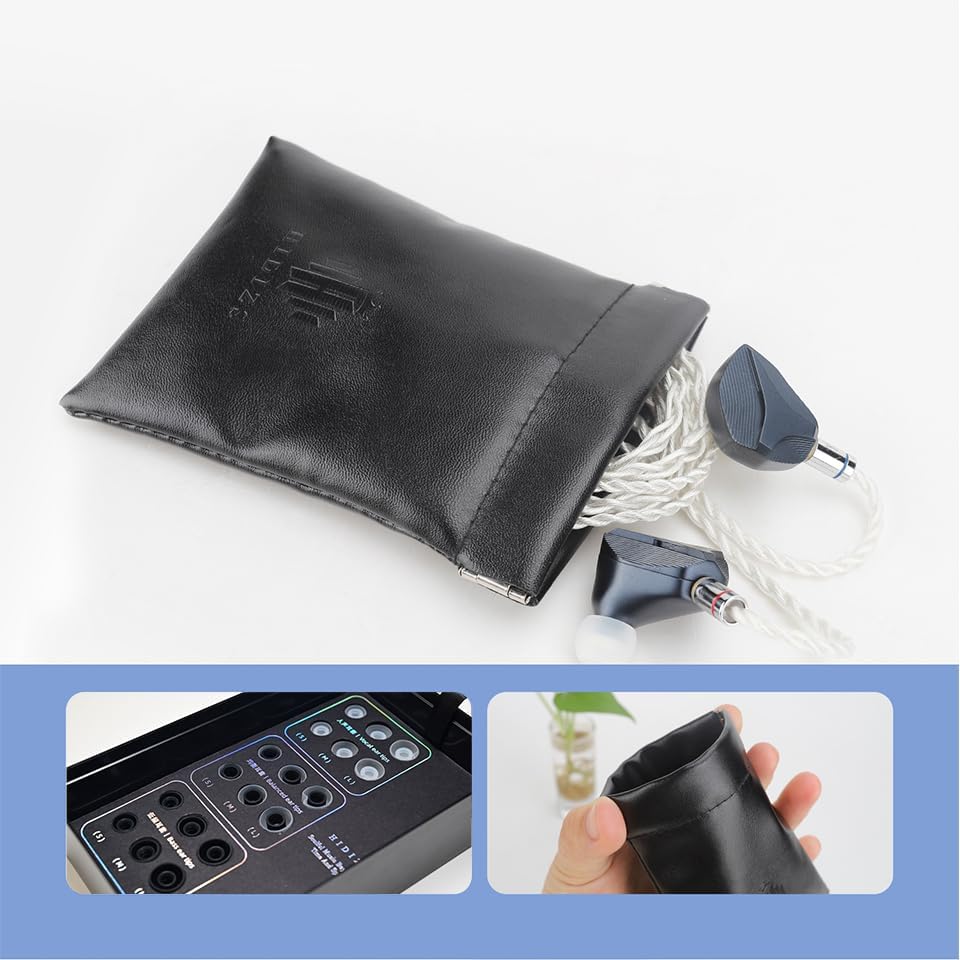
Figure 4: Included ear tips and storage pouch.
3. Wearing the IEMs
Insert the IEMs into your ear canals, ensuring a snug and comfortable fit. The cable is designed to loop over your ear for added stability and to reduce microphonics (cable noise). Adjust the cable and IEMs until they feel secure and the sound is clear and full.

Figure 5: Correct way to wear the Hidizs MP145 IEMs with the cable routed over the ear.
4. Connecting to an Audio Source
Plug the 3.5mm or 4.4mm jack of the cable into your audio source (e.g., smartphone, digital audio player, DAC, computer). Ensure the volume on your audio source is set to a low level before playing audio to prevent sudden loud sounds.
Operating Instructions
The Hidizs MP145 IEMs are passive audio devices, meaning they do not have built-in controls for volume or playback. All controls are managed directly from your connected audio source.
- Volume Control: Adjust the volume using the controls on your smartphone, DAP, DAC, or computer. Start with a low volume and gradually increase it to a comfortable listening level.
- Playback Control: Use your audio source to play, pause, skip tracks, or manage calls.
- Optimal Listening: For the best audio experience, use high-quality audio files and a capable audio source. The MP145's high sensitivity makes it suitable for a wide range of devices, but a dedicated DAC or music player can further enhance the sound quality.
Maintenance
Cleaning the IEMs and Ear Tips
- Regularly wipe the IEM earpieces with a soft, dry, lint-free cloth to remove dust and earwax.
- Remove the ear tips and clean them with mild soap and water. Rinse thoroughly and allow them to dry completely before reattaching.
- Use a small brush or cleaning tool to gently remove any earwax or debris from the IEM nozzles. Ensure no moisture enters the IEM body.
Cable Care
- Avoid sharp bends or kinks in the cable, as this can damage the internal wires.
- When disconnecting the cable from the IEMs or audio source, always grasp the connector housing, not the cable itself.
- Store the cable neatly coiled to prevent tangling.
Storage
When not in use, store your Hidizs MP145 IEMs in the provided customized pouch to protect them from dust, scratches, and physical damage. Avoid exposing them to extreme temperatures or humidity.
Troubleshooting
| Problem | Possible Cause | Solution |
|---|---|---|
| No sound from one or both earpieces. |
|
|
| Distorted or poor sound quality. |
|
|
| IEMs feel uncomfortable or fall out easily. |
|
|
Specifications
| Feature | Detail |
|---|---|
| Model Name | Hidizs MP145 |
| Headphones Jack | 3.5 mm Jack (or 4.4mm depending on variant) |
| Connectivity Technology | Wired |
| Audio Driver Type | 14.5mm Planar Magnetic Driver |
| Frequency Range | 20Hz-40kHz |
| Impedance | 30 Ohm |
| Sensitivity | 104dB |
| Material | Aluminum, Plastic |
| Item Weight | 19 Grams (0.67 ounces) |
| Product Dimensions | 4.72 x 3.94 x 0.79 inches |
| Cable Feature | Detachable 2-pin |
| Included Components | Cable, Eartips |

Figure 6: Key technical specifications of the Hidizs MP145.
Warranty and Support
Linsoul provides a standard warranty for the Hidizs MP145 In-Ear Monitors against manufacturing defects. The specific terms and duration of the warranty may vary by region and retailer. Please retain your proof of purchase for warranty claims.
For technical support, warranty inquiries, or replacement parts, please contact Linsoul customer service through their official website or the retailer from whom you purchased the product. You may also refer to the protection plans offered at the time of purchase for extended coverage options.
Linsoul Official Website: www.linsoul.com
Related documentsHidizs MP145


Ask a question about this manual
Ask about setup, troubleshooting, compatibility, parts, safety, or missing instructions. Manuals+ will review the question and use this page’s manual context to help answer it.