
Fancii FC-RUVFBSC
Fancii Facial Cleansing Brush with Self Cleaning Station Instruction Manual
Model: FC-RUVFBSC
Brand: Fancii
Introduction
The Fancii Skylar Facial Cleansing Brush is designed to provide a superior cleansing experience, effectively removing makeup, dirt, and oils while gently exfoliating the skin. This device helps improve skin texture, minimize pores, and reduce blemishes, leading to a brighter, smoother complexion, with just 1 minute of daily use. Its innovative docking station ensures hygiene and convenience by cleaning, drying, and charging the brush simultaneously.

Image: The Fancii Skylar Facial Cleansing Brush in pink, shown with its white charging station and an additional brush head.
What's Included
Your Fancii Skylar Facial Cleansing Brush package includes:
- Fancii Skylar Facial Cleansing Brush (main unit)
- Self-Cleaning Docking Station with built-in dryer and UV light
- 1 x Ultra-soft Nylon Bristle Brush Head (Daily Brush Head)
- 1 x Silicone Bristle Brush Head (for dry or sensitive skin)
- Charging Cable
- User Manual (this document)
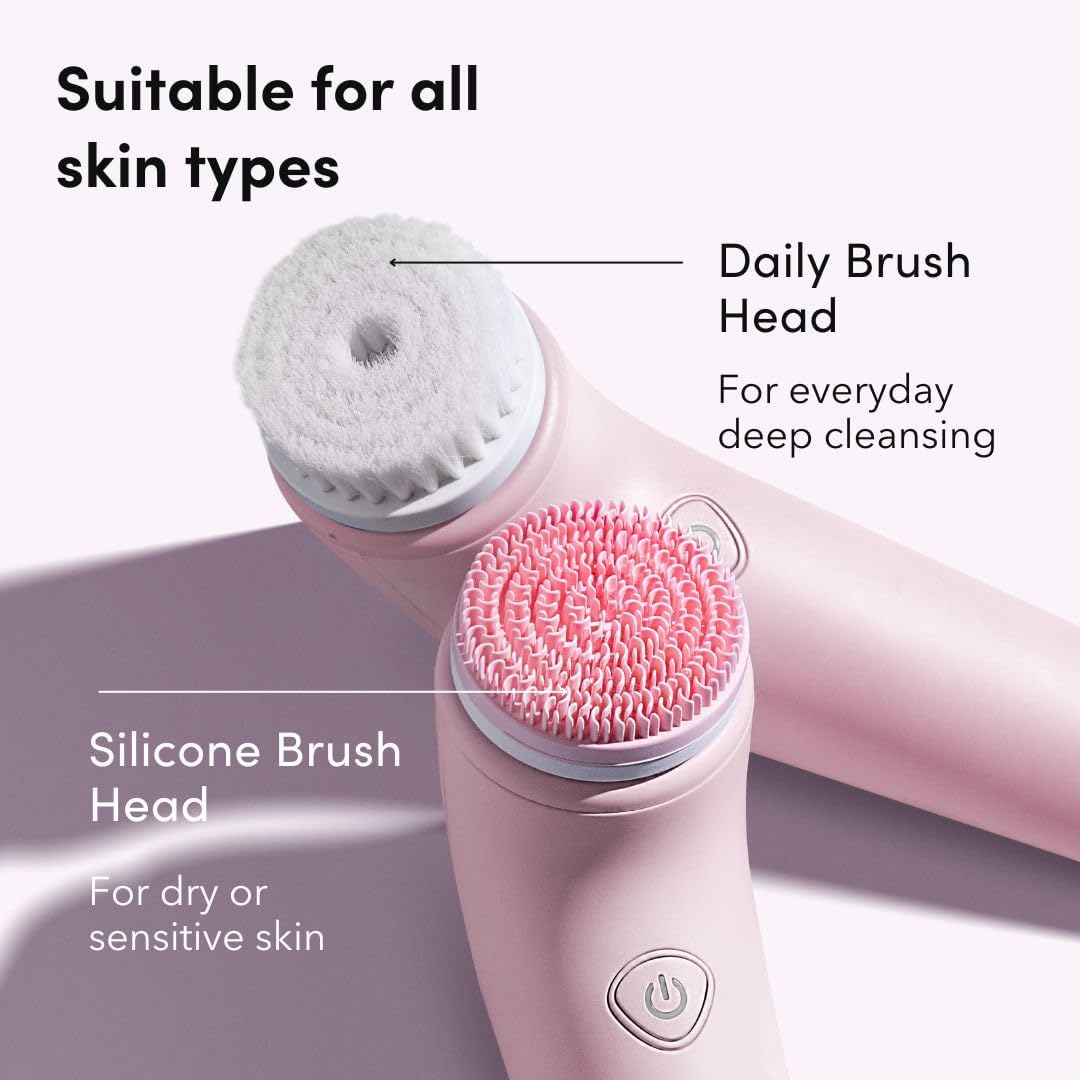
Image: Close-up view of the two interchangeable brush heads: a white daily brush head with soft nylon bristles and a pink silicone brush head for sensitive skin.
Setup
- Initial Charge: Before first use, fully charge the device using the provided docking station. Connect the charging cable to the docking station and plug it into a power outlet. Place the cleansing brush into the docking station. The indicator light will show charging status. A full charge takes approximately 5 hours.
- Attach Brush Head: Select your desired brush head (nylon or silicone). Align the brush head with the rotating pin on the device and gently push until it clicks into place.

Image: The Fancii Skylar Facial Cleansing Brush resting in its docking station, illustrating the UV self-sanitizing technology and built-in dryer.
Operating Instructions
- Wet Skin and Brush Head: Dampen your face with water and apply your preferred facial cleanser directly to your skin or onto the brush head.
- Power On: Press the power button on the handle to turn on the device.
- Select Speed: The device features two-speed settings. Press the power button once for the low setting (gentle cleanse, ideal for sensitive skin) and again for the high setting (deeper exfoliation).
- Cleansing: Gently move the brush in circular motions across your face. The brush will automatically alternate rotation direction (clockwise and counter-clockwise) every 10 seconds to ensure thorough cleaning.
- Duration: Use for approximately 1 minute daily for optimal results.
- Power Off: Press the power button to turn off the device when finished.

Image: A woman smiling while using the Fancii Skylar Facial Cleansing Brush on her cheek, demonstrating its use with facial cleanser foam.
Waterproof Design
The Fancii Skylar Facial Cleansing Brush is IPX7 water-resistant, making it safe for use in the bath or shower. This design allows for convenient and versatile use in your daily skincare routine.

Image: Two Fancii Skylar Facial Cleansing Brushes, one pink and one purple, held under running water, highlighting their IPX7 waterproof feature.
Maintenance
- Rinse Brush Head: After each use, rinse the brush head thoroughly under warm running water to remove any cleanser residue or debris.
- Clean Handle: Wipe the handle of the device with a damp cloth.
- Self-Cleaning and Drying: Place the brush back into the docking station. The station will automatically initiate a cleaning and drying cycle using its built-in dryer and UV light technology. This process ensures the brush head remains hygienic and dry. The drying time is approximately 90 minutes.
- Charging: The docking station also charges the device while it is docked. Ensure the station is plugged in for charging and self-cleaning functions.
- Storage: Store the device in its docking station to maintain hygiene and ensure it is always charged and ready for use.

Image: The Fancii Skylar Facial Cleansing Brush standing upright in its charging station, with cleansing foam around the base, indicating its use and readiness for cleaning.
Troubleshooting
| Problem | Possible Cause | Solution |
|---|---|---|
| Device does not turn on. | Battery is low or depleted. | Place the device in the docking station and ensure it is properly connected to power. Allow it to charge fully. |
| Brush head does not spin or spins weakly. | Brush head not properly attached or debris obstructing movement. Low battery. | Ensure the brush head is securely clicked into place. Remove the brush head and clean any debris from the connection point. Charge the device. |
| Docking station fan is noisy during cleaning/drying. | Normal operation during the drying cycle. | This is normal. The fan operates to ensure thorough drying of the brush head. The cycle lasts approximately 90 minutes. |
| Device stops during use. | Automatic shut-off feature or low battery. | The device has an automatic shut-off after a certain period of use. If it stops prematurely, recharge the device. |
Specifications
- Model Name: Skylar
- Item Model Number: FC-RUVFBSC
- Brand: Fancii
- Color: Pink
- Material: Plastic
- Power Source: Battery Powered (1 Lithium Ion battery included)
- Water Resistance: IPX7 (safe for bath and shower use)
- Product Dimensions: 2.76 x 6.69 x 17.72 inches
- Item Weight: 12.87 ounces
- Charging Time: Approximately 5 hours for full charge
- Drying Cycle Time: Approximately 90 minutes
Safety Information
- Do not use the device on broken, irritated, or severely sensitive skin.
- If you experience any discomfort or irritation, discontinue use immediately.
- Keep out of reach of children.
- Do not disassemble or attempt to repair the device yourself.
- Ensure the charging station is kept dry and away from water when plugged in.
- Use only the provided charging cable and docking station.
Warranty and Support
For warranty information, product support, or to purchase replacement parts, please visit the official Fancii website or contact Fancii customer service. Refer to your purchase documentation for specific warranty terms and conditions.
Fancii Official Store: Visit the Fancii Store on Amazon
Ask a question about this manual
Ask about setup, troubleshooting, compatibility, parts, safety, or missing instructions. Manuals+ will review the question and use this page’s manual context to help answer it.