
YOVDA CZE-15A
FM Transmitter User Manual
Model: CZE-15A | Brand: YOVDA
Product Overview
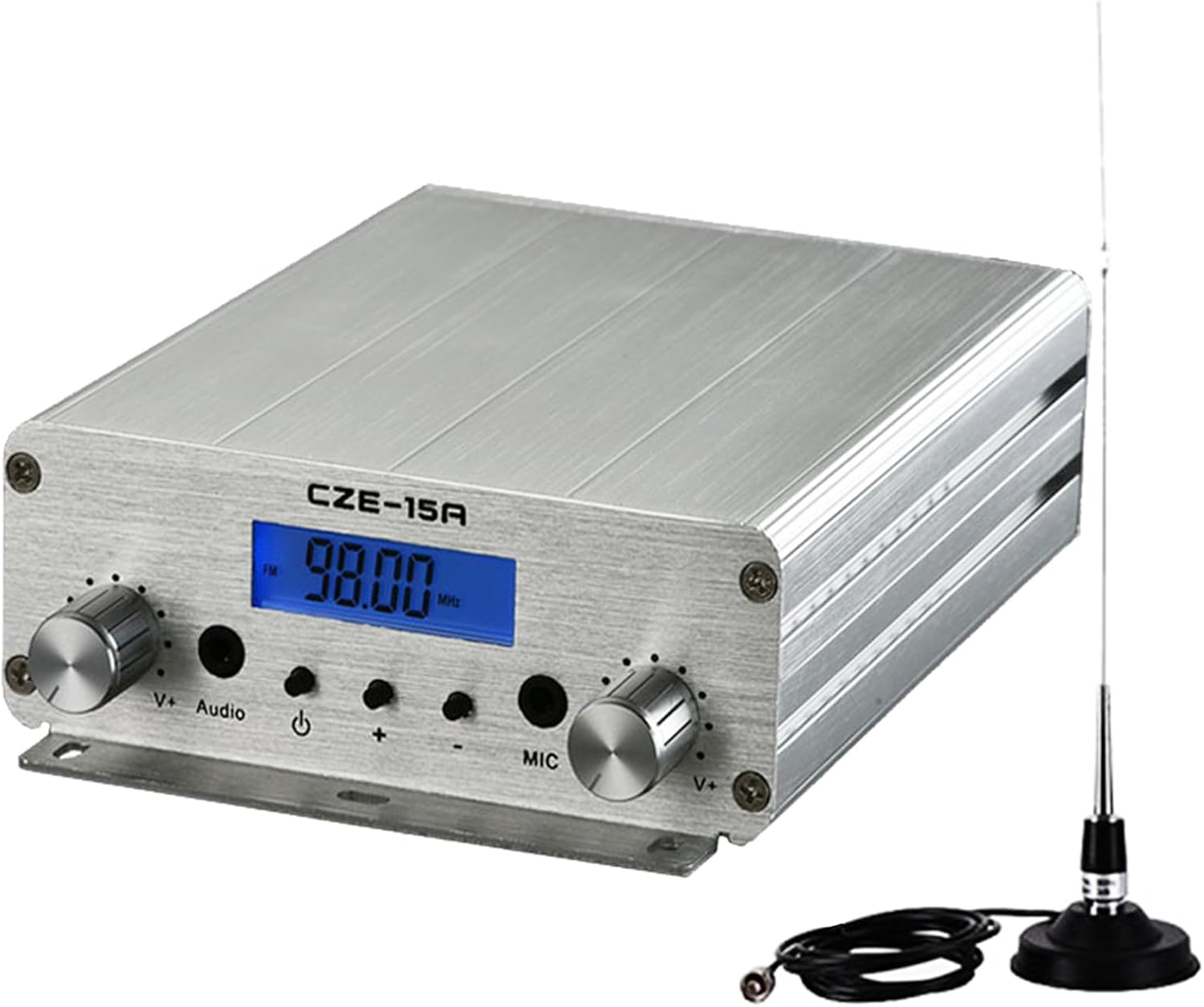
The YOVDA CZE-15A FM Transmitter is a versatile 15W radio broadcast transmitter designed for various applications, including church services, drive-in movies, and other events requiring long-range FM transmission. It features a high-quality aluminum housing for effective heat dissipation and provides stable, high-fidelity sound.
This device supports multiple audio inputs, including a 3.5mm AUX jack, making it compatible with a wide range of devices such as MP3 players, mobile phones, computers, and audio mixers. The adjustable power output (3W/15W) allows for flexible use depending on your broadcasting needs.
Package Contents
Please verify that all items listed below are included in your package:
- 1x 15W FM Transmitter (CZE-15A)
- 1x 12V Power Supply
- 1x 3.5mm Audio Cable
- 1x Aluminum Antenna
- 1x Antenna Cable
- 1x User Manual (this document)

Setup Guide
Follow these steps to set up your FM Transmitter:
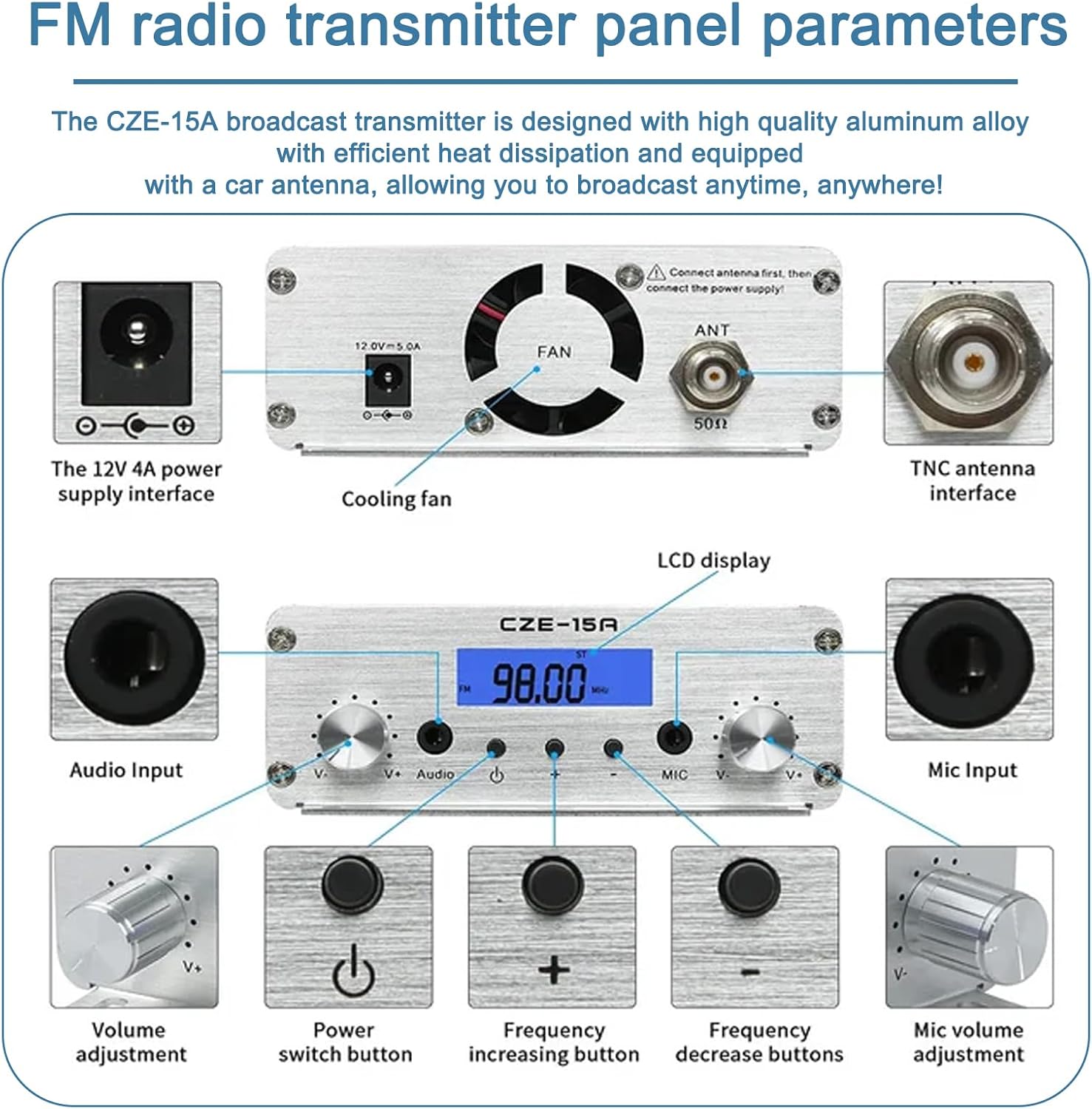
- Connect the Antenna: Screw the antenna cable into the TNC antenna interface on the back of the transmitter. Ensure it is securely fastened.
- Connect Power: Plug the 12V power supply into the DC 12V 4A power supply interface on the back of the transmitter. Then, plug the power supply into a suitable electrical outlet.
- Connect Audio Input: Use the provided 3.5mm audio cable to connect your audio source (e.g., MP3 player, phone, computer, audio mixer) to the Audio Input jack on the front panel.
- Optional Microphone Input: If using a microphone, connect it to the Mic Input jack on the front panel.

For a visual guide on connecting the device and its basic operation, please watch the following video:
Video 1: Demonstration of the YOVDA CZE-15A FM Transmitter setup and audio playback. This video shows the connection of the audio source, power, and antenna, along with basic operation.
Operating Instructions
Once the transmitter is set up, follow these steps for operation:
- Power On: Press the Power switch button on the front panel to turn on the transmitter. The LCD display will illuminate, showing the current transmission frequency.
- Adjust Frequency: Use the "Frequency increasing button" (+) and "Frequency decrease buttons" (-) to set your desired FM broadcasting frequency. Ensure the chosen frequency is clear and not in use by other stations in your area.
- Adjust Audio Volume: Rotate the "Volume adjustment" knob (labeled "Audio V+") to control the audio input level.
- Adjust Microphone Volume (if applicable): Rotate the "Mic volume adjustment" knob (labeled "Mic V+") to control the microphone input level.
- Select Power Output: The transmitter supports 3W and 15W output. Refer to the device's internal settings or specific button (if available, not explicitly shown on panel diagram) to switch between these power levels. For shorter distances or to avoid interference, use 3W. For maximum range (1-3 km), use 15W.
- Start Broadcasting: Begin playing audio from your connected source. The transmitter will broadcast the audio on the selected FM frequency.
The intelligent chip control system helps manage heat dissipation, with the cooling fan adjusting speed based on the 15W power broadcasting to maintain optimal performance.


Specifications
| Feature | Description |
|---|---|
| Working Voltage | 12V |
| Working Current | <3A |
| Frequency Stabilization | ±10PPM |
| Working Ambient Temperature | -10°C to 45°C |
| Output Impedance | 50Ω |
| Output Power | 3W / 15W (Adjustable) |
| Signal-to-Noise Ratio | ≥60dB (Input), ≤-60dB (Output) |
| Audio Distortion | 0.30% |
| Pre-emphasis | 50us |
| Separation | ≥35 dB |
| Input Level | ≤15 dB |
| Product Dimensions | 7.48 x 4.92 x 1.77 inches (19 x 12.5 x 4.5 cm) |
| Item Weight | 1.2 pounds (0.54 kg) |
| Material | Metal (Aluminum Housing) |
Maintenance
To ensure the longevity and optimal performance of your YOVDA FM Transmitter, follow these maintenance guidelines:
- Cleaning: Use a soft, dry cloth to wipe the exterior of the transmitter. Do not use liquid cleaners or abrasive materials, as they may damage the finish or internal components.
- Ventilation: Ensure the cooling fan and ventilation openings on the device are not obstructed. Proper airflow is crucial for heat dissipation, especially during prolonged operation at higher power.
- Storage: When not in use for extended periods, store the transmitter in a cool, dry place away from direct sunlight and extreme temperatures.
- Cable Care: Handle all cables and connectors with care to prevent damage. Avoid sharp bends or excessive pulling.
Troubleshooting
If you encounter issues with your FM Transmitter, please refer to the following common problems and solutions:
| Problem | Possible Cause / Solution |
|---|---|
| No Power / Device Not Turning On |
|
| No Audio Output / Poor Sound Quality |
|
| Limited Broadcast Range |
|
| Microphone Not Working |
|
Safety Information
Please read and adhere to the following safety guidelines:
- This product emits radiofrequency radiation. Keep the device away from sensitive areas.
- Use the power supply responsibly and keep it out of reach of children and pets.
- Follow all data security and privacy guidelines when connecting external devices.
- Do not expose the device to water, moisture, or extreme temperatures.
- Do not attempt to open or repair the device yourself. Refer to qualified personnel for service.
FCC Approval: 2A6BQ-15A. This device is legal to operate in the frequency bands restricted by the FCC.
Warranty and Support
The YOVDA CZE-15A FM Transmitter comes with a 1-year warranty from the date of purchase, ensuring high performance and reliability. For any technical support, warranty claims, or inquiries, please contact YOVDA customer service through the retailer where you purchased the product or visit the official YOVDA website for contact information.
Please retain your purchase receipt as proof of purchase for warranty purposes.
Related documentsCZE-15A


Ask a question about this manual
Ask about setup, troubleshooting, compatibility, parts, safety, or missing instructions. Manuals+ will review the question and use this page’s manual context to help answer it.