
1. Introduction
The SKYSHL SS315T-2MM1 is a comprehensive multimode Optical Time Domain Reflectometer (OTDR) designed for efficient and accurate fiber optic network testing. This device integrates multiple essential functions including OTDR, Optical Power Meter (OPM), Optical Light Source (OLS), and Visual Fault Locator (VFL). It features a 7-inch touchscreen, an Event Map function, and an APP Module for enhanced usability and data management.
2. Key Features
- Dual-Wavelength Multimode OTDR: Offers 850nm and 1300nm wavelengths with dynamic ranges of 29dB and 37dB respectively. The maximum test distance can reach 8km at 850nm and 80km at 1300nm. It incorporates high-quality light sources, advanced optical algorithms, and multiple test modes for precise fiber connection identification and adjustable pass/fail analysis.
- Integrated Test Instruments: Combines four optical basic test instruments: Optical Time Domain Reflectometer (OTDR-850nm+1300nm/29dB+37dB), Visual Fault Locator (650nm, 10km), Optical Power Meter (OPM-850nm~1650nm/-60~+3dB), and Optical Light Source (OLS-850nm+1300nm).
- Short Dead Zones: Features extremely short event dead zones (typical MM value 2.0m) and attenuation dead zones (typical MM value 6.0m) due to advanced optical technology, allowing testing of very short fibers without the need for extension cords.
- Intelligent and Durable Design: Equipped with automatic test, test scheduling, and Event Map functions, simplifying operation for all users. The device features an ABS shell for lightweight durability.
- Smart APP and PC Software: Supports connectivity with Android phones/tablets (Android only) and PCs via a Smart APP and Windows software for real-time viewing, sharing, analysis, and storage of test data.
- Broad Connector Compatibility: Supplied with 2 fiber patch cables (1*MM FC/UPC-FC/UPC + 1*MM FC/UPC-FC/APC) and FC-SC, FC-ST, FC-FC, FC-LC connectors. Compatible with SC/UPC, ST/UPC, FC/UPC, LC/UPC, SC/APC, ST/APC, FC/APC, LC/APC.
- Multi-language Support: The SS315T supports English, French, German, Spanish, Italian, and Portuguese.
- Advanced Data Management: Facilitates data communication with a PC via USB. Test traces can be saved to an SD card and USB flash drive. Supports EI&SOR format, one-click screenshot, and one-click PDF generation.
3. Product Overview
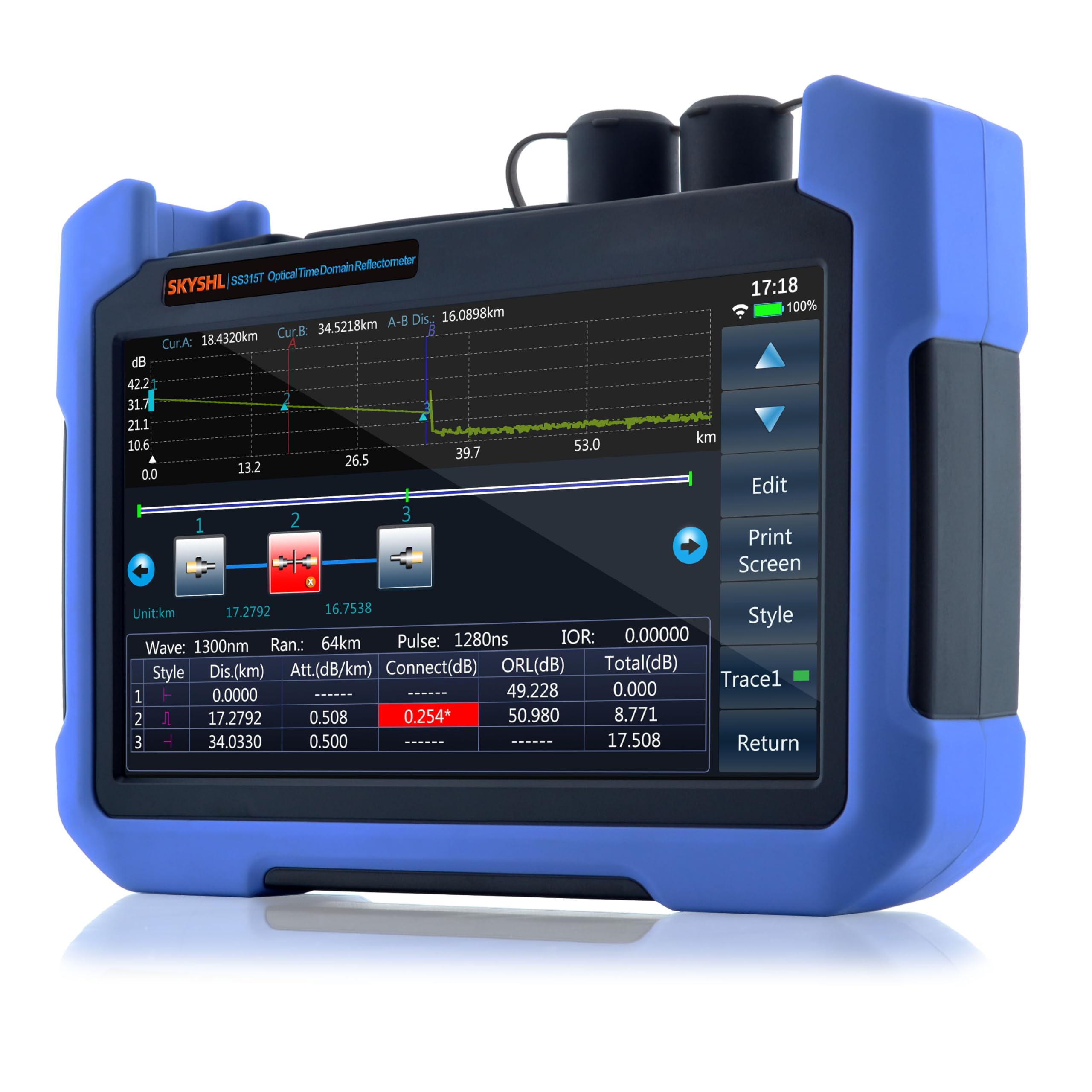
Front view of the SKYSHL SS315T-2MM1 OTDR Fiber Tester, showing the 7-inch capacitive touchscreen with various function icons.

Side view of the SS315T-2MM1, illustrating the ergonomic design and foldable stand for convenient use.
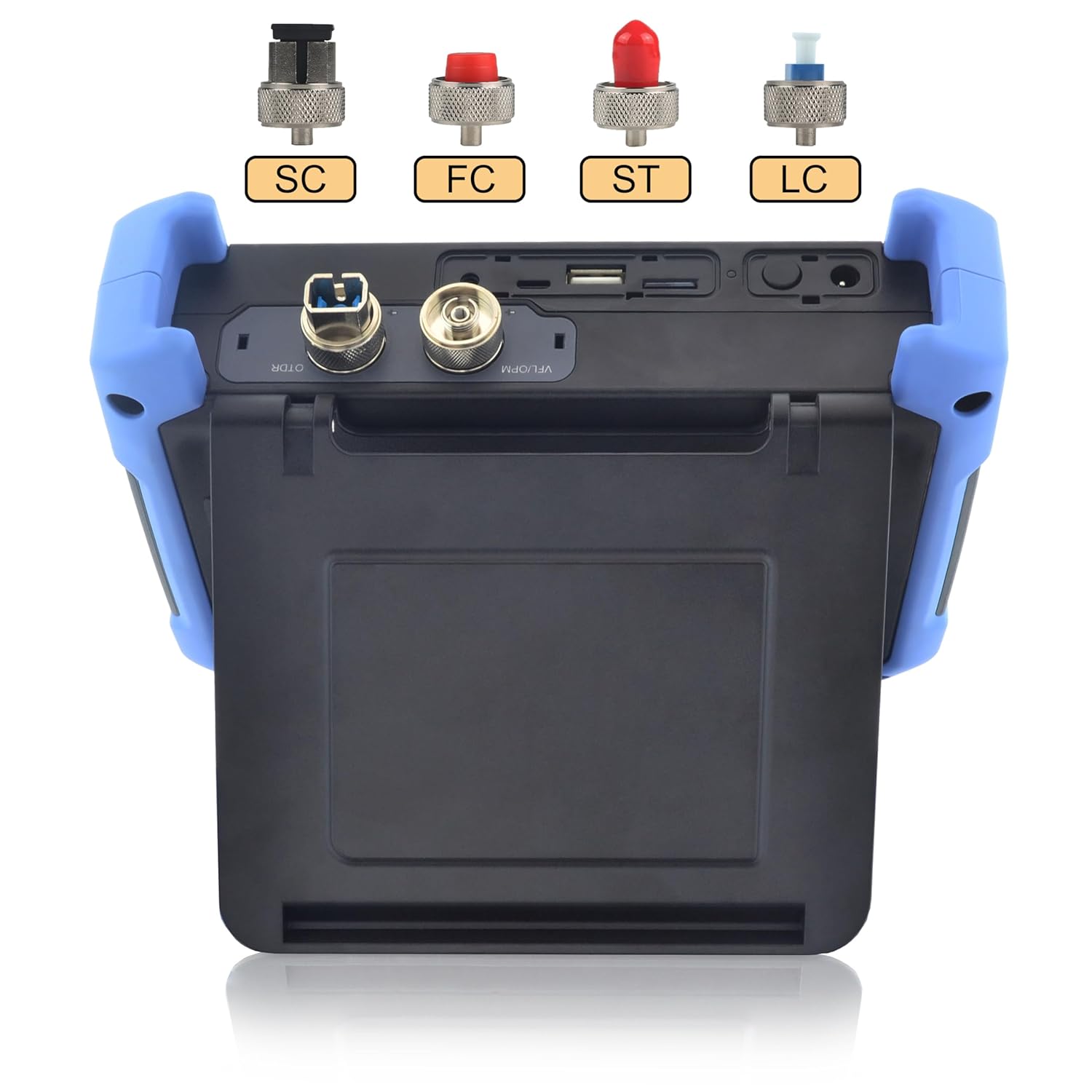
Top view of the SS315T-2MM1, highlighting the OTDR/OLS and OPM/VFL ports, along with USB, Micro USB, and TF card slots. Various connector types (SC, FC, ST, LC) are shown for compatibility.

Back panel of the SS315T-2MM1, displaying product information and a QR code for accessing the manual and software downloads.
Product Video Overview
This video provides a visual overview of the SKYSHL SS315T-2MM1 OTDR Fiber Tester, demonstrating its physical features, ports, and ergonomic design.
4. Setup
4.1 Unboxing and Initial Inspection
- Carefully remove all components from the packaging.
- Verify that all items listed in the packing list are present (refer to Section 8.1 for packing list).
- Inspect the device for any visible damage. If damage is found, contact customer support immediately.

Image showing the complete packing list for the SS315T-2MM1, including the main unit, cables, adapters, and cleaning supplies.
4.2 Charging the Battery
- Connect the provided power adapter to the device's charging port.
- Plug the adapter into a standard electrical outlet.
- Allow the device to charge fully before first use. The charging indicator on the screen will show the battery status.
4.3 Powering On/Off
- To power on, press and hold the power button until the screen illuminates.
- To power off, press and hold the power button until a shutdown prompt appears, then confirm.
4.4 Initial Settings
- Upon first startup, you may be prompted to select a language. Choose your preferred language from the available options (English, French, German, Spanish, Italian, Portuguese).
- Adjust date, time, and other regional settings as needed through the 'System' menu.

The settings screen of the SS315T-2MM1, showing options for network configuration, WiFi, and Bluetooth.
4.5 Connecting Fiber Optic Cables
- Ensure all fiber connectors are clean before connecting to the device. Use the provided cleaning tools.
- Select the appropriate adapter (SC, ST, FC, LC) for your fiber cable and securely attach it to the OTDR/OLS or OPM/VFL port.
- Connect the fiber optic cable to the adapter.
5. Operating Instructions
5.1 Navigating the User Interface
- The device features a 7-inch capacitive touchscreen for intuitive navigation.
- Tap on the icons to access different functions (OTDR, OPM, OLS, VFL, File, Help, System, Server).
5.2 OTDR Function
- From the main menu, tap the 'OTDR' icon.
- Select the desired wavelength (850nm or 1300nm) and test parameters (e.g., pulse width, range).
- Initiate the test. The device will display the fiber trace and an Event Map.
- Analyze the trace for events such as splices, connectors, and fiber ends. The Event Map provides a simplified graphical representation of these events.

Illustration of event types and a typical test curve on the SS315T-2MM1 OTDR, showing splicing points, adapters, fractures, bends, fixed connectors, and fiber ends.

Detailed view of the Event Mapping and Graphic Analysis feature, simplifying fiber testing and result interpretation.
5.3 OPM (Optical Power Meter) Function
- Tap the 'OPM' icon.
- Connect the fiber to the OPM port.
- The device will display the optical power measurement in dBm or other selected units.
5.4 OLS (Optical Light Source) Function
- Tap the 'OLS' icon.
- Connect the fiber to the OLS port.
- Select the desired wavelength and output power. The device will emit a stable optical signal.
5.5 VFL (Visual Fault Locator) Function
- Tap the 'VFL' icon.
- Connect the fiber to the VFL port.
- The VFL emits a visible red laser light (650nm) to quickly locate breaks, bends, or poor connections in fiber optic cables up to 10km.

Visual representation of the integrated OTDR, OPM, OLS, and VFL functions within the SS315T-2MM1.
5.6 Data Management (Saving and Exporting)
- After a test, use the 'Save' option to store results internally or to an inserted SD card/USB flash drive.
- Connect the device to a PC via USB to transfer saved data.
- Utilize the Smart APP (Android only) or Windows software to view, analyze, and share test data. The device supports EI&SOR format, one-click screenshot, and one-click PDF generation.

The SS315T-2MM1 connected to an Android device, demonstrating the Smart APP module for viewing and analyzing test curves.
6. Maintenance
6.1 Cleaning Fiber Optic Connectors
- Regularly clean all fiber optic connectors and adapters using the provided cleaning tools.
- Improper cleaning can lead to inaccurate measurements and damage to the device ports.
6.2 Battery Care
- To prolong battery life, avoid fully discharging the battery frequently.
- Store the device in a cool, dry place when not in use for extended periods.
6.3 Software Updates
- Check the official SKYSHL website or the provided Mediafire link (https://www.mediafire.com/folder/dw7tpy3vk59xc/SS315T) for available software updates.
- Follow the instructions provided with the update package carefully.
6.4 Storage
- Store the device in its protective case when not in use to prevent damage from dust, moisture, and impact.
- Avoid exposing the device to extreme temperatures or direct sunlight.
7. Troubleshooting
7.1 Device Does Not Power On
- Ensure the battery is sufficiently charged. Connect the device to the power adapter and allow it to charge for at least 30 minutes.
- Verify that the power button is pressed and held correctly.
7.2 Inaccurate Measurements
- Check all fiber optic connectors for cleanliness. Dirty connectors are a common cause of inaccurate readings.
- Ensure the correct test parameters (wavelength, pulse width, range) are selected for the fiber being tested.
- Verify that the fiber is properly connected to the device ports.
7.3 Connectivity Issues (APP/PC)
- For APP connectivity, ensure your Android device's Bluetooth or Wi-Fi is enabled and correctly paired/connected to the SS315T-2MM1.
- For PC connectivity, ensure the USB cable is securely connected and the necessary drivers are installed (if required).
- Confirm that the Smart APP or Windows software is the latest version.
7.4 Screen Unresponsive
- Attempt a soft reset by pressing and holding the power button until the device restarts.
- Ensure the screen is clean and free from debris or moisture.
If these troubleshooting steps do not resolve the issue, please contact SKYSHL customer support.
8. Specifications
| Feature | Specification |
|---|---|
| Model Number | SS315T-2MM1 |
| Wavelengths | 850nm, 1300nm |
| Dynamic Range | 29dB (850nm), 37dB (1300nm) |
| Max Test Distance | 8km (850nm), 80km (1300nm) |
| Event Dead Zone (MM) | 2.0m (typical) |
| Attenuation Dead Zone (MM) | 6.0m (typical) |
| VFL Wavelength | 650nm |
| VFL Range | 10km |
| OPM Wavelength Range | 850nm ~ 1650nm |
| OPM Measurement Range | -60 ~ +3dB |
| OLS Wavelengths | 850nm, 1300nm |
| Display | 7-inch Capacitive Touchscreen |
| Connectors Supported | SC/UPC, ST/UPC, FC/UPC, LC/UPC, SC/APC, ST/APC, FC/APC, LC/APC |
| Power Source | Electric Wired (Internal Lithium-metal battery included) |
| Operating Voltage | 9 VDC (Min) - 12.75 VDC (Max) |
| Operating Temperature | Up to 60 Degrees Celsius |
| Product Dimensions | 19 x 5 x 14.5 cm |
| Item Weight | 2.58 kg |
| Included Components | 1*SS315T-2MM1 OTDR-Set |
| Manufacturer | SKYSHL |
| Country of Origin | China |
9. Warranty and Support
9.1 Warranty Information
The SKYSHL SS315T-2MM1 comes with a comprehensive warranty:
- 3 years free replacement
- 5 years free maintenance
- Lifetime warranty
9.2 Technical Support
Professional technical support is available 24 hours a day to assist with any inquiries or issues you may encounter.
For additional resources, including the full manual and software downloads, please visit: https://www.mediafire.com/folder/dw7tpy3vk59xc/SS315T