
Introduction
This manual provides detailed instructions for the assembly, operation, and maintenance of your ODK L-Shaped Corner Desk. Designed for versatility and efficiency, this desk features a reversible L-shaped configuration, integrated power outlets with USB ports, and four fabric storage drawers. Please read these instructions carefully before beginning assembly to ensure correct setup and safe use.
Safety Information
- Stability Warning: This product may present stability risks if not assembled correctly. Ensure all fasteners are tightened securely according to the instructions.
- Proper Use: Use the reversible function with caution. Avoid inappropriate use or overloading the desk to prevent injury or damage.
- Electrical Safety: The integrated power outlets and USB ports are designed for standard use. Do not exceed the specified electrical ratings (220-250V/15A for AC outlets, 5V/2.1A for USB ports). Do not expose the power strip to moisture.
- Weight Capacity: The desk is designed to support objects weighing up to 50 kg (110 lbs) without deformation or shaking. Distribute weight evenly.
- Children: Keep small parts and packaging materials away from children during assembly.
Package Contents
Before assembly, verify that all components are present and undamaged. Refer to the parts list provided in your physical instruction booklet. Typically, the package includes:
- Desk panels (engineered wood)
- Metal frame components
- 4 fabric drawers
- Integrated power strip with 2 AC outlets and 2 USB ports
- CPU stand
- 2 headphone hooks
- Adjustable foot pads
- Assembly hardware (screws, bolts, Allen wrench)
- Instruction manual (this document)
Assembly Instructions
Assembly is designed to be straightforward. It is recommended to have a clear, spacious area for assembly. Follow the graphical instructions provided in your physical manual for step-by-step guidance. The desk can be configured for a left or right-hand L-shape.
Key Assembly Steps:
- Unpack and Identify Parts: Carefully unbox all components and lay them out. Match each part to the corresponding label in the parts list.
- Assemble the Metal Frame: Connect the metal frame components using the provided hardware. Ensure all connections are firm but do not overtighten until all parts are aligned.
- Attach Desk Panels: Secure the engineered wood desk panels to the assembled metal frame. Pay attention to the orientation for your desired L-shape (left or right).
- Install Power Strip: Integrate the power strip into the designated cutout on the desk surface. Ensure the power cord is routed safely.
- Assemble Fabric Drawers: Fold and assemble the four fabric drawers. These are designed for easy setup.
- Insert Drawers: Place the assembled fabric drawers into the designated storage unit.
- Attach CPU Stand: Position the CPU stand under the desk as desired.
- Attach Headphone Hooks: Secure the two headphone hooks to the side of the desk.
- Adjust Foot Pads: Level the desk by adjusting the foot pads on the bottom of the legs.
Tip: The reversible design allows you to choose the orientation of the L-shape during assembly. Refer to the specific diagrams in your manual for left-hand or right-hand configurations.

Image: The ODK L-Shaped Corner Desk in a typical setup, showcasing its spacious design and integrated features like the power strip and headphone hooks. The image also highlights the reversible design option.

Image: A detailed diagram showing the dimensions of the ODK L-Shaped Corner Desk, including the main desk sections, storage unit, and power cord length. It also illustrates the reversible configuration.
Features Overview
4 Fabric Drawers + 2 Hooks
The desk includes four spacious fabric drawers for organized storage of documents, notebooks, stationery, and other daily items. Two practical hooks are also provided, ideal for hanging headphones or bags.

Image: A close-up view of the four fabric drawers, demonstrating their capacity and smooth operation. The drawers are designed to keep your workspace tidy.
Integrated Power Outlets
Equipped with 2 AC power outlets and 2 USB charging ports, allowing multiple devices to be charged simultaneously directly from your desk. The power cord length is 200cm.

Image: A detailed view of the integrated power strip, showing the two AC outlets and two USB ports in use, charging a smartphone and powering another device.
Reversible Design
The flexible L-shaped design allows the desk to be installed in either a left or right-hand corner configuration, adapting to various room layouts.

Image: A diagram illustrating the reversible nature of the L-shaped desk, showing how the storage unit can be positioned on either the left or right side.
CPU Stand
A dedicated CPU stand is located at the bottom of the desk, providing a secure and convenient place for your computer tower, protecting it from floor dust and moisture.

Image: A close-up of the durable CPU stand, showing a computer tower placed on it, demonstrating how it elevates the CPU from the floor.
Adjustable Foot Pads
Adjustable foot pads are included to help prevent damage to your floor and ensure the desk remains stable, even on uneven surfaces.

Image: A close-up view of the adjustable foot pads on one of the desk legs, highlighting their design for stability and floor protection.
Usage and Operation
The ODK L-Shaped Corner Desk is designed for various uses, including office work, gaming, studying, and writing. Its spacious L-shaped surface provides ample room for multiple monitors, laptops, printers, and other equipment.
- Workspace Organization: Utilize the four fabric drawers to keep your workspace clutter-free. The drawers are suitable for office supplies, gaming accessories, or personal items.
- Power Management: Use the integrated power outlets and USB ports to conveniently power and charge your electronic devices without needing additional power strips.
- Ergonomics: Position your monitors and keyboard at a comfortable height and distance to maintain good posture. The generous legroom (100cm) allows for comfortable seating.
- CPU Placement: Place your computer tower on the dedicated CPU stand to keep it off the floor, improving airflow and protecting it from dust.
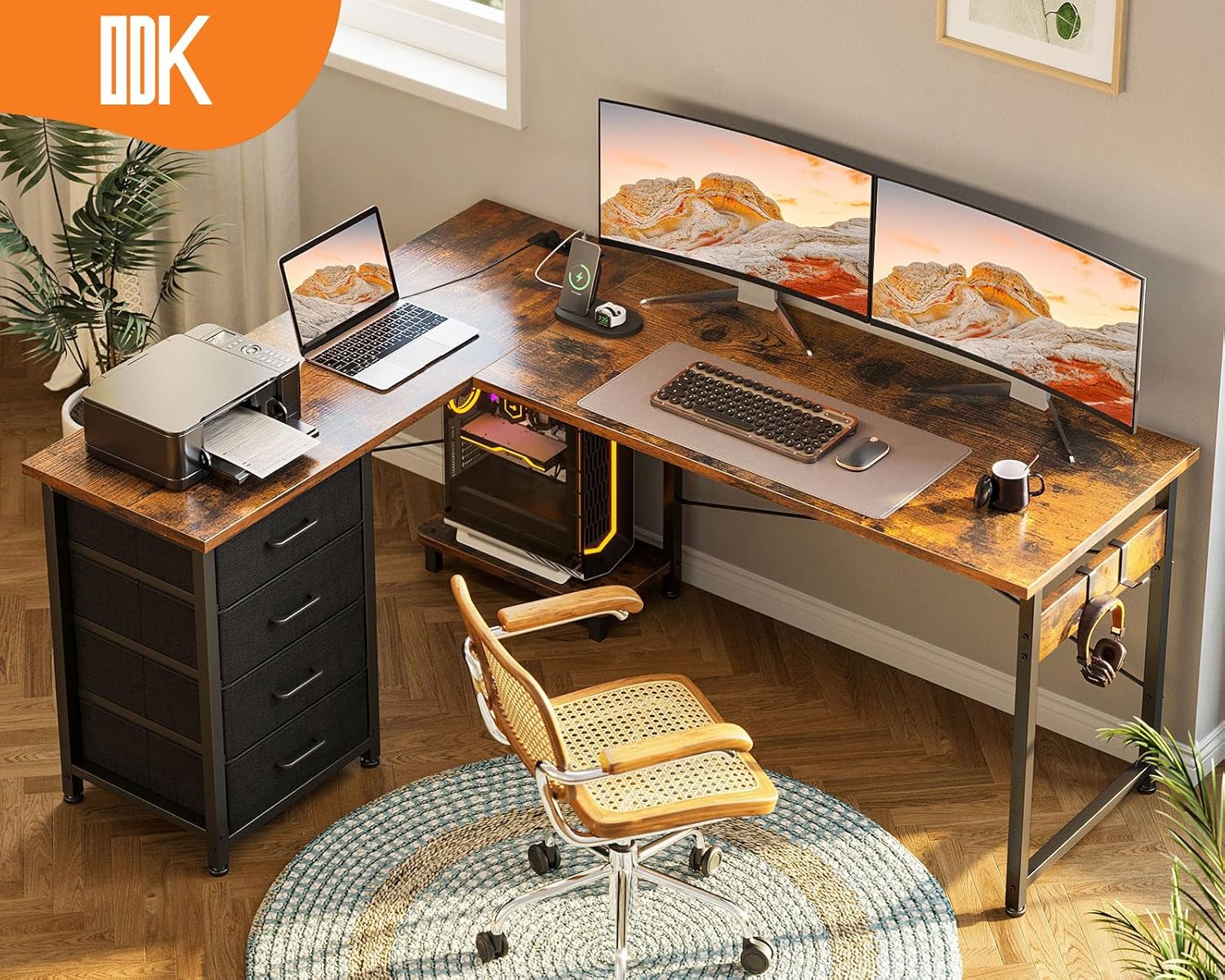
Image: The ODK L-Shaped Corner Desk set up in an office environment, demonstrating its capacity for dual monitors, a laptop, and a printer, highlighting its functional design.
Maintenance
To ensure the longevity and appearance of your ODK L-Shaped Corner Desk, follow these maintenance guidelines:
- Cleaning: Wipe the desk surfaces with a soft, damp cloth. Avoid harsh chemicals or abrasive cleaners, which can damage the engineered wood finish.
- Spills: Immediately wipe up any spills to prevent water damage or staining.
- Drawer Care: The fabric drawers can be spot cleaned with a mild detergent and water. Allow them to air dry completely.
- Fasteners: Periodically check all screws and bolts to ensure they remain tight. Retighten if necessary to maintain stability.
- Heat and Moisture: Avoid placing hot items directly on the desk surface. Use coasters for drinks. Keep the desk away from excessive moisture or direct sunlight to prevent warping or fading.
Troubleshooting
If you encounter any issues with your ODK L-Shaped Corner Desk, consider the following common solutions:
- Desk Wobbles: Ensure all assembly screws are fully tightened. Adjust the leveling foot pads on each leg to compensate for uneven floors.
- Drawers Not Sliding Smoothly: Check that the fabric drawers are correctly assembled and not overloaded. Ensure no obstructions are in the drawer slots.
- Power Outlets Not Working: Verify that the desk's main power cord is securely plugged into a functional wall outlet. Check for any tripped circuit breakers. Ensure devices are properly plugged into the desk's outlets/USB ports.
- Missing Parts: If any parts were missing upon delivery, contact customer support with your purchase details.
Specifications
| Attribute | Detail |
|---|---|
| Brand | ODK |
| Model Number | ZJZ-ZXSC |
| Color | Vintage Brown |
| Product Dimensions (L x W x H) | 100 x 135 x 75.7 cm |
| Item Weight | 17.8 Kilograms |
| Material | Engineered Wood, Metal |
| Special Features | 4 Fabric Drawers, 2 Headphone Hooks, Compact, Integrated Power Outlets & USB Ports, Reversible, Computer Tower Stand |
| Power Outlet Rating | 220-250V/15A |
| USB Port Rating | 5V/2.1A |
| Power Cord Length | 200 cm |
Warranty and Support
For warranty information or customer support, please refer to the documentation included with your purchase or contact ODK customer service directly. Details for contacting support are typically found on the product packaging or the brand's official website. Please have your model number (ZJZ-ZXSC) and purchase date available when contacting support.


