
1. Product Overview
This ODK L-Shaped Corner Desk is designed for versatile use in home offices, studies, or gaming setups. It features a robust construction, integrated power solutions, and ample storage to enhance productivity and organization.
- Integrated Storage: Includes 4 spacious fabric drawers and 2 practical hooks for documents, stationery, and accessories.
- Power & Charging: Equipped with 2 power outlets and 2 USB charging ports for convenient device power.
- Reversible Design: The L-shaped configuration can be assembled for left or right corner placement, adapting to various room layouts.
- CPU Stand: A dedicated stand at the base protects your computer tower from dust and moisture.
- Durable Construction: Made from a sturdy waterproof panel and a high-strength iron frame with adjustable feet for stability.
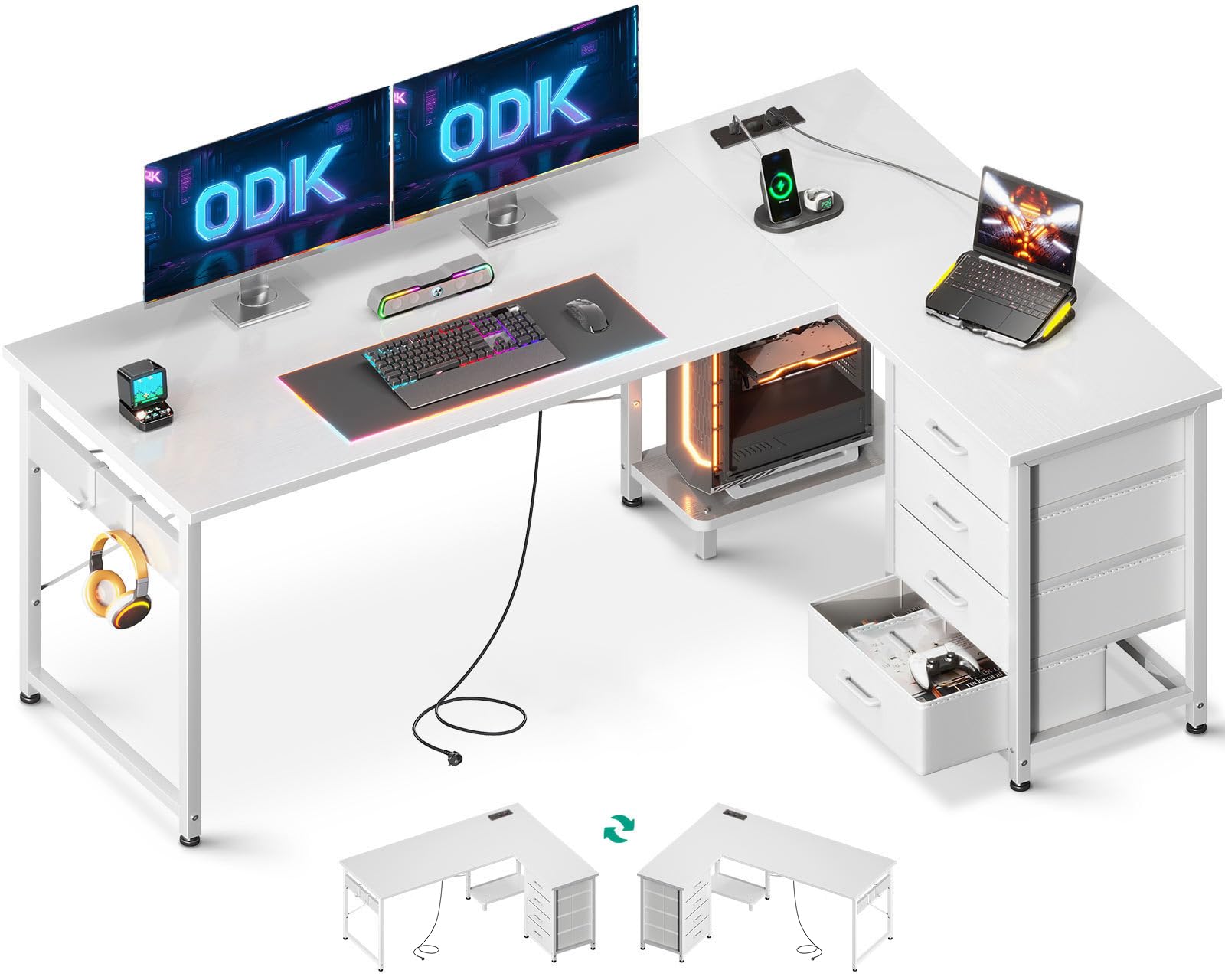
Figure 1: ODK L-Shaped Corner Desk in a typical setup, showcasing its design and features.
2. Safety Warnings
Please read and follow these safety guidelines to ensure safe use and prevent damage to the product or injury.
- Secure Placement: Always place the desk on a level and stable surface.
- Adjustable Feet: Ensure all adjustable feet are properly installed and adjusted to prevent wobbling.
- Weight Restrictions: Do not exceed the maximum recommended load capacity of 50 kg (110 lbs) to maintain stability.
- Electrical Safety: When using the integrated power outlets and USB ports, ensure devices are compatible and do not overload the circuit. Avoid liquid spills near electrical components.
- Children and Pets: Keep small parts away from children and pets during assembly.
3. Package Contents
Before assembly, verify that all components are present and undamaged. If any parts are missing or damaged, please contact customer support.
- Desk panels (main desktop, side panels, CPU stand panel)
- Metal frame components (legs, support bars)
- 4 Fabric drawers
- Power strip with 2 outlets and 2 USB ports
- 2 Headphone hooks
- Adjustable feet
- Assembly hardware (screws, bolts, nuts, etc.)
- Assembly tools (screwdriver)
- Graphical instruction manual
4. Setup and Assembly Instructions
Assembly is designed to be straightforward. It is recommended that one person can complete the assembly by following the detailed graphical instructions provided in the package.
- Unpack Components: Carefully remove all parts from the packaging and lay them out on a clean, soft surface to prevent scratches.
- Identify Parts: Refer to the parts list in the included manual to identify each component.
- Assemble Frame: Begin by assembling the metal frame components according to the diagrams. Ensure all connections are secure but do not overtighten screws until the frame is fully assembled.
- Attach Desk Panels: Secure the main desktop and side panels to the assembled frame. Pay attention to the orientation for the reversible L-shape.
- Install Power Strip: Mount the power strip with outlets and USB ports in the designated location. Connect the power cable.
- Insert Drawers: Assemble the fabric drawers and slide them into their respective compartments.
- Attach Hooks: Secure the headphone hooks to the desired location on the desk frame.
- Adjust Feet: Once the desk is fully assembled and in its final position, adjust the leveling feet to ensure stability and prevent wobbling.
- Final Check: Verify that all screws are tightened and the desk is stable before placing any items on it.

Figure 2: Close-up of the desk's storage drawers and integrated power/USB ports.
5. Operating Instructions
This section details how to utilize the key features of your ODK L-Shaped Corner Desk.
5.1 Using the Integrated Power Outlets and USB Ports
The desk includes a built-in power strip for convenient access to power.
- Plug the desk's main power cord into a wall outlet.
- Connect your devices (laptops, monitors, lamps) to the 2 standard power outlets.
- Use the 2 USB ports to charge smartphones, tablets, or other USB-powered devices.
- Ensure total power consumption does not exceed the rated capacity of the power strip.
5.2 Utilizing Storage Features
The desk offers various storage options to keep your workspace tidy.
- Fabric Drawers: Use the 4 fabric drawers for organizing documents, office supplies, or personal items.
- Headphone Hooks: Hang headphones or other accessories on the two integrated hooks to keep them within reach and off the desktop.
- CPU Stand: Place your computer tower on the dedicated stand to keep it off the floor, protecting it from dust and accidental kicks.
5.3 Reversible L-Shape Configuration
The desk's design allows for flexible placement in your room.
- During assembly, you can choose to configure the longer side of the L-shape to either the left or right, depending on your room layout and preference.
- This flexibility allows for easy adaptation if you rearrange your room or move to a new space.
6. Maintenance
Proper care will extend the life and appearance of your desk.
- Cleaning: Wipe the desk surface with a damp cloth for general cleaning. For a streak-free finish, follow with a dry cloth. Avoid abrasive cleaners or harsh chemicals.
- Spills: Immediately wipe up any spills to prevent damage to the waterproof panel.
- Hardware: Periodically check and tighten any loose screws or bolts to maintain structural integrity.
- Adjustable Feet: Ensure the adjustable feet remain properly set to keep the desk level and stable.
7. Troubleshooting
This section addresses common issues you might encounter.
- Desk is Wobbly:
- Check if the adjustable feet are properly extended and making firm contact with the floor.
- Ensure all assembly screws are tightened.
- Verify the desk is on a flat surface.
- Power Outlets/USB Ports Not Working:
- Ensure the desk's main power cord is securely plugged into a functional wall outlet.
- Check if the wall outlet itself is receiving power (test with another device).
- Avoid overloading the power strip with too many high-power devices.
- Drawers Do Not Slide Smoothly:
- Ensure the fabric drawers are assembled correctly and not overfilled.
- Check for any obstructions in the drawer compartments.
8. Specifications
| Feature | Detail |
|---|---|
| Model Number | ZJZ-ZXSC |
| Dimensions (L x W x H) | 155 x 110 x 76 cm (61 x 43.3 x 29.9 inches) |
| Weight | 19.5 Kilograms (43 lbs) |
| Material | Engineered Wood, Metal |
| Color | White |
| Max. Load Capacity | 50 Kilograms (110 lbs) |
| Number of Drawers | 4 (Fabric) |
| Power Outlets | 2 |
| USB Charging Ports | 2 |
| Assembly Required | Yes |
| Recommended Assembly Persons | 1 |
9. Warranty and Support
ODK is committed to providing high-quality products and customer satisfaction.
- Customer Service: We provide professional customer service and aim to respond to all your after-sales inquiries and needs within 24 hours.
- For any questions regarding assembly, missing parts, or product functionality, please contact ODK customer support.


