
Lrecat i21
Lrecat i21 Wireless Earbuds
Instruction Manual
Introduction
Welcome to the Lrecat i21 Wireless Earbuds instruction manual. These earbuds are designed to provide a high-quality audio experience with advanced features such as Bluetooth 5.3 connectivity, extended battery life, environmental noise cancellation (ENC), and IP7 water resistance. This manual will guide you through the setup, operation, maintenance, and troubleshooting of your new earbuds to ensure optimal performance and longevity.
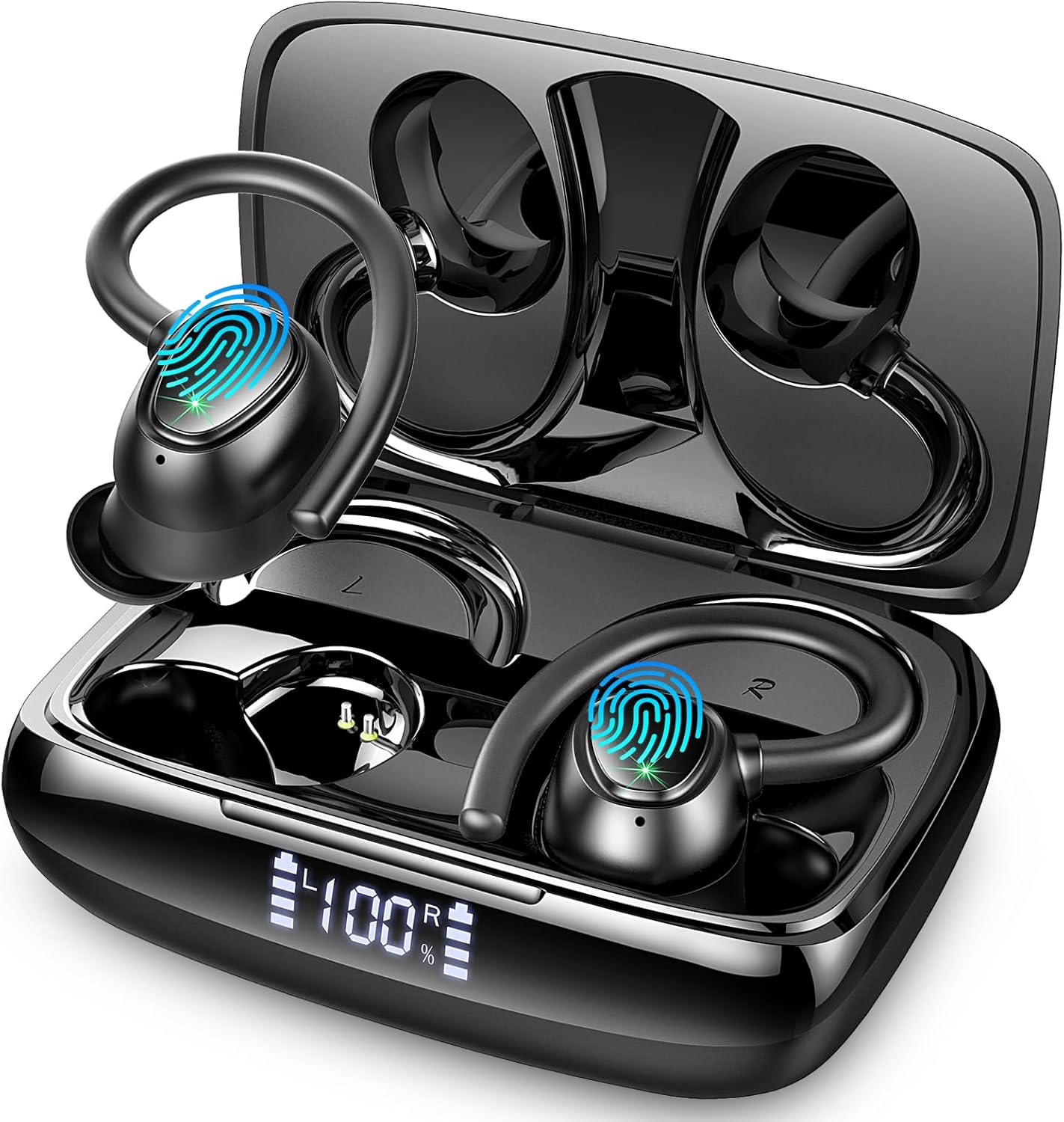
What's in the Box
Please verify that all the following components are included in your package:
- Charging Case
- User Manual
- USB-C Charging Cable
- Ear Tips (three size options: S, M, L)
- Wireless Earbuds (Left and Right)

Setup
Charging the Earbuds and Case
Before first use, fully charge the earbuds and the charging case. The charging case has a 445mAh battery capacity and can fully recharge the earbuds multiple times. A full charge of the case takes approximately 1.5 hours via the USB-C cable.
- Place the earbuds into the charging case. Ensure they are correctly seated in their respective slots (L for left, R for right).
- Connect the USB-C charging cable to the charging port on the case and the other end to a compatible USB power source (e.g., wall adapter, computer USB port).
- The LED display on the charging case will show the current battery percentage, indicating charging status. Once fully charged, the display will show 100%.

For a visual guide on charging and features, please refer to the official product video below:
Automatic Pairing and Bluetooth 5.3 Connection
The Lrecat i21 earbuds utilize Bluetooth 5.3 technology for a stable and efficient wireless connection. They feature automatic pairing for convenience.
- Initial Pairing: Open the charging case. The earbuds will automatically enter pairing mode.
- On your device (smartphone, tablet, laptop), enable Bluetooth and search for available devices.
- Select "i21" from the list of found devices to connect. Once connected, you will hear a confirmation tone.
- Subsequent Pairing: After the initial pairing, the earbuds will automatically connect to the last paired device when you open the charging case and take them out.


Operating Instructions
Touch Controls
The Lrecat i21 earbuds feature intuitive touch controls on each earbud for easy management of music playback, calls, and voice assistant activation. The touch-sensitive area is located on the outer surface of each earbud.
| Function | Action (Left Earbud) | Action (Right Earbud) |
|---|---|---|
| Play/Pause | Click Once | Click Once |
| Next Song | Hold for 1s | |
| Previous Song | Hold for 1s | |
| Volume + | Double Click | |
| Volume - | Double Click | |
| Answer Call | Click Once | Click Once |
| Hang Up Call | Press and Hold | Press and Hold |
| Activate Voice Assistant (Siri) | Triple Click | Triple Click |

Wearing the Earbuds
The Lrecat i21 earbuds are designed with ergonomic ear hooks to ensure a secure and comfortable fit, especially during physical activity.
- Identify the Left (L) and Right (R) earbuds.
- Gently place the earbud into your ear canal.
- Adjust the ear hook over the top of your ear until it feels snug and secure.
- Experiment with the different sized ear tips provided to find the best fit for your ear, which will optimize sound quality and comfort.

Features and Performance
Immersive Audio Quality
The Lrecat i21 earbuds are equipped with 14.2mm dynamic drivers, delivering powerful bass, clear mids, and bright highs for an immersive listening experience. The Environmental Noise Cancellation (ENC) technology enhances call clarity by reducing ambient noise.

IP7 Water Resistance
With an IP7 waterproof rating, the Lrecat i21 earbuds are protected against sweat, rain, and splashes, making them suitable for various activities including jogging, yoga, cycling, and intense workouts.

Maintenance
Cleaning
Regular cleaning helps maintain sound quality and extends the lifespan of your earbuds.
- Use a soft, dry, lint-free cloth to wipe the earbuds and charging case.
- For ear tips, remove them from the earbuds and clean with a mild soap solution if necessary. Rinse thoroughly and ensure they are completely dry before reattaching.
- Do not use abrasive cleaners, alcohol, or chemical solvents.
Storage
When not in use, store the earbuds in their charging case to protect them from dust and damage.
Troubleshooting
Common Issues and Solutions
- Earbuds not charging:
- Ensure the charging cable is securely connected to both the case and the power source.
- Check if the charging pins on the earbuds and inside the case are clean and free of debris.
- Verify the power source is working correctly. - Earbuds not pairing:
- Make sure Bluetooth is enabled on your device.
- Ensure the earbuds are fully charged.
- Place the earbuds back into the case, close the lid, wait a few seconds, then open the lid again to re-enter pairing mode.
- If issues persist, try forgetting the device from your phone's Bluetooth settings and re-pairing. - No sound or low volume:
- Check the volume levels on both your device and the earbuds.
- Ensure the earbuds are properly seated in your ears.
- Try cleaning the ear tips and speaker mesh to remove any obstructions. - Intermittent connection:
- Ensure there are no significant obstacles between your device and the earbuds.
- Keep the earbuds within the effective Bluetooth range (up to 15 meters).
- Avoid environments with strong electromagnetic interference.
Specifications
| Feature | Detail |
|---|---|
| Model Number | i21 |
| Connectivity Technology | Wireless (Bluetooth 5.3) |
| Ear Placement | Over-Ear / In-Ear |
| Water Resistance Rating | IP7 (Waterproof) |
| Playtime (Single Charge) | Up to 8 hours |
| Total Playtime (with Charging Case) | Up to 48 hours |
| Charging Time | Approx. 1.5 hours (case) |
| Charging Port | USB Type-C |
| Microphone Technology | Bidirectional with ENC Noise Cancellation |
| Driver Size | 14.2 mm |
| Frequency Range | 20 Hz - 20,000 Hz |
| Weight | 100 Grams |
| Compatible Devices | iOS/Android mobile phones, TVs, smartwatches, PCs, tablets, laptops, car audio systems |
Warranty and Support
Warranty Information
The Lrecat i21 Wireless Earbuds come with a manufacturer's warranty of 365 days from the date of purchase. This warranty covers defects in materials and workmanship under normal use. Please retain your proof of purchase for warranty claims.
Customer Support
For any questions, technical assistance, or warranty inquiries, please refer to the contact information provided on the product packaging or the official Lrecat website. Our support team is available to assist you with any issues you may encounter.
Ask a question about this manual
Ask about setup, troubleshooting, compatibility, parts, safety, or missing instructions. Manuals+ will review the question and use this page’s manual context to help answer it.