
1. Introduction and Overview
The Focal FDP 1.900 V2 is a high-performance monoblock amplifier designed for powersport applications, delivering up to 850 watts RMS. This Class D amplifier is engineered for compact size and efficient power delivery, providing a robust low-frequency foundation for your audio system. It features a versatile filter section, including variable bass boost and adjustable phase, to optimize sound for various subwoofers. Speaker-level inputs with auto turn-on ensure broad compatibility with different car stereo systems, including factory units. A wired remote bass level controller with an LED clip light is included for convenient, real-time audio adjustments.
2. Safety Information
Please read all instructions carefully before installation and use. Failure to follow these instructions may result in serious injury or damage to the amplifier or vehicle. Always disconnect the vehicle's battery before performing any electrical work. Ensure proper ventilation around the amplifier to prevent overheating. Use appropriate gauge wiring for power, ground, and speaker connections as specified in the installation guide. Avoid exposing the amplifier to moisture or extreme temperatures. If you are unsure about any installation steps, consult a qualified professional.
3. What's in the Box
- Focal FDP-1.900-V2 Monoblock Amplifier
- Wired Remote Bass Level Controller
- Mounting Hardware (screws, etc.)
- User Manual (this document)
4. Setup and Installation
Proper installation is crucial for optimal performance and safety. The FDP 1.900 V2 amplifier features a compact design, measuring approximately 10.02" (width) x 2" (height) x 8" (depth), allowing for flexible mounting options within your vehicle. Ensure the mounting location provides adequate ventilation and is protected from direct moisture.
4.1 Wiring Connections
Connect the power, ground, and remote turn-on wires to the amplifier's terminals. Use appropriate gauge wiring to handle the amplifier's power output. Connect your audio source (head unit) to the amplifier's input terminals. The amplifier supports both RCA (low-level) and speaker-level (high-level) inputs, offering compatibility with a wide range of car stereos, including factory units. The auto turn-on feature simplifies integration with speaker-level inputs.

Image 1: Top view of the Focal FDP 1.900 V2 amplifier, illustrating the layout of power, ground, speaker, and RCA input/output connections.
4.2 Mounting
Securely mount the amplifier using the provided hardware. Choose a location that minimizes vibration and allows for easy access to controls and wiring if needed. Avoid mounting in enclosed spaces without airflow.

Image 2: Diagram illustrating key features and advantages of the Focal FDP 1.900 V2 amplifier, including its compact design, robust aluminum chassis for heat dissipation, high and low-level input options, remote sub control, and flexible crossover settings.
5. Operating and Adjustments
The FDP 1.900 V2 offers extensive controls to fine-tune your audio experience.
5.1 Crossover Settings
Utilize the built-in 24 dB/octave low-pass crossover (LP) and 24 dB/octave high-pass crossover (HP) to direct specific frequency ranges to your subwoofer. Adjust these settings to match your subwoofer's characteristics and your vehicle's acoustic environment.
5.2 Bass Boost and Phase
The variable bass boost allows you to enhance low frequencies, while the adjustable phase control (0-180 degrees) helps align the subwoofer's output with other speakers in your system, ensuring cohesive sound. Experiment with these settings to achieve the desired bass impact and integration.
5.3 Remote Bass Level Controller
The included wired remote bass level controller allows for convenient, on-the-fly adjustment of the subwoofer's output from your listening position. An integrated LED clip light provides a visual warning if the signal is clipping, helping you prevent distortion and potential damage to your speakers.
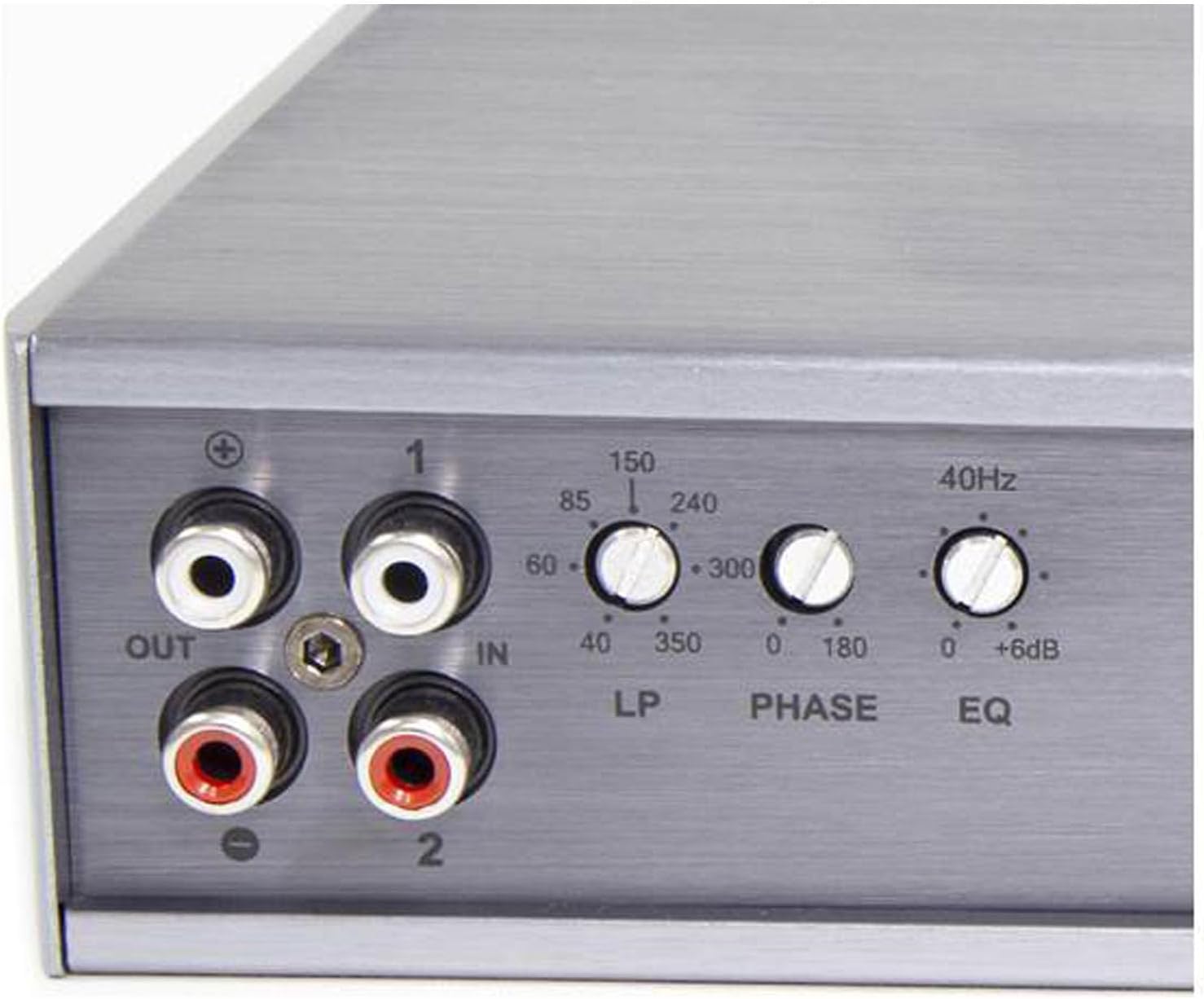
Image 3: Close-up view of the Focal FDP 1.900 V2 amplifier's control panel, detailing the adjustable knobs for Low-Pass (LP) frequency, Phase adjustment, and EQ (bass boost) settings.
6. Maintenance
To ensure the longevity and optimal performance of your Focal FDP 1.900 V2 amplifier, follow these maintenance guidelines:
- Cleaning: Periodically clean the amplifier's exterior with a soft, dry cloth. Avoid using harsh chemicals or abrasive cleaners. Ensure no dust or debris accumulates in the cooling fins.
- Ventilation: Regularly check that the amplifier's ventilation areas are clear and unobstructed. Proper airflow is essential to prevent overheating.
- Connections: Occasionally inspect all wiring connections (power, ground, remote, speaker, RCA) to ensure they are secure and free from corrosion. Loose connections can lead to performance issues or damage.
- Environment: Protect the amplifier from excessive heat, direct sunlight, and moisture.
7. Troubleshooting
If you encounter issues with your amplifier, refer to the following common troubleshooting steps:
| Problem | Possible Cause | Solution |
|---|---|---|
| No Power / Amplifier Not Turning On |
|
|
| No Sound Output |
|
|
| Distorted Sound |
|
|
If the problem persists after attempting these solutions, please contact Focal customer support or an authorized service center.
8. Specifications
| Feature | Detail |
|---|---|
| Model | FDP-1.900-V2 |
| Amplifier Type | Class D Monoblock |
| RMS Power @ 4 Ohms | 1 x 600 Watts (1% THD) |
| RMS Power @ 2 Ohms | 1 x 850 Watts (1% THD) |
| RMS Power @ 1 Ohm | 1 x 900 Watts (1% THD) |
| Frequency Response | 5Hz - 25kHz |
| Signal-to-Noise Ratio | 90dB |
| Adjustable Gain | 200mV - 10V |
| Low-Pass Crossover | 24 dB/octave |
| High-Pass Crossover | 24 dB/octave |
| Dimensions (L x W x H) | 10.02 x 8 x 2 inches (254 x 203 x 50 mm) |
| Item Weight | 5 Pounds (2.27 kg) |
| Protections | Short-circuit, Thermal Overload, Polarity Reversal |
| UPC | 879545001830 |
9. Warranty Information
The Focal FDP 1.900 V2 Powersport Monoblock Amplifier is covered by a 2-Year Manufacturer Warranty from the date of purchase. This warranty covers defects in materials and workmanship under normal use. It does not cover damage resulting from improper installation, accident, misuse, abuse, neglect, unauthorized modification, or normal wear and tear. Please retain your proof of purchase for warranty claims. For detailed warranty terms and conditions, refer to the official Focal website or contact customer support.
10. Customer Support
For technical assistance, troubleshooting beyond this manual, or warranty inquiries, please contact Focal customer support or your authorized Focal dealer. You can find contact information on the official Focal website:
When contacting support, please have your amplifier model number (FDP-1.900-V2) and proof of purchase readily available.