
Introduction
This manual provides comprehensive instructions for the setup, operation, and maintenance of your Assistrust Sound Bar Model KY-8000. Please read this guide thoroughly to ensure proper use and to maximize your audio experience.

The Assistrust Sound Bar KY-8000, featuring its main unit, remote control, and optional vertical speaker configurations.
Product Features
- Full Range Stereo Audio: Experience 360° sound with 4 high-performance drivers, designed to reproduce delicate nuances and powerful audio moments for an immersive movie experience.
- Superior DSP Sound Bar: Equipped with a Digital Signal Processor (DSP) chip, this soundbar delivers enhanced clarity, precise sound staging, and immersive virtual surround sound, elevating your audio experience.
- Tailored Audio Effects: Choose from 3 distinct equalizer modes—Movie, Music, and News—to optimize audio for any scenario. Enjoy greater clarity in vocals and dialogue for an enhanced listening experience.
- Flexible Placement: The soundbar offers 3 placement options. It can be split into 2 compact tower soundbars for an immersive vertical sound experience, or transformed into a sleek long soundbar for tabletop placement or wall mounting.

Internal view of the soundbar highlighting its 4 speaker drivers and key specifications.

Visual comparison demonstrating the audio clarity and quality improvement with DSP technology.

Illustration of the three distinct equalizer modes available for personalized sound quality.

Various setup configurations for the soundbar, including split vertical and horizontal placements.
Package Contents
Verify that all items are present in the package:
- Assistrust Sound Bar (2 separable units)
- Remote Control
- Optical Cable
- 3.5mm AUX Cable
- Power Adapter
- Wall Mounting Template
- Wall Mounting Screws and Anchors
- User Manual

Rear view of the soundbar highlighting various wired and wireless connection options.
Setup
1. Physical Assembly
The Assistrust Sound Bar KY-8000 features a detachable design, allowing for flexible placement. To assemble the full soundbar unit:
- Connect the included 3.5mm audio cable from one soundbar section to the other. Ensure the cable is fully inserted.
- Align the two soundbar sections and gently push them together until they click into place, forming a single unit.
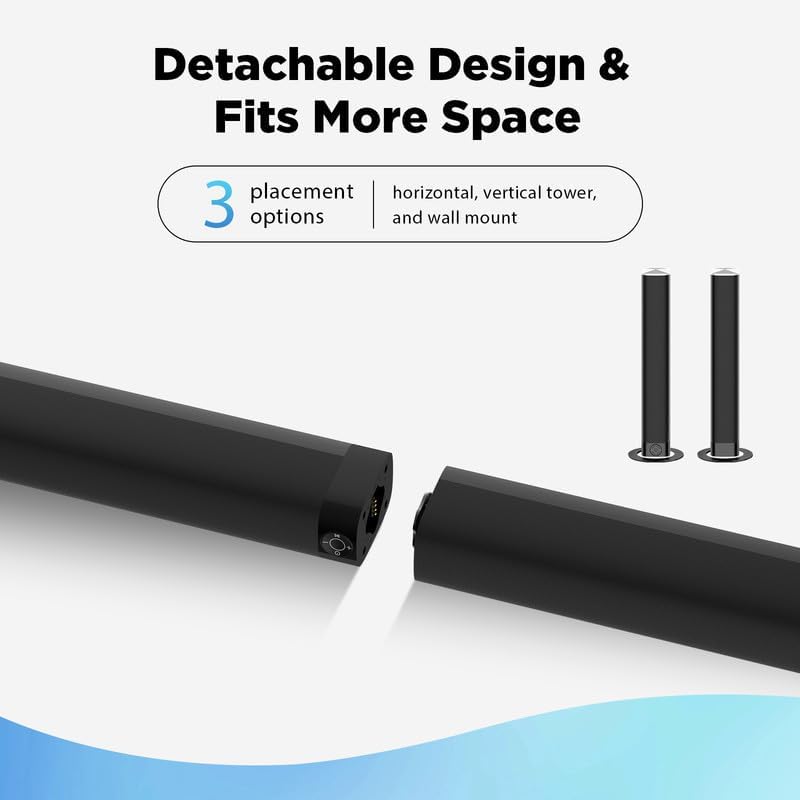
Visual guide for assembling the detachable soundbar sections.
2. Connection Options
The soundbar supports multiple connection methods:
- HDMI (ARC): Connect an HDMI cable from the soundbar's HDMI (ARC) port to your TV's HDMI (ARC) port. This allows for high-quality audio and control via your TV remote.
- Optical: Connect an optical cable from the soundbar's OPTICAL port to your TV's optical digital audio output.
- AUX: Connect the included 3.5mm AUX cable from the soundbar's AUX IN port to the audio output of your device (e.g., smartphone, tablet, computer).
- Bluetooth 5.0: For wireless audio streaming, enable Bluetooth on your device and pair with the soundbar.
- USB: Insert a USB drive with audio files into the USB port for local music playback.
3. TV Audio Settings (Important)
After connecting the soundbar to your TV, it is crucial to adjust your TV's audio settings to ensure sound is output correctly through the soundbar and to prevent audio conflicts:
- Access your TV's settings menu.
- Navigate to the 'Sound' or 'Audio Output' section.
- Turn off your TV's built-in speakers.
- Select the soundbar as the audio output device (e.g., 'HDMI ARC', 'Optical', or 'External Speaker').
- If using an optical connection, set the 'Digital Audio Format' to 'PCM' (Pulse Code Modulation) in your TV's audio settings. Avoid 'Dolby Digital' or 'Passthrough' if experiencing issues.
Operating Instructions
1. Remote Control Functions
The included remote control provides full functionality for your soundbar:
- Power Button: Turns the soundbar on or off.
- Input/Mode Selection: Cycle through HDMI, Bluetooth (BT), Optical (OP), AUX, and USB input modes.
- Volume Control: Increase (VOL+) or decrease (VOL-) the master volume.
- Mute: Mutes or unmutes the sound.
- Playback Controls: Play/Pause, Skip Forward, Skip Backward (for Bluetooth/USB modes).
- Bass Adjustment: Increase (BASS+) or decrease (BASS-) the bass level.
- Sound Presets: Select from predefined equalizer modes: Standard, Music, Movie, Dialog, Night, and 3D.
2. On-Device Controls
The soundbar also features integrated controls on one of its end panels:
- Power Button: Turns the soundbar on or off.
- Mode Button: Cycles through input sources.
- Volume Buttons: Increase (+) or decrease (-) volume.
Maintenance
To ensure the longevity and optimal performance of your Assistrust Sound Bar KY-8000:
- Keep the soundbar clean by wiping it with a soft, dry cloth.
- Avoid using liquid cleaners or abrasive materials.
- Do not block the speaker grilles or ports.
- Store the soundbar in a cool, dry place away from direct sunlight and extreme temperatures.
Troubleshooting
If you encounter any issues, refer to the following troubleshooting steps:
- No Sound:
- Ensure the soundbar is powered on and the volume is not muted or too low.
- Verify the correct input mode is selected on the soundbar (e.g., HDMI, Optical, AUX).
- Check all cable connections between the soundbar and your TV/device.
- Confirm your TV's audio output settings are correctly configured (TV speakers off, external speaker selected, PCM format for optical).
- Poor Sound Quality:
- Try switching between different sound presets (Music, Movie, News) to find the optimal setting.
- Adjust the bass levels using the remote control.
- Ensure the soundbar is placed on a stable surface and not obstructed.
- Bluetooth Connection Issues:
- Ensure the soundbar is in Bluetooth pairing mode (LED flashing blue).
- Disable and re-enable Bluetooth on your device.
- Move your device closer to the soundbar.
Specifications
- Model Name: KY-8000
- Speaker Type: Soundbar, Surround Sound
- Special Feature: DSP Chip, Hi Res Audio
- Connectivity Technology: Bluetooth, HDMI(ARC), Optical, AUX, USB
- Speaker Size: 32 Inches
- Speaker Maximum Output Power: 50 Watts
- Surround Sound Channel Configuration: 2.1
- Control Method: Remote
- Item Weight: 1 pounds
- Product Dimensions: 32 x 3 x 2 inches
Warranty and Support
Your Assistrust Sound Bar KY-8000 comes with:
- 18 months warranty
- 24/7 online support
- 60 days unconditional replacement
For any support needs, please refer to the contact information provided in your product packaging or on the official Assistrust website.


