
Introduction
This manual provides detailed instructions for the Ninetom 10.25-inch car radio touch screen. This device is designed to upgrade the infotainment system in specific BMW models, offering enhanced features while retaining original vehicle functionalities.
Compatibility
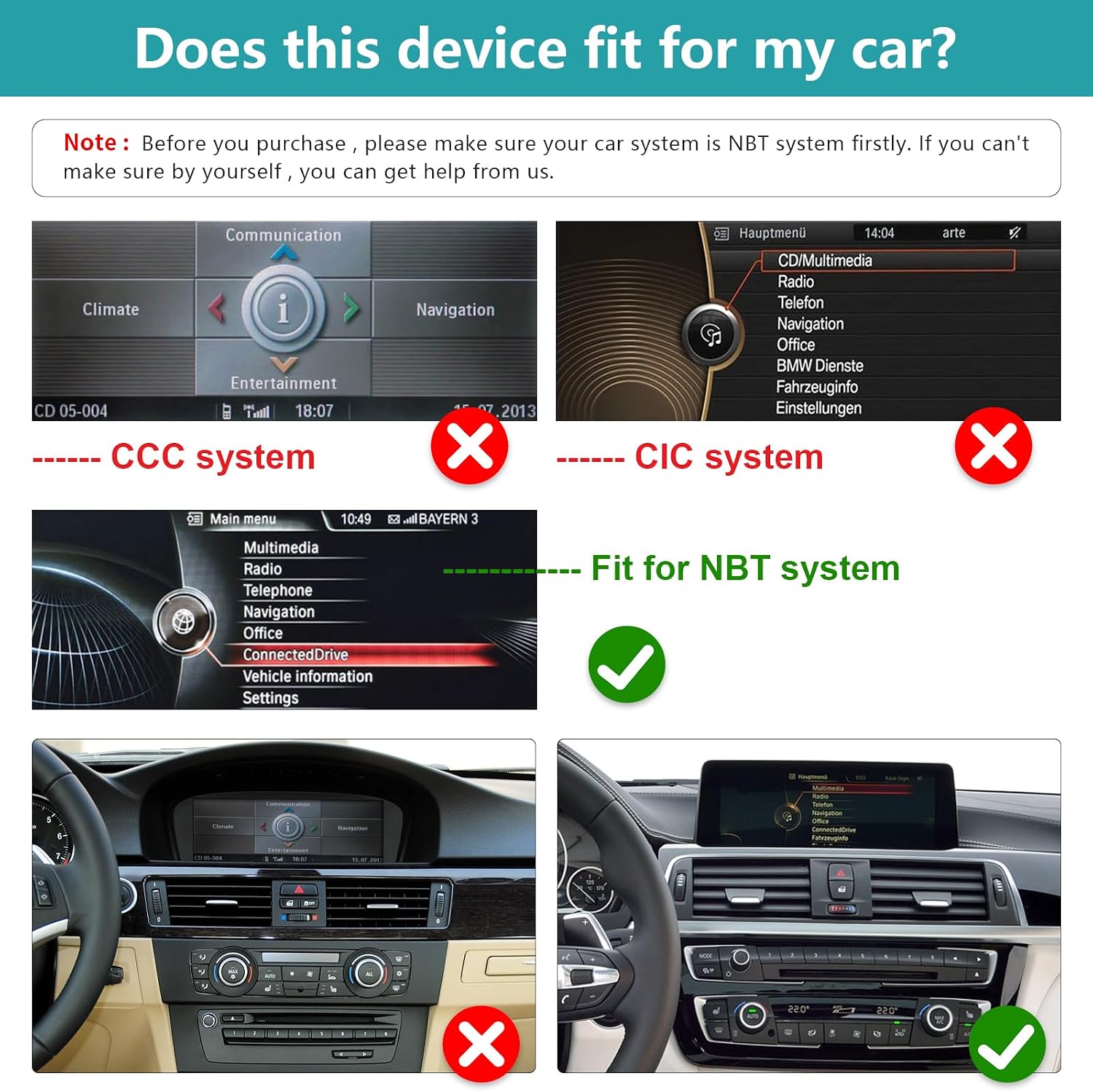
This car radio touch screen is compatible with BMW 1/2 Series F20, F21, F22, F23 models from 2011-2016 that are equipped with the NBT system. It is crucial to verify your car's existing system before installation to ensure proper functionality. If unsure, consult a professional.
Key Features
- Wireless/Wired CarPlay & Android Auto: Seamless integration with iOS and Android smartphones for navigation, calls, messages, and music.
- Mirrorlink Functionality: Synchronize your smartphone's display (maps, videos, etc.) directly to the 10.25-inch HD capacitive touch screen (1920x720 resolution).
- GPS Navigation: Supports various navigation software.
- Original Function Retention: Preserves all original car functions, including the factory radio, amplifier, joystick control, and original reverse camera.
- One-Button System Switching: Easily switch between the new Linux system interface and the original vehicle system.
Safety Information
Please read all safety instructions carefully before installation and operation. Failure to follow these guidelines may result in injury, damage to the device, or damage to your vehicle.
- Ensure the vehicle's ignition is off and the battery is disconnected before beginning installation.
- Do not attempt to operate the device in a way that distracts you from driving.
- Avoid exposing the device to extreme temperatures, moisture, or direct sunlight for prolonged periods.
- Only use approved accessories and wiring.
- If you are unsure about any part of the installation process, seek professional assistance.
Setup and Installation
Pre-Installation Check
Before proceeding with installation, confirm that your BMW 1/2 Series (F20, F21, F22, F23, 2011-2016) is equipped with the NBT system. Refer to the image below for visual guidance on identifying compatible systems.
General Installation Overview
The installation process is designed to be non-destructive, meaning no permanent modifications to your vehicle's wiring are required. It primarily involves removing the original car screen and connecting the provided cables. Detailed installation instructions are included with the product accessories.

Product Accessories
The package includes all necessary accessories for installation. The back bracket may vary depending on the specific model.

Operating Instructions
CarPlay and Android Auto
The unit features built-in Wireless/Wired CarPlay and Android Auto. Connect your smartphone to access navigation, make phone calls, send emails, receive notifications, and play music directly through the car's display.

Mirrorlink Function
The full touch screen audio system supports Mirrorlink for both iOS and Android smartphones. This allows you to synchronize your phone's display, including maps, movies, and other content, onto the large 10.25-inch screen for a clear and responsive visual experience.
Switching Between Systems
The device allows for easy one-button switching between its Linux operating system and your car's original NBT system. This ensures that all original vehicle functions remain accessible.

Retained Original Functions
The upgrade screen retains all original functions of your BMW, including:
- Original car radio and amplifier function.
- Factory joystick control and command knob.
- Original reverse camera and reverse trajectory display.
- Steering wheel controls.
- CD/DVD, USB, Bluetooth, and GPS navigation from the original system.

Maintenance
To ensure the longevity and optimal performance of your Ninetom car radio touch screen, follow these maintenance guidelines:
- Cleaning: Use a soft, lint-free cloth to gently wipe the screen. For stubborn smudges, slightly dampen the cloth with water or a screen-safe cleaner. Avoid harsh chemicals or abrasive materials.
- Software Updates: Periodically check the manufacturer's website or contact support for any available software updates. Keeping the software updated can improve performance and add new features.
- Environmental Care: Protect the device from extreme temperatures, direct sunlight, and excessive moisture.
- Cable Connections: Ensure all cables are securely connected. Avoid pulling on cables forcefully.
Troubleshooting
If you encounter issues with your Ninetom car radio touch screen, refer to the following common troubleshooting steps:
- No Power/Screen Blank:
- Check all power connections to ensure they are secure.
- Verify the vehicle's fuse related to the infotainment system.
- No Sound:
- Ensure the volume is not muted or set too low.
- Check audio cable connections (e.g., AUX cable).
- Confirm the correct audio source is selected on both the new screen and the original car system.
- CarPlay/Android Auto Not Connecting:
- Ensure Bluetooth and Wi-Fi are enabled on your smartphone.
- Try restarting both your phone and the car screen.
- Check USB cable connection if using wired CarPlay/Android Auto.
- Original Functions Not Working:
- Ensure the system is correctly switched to the original car interface.
- Verify all connections related to the original system are properly seated.
- Touch Screen Unresponsive:
- Try restarting the device.
- Ensure the screen is clean and free of debris.
If these steps do not resolve the issue, please contact customer support for further assistance.
Product Specifications
| Feature | Specification |
|---|---|
| Brand | ninetom |
| Model Name | RT-LN-NBT-10-1/2S-DE |
| Screen Size | 10.25 Inches |
| Screen Resolution | 1920x720 (Estimated) |
| Operating System | Linux |
| Touch Screen Type | Capacitive |
| Connectivity Technology | Bluetooth |
| Special Features | Wireless/Wired CarPlay, Android Auto, Mirrorlink, GPS Navigation, Phone Calls, Emails, Notifications, Music |
| Supported Satellite Navigation System | GPS |
| Audio Output Mode | Stereo |
| Mounting Type | Dashboard Mount |
| Compatible Vehicle Type | Car (BMW 1/2 Series F20 F21 F22 F23 2011-2016 with NBT system) |
| Item Dimensions (L x W x H) | 32.2L x 17.8W x 13.9H centimeters |
| Country of Origin | China |
Warranty Information
This Ninetom product comes with a 1-year warranty from the date of purchase. This warranty covers manufacturing defects and malfunctions under normal use. It does not cover damage caused by improper installation, misuse, accidents, or unauthorized modifications.
Please retain your proof of purchase for warranty claims. For warranty service, contact customer support.
Customer Support
For any questions, technical assistance, or support regarding your Ninetom 10.25-inch Car Radio Touch Screen, please contact our customer service team.
- Online Support: Visit the Ninetom official website for FAQs, troubleshooting guides, and contact forms.
- Email Support: Refer to the product packaging or included documentation for the customer support email address.
- Installation Assistance: Professional installation assistance may be available through authorized service centers.
When contacting support, please have your product model number (RT-LN-NBT-10-1/2S-DE) and purchase information ready.

