
Introduction
Thank you for choosing the EVERSECU 2K Outdoor-Solar Security Camera. This manual provides detailed instructions for the installation, operation, and maintenance of your security camera. Please read this manual thoroughly before use to ensure proper functionality and safety.
This camera features 2K 3MP resolution, Pan-Tilt-Zoom (PTZ) functionality with 355° horizontal and 120° vertical rotation, smart PIR human detection, color night vision, two-way audio, and is powered by a 7500mAh battery with a 3-watt solar panel for continuous operation. It is designed for outdoor use with an IP65 waterproof rating and connects via 2.4 GHz Wi-Fi.
What's in the Box
Please check the package contents to ensure all items are present:
- Camera Body
- Solar Panel
- USB Cable
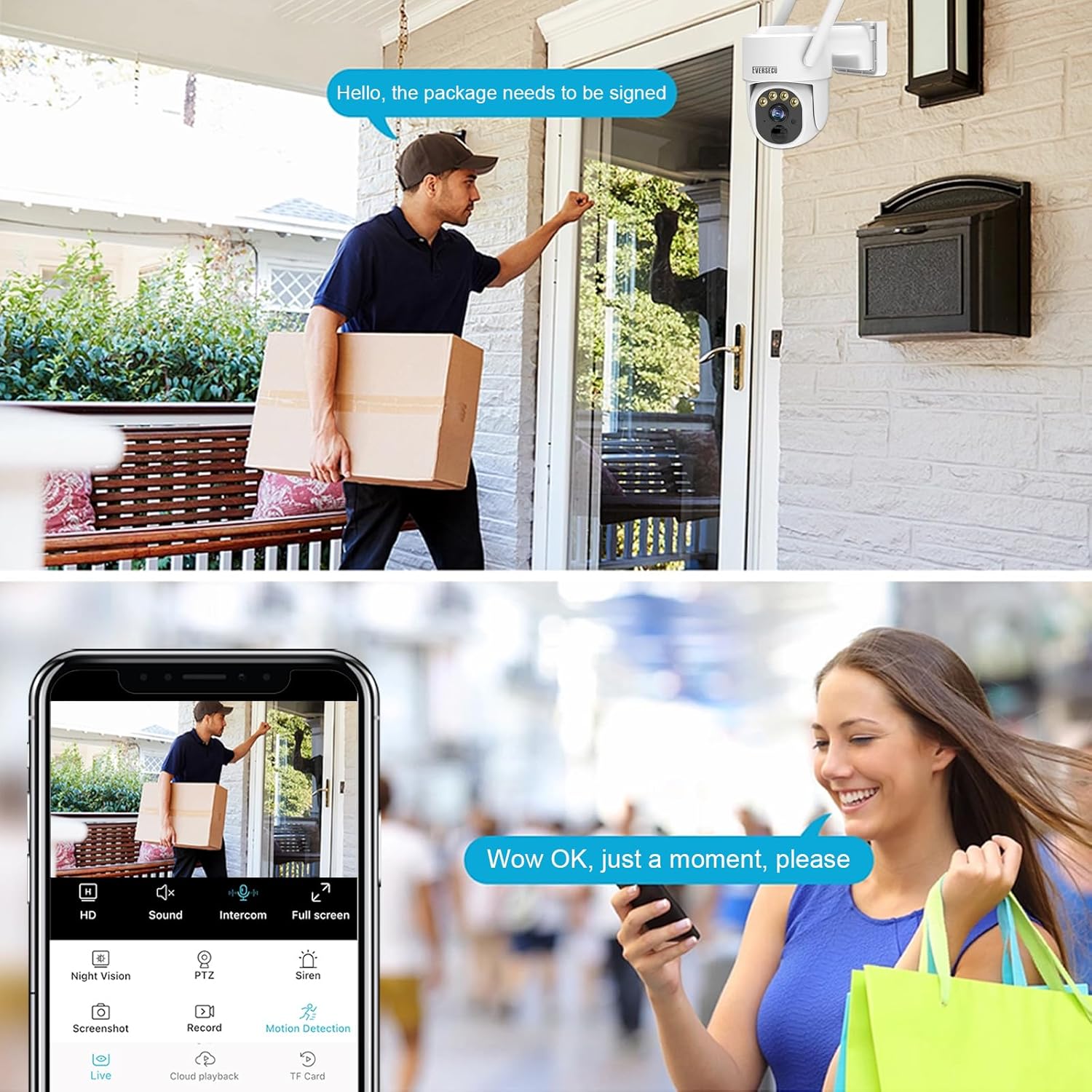
Image: Overview of the EVERSECU 2K Outdoor-Solar Security Camera and its main components.
Setup Guide
1. Initial Charging
Before first use, fully charge the camera's built-in 7500mAh battery using the provided USB cable. Connect the USB cable to the camera's charging port and a standard 5V USB power adapter (not included). The camera will also charge via the solar panel once installed.
2. App Download and Account Registration
Download the O-KAM app from the App Store (iOS) or Google Play Store (Android). Register for an account and log in.
3. Camera Pairing with App
- Power on the camera using the switch.
- Open the O-KAM app and tap the '+' icon to add a new device.
- Follow the on-screen instructions to connect the camera to your 2.4 GHz Wi-Fi network. Note: This camera only supports 2.4 GHz Wi-Fi.
- Scan the QR code displayed on your phone with the camera lens. A confirmation sound will indicate successful pairing.
4. Mounting the Camera and Solar Panel
Select a suitable outdoor location for mounting. Ensure the solar panel receives direct sunlight for several hours daily. The camera is IP65 waterproof, suitable for various weather conditions.
- Use the provided mounting bracket and screws to secure the camera to a wall or ceiling.
- Mount the solar panel in a position that maximizes sun exposure. Connect the solar panel cable to the camera's charging port.

Image: The EVERSECU camera and solar panel mounted outdoors.
Operating Instructions
1. Live View and PTZ Control
Access the live feed through the O-KAM app. Use the on-screen controls to pan the camera 355° horizontally and tilt 120° vertically to adjust the viewing angle. The camera supports automatic tracking or manual control.

Image: Illustration of the camera's Pan and Tilt movement range.
2. Smart PIR Motion Detection and Alerts
The camera uses PIR (Passive Infrared) technology for human detection, reducing false alarms. When motion is detected, you will receive instant alerts on your phone. You can customize alarm modes, including light and siren warnings, through the app.

Image: PIR human body induction in action, detecting a person.
3. Two-Way Audio
Utilize the built-in microphone and speaker for two-way communication. Speak through the app to communicate with visitors or deter unwanted individuals.

Image: Demonstrating two-way audio communication via the camera.
4. Color Night Vision
The camera provides color night vision using dual-source lighting (infrared lamp/white-light source) for clear images up to 30 meters in low-light conditions.

Image: Ultra HD Night Vision capability of the camera.
5. Storage Options
The camera supports both cloud storage (subscription may be required) and local storage via an SD card (up to 64MB, not included). Configure your preferred storage method in the O-KAM app.
6. Alexa Compatibility
The camera is compatible with Amazon Alexa. Follow the instructions in the O-KAM app or Alexa app to link your devices for voice control and viewing.
Maintenance
1. Cleaning
- Camera Lens: Gently wipe the camera lens with a soft, clean, lint-free cloth to remove dust or smudges. Avoid abrasive cleaners.
- Solar Panel: Periodically clean the surface of the solar panel to ensure maximum charging efficiency. Dust, dirt, or debris can reduce its performance.
- Camera Body: Wipe the camera body with a damp cloth as needed. The IP65 rating ensures protection against dust and water jets, but regular cleaning helps maintain appearance and functionality.
2. Battery Management
The camera's 7500mAh battery is designed for long-lasting power, supplemented by the solar panel. Ensure the solar panel is positioned to receive adequate sunlight. In prolonged periods of low sunlight, the camera may require occasional charging via the USB port.
3. Firmware Updates
Regularly check the O-KAM app for available firmware updates. Keeping your camera's firmware updated ensures optimal performance, security, and access to new features.
Troubleshooting
- Camera not connecting to Wi-Fi:
- Ensure your Wi-Fi network is 2.4 GHz. The camera does not support 5 GHz Wi-Fi. Check Wi-Fi signal strength at the camera's location. Restart your router and the camera, then attempt pairing again.
- Poor image quality:
- Clean the camera lens. Ensure there are no obstructions. Check your internet connection speed, as low bandwidth can affect streaming quality. Verify the camera is set to 2K resolution in the app settings.
- Motion detection not working or too many false alarms:
- Adjust the PIR sensitivity settings in the O-KAM app. Ensure the camera's field of view is clear of moving branches or objects that could trigger false alarms. Define custom alarm areas to focus detection on specific zones.
- Battery not charging:
- Ensure the solar panel is clean and receiving direct sunlight. Check the connection between the solar panel and the camera. If necessary, charge the camera directly via the USB cable.
- Two-way audio issues:
- Check the volume settings on your phone and in the O-KAM app. Ensure there are no obstructions blocking the camera's microphone or speaker. Verify your internet connection is stable.
Product Specifications
| Feature | Specification |
|---|---|
| Model Name | BS16-4 |
| Video Capture Resolution | 1296p (2K 3MP) |
| Indoor/Outdoor Usage | Indoor, Outdoor |
| Power Source | Solar Powered (7500mAh Battery) |
| Connectivity Protocol | Wi-Fi (2.4 GHz only) |
| Controller Type | Amazon Alexa |
| Mounting Type | Ceiling Mount |
| Pan/Tilt Range | 355° Horizontal, 120° Vertical |
| Night Vision | Color Night Vision (up to 30m) |
| Waterproof Rating | IP65 |
| Included Components | Camera Body, Solar Panel, USB Cable |
| Product Dimensions | 7.13 x 5.79 x 11 inches |
| Item Weight | 7.7 pounds (3.5 Kilograms) |
| Batteries | 6 Lithium Ion batteries (included) |
| Operating Temperature | -13°F to 140°F (-25°C to 60°C) |
Warranty and Support
For warranty information and technical support, please refer to the official EVERSECU website or contact their customer service directly. Contact details are typically found on the product packaging or the EVERSECU brand store on Amazon.
For further assistance, you may visit the EVERSECU Store on Amazon.