
1. Product Overview
The IVELECT AAC3 3.2W Motion Detection WiFi Wireless Camera is a versatile security device designed for monitoring and surveillance. It features motion detection capabilities and WiFi connectivity for remote access and control.
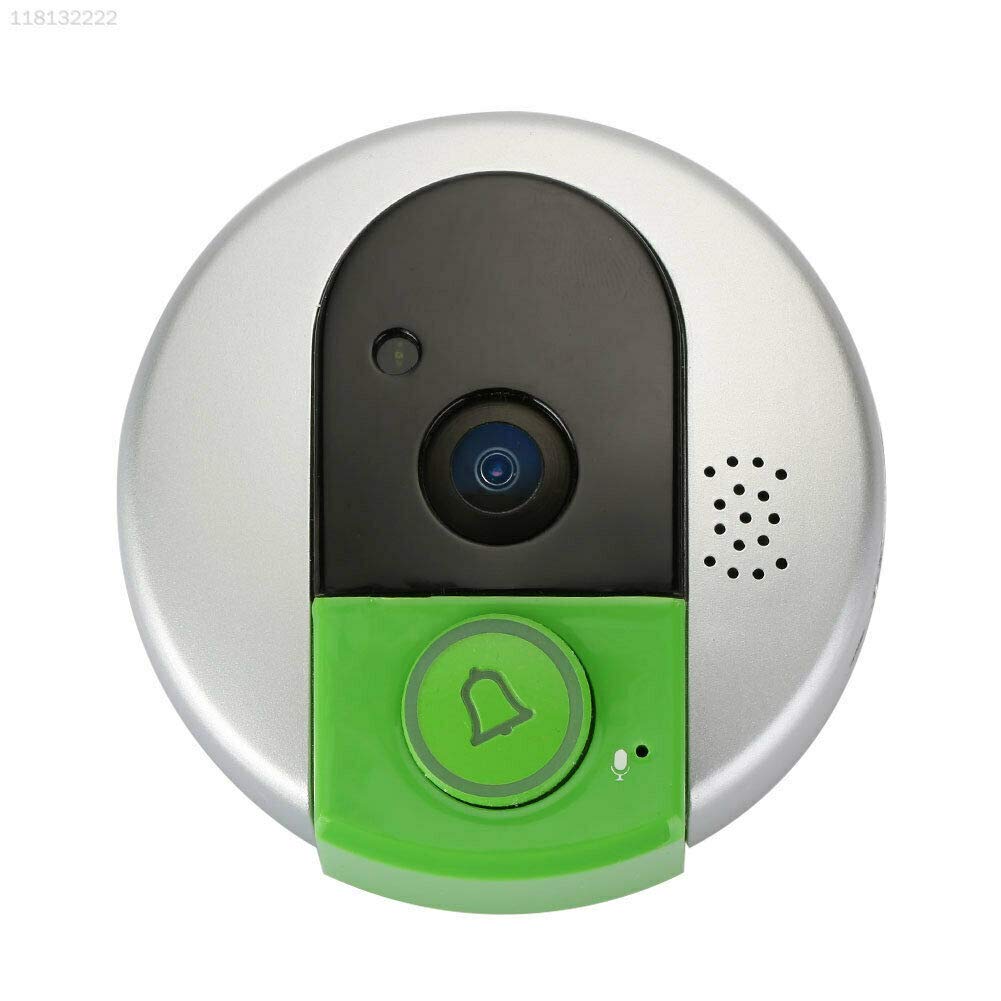
Figure 1.1: Front view of the AAC3 WiFi Wireless Camera, showing the camera lens, motion sensor, and bell button.
Key Features:
- Motion Detection: Automatically detects movement and can trigger alerts or recordings.
- WiFi Connectivity: Enables remote monitoring and control via a smartphone application.
- Compact Design: Silver and green finish, suitable for various indoor environments.
- Easy Installation: Designed for straightforward setup and operation.
2. Package Contents
Before proceeding with the setup, please verify that all items listed below are present in your package.

Figure 2.1: Contents of the AAC3 WiFi Wireless Camera package, including the camera unit, power adapter, cables, and mounting hardware.
- AAC3 WiFi Wireless Camera Unit
- Power Adapter
- USB Cable
- Mounting Hardware (screws, anchors)
- User Manual (this document)
3. Setup Guide
3.1 Powering On
Connect the provided power adapter to the camera's power input port. Plug the adapter into a standard electrical outlet. The camera will power on automatically, indicated by an LED light.
3.2 App Installation
Download the official companion application for the AAC3 camera from your smartphone's app store (e.g., Google Play Store for Android or Apple App Store for iOS). Search for "IVELECT Camera" or refer to the QR code on the product packaging for direct download.
3.3 Device Pairing
- Open the installed application and create a new user account or log in if you already have one.
- Follow the on-screen instructions to add a new device. This typically involves scanning a QR code on the camera or manually entering its serial number.
- Connect the camera to your home WiFi network by entering your network's SSID and password in the app. Ensure your camera is within range of your WiFi router.
- Once connected, the camera's LED indicator will change, and the app will confirm successful pairing.
3.4 Mounting
Choose a suitable location for mounting the camera, ensuring it has a clear view of the area you wish to monitor and is within WiFi range. Use the provided mounting hardware to securely attach the camera to a wall or ceiling. Ensure the camera is positioned to capture optimal motion detection.
4. Operating Instructions
4.1 Motion Detection
The AAC3 camera is equipped with motion detection capabilities. When motion is detected within its field of view, the camera can automatically:
- Send push notifications to your smartphone.
- Begin recording video footage.
You can adjust the sensitivity of motion detection and set up specific detection zones within the camera's application settings.
4.2 Remote Monitoring
With the companion app, you can remotely monitor your property from anywhere with an internet connection. Open the app to view live video feed from your camera.

Figure 4.1: Illustration of remote monitoring, showing the camera feed displayed on a smartphone.
4.3 Two-Way Audio
The camera supports two-way audio communication. This allows you to speak through the camera's speaker and hear audio from the camera's microphone via the app. To use this feature, tap the microphone icon in the live view interface of the app.
5. Maintenance
5.1 Cleaning
To ensure optimal performance, regularly clean the camera lens and body. Use a soft, dry cloth to wipe away dust and smudges. For stubborn dirt, slightly dampen the cloth with water. Do not use harsh chemicals or abrasive cleaners as they may damage the camera's surface or lens.
5.2 Software Updates
Periodically check the companion application for available firmware updates for your camera. Updates often include performance improvements, new features, and security enhancements. Follow the in-app instructions to perform any necessary updates.
6. Troubleshooting
This section addresses common issues you might encounter with your AAC3 camera.
| Problem | Possible Cause | Solution |
|---|---|---|
| Camera not powering on | Power adapter not connected; Power outlet issue | Ensure power adapter is securely connected and plugged into a working outlet. Try a different outlet. |
| Cannot connect to WiFi | Incorrect WiFi password; Camera too far from router; Router issues | Verify WiFi password. Move camera closer to router. Restart router. Ensure camera is connecting to a 2.4GHz network if applicable. |
| No motion detection alerts | Motion detection disabled; Sensitivity too low; App notifications off | Enable motion detection in app settings. Increase sensitivity. Check app notification settings on your phone. |
| Poor video quality | Dirty lens; Weak WiFi signal; Low light conditions | Clean the camera lens. Improve WiFi signal strength. Ensure adequate lighting in the monitored area. |
7. Specifications
Detailed technical specifications for the AAC3 3.2W Motion Detection WiFi Wireless Camera.
| Feature | Detail |
|---|---|
| Model Number | FPCHD209138 |
| Manufacturer | IVELECT |
| Product Dimensions | 15 x 5 x 10 cm |
| Item Dimensions LxWxH | 15 x 5 x 10 Centimeters |
| Country of Origin | China |
| Included Components | Camera Unit, Power Adapter, USB Cable, Mounting Hardware |
| Net Quantity | 1.00 Count |
8. Warranty and Support
For any queries, technical assistance, or support regarding your AAC3 3.2W Motion Detection WiFi Wireless Camera, please contact the seller directly. They will be able to provide specific information regarding warranty terms and troubleshooting assistance.
Seller Contact: Please refer to your purchase documentation or the online platform where you purchased the product for seller contact details.