
Introduction
Thank you for choosing the Masterpro by Carlo Cracco Robot 1000 Multicooker. This advanced kitchen appliance is designed to simplify your cooking process with its versatile functions and integrated Wi-Fi connectivity. This manual provides essential information for safe operation, setup, usage, maintenance, and troubleshooting to ensure you get the most out of your device.

The Masterpro Robot 1000 multicooker with its main bowl and control panel.
Safety Instructions
Please read all safety instructions carefully before using the appliance. Failure to follow these instructions may result in injury or damage to the appliance.
- Always ensure the appliance is placed on a stable, flat, heat-resistant surface.
- Do not immerse the main unit in water or any other liquid. Clean with a damp cloth only.
- Keep hands and utensils away from moving blades during operation. Always use the spatula provided.
- Ensure all parts are correctly assembled before operation.
- Unplug the appliance from the power outlet when not in use, before cleaning, and before assembling or disassembling parts.
- Do not operate the appliance with a damaged cord or plug, or if it malfunctions or has been damaged in any way.
- This appliance is for household use only. Do not use outdoors.
- Exercise caution when handling hot liquids or steam.
Package Contents
Verify that all items are present in the package:
- Masterpro Robot 1000 Main Unit
- 4.5 Liter Stainless Steel Bowl with ergonomic handle
- Preparation/Cooking Lid
- Blender Lid
- Internal Steamer Basket
- Steamer with Tray and Lid
- Shaft with Mixing Paddle
- Shaft with Butterfly Whisk
- Shaft with Stainless Steel Blades
- Extension Shaft with Slicing/Grating Disc
- Slicing/Grating Disc with Extension Shaft
- Spatula

An overview of the Masterpro Robot 1000 multicooker and its comprehensive set of accessories, including various blades, whisks, steaming baskets, and lids.
Product Overview
The Masterpro Robot 1000 is a high-tech multicooker designed for diverse culinary tasks. Key components include:
- Main Unit: Houses the motor, heating element, and control panel.
- Stainless Steel Bowl: 4.5-liter capacity for large preparations.
- 7.7-inch Touch Screen Display: For intuitive control and recipe viewing.
- Quick Control Knob: With backlit ring for easy adjustments.
- Wi-Fi Connectivity: Enables integrated recipe updates and online features.
- Integrated Scale: Accurate to 5 grams for precise ingredient measurement.
Setup
Follow these steps for initial setup:
- Unpack: Carefully remove all components from the packaging.
- Clean: Wash the stainless steel bowl, lids, and all accessories with warm soapy water before first use. Rinse thoroughly and dry.
- Placement: Place the main unit on a clean, dry, stable, and heat-resistant surface, away from edges and heat sources.
- Power Connection: Plug the appliance into a grounded electrical outlet (220V-240V, 50-60Hz).
- Initial Power On: The touch screen display will illuminate. Follow any on-screen prompts for initial language selection or Wi-Fi setup.
Operating Instructions
Manual and Automatic Modes
The Masterpro Robot 1000 offers both manual and automatic operation modes. In manual mode, you control each setting (time, temperature, speed). In automatic mode, you can select from integrated recipes that guide you step-by-step.
Integrated Recipes and Wi-Fi
The appliance comes with over 500 integrated recipes. Connect the device to Wi-Fi to receive updates and potentially access new recipes. Each recipe provides step-by-step instructions on the 7.7-inch touch screen display.
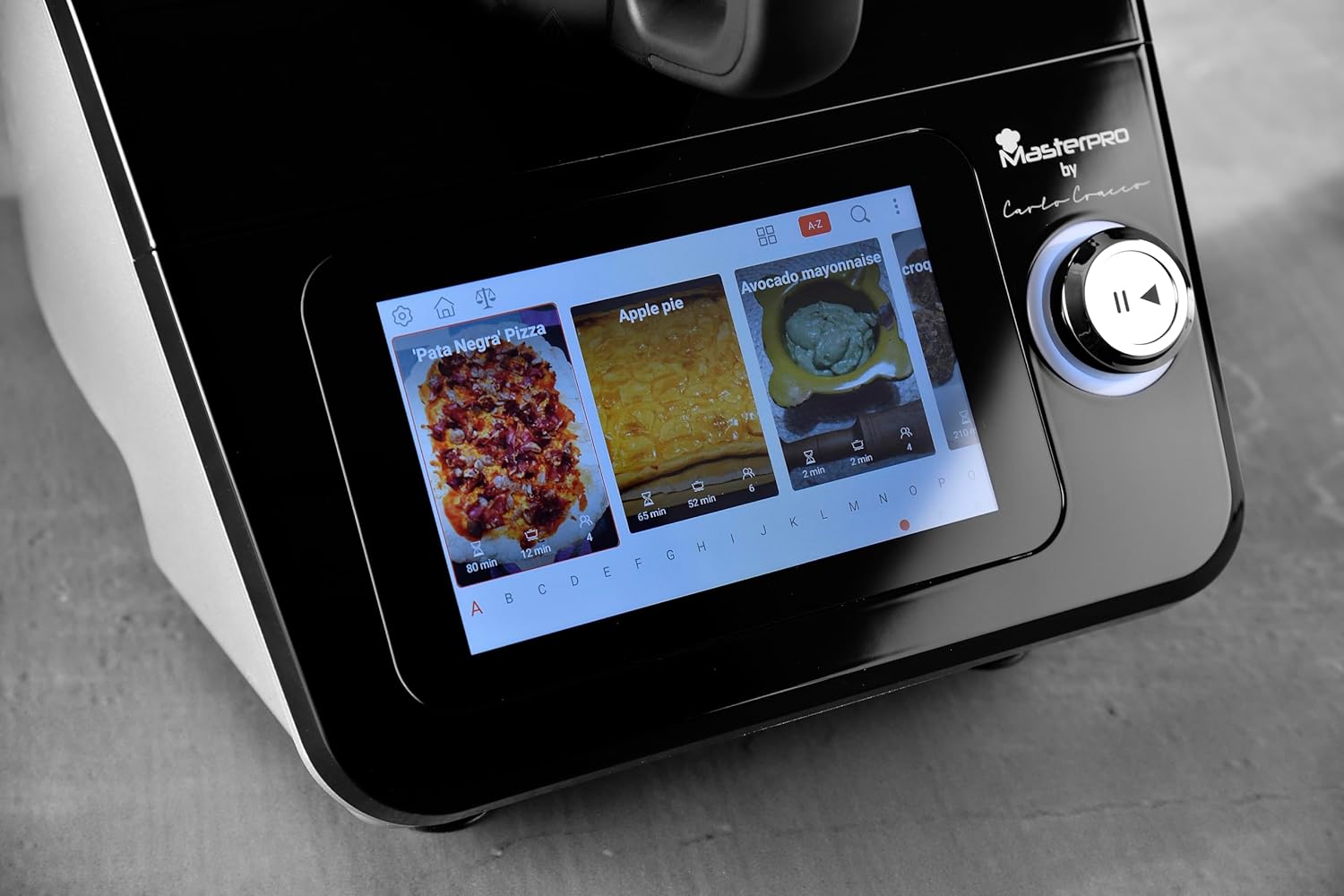
A close-up of the 7.7-inch touch screen display, illustrating the interface for selecting integrated recipes.
Core Functions
The multicooker performs a wide range of functions:
- Weighing: Use the integrated scale for precise ingredient measurement.
- Blending: Ideal for smoothies, sauces, and purees.
- Emulsifying: Create perfect mayonnaise or dressings.
- Kneading: Prepare dough for bread, pizza, or pastries.
- Slicing/Grating: Utilize the dedicated disc and extension shaft for uniform slicing and grating of vegetables.
- Whipping: Use the butterfly whisk for whipping cream or egg whites.
- Cooking: Various cooking methods, including simmering, sautéing, and stewing.
- Steaming: Use the internal basket or the external steamer with tray and lid for healthy steamed dishes.

The multicooker in use, demonstrating the steaming function with the steamer basket and lid in place, preparing seafood.

The multicooker demonstrating the slicing function with the dedicated accessory, processing carrots.
Temperature and Timer
Adjust the cooking temperature from 37°C to 130°C. Set the timer for up to 90 minutes. These settings are controlled via the touch screen and quick control knob.
Speed Control and Inverter Blade
The appliance features 12 speed levels. For delicate preparations like risottos, use the inverter blade function to stir gently without cutting ingredients.
Maintenance and Cleaning
Regular cleaning ensures the longevity and optimal performance of your Masterpro Robot 1000.
- Unplug: Always unplug the appliance before cleaning.
- Bowl and Accessories: The stainless steel bowl, lids, and most accessories are dishwasher safe. For manual cleaning, use warm soapy water and a non-abrasive sponge.
- Main Unit: Wipe the main unit and touch screen display with a soft, damp cloth. Do not use abrasive cleaners or immerse the unit in water.
- Drying: Ensure all parts are completely dry before reassembling or storing.
Troubleshooting
If you encounter issues with your Masterpro Robot 1000, refer to the table below for common problems and solutions.
| Problem | Possible Cause | Solution |
|---|---|---|
| Appliance does not turn on. | Not plugged in; power outage; faulty outlet. | Check power cord connection; verify power supply; try a different outlet. |
| Software update fails or gets stuck. | Unstable Wi-Fi connection; corrupted download; temporary software glitch. | Ensure stable Wi-Fi connection. Restart the appliance and attempt the update again. If the problem persists, contact customer support. |
| Touch screen unresponsive or inaccurate. | Screen is dirty; temporary software issue; hardware malfunction. | Clean the screen with a soft, dry cloth. Restart the appliance. If the issue continues, contact customer support. |
| Blade inverter function not engaging. | Incorrect setting; temporary glitch. | Ensure the correct function is selected on the display. Restart the appliance. |
| Bowl capacity appears less than stated. | Misinterpretation of usable vs. total capacity; specific recipe limits. | The stated capacity of 4.5L refers to the total volume. Usable capacity for certain preparations might be slightly less to prevent overflow. Refer to recipe guidelines. |
Technical Specifications
| Feature | Specification |
|---|---|
| Brand | MasterPRO |
| Model | Robot 1000 |
| Color | Black |
| Bowl Capacity | 4.5 Liters |
| Number of Speeds | 12 |
| Special Features | Adjustable speed control, Wi-Fi connectivity, Integrated recipes, Integrated scale, Inverter blade function |
| Adjustable Temperature | 37-130°C |
| Timer Range | 0-90 minutes |
| Scale Accuracy | 5 grams |
| Power | 1000 Watts (motor and heating) |
| Voltage/Frequency | 220V-240V ~ 50-60HZ |
| Product Dimensions | 38P x 22l x 32H cm |
Warranty and Support
The Masterpro by Carlo Cracco Robot 1000 Multicooker comes with a standard manufacturer's warranty. Please refer to the warranty card included in your product packaging for specific terms and conditions. For technical support, service, or spare parts, please contact your retailer or the MasterPRO customer service department. Keep your proof of purchase for warranty claims.


