

1. Introduction
The RYOBI RG-9000I 9KVA Inverter Generator is designed to provide clean and stable power for various applications, including sensitive electronic devices. This manual provides essential information for the safe operation, setup, maintenance, and troubleshooting of your generator.
Key Features:
- Maximum 9000 Watt output with electric and manual start options.
- Produces clean and stable power, suitable for computers and sensitive electronics.
- Equipped with an environmentally friendly lithium battery.
- Features a 3-in-1 digital readout meter for monitoring output voltage, frequency, and running time.
- Designed for quiet operation and fuel efficiency.
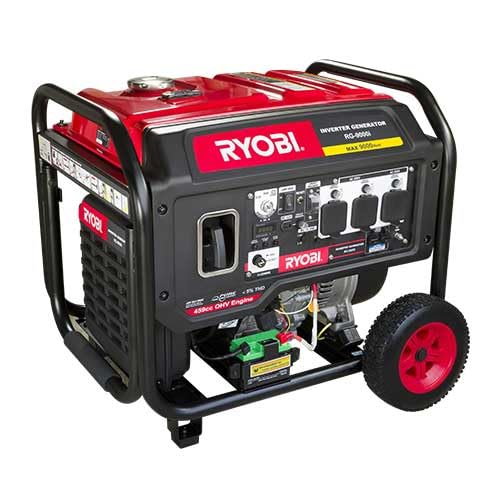
This image displays the RYOBI RG-9000I 9KVA Inverter Generator, showcasing its robust frame, control panel, and wheels. Alongside the generator, various accessories are visible, including jumper cables, a spark plug wrench, multiple power adapters, and a funnel, which are typically included for setup and maintenance.
2. Safety Information
WARNING: Failure to follow these safety instructions can result in serious injury or death.
- Carbon Monoxide Hazard: Generators produce carbon monoxide, a colorless, odorless, poisonous gas. Operate generators outdoors only, far away from windows, doors, and vents. Never operate indoors or in enclosed spaces.
- Electrical Shock Hazard: Do not operate the generator in wet conditions. Ensure all connections are dry and properly insulated. Ground the generator according to local electrical codes.
- Fire Hazard: Fuel is highly flammable. Store fuel in approved containers in a well-ventilated area. Do not refuel while the engine is running or hot. Keep fuel away from sparks, open flames, and heat sources.
- Hot Surfaces: The generator engine and muffler become very hot during operation and remain hot for some time after shutdown. Avoid contact to prevent burns.
- Moving Parts: Keep hands, feet, and clothing away from moving parts to prevent injury.
- Children and Pets: Keep children and pets away from the generator at all times.
3. Package Contents
Verify that all items are present upon unpacking:
- RYOBI RG-9000I Inverter Generator
- Instruction Manual
- Spark Plug Wrench
- Oil Funnel
- Battery Charging Cables
- Various Power Adapters/Plugs
- Screwdriver
4. Setup
4.1 Unpacking and Assembly
Carefully remove the generator and all components from the packaging. Assemble the wheels and support feet if they are not pre-installed, following the diagrams in the full manual.
4.2 Adding Engine Oil
- Place the generator on a level surface.
- Remove the oil fill cap/dipstick.
- Using the provided funnel, slowly add the recommended engine oil (refer to the full manual for oil type and capacity) until it reaches the upper mark on the dipstick. Do not overfill.
- Replace the oil fill cap/dipstick securely.
4.3 Adding Fuel
- Ensure the generator is turned off and cool.
- Open the fuel tank cap.
- Fill the fuel tank with unleaded gasoline (refer to the full manual for octane requirements). Do not overfill; leave space for fuel expansion.
- Securely close the fuel tank cap. Wipe up any spilled fuel immediately.
4.4 Connecting the Battery (for Electric Start)
The generator includes an environmentally friendly lithium battery for electric starting. Connect the battery terminals as instructed in the full manual, ensuring correct polarity (positive to positive, negative to negative).
5. Operating Instructions
5.1 Starting the Generator
- Ensure the generator is on a level outdoor surface, away from combustible materials.
- Turn the fuel valve to the "ON" position.
- Move the choke lever to the "CHOKE" position (if the engine is cold).
- For Electric Start: Press and hold the electric start button until the engine starts.
- For Manual Start: Pull the recoil starter handle firmly and smoothly until the engine starts.
- Once the engine starts, slowly move the choke lever to the "RUN" position.
- Allow the generator to warm up for a few minutes before connecting electrical loads.
5.2 Connecting Electrical Loads
Connect appliances or tools to the generator's outlets. Ensure the total wattage of connected devices does not exceed the generator's rated output (9000 Watts maximum). The 3-in-1 digital readout meter will display output voltage, frequency, and running time.

This image displays a close-up of the generator's control panel, highlighting the various power outlets and the 3-in-1 digital readout meter. The digital meter provides real-time information on output voltage, frequency, and accumulated running time, essential for monitoring generator performance.
5.3 Shutting Down the Generator
- Disconnect all electrical loads from the generator.
- Allow the generator to run for a few minutes without load to cool down.
- Turn the engine switch to the "OFF" position.
- Turn the fuel valve to the "OFF" position.
6. Maintenance
Regular maintenance ensures optimal performance and extends the lifespan of your generator. Always refer to the full manual for detailed maintenance schedules and procedures.
- Engine Oil: Check oil level before each use. Change oil after the first 20 hours of operation, then every 50-100 hours or annually.
- Air Filter: Inspect and clean the air filter every 50 hours or more frequently in dusty conditions. Replace if damaged.
- Spark Plug: Inspect and clean the spark plug every 100 hours or annually. Replace if worn or fouled.
- Fuel Filter: Inspect and clean or replace the fuel filter as recommended in the full manual.
- Battery: Keep the lithium battery charged, especially during storage, to maintain its lifespan.
6.1 Storage
For extended storage, drain the fuel tank and carburetor, or use a fuel stabilizer. Store the generator in a clean, dry, well-ventilated area, away from direct sunlight and extreme temperatures.
7. Troubleshooting
| Problem | Possible Cause | Solution |
|---|---|---|
| Engine does not start | No fuel; Low oil level; Choke not set correctly; Spark plug issue; Battery discharged (for electric start) | Add fuel; Add oil; Adjust choke; Inspect/clean/replace spark plug; Charge/check battery |
| No power output | Circuit breaker tripped; Overload; Faulty connection | Reset circuit breaker; Reduce load; Check connections |
| Engine runs rough | Stale fuel; Clogged air filter; Dirty spark plug | Drain and replace fuel; Clean/replace air filter; Clean/replace spark plug |
For more detailed troubleshooting, consult the comprehensive manual or contact customer support.
8. Specifications
| Feature | Detail |
|---|---|
| Brand | RYOBI |
| Model Number | RG-9000I |
| Maximum Output | 9000 Watts |
| Start Type | Electric Start, Manual Start |
| Power Source | Fuel Powered |
| Voltage | 230 Volts |
| Battery Type | Lithium Battery |
| Monitoring | 3-in-1 Digital Readout (Voltage, Frequency, Running Time) |
9. Warranty and Support
For warranty information, please refer to the warranty card included with your product or visit the official RYOBI website. For technical support, parts, or service inquiries, please contact RYOBI customer service directly. Keep your purchase receipt as proof of purchase.
Contact Information: Refer to the official RYOBI website or your product documentation for the most current contact details.