
1. Introduction
Thank you for purchasing the LEKATO Bluetooth Page Turner Pro. This compact and versatile foot pedal is designed to provide musicians, presenters, and readers with hands-free control over digital documents and music scores. With broad compatibility across various operating systems and applications, it allows for seamless page turning, scrolling, and media control, enhancing your performance and workflow.
2. Safety Information
- Do not expose the device to extreme temperatures, humidity, or direct sunlight.
- Avoid dropping or subjecting the device to strong impacts.
- Keep out of reach of children.
- Use only the provided charging cable or a certified equivalent.
- Do not attempt to disassemble or modify the device. This will void the warranty.
- Clean the device with a soft, dry cloth. Do not use liquid cleaners.
3. Package Contents
Please check the package contents upon receipt:
- LEKATO Bluetooth Page Turner Pro Foot Pedal
- USB-C Charging Cable
- User Manual
4. Product Overview
The LEKATO Page Turner Pro features a compact design with two foot pedals for intuitive control. It includes an ON/OFF switch, a USB-C charging port, and indicator lights for mode selection and battery status. The bottom is equipped with non-slip pads for stability during use.

Image: LEKATO Page Turner Pro showing its compact size (12.2 x 7.6 x 3.4 cm), quiet foot pedals, and non-slip pads.

Image: The LEKATO Page Turner Pro held in a hand, demonstrating its mini size and portability.

Image: Close-up of the non-slip pad on the bottom of the LEKATO Page Turner Pro, ensuring stability during use.
5. Setup
5.1 Powering On/Off
To power on the device, slide the ON/OFF switch to the 'ON' position. The indicator lights will illuminate. To power off, slide the switch to 'OFF'.
5.2 Bluetooth Pairing
The LEKATO Page Turner Pro is compatible with iOS, Windows, and Android devices.
- Ensure the page turner is powered on.
- On your device (tablet, smartphone, PC), navigate to Bluetooth settings.
- Turn on Bluetooth and search for available devices.
- Select "TurnerPro" from the list of devices.
- Once connected, the device will indicate successful pairing.

Image: Visual guide showing the steps for Bluetooth pairing on a tablet, from enabling Bluetooth to connecting to "TurnerPro".
5.3 Connecting to Windows 11
For Windows 11, ensure that "Wireless Device Discovery" is set to "Advanced" in your Bluetooth settings to allow the system to find the device.
Video: Demonstrates how to connect the LEKATO Page Turner Pro to Windows 11, including adjusting wireless device discovery settings to 'Advanced' and pairing the device.
5.4 TRS Output Interface
The page turner features a TRS (Tip-Ring-Sleeve) output interface (1/4" or 6.35mm) for connecting to other devices that support momentary switches. Ensure the power switch is OFF before connecting.

Image: Close-up of the TRS output interface on the LEKATO Page Turner Pro, used for connecting to other compatible devices.
Video: Shows the LEKATO Page Turner Pro in various usage scenarios, including connecting via TRS output to another musical device and demonstrating page turning for music scores and documents.
6. Operating Modes
The Page Turner Pro offers 7 distinct modes and a repeat function to suit various applications. Tap the central 'Select Mode' button to cycle through modes. Hold the button to activate/deactivate repeat mode.
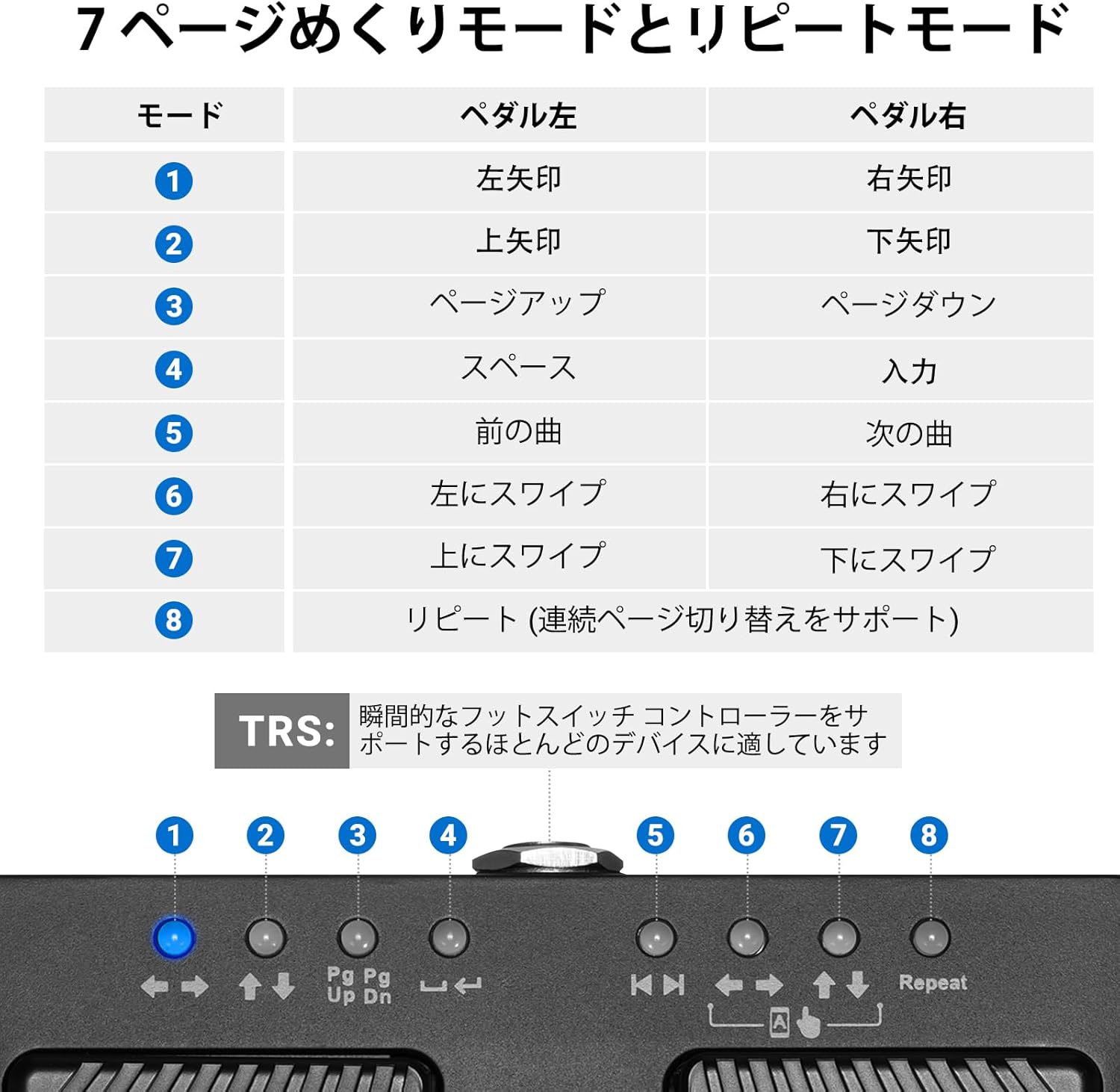
Image: A table illustrating the 7 operational modes and repeat function of the LEKATO Page Turner Pro, detailing the function of the left and right pedals for each mode.
| Mode | Left Pedal | Right Pedal |
|---|---|---|
| 1 | Left Arrow | Right Arrow |
| 2 | Up Arrow | Down Arrow |
| 3 | Page Up | Page Down |
| 4 | Space | Enter |
| 5 | Previous Track | Next Track |
| 6 | Swipe Left | Swipe Right |
| 7 | Swipe Up | Swipe Down |
| 8 (Repeat) | Supports continuous page switching | |
7. Charging
The LEKATO Page Turner Pro is equipped with a built-in rechargeable battery that provides over 48 hours of continuous use on a single charge.
- Connect the included USB-C cable to the charging port on the device.
- Connect the other end of the cable to a USB power adapter (not included) or a computer's USB port.
- The charging indicator light will show the charging status.
- A full charge typically takes a few hours.

Image: The LEKATO Page Turner Pro connected via a USB-C cable for charging, highlighting its 48+ hour battery life.
8. Compatibility
The LEKATO Page Turner Pro offers wide compatibility with various operating systems and music applications:
- Operating Systems: iOS, Windows (including Windows 11), Android.
- Music Applications: OnSong, piaScore, and many other popular music software and PDF readers.

Image: Diagram showing the LEKATO Page Turner Pro's wide compatibility with various music applications and platforms.

Image: Visual representation of the LEKATO Page Turner Pro's compatibility with iOS, Windows, and Android systems, as well as various applications.
9. Troubleshooting
9.1 Device Not Connecting
- Ensure the page turner is powered on and fully charged.
- Make sure Bluetooth is enabled on your host device.
- If using Windows 11, check that "Wireless Device Discovery" is set to "Advanced" in Bluetooth settings.
- Try unpairing and re-pairing the device. On some devices, you may need to "Forget This Device" before re-pairing.
- Restart both the page turner and your host device.
9.2 Incorrect Page Turning/Functionality
- Verify that the correct operating mode is selected on the page turner for your application.
- Check the settings within your music or document application to ensure it supports external page turners or foot pedals. Some apps may require specific settings or mappings.
- Ensure the device's firmware is up to date (if applicable, check the manufacturer's website for updates).
9.3 Short Battery Life
- Ensure the device is fully charged before use.
- Avoid using the device in extreme temperatures, which can affect battery performance.
- If battery life significantly degrades, contact customer support.
If you encounter any operational problems not covered here, please contact LEKATO customer support via Amazon email for assistance.
10. Specifications
| Feature | Specification |
|---|---|
| Brand | LEKATO |
| Model | Page Turner Pro |
| Product Dimensions (L x W x H) | 12.2 cm x 7.6 cm x 3.4 cm |
| Control Type | Push Button |
| Connectivity | Bluetooth |
| Battery Life | 48+ hours (on a single charge) |
| Charging Port | USB-C |
| Output Interface | TRS 1/4" (6.35mm) |
| Compatibility | iOS, Windows, Android (various music apps) |
11. Warranty and Support
LEKATO products are designed for reliability and performance. This product comes with a standard manufacturer's warranty. For detailed warranty information, product support, or technical assistance, please contact LEKATO customer service through your Amazon purchase channel. Please have your order number ready when contacting support.