
A4TECH FG20
A4TECH FG20 2.4G Wireless Mouse User Manual
Model: FG20 | Brand: A4TECH
Introduction
This manual provides comprehensive instructions for the setup, operation, maintenance, and troubleshooting of your A4TECH FG20 2.4G Wireless Mouse. Please read this manual carefully before using the product to ensure optimal performance and longevity.
Package Contents
- A4TECH FG20 2.4G Wireless Mouse
- USB Nano Receiver
- AA Battery (may be pre-installed or included separately)
- User Manual (this document)
Setup Guide
Follow these steps to set up your A4TECH FG20 Wireless Mouse:
- Install the Battery: Locate the battery compartment on the underside of the mouse. Open the cover and insert the AA battery, ensuring the polarity (+/-) matches the diagram inside the compartment. Close the battery cover securely.
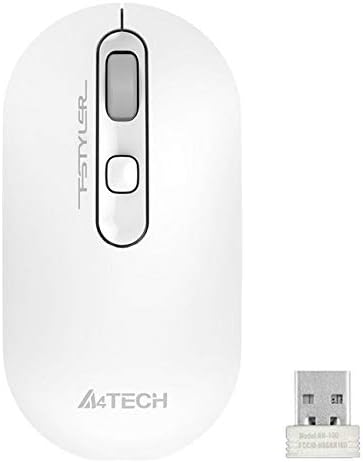
Image: A4TECH FG20 Wireless Mouse shown alongside its USB Nano Receiver. This illustrates the two main components required for operation.
- Connect the USB Nano Receiver: Remove the USB Nano Receiver from its storage slot, usually located within the battery compartment or near it. Plug the receiver into an available USB port on your computer.

Image: A schematic diagram depicting the wireless connection between the mouse and a computer via the USB receiver. This visual aid helps understand the connection process.
- Power On the Mouse: If your mouse has an On/Off switch, slide it to the "On" position. The mouse should automatically connect to the receiver.
- Driver Installation: Your computer's operating system (Windows, Linux) should automatically detect and install the necessary drivers. No manual driver installation is typically required.
Operating Instructions
The A4TECH FG20 Wireless Mouse is designed for intuitive use. Here are its primary functions:
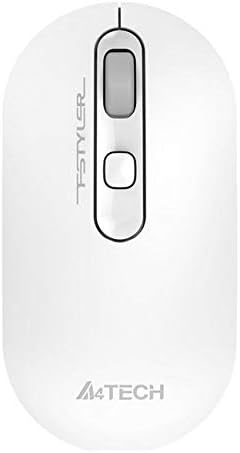
Image: Top-down view of the A4TECH FG20 Wireless Mouse, highlighting its ergonomic shape and button layout.
- Left Click: Used for selecting items, opening files, and activating functions.
- Right Click: Opens context menus, providing additional options for selected items.
- Scroll Wheel: Scroll up or down through documents and web pages. The scroll wheel can also function as a middle click button.
- DPI Adjustment Button: (If applicable, typically located near the scroll wheel) This button allows you to cycle through different cursor speeds (DPI settings) to suit your preference and task.
- Ergonomic Design: The mouse features an ergonomic design for comfortable use during extended periods.
Maintenance
Proper maintenance ensures the longevity and performance of your mouse:
- Cleaning: Use a soft, dry cloth to clean the surface of the mouse. For stubborn dirt, slightly dampen the cloth with water or a mild cleaning solution. Avoid harsh chemicals or abrasive materials.
- Sensor Cleaning: Occasionally, clean the optical sensor on the underside of the mouse with a cotton swab to ensure accurate tracking.
- Battery Replacement: When the mouse performance degrades or it stops responding, replace the AA battery with a fresh one.
- Storage: When not in use for extended periods, turn off the mouse to conserve battery life. Store the USB Nano Receiver in its designated slot to prevent loss.
Troubleshooting
If you encounter issues with your A4TECH FG20 Wireless Mouse, refer to the following common solutions:
- Mouse Not Responding:
- Ensure the mouse is turned on.
- Check if the battery is correctly installed and has sufficient charge. Replace if necessary.
- Verify the USB Nano Receiver is securely plugged into a working USB port on your computer. Try a different USB port.
- Restart your computer.
- Lagging or Erratic Cursor Movement:
- Clean the optical sensor on the underside of the mouse.
- Ensure you are using the mouse on a suitable surface (non-reflective, opaque).
- Move the mouse closer to the USB Nano Receiver to reduce interference.
- Check for other wireless devices that might be causing interference.
- Connection Issues:
- If the mouse loses connection frequently, try re-pairing it (if a pairing button is available, otherwise, simply unplug and replug the receiver).
- Ensure no large metal objects are between the mouse and the receiver.
Specifications

Image: Side profile view of the A4TECH FG20 Wireless Mouse, illustrating its slim and ergonomic contour.
| Feature | Detail |
|---|---|
| Model | FG20 |
| Connectivity Technology | 2.4G Wireless (Infrared) |
| Movement Detection | Laser |
| Button Quantity | 3 |
| Hand Orientation | Ambidextrous |
| Special Features | Ergonomic Design |
| Color | White |
| Compatible Devices | Personal Computer |
| Operating System Compatibility | Linux, Windows 7, Windows XP |
| Manufacturer | A4TECH |
| Country of Origin | China |
Warranty and Support
The A4TECH FG20 Wireless Mouse is manufactured to high-quality standards. For information regarding the manufacturer's warranty, please refer to the documentation provided with your purchase or visit the official A4TECH website.
Extended warranty options may be available from third-party providers, such as the 1-Year or 2-Year Extended Warranty by Salama Care. These are separate from the manufacturer's warranty.
For technical support or further assistance, please contact the retailer where you purchased the product or visit the official A4TECH support channels.
Related documentsFG20

Ask a question about this manual
Ask about setup, troubleshooting, compatibility, parts, safety, or missing instructions. Manuals+ will review the question and use this page’s manual context to help answer it.