
VOWNER VOWNER-222
VOWNER Vanity with Lighted Mirror User Manual
Model: VOWNER-222
Brand: VOWNER
1. Introduction
This user manual provides detailed instructions for the assembly, setup, operation, and maintenance of your VOWNER Vanity with Lighted Mirror. Please read this manual thoroughly before assembly and use to ensure proper function and safety. Keep this manual for future reference.

Figure 1.1: VOWNER Vanity with Lighted Mirror and Stool.
This image shows the complete vanity setup, including the lighted mirror, desk with drawers, and the accompanying stool. Various cosmetic items and a hairdryer are displayed on the tabletop, highlighting its functional use.
2. Important Safety Information
WARNING: Failure to follow these safety instructions could result in fire, electric shock, or other injury or damage.
- Always follow the assembly instructions carefully to avoid injury.
- Be cautious when using the electrical outlets and USB ports to prevent electrical hazards.
- Ensure the vanity is properly assembled and stable before use to prevent tipping or collapse.
- Keep the vanity away from water to prevent electrical shorts.
- Do not overload the drawers to maintain the stability of the vanity.
3. Package Contents
Before beginning assembly, verify that all parts are present and undamaged. If any parts are missing or damaged, please contact customer support.
| Item | Quantity |
|---|---|
| Vanity Desk Components | 1 set |
| Lighted Mirror | 1 |
| Cushioned Stool | 1 |
| Assembly Hardware (screws, dowels, etc.) | 1 set |
| Power Outlet Unit (with USB ports) | 1 |
| Instruction Manual | 1 |
4. Assembly Instructions
The VOWNER Vanity requires assembly. Please follow the step-by-step instructions provided in the separate assembly guide included in your package. It is recommended to have at least two people for assembly to ensure stability and ease of construction.
- Unpack all components and verify against the parts list.
- Identify all hardware and tools required (e.g., screwdriver, hammer).
- Assemble the main desk frame according to the diagrams.
- Install the drawers and their slides.
- Attach the lighted mirror securely to the desk.
- Install the power outlet unit.
- Assemble the cushioned stool.

Figure 4.1: Vanity Dimensions. This diagram provides key measurements for the vanity desk, mirror, and stool, aiding in space planning and assembly.

Figure 4.2: Storage Capacity. This image illustrates the seven spacious drawers of the vanity, showcasing their depth and potential for organizing various beauty essentials.
5. Setup
5.1 Connecting the Lighted Mirror
Once the vanity and mirror are assembled, connect the mirror's power cable to the integrated power outlet unit located on the vanity desk. Ensure the connection is secure.
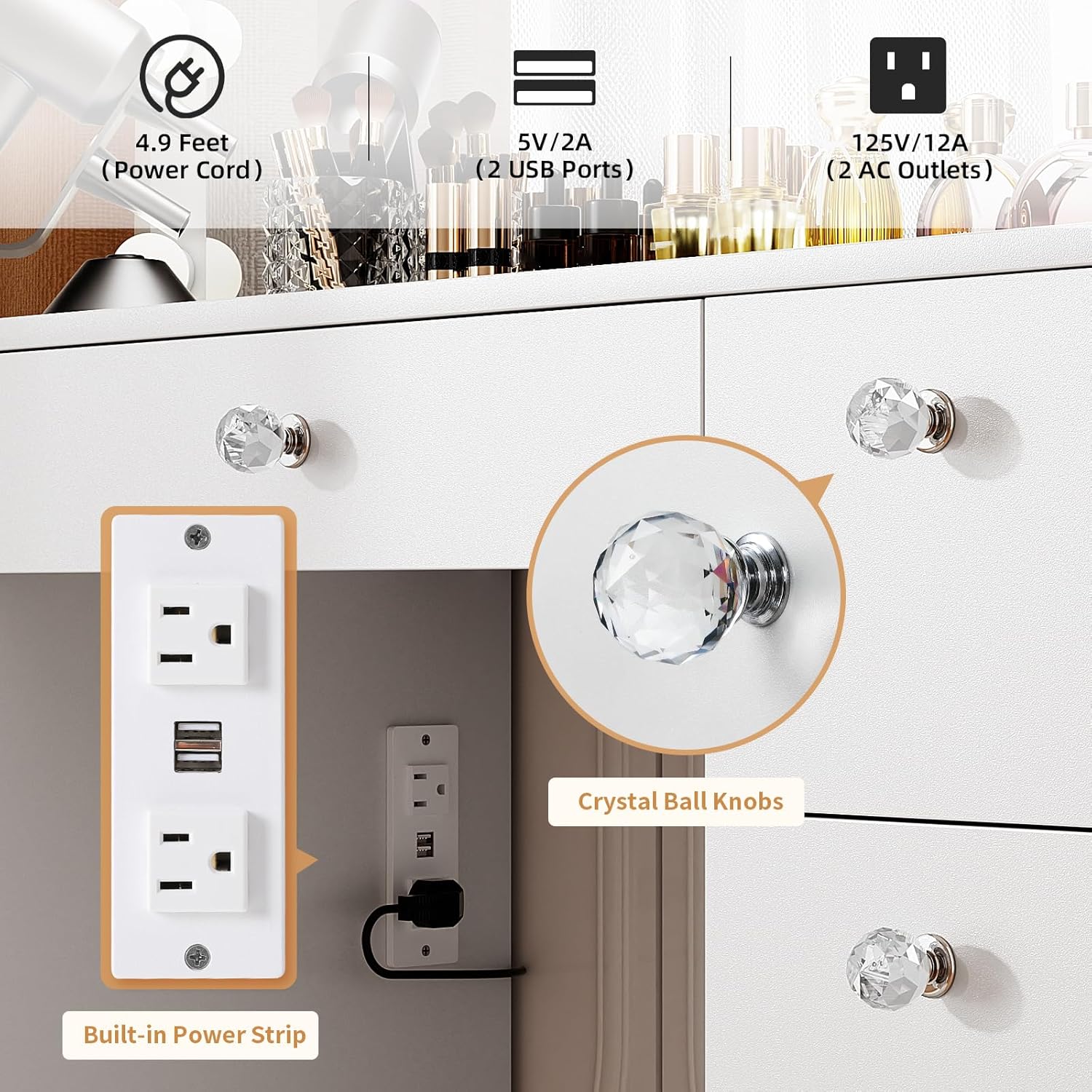
Figure 5.1: Built-in Power Strip. This image highlights the integrated power strip, featuring two standard AC outlets and two USB ports for convenient charging of devices.
6. Operating Instructions
6.1 Lighted Mirror Operation
The lighted mirror features 14 built-in LED lights with adjustable settings:
- Power On/Off: Locate the touch sensor on the mirror surface to turn the lights on or off.
- Color Temperature Modes: Tap the touch sensor to cycle through 3 color lighting modes:
- Warm White
- Natural White
- Cool White
- Adjustable Brightness: Press and hold the touch sensor to adjust the brightness level. Release when the desired brightness is achieved.

Figure 6.1: 3 Color Light Options. This image demonstrates the three distinct color temperature modes available for the mirror lights: Warm White, Natural White, and Cool White, along with a brightness adjustment slider.
6.2 Power Outlet and USB Ports
The vanity desk is equipped with a convenient power strip:
- AC Outlets: Two standard 125V/12A plug sockets are available for powering devices such as hair dryers, curling irons, or other beauty appliances.
- USB Ports: Two 5V/2A USB ports are provided for charging mobile phones, tablets, or other USB-powered devices.
Ensure devices are compatible with the provided voltage and current specifications before plugging them in.
7. Maintenance
To ensure the longevity and appearance of your VOWNER Vanity, follow these simple maintenance guidelines:
- Cleaning: Wipe the vanity surfaces with a dry cloth. Avoid abrasive cleaners or harsh chemicals that may damage the finish.
- Spills: Immediately wipe up any spills to prevent staining or damage to the wood tabletop.
- Mirror Care: Clean the mirror surface with a soft, lint-free cloth and a glass cleaner. Do not spray cleaner directly onto the mirror to avoid liquid seeping into the light fixtures.
- Drawer Maintenance: Periodically check drawer slides for smooth operation. If needed, a small amount of silicone lubricant can be applied.
- Electrical Components: Ensure the power cord and outlet unit are free from damage. Do not attempt to repair electrical components yourself.
8. Troubleshooting
If you encounter issues with your VOWNER Vanity, refer to the following common troubleshooting steps:
| Problem | Possible Cause | Solution |
|---|---|---|
| Lights not turning on | Power cord not plugged in; loose connection; power outage; faulty touch sensor. | Check power connections. Ensure the wall outlet has power. Gently tap the touch sensor. If issues persist, contact customer support. |
| Lights flickering or dim | Low power supply; brightness setting too low. | Ensure stable power. Adjust brightness by pressing and holding the touch sensor. |
| Power outlets/USB ports not working | Vanity not plugged into wall outlet; device not properly plugged in; overloaded circuit. | Verify the vanity's main power cord is plugged into a working wall outlet. Ensure devices are fully inserted. Avoid overloading the outlets. |
| Drawers are stiff or misaligned | Improper assembly; debris in slides; overloaded drawer. | Refer to assembly instructions to check alignment. Clear any obstructions from slides. Redistribute weight in drawers. |
9. Specifications
| Feature | Detail |
|---|---|
| Brand | VOWNER |
| Model Number | VOWNER-222 |
| Product Dimensions | 15.8"D x 43.3"W x 58.3"H |
| Item Weight | 112.2 pounds |
| Frame Material | Engineered Wood |
| Color | White |
| Lighting | 14 LED bulbs, 3 color modes (Warm, Natural, Cool White), Adjustable Brightness |
| Power Outlet | 2 Standard AC Outlets (125V/12A) |
| USB Ports | 2 USB Ports (5V/2A) |
| Assembly Required | Yes |
| Product Care | Wipe with Dry Cloth |
10. Warranty and Support
VOWNER is committed to providing excellent service. If you have any questions, concerns, or require assistance with your vanity, please do not hesitate to contact our customer support team.
- Customer Service: Please refer to the contact information provided on your purchase receipt or the VOWNER official website.
- Response Time: We aim to reply to all inquiries within 24 hours.
- Returns: This product is eligible for 30-day easy returns.
For the most up-to-date warranty information, please visit the VOWNER brand store or contact customer service directly.
Ask a question about this manual
Ask about setup, troubleshooting, compatibility, parts, safety, or missing instructions. Manuals+ will review the question and use this page’s manual context to help answer it.