
DUMBORC P6FG Receiver
DUMBORC P6FG 2.4G 6 Channel Gyro Inside Receiver User Manual
Model: P6FG Receiver | Brand: DUMBORC
1. Introduction and Overview
The DUMBORC P6FG 2.4G 6-channel receiver is designed for use with DUMBORC X4 and X6 transmitters in various remote control vehicles, including cars, boats, and tanks. This receiver features FHSS (Frequency Hopping Spread Spectrum) signal anti-interference technology for stable and fast signal transmission. It also includes a built-in gyroscope function to enhance vehicle stability and control.
This manual provides essential information for the proper setup, operation, and maintenance of your DUMBORC P6FG receiver. Please read it thoroughly before use.
2. What's in the Box
- 2 x DUMBORC P6FG Receivers

Image: Two DUMBORC P6FG 2.4G 6-channel receivers, as typically included in the package.
3. Key Features
- Compatibility: Specifically designed to work only with DUMBORC X4 and X6 transmitters.
- Channels: 6-channel operation for versatile control.
- Gyro Function: Built-in gyroscope for enhanced stability and anti-slip performance in vehicles.
- Signal Technology: FHSS (Frequency Hopping Spread Spectrum) for stable and interference-resistant signal.
- Response Speed: Fast response time, reaching 12ms.
- Voltage Range: Supports 4.8V to 10V DC high voltage input.
- Control Distance: Approximately 400 meters (actual distance may vary based on environmental factors like metal obstructions).
- Modes: Supports both Normal Mode and Gyro Mode.
- Compact Size: Dimensions of 35mm x 20mm x 13mm (1.38 x 0.79 x 0.51 inches).
4. Specifications
| Attribute | Value |
|---|---|
| Product Dimensions | 0.79 x 0.51 x 1.38 inches (35 x 20 x 13 mm) |
| Item Weight | 0.32 ounces |
| Country of Origin | China |
| Manufacturer | DUMBORC |
| Channels | 6 |
| Frequency | 2.4GHz FHSS |
| Voltage Range | 4.8V - 10V DC |
| Control Distance | Approx. 400 meters |
| Gyroscope | Integrated |

Image: Dimensions of the DUMBORC P6FG receiver, showing its compact size.
5. Safety Information
While the product information states "no" specific safety information, general safety practices should always be followed when operating RC equipment:
- Always ensure proper wiring and connections to avoid short circuits or damage.
- Verify correct voltage input (4.8V-10V DC) to prevent receiver malfunction or damage.
- Keep the receiver away from water, excessive heat, and direct sunlight.
- Ensure the antenna is not obstructed for optimal signal reception.
- Operate RC vehicles responsibly and in safe environments, away from people, pets, and obstacles.
- If any unusual behavior or malfunction occurs, immediately power off the system and inspect connections.
6. Setup and Binding
The DUMBORC P6FG receiver must be bound to a compatible DUMBORC X4 or X6 transmitter before use.
6.1. Receiver Port Layout
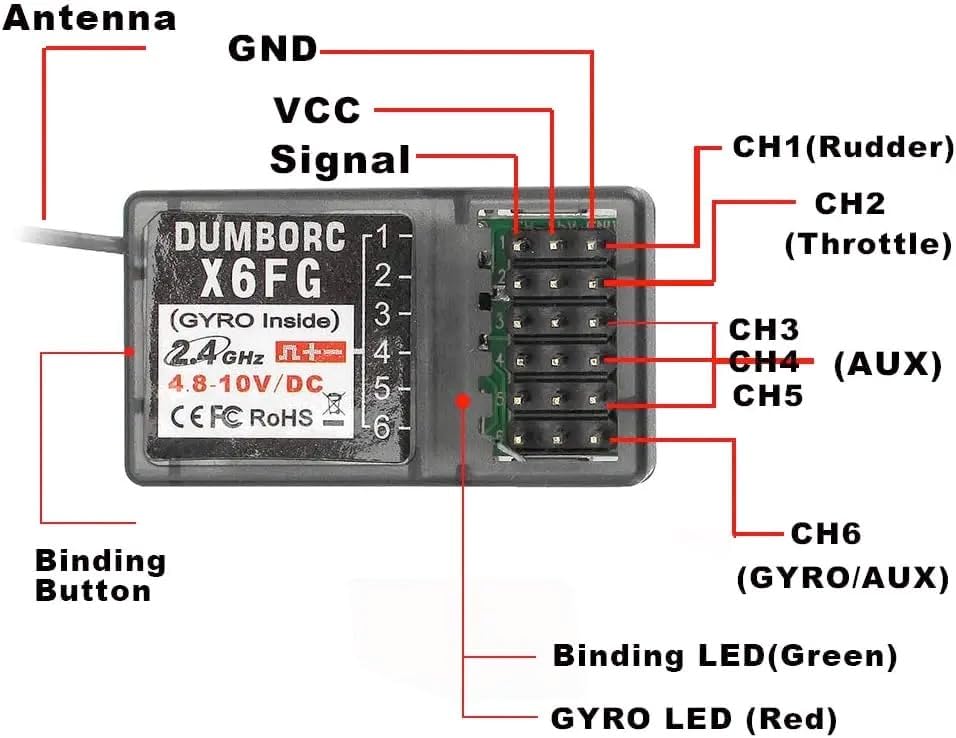
Image: Detailed diagram showing the binding button, antenna, VCC, GND, Signal pins, and channels CH1-CH6 on the DUMBORC P6FG receiver.
- CH1 (Rudder): Typically for steering servo.
- CH2 (Throttle): Typically for motor/ESC.
- CH3-CH5 (AUX): Auxiliary channels for additional functions (e.g., lights, gear shifts).
- CH6 (GYRO/AUX): Can be used for gyroscope sensitivity adjustment or another auxiliary function.
- VCC: Positive power input.
- GND: Ground.
- Binding Button: Used to initiate the binding process.
- Binding LED (Green): Indicates binding status.
- GYRO LED (Red): Indicates gyroscope status.
6.2. Binding Procedure
- Ensure your DUMBORC X4 or X6 transmitter is turned off.
- Connect a power source (e.g., ESC or separate battery) to the receiver's VCC and GND pins.
- Press and hold the Binding Button on the P6FG receiver.
- While holding the binding button, turn on the receiver's power. The Binding LED (Green) should start flashing rapidly.
- Release the binding button.
- Turn on your DUMBORC X4 or X6 transmitter.
- The Binding LED on the receiver should turn solid green, indicating a successful bind.
- If the LED continues to flash, repeat the binding process.
- Once bound, power off both the receiver and transmitter, then power them on again in the correct sequence (transmitter first, then receiver) to confirm the connection.
7. Operating Instructions
7.1. Normal Mode vs. Gyro Mode
The P6FG receiver supports two operational modes:
- Normal Mode: Standard receiver operation without gyroscope assistance.
- Gyro Mode: The integrated gyroscope actively assists in maintaining vehicle stability, especially useful for drift cars or vehicles prone to losing traction. The red GYRO LED indicates when Gyro Mode is active.
The mode can typically be switched or adjusted via a dedicated channel on your DUMBORC transmitter (often CH6). Refer to your transmitter's manual for specific instructions on adjusting gyroscope sensitivity or switching modes.
7.2. Power On/Off Sequence
- Always turn on your DUMBORC transmitter first.
- Then, power on the receiver (by powering on your RC vehicle).
- When finished, power off the receiver (vehicle) first.
- Finally, turn off your DUMBORC transmitter.
Following this sequence helps prevent unexpected vehicle movement or loss of control.
8. Maintenance
- Cleaning: Keep the receiver clean and free from dust, dirt, and moisture. Use a soft, dry cloth for cleaning.
- Connections: Periodically check all wire connections to ensure they are secure and free from corrosion.
- Antenna: Ensure the receiver antenna is not cut, kinked, or damaged. A damaged antenna can significantly reduce range. Position the antenna away from metal parts of the vehicle for optimal signal.
- Storage: Store the receiver in a dry, cool place when not in use, away from extreme temperatures.
- Physical Inspection: Regularly inspect the receiver for any signs of physical damage, such as cracks in the casing or bent pins.
9. Troubleshooting
| Problem | Possible Cause | Solution |
|---|---|---|
| Receiver not binding (LED flashing continuously) | Incorrect binding procedure, transmitter not in binding mode, or incompatible transmitter. |
|
| Loss of signal or short range | Antenna obstruction/damage, environmental interference, low battery. |
|
| Vehicle not responding to controls | Not bound, incorrect power sequence, faulty connections, or damaged components. |
|
| Gyro function not working or erratic | Gyro mode not enabled, incorrect sensitivity setting, or receiver not stable. |
|
10. Warranty and Support
For warranty information and technical support, please refer to the official DUMBORC website or contact your point of purchase. Keep your proof of purchase for any warranty claims.
Manufacturer: DUMBORC
Related documentsP6FG Receiver


Ask a question about this manual
Ask about setup, troubleshooting, compatibility, parts, safety, or missing instructions. Manuals+ will review the question and use this page’s manual context to help answer it.