
YESYAMO C8T
YESYAMO 2K Wireless Solar WiFi Surveillance Camera User Manual
Model: C8T
Introduction
Thank you for choosing the YESYAMO 2K Wireless Solar WiFi Surveillance Camera. This manual provides essential information for setting up, operating, and maintaining your camera to ensure optimal performance and security. This camera is designed for outdoor use, featuring solar power, 2K QHD resolution, 360° PTZ capabilities, night vision, two-way audio, and intelligent detection features.
What's Included
- 1 x WiFi Surveillance Camera
- 1 x Solar Panel with Cable (3M)
- 1 x Solar Panel Bracket
- 1 x Removable Base
- 1 x User Manual (English)
- 1 x Power Cable
- Mounting Screws
Key Features
- 2.4G WiFi Connectivity: Supports 2.4GHz WiFi networks only (5G not supported).
- Solar Powered: Equipped with a solar panel and upgraded rechargeable battery for continuous operation.
- 2K QHD Resolution: Delivers clear 2K QHD (2304x1296) image quality with 5x digital zoom.
- 360° PTZ Coverage: Offers 355° horizontal pan and 90° vertical tilt via the mobile application for comprehensive area monitoring.
- 100% Wireless Installation: No network or power cords required, simplifying setup.
- PIR Detection & Triple Alert: Intelligent infrared PIR sensor detects human movement, triggering lights, an alarm siren, and instant phone notifications.
- Intelligent AI Humanoid Analysis: Advanced AI function reduces false alarms by accurately identifying human shapes.
- Color Night Vision: Four infrared night vision lights provide clear color night vision, automatically activating in low light.
- Two-Way Audio: Built-in microphone and speaker for real-time communication.
- IP66 Weatherproof: Designed to withstand various outdoor weather conditions.
- Storage Options: Supports up to 128GB Micro SD card and offers a 7-day free trial for cloud storage with data encryption.
Setup
1. Initial Charging
Before first use, ensure the camera's internal battery is fully charged using the provided power cable. This ensures sufficient power for initial setup and network connection.
2. App Download and Account Creation
Download the official YESYAMO surveillance camera application from your smartphone's app store (compatible with Android and iOS). Follow the on-screen instructions to create an account and log in.
3. Camera Connection to WiFi
Within the app, select 'Add Device' and follow the prompts to connect your camera to your 2.4GHz WiFi network. Ensure your camera is within range of your WiFi router. This camera does not support 5GHz WiFi.
4. Mounting the Camera and Solar Panel
The camera can be mounted on a wall or ceiling using the included mounting screws and bracket. The solar panel should be installed in a location that receives direct sunlight for most of the day to ensure continuous charging of the camera's battery. The 3-meter solar cable provides flexibility for optimal panel placement.

Image: The camera offers flexible installation options for both wall and ceiling mounting, ensuring 100% wireless operation.

Image: The solar panel ensures continuous power, allowing the camera to operate 365 days a year without manual charging, connecting via 2.4G WiFi.
Operating
1. Live View and PTZ Control
Open the YESYAMO app to access the live feed from your camera. Use the on-screen controls to pan the camera horizontally up to 355° and tilt vertically up to 90°, providing a full 360° coverage of your monitored area.

Image: Control the camera's 355° pan and 90° tilt directly from your smartphone, ensuring complete 360° coverage of your surroundings.
2. Motion Detection and Alerts
The camera features an intelligent PIR sensor and AI humanoid analysis to accurately detect human movement. When motion is detected, the camera will activate its lights and siren, and send an instant notification to your phone (within 1 second). You can also use the two-way audio feature to speak through the camera and deter intruders.

Image: Intelligent AI detection precisely identifies human figures, minimizing false alarms and enhancing security accuracy.
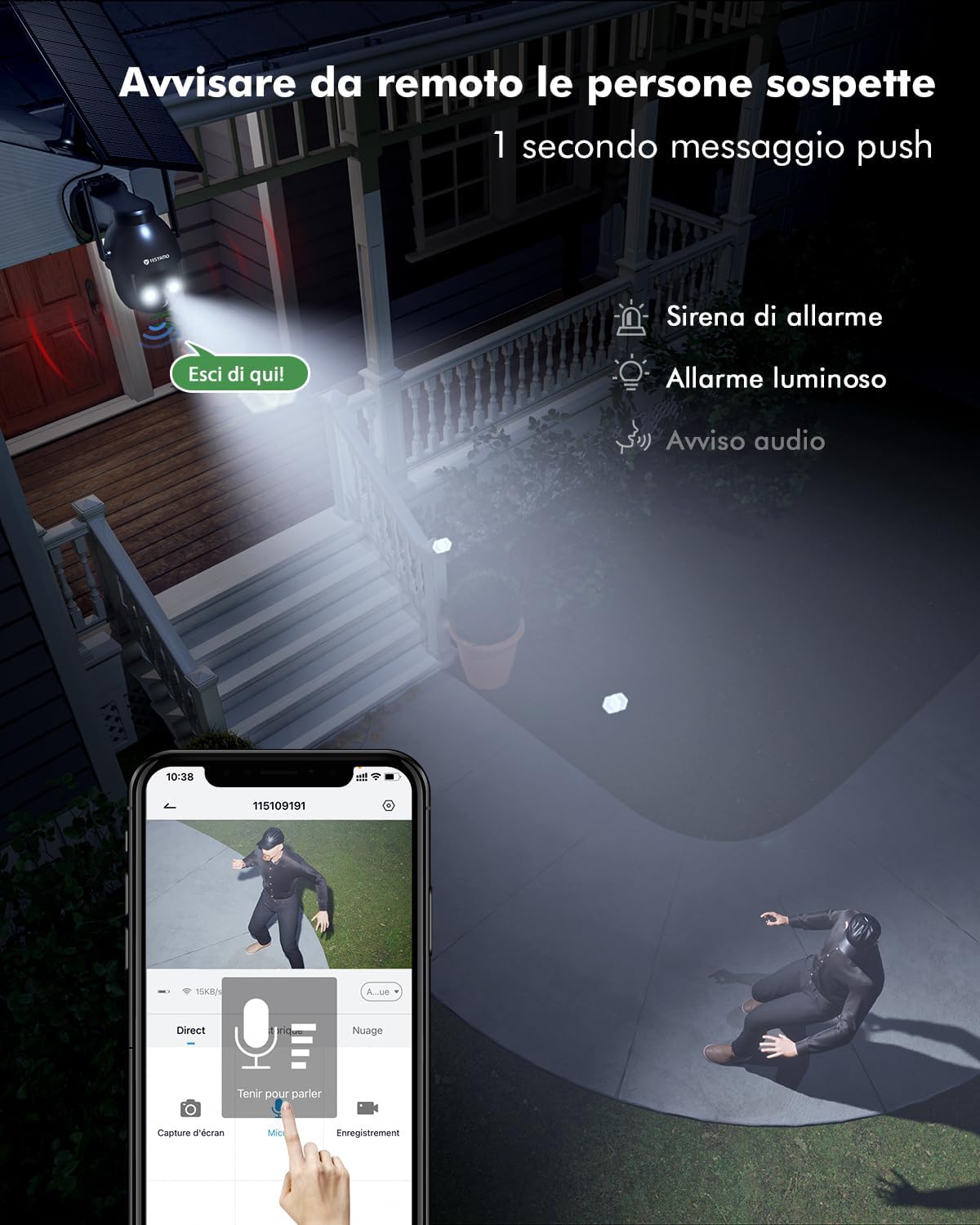
Image: Remotely alert suspicious individuals with a siren, light alarm, and audio warning, receiving instant push notifications to your phone.
3. Night Vision
The camera automatically switches to night vision mode in low-light conditions. With four infrared lights, it provides clear color night vision, ensuring visibility even in complete darkness.
4. Recording and Storage
Recordings can be stored locally on a Micro SD card (up to 128GB, not included) or via cloud storage. The camera features unique data encryption for local recordings and offers a 7-day free trial for cloud storage.

Image: Benefit from secure data encryption and flexible storage options, including Micro SD card support up to 128GB and a 7-day free cloud storage trial.
Maintenance
The YESYAMO camera is designed for minimal maintenance. Its IP66 waterproof rating ensures durability in various weather conditions. Regularly check the solar panel for any obstructions (like leaves or dirt) that might reduce its charging efficiency. Gently wipe the camera lens and solar panel with a soft, damp cloth to remove dust and grime. Avoid using harsh chemicals or abrasive materials.
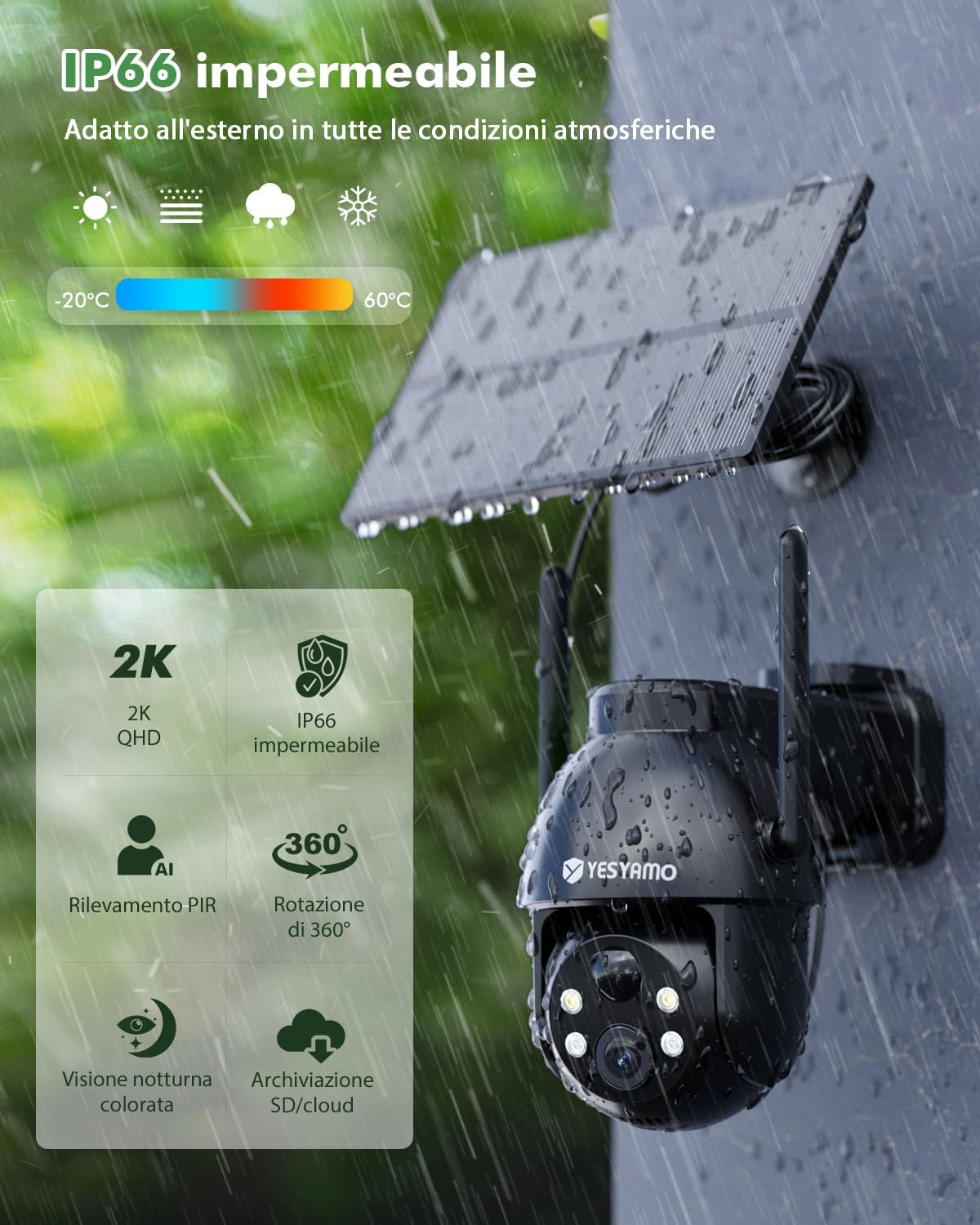
Image: The camera boasts an IP66 waterproof rating, making it suitable for outdoor use in temperatures ranging from -20°C to 60°C.
Troubleshooting
- Camera Offline: Ensure the camera is within range of your 2.4GHz WiFi network. Check your router's internet connection. Restart the camera and your router.
- Battery Not Charging: Verify the solar panel is clean and receiving direct sunlight. Ensure the solar panel cable is securely connected to the camera.
- Frequent False Alarms: Adjust the motion detection sensitivity settings in the app. Ensure the AI humanoid detection is enabled.
- Poor Image Quality: Clean the camera lens. Ensure there are no obstructions in the camera's field of view. Check your network speed.
- Two-Way Audio Issues: Check the volume settings on your phone and in the app. Ensure there are no obstructions blocking the camera's microphone or speaker.
For further assistance, please refer to the in-app help section or contact YESYAMO customer support.
Specifications
| Model Name | C8T |
| Indoor/Outdoor Usage | Outdoor |
| Connectivity Protocol | Wi-Fi (2.4GHz only) |
| Power Source | Solar powered, battery powered (15000mAh built-in) |
| Video Capture Resolution | 2K 3MP (2304x1296) |
| PTZ Coverage | 355° Pan, 90° Tilt |
| Viewing Angle | 135 Degrees |
| Night Vision | Infrared + LED (Color Night Vision) |
| Waterproof Rating | IP66 |
| Storage | Micro SD (up to 128GB), Cloud Storage |
| Controller Type | Android & iOS App |
| Dimensions (L x W x H) | 13.6 x 10.6 x 13.5 cm |
| Item Weight | 870 g |
Warranty and Support
For warranty information and technical support, please refer to the documentation included with your purchase or contact the seller/manufacturer directly. Keep your purchase receipt as proof of purchase for any warranty claims.