
1. Product Overview
The ETT Eco Tech Time EGS-11609-35M is a sophisticated men's watch featuring a solar-powered quartz movement, radio-controlled time synchronization, and a chronograph function. Crafted with a durable stainless steel case and bracelet, it boasts a synthetic sapphire crystal for enhanced scratch resistance and a striking blue dial. This watch is designed for precision and reliability, offering both style and advanced functionality.
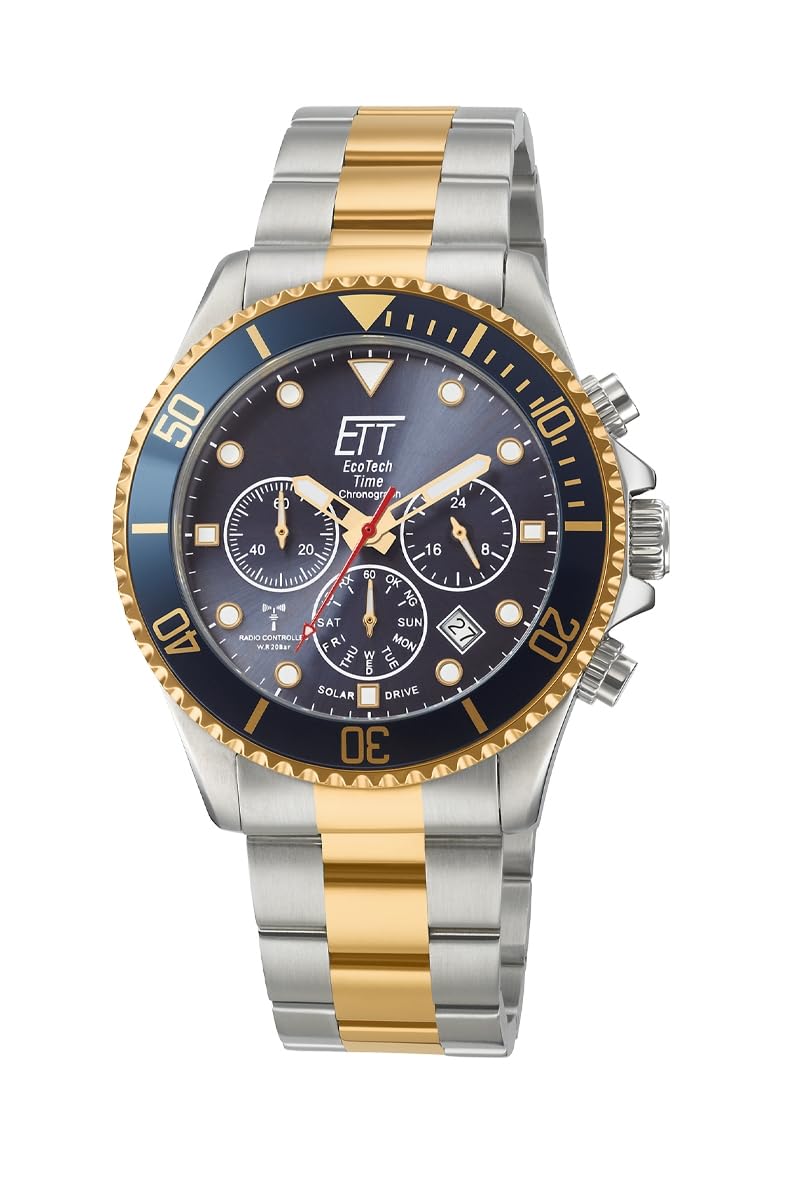
Figure 1: ETT Eco Tech Time EGS-11609-35M Men's Watch. This image displays the watch face with its blue dial, chronograph sub-dials, and the two-tone stainless steel bracelet.
Key Features:
- Solar Drive: Environmentally friendly power source, eliminating the need for regular battery changes.
- Radio-Controlled Time: Automatic time synchronization for precise accuracy.
- Chronograph: Stopwatch functionality for measuring elapsed time.
- Synthetic Sapphire Crystal: Highly scratch-resistant watch glass.
- Water Resistance: Rated for 20 ATM (200 meters), suitable for swimming and diving.
- Stainless Steel Construction: Durable case and bracelet with a secure folding clasp.
2. Setup
2.1 Initial Charging (Solar Drive)
Before first use, expose the watch dial to a strong light source (natural sunlight is ideal) for several hours. This will fully charge the internal power cell. The watch will begin operating once sufficient charge is accumulated.

Figure 2: Eco Tech Time Solar Drive Initiative. This logo represents the solar charging technology used in the watch.
2.2 Radio Signal Reception
Your watch automatically attempts to receive the time signal daily, typically overnight. For optimal reception, place the watch near a window, away from electronic devices that may cause interference. The watch is designed to receive the DCF77 signal from Mainflingen, Germany, covering a wide area of Europe.

Figure 3: DCF77 Radio Signal Coverage Map. This map illustrates the approximate reception range for the radio-controlled time signal across Europe.
2.3 Adjusting the Bracelet
The stainless steel bracelet can be adjusted by removing or adding links. This procedure typically requires specialized tools and is best performed by a qualified watchmaker or jeweler to avoid damage to the clasp or links.

Figure 4: Watch Bracelet with Folding Safety Clasp. This image shows the detail of the secure clasp mechanism.
3. Operating Instructions
3.1 Time and Date Display
The watch displays the current time with hour, minute, and second hands. The date is shown in a dedicated window on the dial. Due to the radio-controlled function, the time and date should automatically adjust to the correct local time zone after successful signal reception.
3.2 Using the Chronograph
The chronograph function allows for precise measurement of elapsed time. Refer to the specific button layout on your watch for operation:
- Start/Stop Button: Typically the button at the 2 o'clock position. Press once to start the chronograph, press again to stop.
- Reset Button: Typically the button at the 4 o'clock position. After stopping the chronograph, press this button to reset all chronograph hands to their zero positions.
- The sub-dials on the watch face indicate chronograph minutes, seconds, and potentially 24-hour time or other measurements.
3.3 Manual Time Setting (If Radio Signal Unavailable)
In areas without radio signal reception, the watch can be set manually. Pull the crown out to the appropriate position (usually the second click for time setting) and rotate to adjust the hands. Push the crown back in to engage the movement. Consult the detailed manual provided with your watch for specific crown positions and setting procedures for date and other functions.
4. Maintenance
4.1 Cleaning Your Watch
Wipe the watch case and bracelet regularly with a soft, dry cloth to remove dust and fingerprints. For more thorough cleaning, especially after exposure to saltwater, rinse the watch with fresh water and dry it completely with a soft cloth. Ensure the crown is pushed in fully before rinsing.
4.2 Water Resistance
The EGS-11609-35M watch is water-resistant up to 20 ATM (200 meters). This makes it suitable for swimming, snorkeling, and recreational diving. However, avoid operating the crown or pushers while the watch is wet or submerged, as this can compromise the water seal. Always ensure the crown is fully pushed in before exposing the watch to water.
4.3 Solar Cell Care
To ensure continuous operation, regularly expose the watch to light. If the watch is stored in darkness for extended periods, it may enter a power-saving mode or stop. A full charge can last for several months in darkness, but consistent light exposure is recommended for optimal performance and longevity of the power cell.
5. Troubleshooting
5.1 Watch Not Running / Hands Not Moving
- Insufficient Charge: Expose the watch to strong light for several hours to ensure the solar cell is adequately charged.
- Power Saving Mode: If the watch has been in darkness, it might be in power-saving mode. Expose it to light to reactivate.
5.2 Incorrect Time / Date
- Poor Signal Reception: Ensure the watch is placed in an area with good radio signal reception, away from interference. Perform a manual signal reception attempt if your watch model supports it (refer to the full manual).
- Time Zone Setting: Verify that the watch's time zone setting (if applicable) is correct for your region.
- Manual Adjustment: If radio reception is consistently poor, manually set the time and date as described in Section 3.3.
5.3 Chronograph Not Resetting to Zero
- Reset Procedure: Ensure the chronograph is stopped before pressing the reset button. If the hands are still misaligned, a chronograph zero-position adjustment may be required. This usually involves pulling the crown out and using the pushers to align the hands. Consult the full product manual for detailed instructions on this procedure.
6. Specifications
| Model Number | EGS-11609-35M |
| Movement | Quartz (Solar Powered, Radio-Controlled) |
| Case Material | Stainless Steel |
| Case Diameter | 45 mm |
| Case Thickness | 14 mm |
| Band Material | Stainless Steel (Two-tone) |
| Band Width | 22 mm |
| Band Length | 21.5 cm |
| Clasp Type | Folding Safety Clasp |
| Crystal Material | Synthetic Sapphire |
| Dial Color | Blue |
| Water Resistance | 20 ATM (200 Meters) |
| Special Features | Chronograph, Perpetual Calendar, Radio-Controlled, Solar Powered |
| Weight | 162 Grams |
7. Warranty and Support
7.1 Limited Warranty
This ETT Eco Tech Time watch comes with a limited warranty. Details regarding the duration and coverage of this warranty are typically provided in the warranty card included with your purchase. Please retain your proof of purchase for any warranty claims.
7.2 Customer Support
For further assistance, technical support, or service inquiries, please refer to the contact information provided in your product packaging or visit the official ETT Eco Tech Time website. When contacting support, please have your watch model number (EGS-11609-35M) and purchase details readily available.