
Taiyo TYS-300061D
Taiyo Radio Control High Speed Wave Runner Mini Boat User Manual
Model: TYS-300061D
Important Safety Information
WARNING: CHOKING HAZARD - Small parts. Not suitable for children under 3 years old.
- Always operate the boat in clear, open water, away from swimmers, animals, and obstacles.
- Do not operate in saltwater. This product is designed for fresh water use only.
- Ensure all hatches are securely closed before placing the boat in water.
- Adult supervision is recommended for children operating this product.
- Do not touch the propeller when the boat is powered on.
- Remove batteries from the boat and remote control when not in use for extended periods.
- Use only the specified charging cable and power source for the boat's battery.
Product Overview
The Taiyo Radio Control High Speed Wave Runner Mini Boat is engineered for high-speed aquatic adventures. Its compact design and powerful motor allow for rapid movement and agile maneuvers on the water. The intuitive remote control provides full command, making it suitable for users of various skill levels.
- Provides fast and thrilling boat racing experiences.
- Easy to control for users of all ages.
- Durable and water-resistant for worry-free enjoyment.
- Offers hours of fun for both kids and adults.
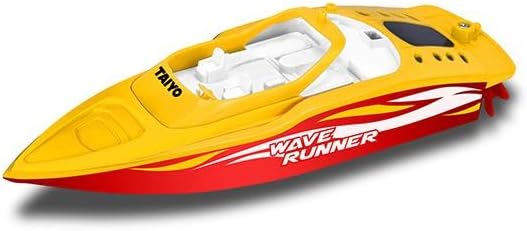
Image: The Taiyo Wave Runner Mini Boat, a compact yellow and red remote-controlled boat, shown outside its packaging, highlighting its sleek design and propeller.
Package Contents
Please ensure all items are present in the package:
- 1x Taiyo Radio Control High Speed Wave Runner Mini Boat
- 1x Remote Control
- 1x Rechargeable Battery (for boat)
- 1x USB Charging Cable
- 2x AA Batteries (for remote control)
- 1x Instruction Manual (this document)
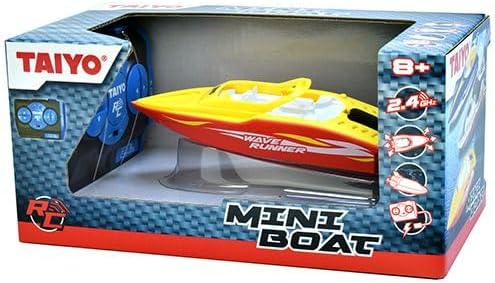
Image: The Taiyo Wave Runner Mini Boat displayed within its retail packaging, showcasing the boat and the remote control visible through the clear plastic window.
Setup Instructions
1. Battery Installation
Boat Battery:
- Locate the battery compartment on the top or bottom of the boat.
- Carefully open the battery compartment cover.
- Connect the rechargeable battery to the boat's power connector.
- Place the battery inside the compartment and securely close the cover, ensuring it is watertight.
Remote Control Batteries:
- Open the battery compartment on the back of the remote control.
- Insert 2x AA batteries, observing the correct polarity (+/-).
- Close the battery compartment cover.
2. Charging the Boat Battery
- Connect the USB charging cable to the boat's battery port.
- Plug the other end of the USB cable into a standard USB power adapter (not included) or a computer USB port.
- The charging indicator light will illuminate (color may vary) during charging.
- Charging typically takes 60-90 minutes. The light will change or turn off when fully charged.
- Do not overcharge the battery.
3. Pairing the Boat and Remote Control
- Ensure both the boat and remote control have fresh or fully charged batteries.
- Turn on the boat's power switch (usually located near the battery compartment).
- Turn on the remote control's power switch.
- The remote control and boat should automatically pair within a few seconds. The boat's indicator light may stop flashing or emit a sound to confirm pairing.
- If pairing fails, turn both devices off and repeat the process.
Operating Instructions
1. Pre-Operation Checklist
- Ensure the boat battery is fully charged.
- Verify the remote control batteries are installed correctly.
- Confirm the battery compartment cover on the boat is securely sealed to prevent water ingress.
- Choose a suitable body of fresh water (pond, lake, large pool) free from debris, strong currents, and marine life.
2. Launching the Boat
- Gently place the boat onto the water surface.
- Ensure the boat is floating level and the propeller is submerged.
3. Remote Control Functions
Familiarize yourself with the remote control layout:
- Forward/Reverse Stick: Push forward to move the boat forward, pull back to move in reverse.
- Left/Right Steering Stick: Move left to turn the boat left, move right to turn right.
- Turbo Boost Button: Press for a temporary burst of speed (if available on your model).
- Range: The remote control has an approximate operating range of 100 feet (30 meters). Operating beyond this range may result in loss of control.
4. Operating Tips
- Start with slow, gentle movements to get a feel for the controls.
- Avoid operating in windy conditions or strong currents, which can affect control.
- Always keep the boat within sight.
- If the boat gets stuck or capsizes, try to maneuver it free using the remote. If unsuccessful, retrieve it manually.
- When the boat's speed significantly decreases, it indicates a low battery. Retrieve the boat and recharge.
Maintenance
1. After Each Use
- Rinse: Gently rinse the boat with fresh, clean water to remove any dirt, algae, or residue from the operating environment.
- Dry: Thoroughly dry the entire boat, especially the battery compartment and any electronic components, with a soft cloth. Allow it to air dry completely before storage.
- Inspect: Check the propeller for any tangled debris (e.g., weeds, fishing line) and carefully remove it. Inspect the rudder and hull for any damage.
2. Battery Care
- Always allow the battery to cool down before recharging.
- Do not overcharge or completely discharge the battery.
- For long-term storage, charge the battery to approximately 50% and store in a cool, dry place.
- Remove batteries from both the boat and remote control if storing for more than a few days.
3. Storage
- Store the boat and remote control in a cool, dry place, away from direct sunlight and extreme temperatures.
- Keep away from dust and moisture.
Troubleshooting
| Problem | Possible Cause | Solution |
|---|---|---|
| Boat does not respond to remote control. |
|
|
| Boat moves slowly or erratically. |
|
|
| Boat capsizes frequently. |
|
|
Technical Specifications
- Model Number: TYS-300061D
- Product Dimensions: 9.7 x 21.7 x 25.7 cm
- Item Weight: 0.53 Kilograms
- Material Type: Plastic
- Colour: Multicolor
- Recommended Age: 6 years and up
- Battery Type (Boat): Rechargeable (included)
- Battery Type (Remote): AA (included)
- Operating Range: Approximately 100 feet (30 meters)
- Top Speed: Up to 13 mph (20.9 km/h)
- Runtime: Approximately 20 minutes per charge
Warranty Information
This product is covered by a standard manufacturer's warranty against defects in materials and workmanship. Please retain your proof of purchase for any warranty claims. For specific warranty terms and conditions, refer to the documentation provided with your purchase or contact customer support.
Customer Support
If you encounter any issues or have questions not covered in this manual, please contact Taiyo customer support. Details for contacting support are typically found on the product packaging or the official Taiyo website.
For further assistance, you may visit the official Taiyo website or the retailer's support page where the product was purchased.
Ask a question about this manual
Ask about setup, troubleshooting, compatibility, parts, safety, or missing instructions. Manuals+ will review the question and use this page’s manual context to help answer it.