
Introduction
Thank you for choosing the PayLessHere 47-inch Height Adjustable Standing Desk. This manual provides essential information for the safe and efficient assembly, operation, and maintenance of your new workstation. Please read these instructions carefully before use and retain them for future reference.
This standing desk is designed to promote a healthier work environment by allowing you to alternate between sitting and standing positions. It features a spacious 47-inch desktop, a durable construction, and a convenient manual height adjustment system.

Image: The PayLessHere 47-inch Standing Desk, shown with two monitors, a laptop, and a plant, illustrating its large workspace capacity.
Setup and Assembly
Assembly of your PayLessHere standing desk is designed to be straightforward, typically taking approximately 20 minutes. Please ensure all components are present before beginning assembly.
Required Tools:
- Screwdriver (not included)
Assembly Steps:
- Unpack all components and verify against the parts list (refer to packaging for detailed list).
- Attach the desk legs to the desktop using the provided hardware. Ensure all screws are tightened securely.
- Install the crossbar and any additional support structures as indicated in the assembly diagram.
- Attach the desk feet to the bottom of the legs. These feet are designed to protect your floor.
- Insert the hand crank mechanism into its designated slot.
- Once assembled, ensure the desk is stable and all connections are firm before placing any items on it.

Image: A hand using a screwdriver to secure a component during the assembly process of the desk.
Operating Instructions
The PayLessHere Standing Desk features a manual height adjustment system, allowing you to easily switch between sitting and standing positions.
Adjusting Desk Height:
- Locate the hand crank on the side of the desk.
- To raise the desk, turn the hand crank clockwise.
- To lower the desk, turn the hand crank counter-clockwise.
- Always use both hands when operating the hand crank to ensure controlled and smooth movement.
- The desk surface can be adjusted from a minimum height of 29 inches to a maximum height of 45 inches.
- Adjust the desk to a height that allows your arms to be at a 90-degree angle while typing and your computer monitors at eye level for optimal ergonomics.

Image: An illustration demonstrating the height adjustment range of the desk, showing a person sitting at 29.1 inches and standing at 45.1 inches.
Maintenance
Proper maintenance will ensure the longevity and optimal performance of your standing desk.
General Care:
- Regularly wipe the desk surface with a soft, damp cloth. The desktop is designed to be waterproof and scratch-resistant.
- Avoid using harsh chemicals or abrasive cleaners, as these may damage the finish.
- Periodically check all screws and connections to ensure they remain tight. Retighten if necessary.
- Ensure the desk is properly anchored to the floor to prevent tipping, especially when fully extended or when moving it.
Weight Capacity:
Do not exceed the maximum weight limit of 41 pounds on the desktop surface. Overloading the desk can compromise its stability and functionality.

Image: A hand using a caliper to measure the desktop, highlighting its 1-inch thickness and wear/scratch resistance.
Troubleshooting
If you encounter any issues with your PayLessHere Standing Desk, please refer to the following common solutions:
Desk is unstable or wobbly:
- Check all assembly screws and ensure they are securely tightened.
- Verify that the desk is placed on a flat, even surface. Adjust the leveling feet if necessary.
- Ensure the weight distribution on the desktop is balanced and not exceeding the maximum weight capacity.
Difficulty adjusting height:
- Ensure the hand crank is properly inserted and engaged with the mechanism.
- Check for any obstructions under the desk that might impede movement.
- If the mechanism feels stiff, ensure it is clean and free of debris.
If these steps do not resolve the issue, please contact customer support for further assistance.
Product Specifications
| Feature | Specification |
|---|---|
| Brand | PayLessHere |
| Model Number | SD-1140-FDW |
| Color | White |
| Product Dimensions (D x W x H) | 24"D x 55"W x 45"H |
| Adjustable Height Range | 29" - 45" |
| Desktop Material | Wood |
| Base Material | Alloy Steel |
| Desktop Thickness | 1 Inch |
| Maximum Weight Capacity | 41 Pounds |
| Assembly Time (Approx.) | 20 minutes |
| Tools Recommended for Assembly | Screwdriver |
| Included Components | 1 standing desk |
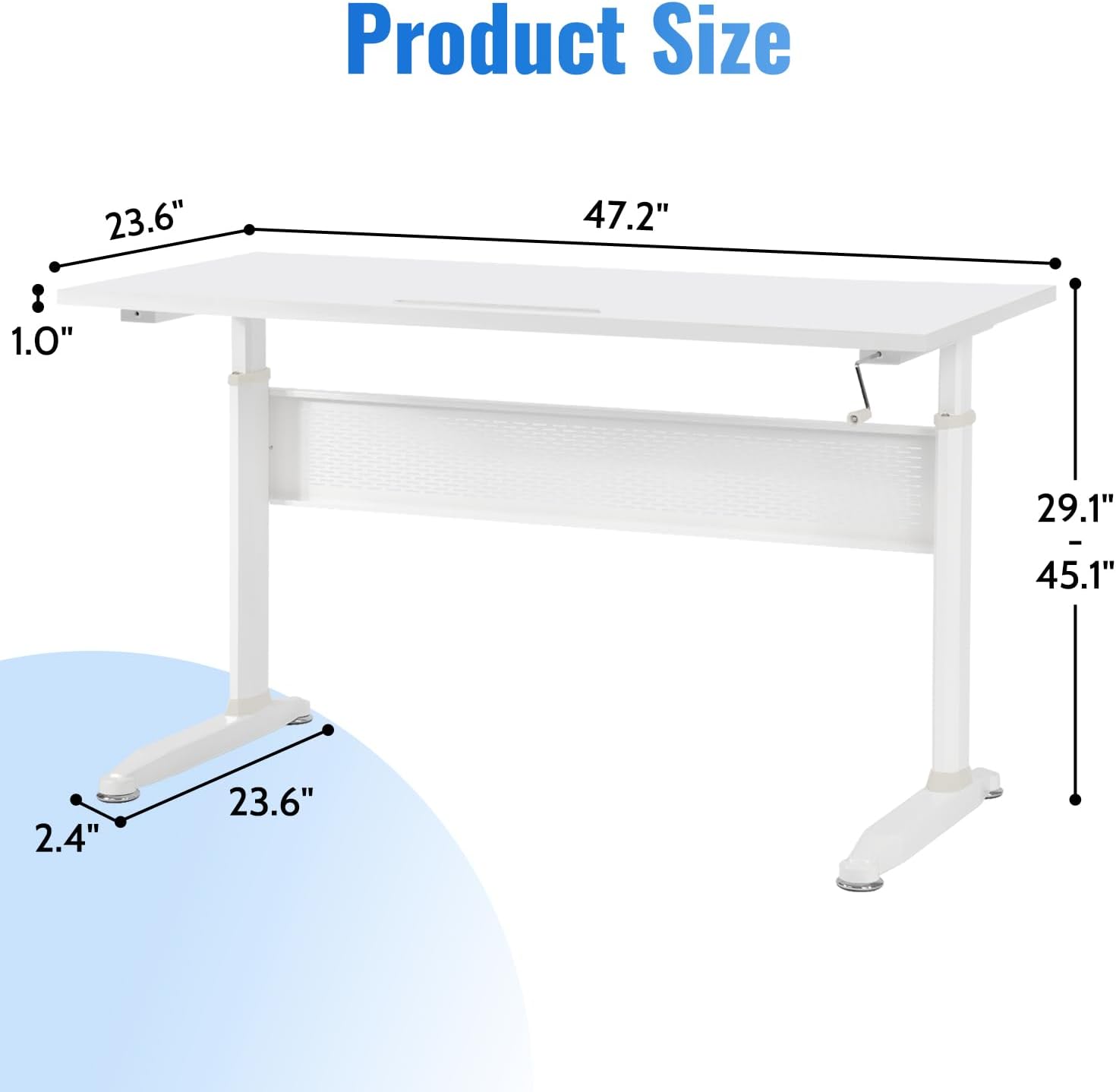
Image: A detailed diagram illustrating the dimensions of the desk, including length, width, and height adjustment range.
Warranty Information
The PayLessHere 47-inch Height Adjustable Standing Desk comes with a limited warranty. Please refer to the product packaging or contact customer support for specific terms and conditions regarding your warranty coverage.
Customer Support
For any questions, concerns, or assistance with your PayLessHere Standing Desk, please contact our customer support team. Contact information can typically be found on the product packaging or on the official PayLessHere website.
