
1. Overview
The Irfora Portable Spectrophotometer is a handheld color measurement instrument designed for precise color analysis across various industries. It features a 2.4-inch IPS full-color touchscreen, a 6mm test aperture, and automatic calibration for ease of use. This device is equipped with a 3000mAh rechargeable battery and supports data management via mobile applications and PC software.

Image 1.1: The Irfora Portable Handheld Colorimeter, a stable and reliable color difference detection instrument.
Key Features:
- 2.4-inch IPS full-color touchscreen for clear data display.
- 6mm test aperture for precise sample measurement.
- Automatic calibration and one-button testing for user convenience.
- International D/8, SCI measuring conditions for highly reflective samples.
- APP and PC software support for mass data storage and analysis.
- Built-in 3000mAh lithium battery, rechargeable via Type-C USB.
- Integrated high-definition camera for accurate observation of the tested area.
2. Safety Information
Please read all safety instructions carefully before operating the device to ensure proper use and prevent damage or injury.
- Battery Safety: Use only the specified Type-C cable and a 5V 2A adapter for charging. Do not expose the battery to extreme temperatures or disassemble it.
- Environmental Conditions: Operate the device within recommended temperature and humidity ranges. Avoid direct sunlight, dust, and corrosive environments.
- Handling: Handle the device with care. Avoid dropping or subjecting it to strong impacts. Keep the test aperture clean and free from obstructions.
- Maintenance: Do not attempt to repair the device yourself. Refer to qualified service personnel for any repairs.
3. Product Components
The package includes the following items:
- Color Meter (Main Unit)
- Calibration Base
- Black Calibration Box
- 6mm Aperture
- U Disk (for software/drivers)
- Type-C Cable
- User Manual (English)

Image 3.1: Package contents of the Irfora Portable Spectrophotometer.
4. Device Features and Controls
Familiarize yourself with the main components and controls of the spectrophotometer:

Image 4.1: Key features and controls of the Irfora Portable Spectrophotometer.
- Indicator Light: Displays device status (e.g., charging, measurement in progress).
- 2.4-inch IPS Full Color Touchscreen: Primary interface for viewing measurements, navigating menus, and adjusting settings.
- Type-C Interface: Used for charging the device and for USB data transmission to a computer.
- Test Button: Initiates a color measurement.
- 6mm Test Aperture: The area where the sample is placed for measurement. Ensure it is clean and unobstructed.
5. Setup
5.1 Charging the Device
- Connect the provided Type-C cable to the device's Type-C interface.
- Connect the other end of the Type-C cable to a 5V 2A power adapter (not included) or a compatible USB port.
- The indicator light will show the charging status. A full charge typically provides 8,000 continuous tests.
5.2 Automatic Calibration
The device features automatic calibration for consistent accuracy.
- Ensure the device is placed correctly on the calibration base.
- Follow the on-screen prompts for automatic calibration. This typically involves a one-button start.
- Perform calibration regularly, especially after long periods of inactivity or if measurement accuracy is critical.
5.3 Using the Magnetic Base
The self-adhesive magnetic base provides a stable and convenient docking station for the colorimeter.
- Clean the desired desktop surface where you intend to place the base.
- Remove the protective film from the self-adhesive magnetic base.
- Firmly stick the base onto the cleaned surface.
- Place the colorimeter with its charging and calibrating base onto the magnetic base for secure storage and easy access.
6. Operation
6.1 Basic Color Measurement
- Ensure the device is charged and calibrated.
- Place the sample to be measured directly over the 6mm test aperture. Ensure full contact and no light leakage.
- Press the Test Button. The device will perform a measurement (approximately 1 second).
- The measurement results, including color values and color differences, will be displayed on the IPS touchscreen.
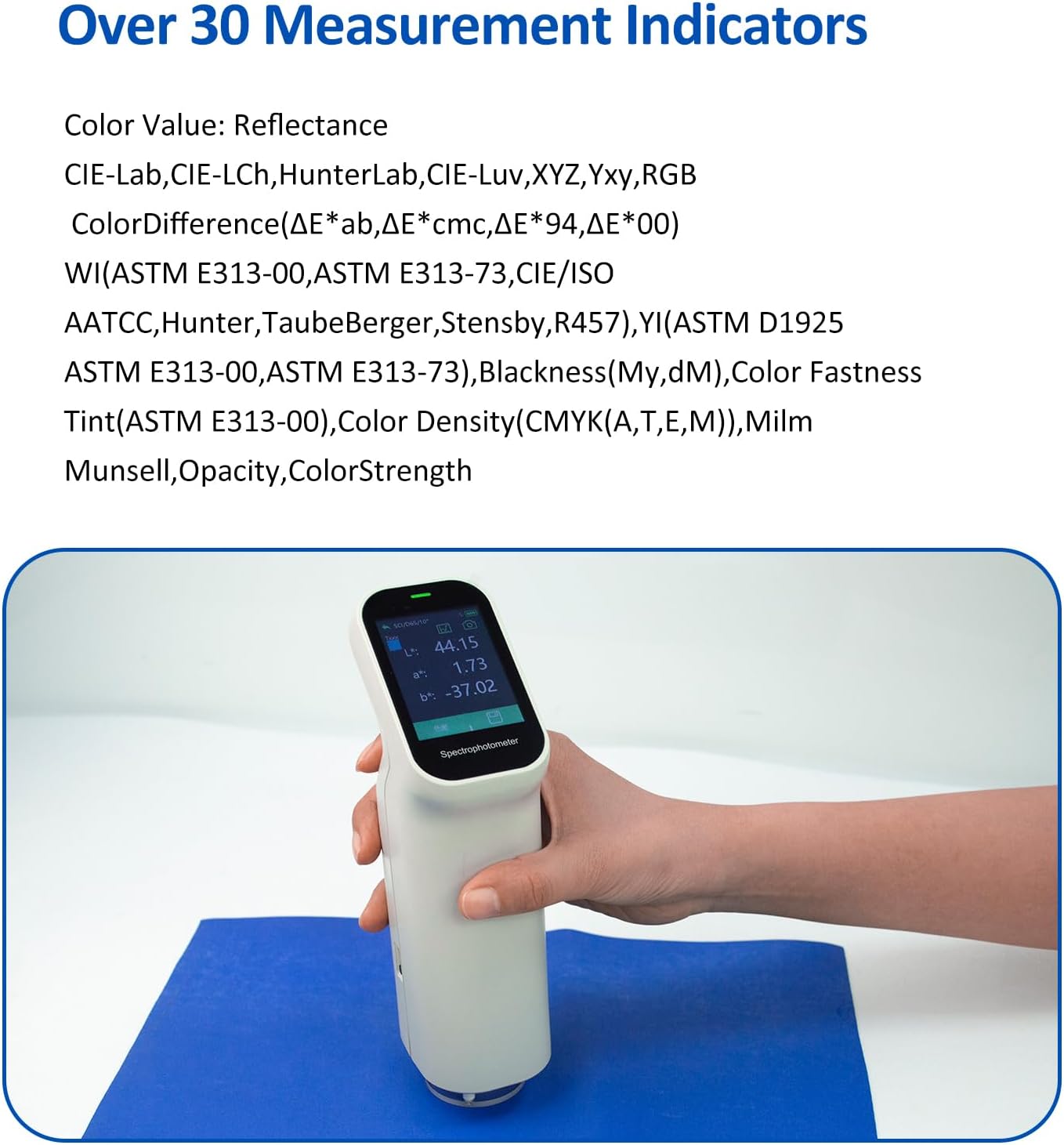
Image 6.1: Performing a color measurement with the handheld spectrophotometer.
6.2 Applications Across Industries
The portable spectrocolorimeter is suitable for color matching and separation measurements in various sectors.

Image 6.2: The spectrophotometer is widely applicable in industries such as plastics, coatings, printing, hardware, textiles, and food.
6.3 Measurement Principles: D/8, SCI, and Dual Optical Path
The device adopts international D/8 (diffused illumination, 8-degree viewing) and SCI (specular component included) measuring conditions, which are ideal for handling highly reflective samples. The dual optical path design enhances measurement repeatability and accuracy by monitoring light source energy fluctuations and reducing interference.

Image 6.3: Dual optical path design for improved repeatability accuracy.
6.4 Measurement Indicators and Light Sources
The spectrophotometer provides over 30 measurement indicators and nearly 40 evaluation light sources, allowing for comprehensive color analysis.

Image 6.4: Examples of measurement indicators available on the device.

Image 6.5: The device supports nearly 40 evaluation light sources.
6.5 Fluorescence Measurement
The device includes UV light, enabling stable and objective reflectance data for color measurement on materials containing fluorescence.

Image 6.6: Examples of materials with fluorescence that can be measured.
6.6 High-definition Camera for Precise Targeting
A built-in high-definition camera allows for clear observation of the tested area during measurement, helping to precisely locate the sample and avoid inaccuracies due to regional errors.

Image 6.7: The device's camera view for accurate sample positioning.
6.7 Data Management and Analysis
Connect the colorimeter to a mobile phone, PC, or computer via Bluetooth or USB to manage and analyze measurement data using the dedicated APP or PC software. This allows for mass storage of data records and printing of test data reports.

Image 6.8: Connectivity options for data management with mobile and PC applications.
7. Maintenance
7.1 Cleaning
- Use a soft, dry cloth to clean the exterior of the device.
- For the touchscreen, use a microfiber cloth specifically designed for electronics.
- Keep the test aperture clean and free of dust or debris. Use a soft brush or air blower if necessary. Do not use abrasive cleaners or solvents.
7.2 Storage
- Store the device in a cool, dry place away from direct sunlight and extreme temperatures.
- When not in use, place the colorimeter on its calibration base to protect the test aperture.
- If storing for an extended period, ensure the battery is partially charged (around 50%) to prolong its lifespan.
7.3 Battery Care
- Avoid fully discharging the battery frequently.
- Charge the device regularly, even if not in constant use, to maintain battery health.
- The light source has a lifetime of 10 years or 3 million tests.
8. Troubleshooting
This section addresses common issues you might encounter with your Irfora Portable Spectrophotometer.
| Problem | Possible Cause | Solution |
|---|---|---|
| Device does not turn on | Low battery; Power button not pressed correctly | Charge the device fully; Press and hold the power button for a few seconds. |
| Inaccurate measurements | Device not calibrated; Test aperture dirty; Sample not properly placed | Perform automatic calibration; Clean the test aperture; Ensure sample is flat and covers the aperture completely. |
| Cannot connect to APP/PC | Bluetooth/USB not enabled; Software not installed; Device out of range | Ensure Bluetooth is on or USB cable is connected; Install the correct software from the U Disk; Move device closer to phone/PC. |
| Touchscreen unresponsive | Software glitch; Screen dirty | Restart the device; Clean the touchscreen with a soft cloth. |
9. Specifications
Detailed technical specifications for the Irfora Portable Spectrophotometer.

Image 9.1: Product dimensions of the Irfora Portable Spectrophotometer.
| Feature | Specification |
|---|---|
| Measurement Area/Aperture Size | MAV: Φ11mm (with 6mm aperture) |
| Geometry and Angle | d/8 (diffused illumination, 8 degree viewing), SCI (specular component included) |
| Standards Compliant | CIE No. 15, GB/T 3978, GB 2, GB/T 18833, ISO7724-1, ASTM E1164, DIN5033 Teil7 |
| Spectroscopic Method | Integrated optical component |
| Sensor | CMOS sensor |
| Color Values | Reflectance, CIE-Lab, CIE-LCh, HunterLab, CIE-Luv, XYZ, Yxy, RGB |
| Color Difference | ΔE*ab, ΔE*cmc, ΔE*94, ΔE*00 |
| Other Indicators | WI (ASTM E313-00, ASTM E313-73, CIE/ISO, AATCC, Hunter, TaubeBerger, Stensby, R457), YI (ASTM D1925, ASTM E313-00, ASTM E313-73), Blackness (My, dM), Color Fastness, Tint (ASTM E313-00), Color Density (CMYK(A,T,E,M)), Milm, Munsell, Opacity, ColorStrength |
| Integrating Sphere Diameter | 40mm |
| Lighting Source | LED (Full band balanced LED light source) |
| Wavelength Interval | 10nm |
| Wavelength Range | 400-700nm |
| Reflectance Measurement Range | 200% |
| Reflectance Resolution | 0.01% |
| Measurement Accuracy | 0.01 |
| Repeatability | ΔE*ab ≤0.03 |
| Measurement Time | About 1S |
| Interface | USB, BT (Bluetooth) |
| Illuminants | A, B, C, D50, D55, D65, D75, F1-F12, CWF, U30, U35, DLF, NBF, TL83, TL84, ID50, ID65, LED-B1-B5, LED-BH1, LED-RGB1, LED-V1, LED-V2 |
| Observer Angle | 2°, 10° |
| Screen | IPS full color screen, 2.4 inches |
| Battery | Rechargeable 3.7V/3000mAh lithium battery, 8,000 times continuous tests |
| Light Source Lifetime | 10 years, 3 million tests |
| Language | Chinese, English |
| Calibration | Automatic |
| Software Support | Android/iOS/Windows/WeChat applet |
| Pass Metrology | Yes |
| Storage | APP mass storage |
| Item Size (without base) | 185 x 75 x 52mm / 7.28 x 2.95 x 2.05in |
| Base Size | 90 x 72 x 50mm / 3.54 x 2.83 x 1.97in |
| Item Weight (with base) | 330g / 0.73lb |
| Product Dimensions (Package) | 11.42 x 11.02 x 3.94 inches |
| Item Weight (Package) | 2.04 pounds |
10. Warranty and Support
Irfora products are manufactured to high-quality standards. For warranty information, technical support, or service inquiries, please refer to the contact information provided with your purchase or visit the official Irfora website. Keep your purchase receipt as proof of purchase for warranty claims.