
Introduction
This manual provides detailed instructions for the installation, operation, and maintenance of your NICREW SlimLED Aquarium LED Light. Designed for aquatic plants, this full-spectrum light offers adjustable brightness and integrated timer functions to create an optimal environment for your aquarium inhabitants.
Product Components
Before installation, ensure all components are present:
- NICREW SlimLED Light Fixture
- Adjustable Mounting Brackets
- Power Adapter with Integrated Controller
- User Manual (this document)

Image: Overview of the NICREW SlimLED Aquarium LED Light, showing the light fixture, adjustable brackets, and the inline controller.
Setup Instructions
- Unpack the Light: Carefully remove all components from the packaging. Inspect for any damage.
- Attach Mounting Brackets: Slide the adjustable mounting brackets onto both ends of the light fixture. Ensure they are securely attached.

Image: Close-up of the adjustable mounting brackets being attached to the light fixture, allowing for flexible installation on various aquarium widths.
- Position the Light: Place the light fixture on top of your aquarium. Adjust the brackets to fit the width of your tank (suitable for aquariums with or without lids). Ensure the light is centered and stable.
- Connect Power: Connect the power adapter to the light fixture. Then, plug the power adapter into a suitable electrical outlet.
- Initial Power On: The light should turn on. If not, check all connections.
Operating Instructions
The NICREW SlimLED features an inline controller for easy operation and programming.
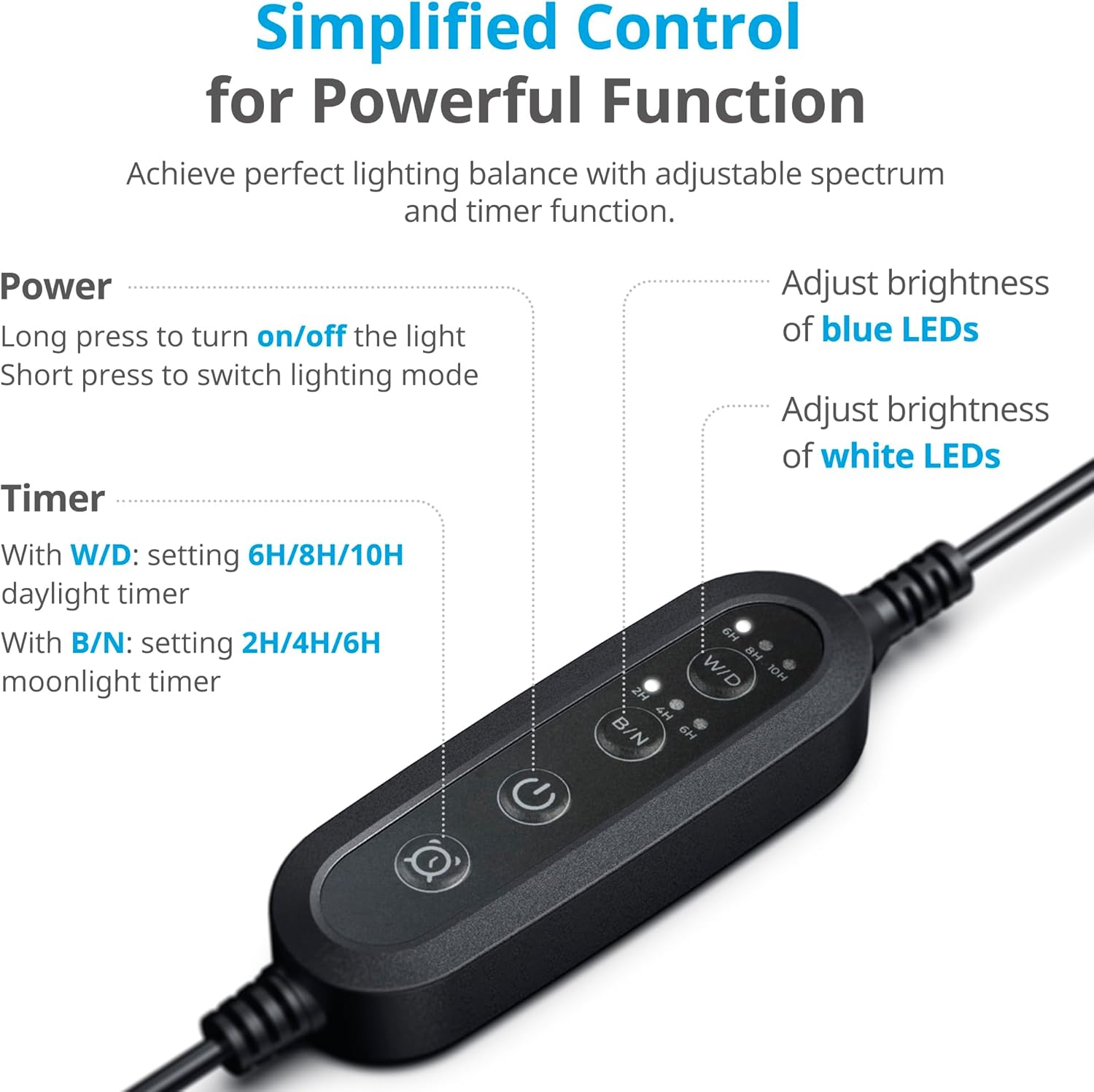
Image: The inline controller, illustrating buttons for power, white/daylight mode (W/D), and blue/night mode (B/N), along with timer settings.
Controller Functions:
- Power Button:
- Long press to turn on/off the light.
- Short press to switch between lighting modes (e.g., full spectrum, blue only).
- W/D Button (White/Daylight Mode):
- Adjusts the brightness of the white LEDs.
- Sets the daylight timer: 6, 8, or 10 hours.
- B/N Button (Blue/Night Mode):
- Adjusts the brightness of the blue LEDs.
- Sets the moonlight timer: 2, 4, or 6 hours.
Setting the Timer:
The light features an integrated timer with gradual sunrise and sunset effects.
- Set Daylight Cycle: Press the W/D button repeatedly to cycle through 6, 8, or 10-hour daylight settings. The light will automatically turn on at the set time each day.
- Set Moonlight Cycle: Press the B/N button repeatedly to cycle through 2, 4, or 6-hour moonlight settings. This mode typically follows the daylight cycle.
- Sunrise/Sunset Simulation: The light gradually ramps up brightness at the start of the daylight cycle and dims down at the end, simulating natural sunrise and sunset.

Image: Visual representation of the fading effect, simulating natural sunrise and sunset to create a realistic aquatic environment.
Light Spectrum and Intensity Guide:
The NICREW SlimLED combines white (6500K), blue (460nm), and red (660nm) LEDs to provide a full spectrum suitable for aquatic plants. Different color settings can enhance specific aspects of your aquarium.

Image: A guide illustrating various color spectrum and intensity settings, such as warm white, cool white, bluish white, and deep blue night mode, and their recommended uses for different aquatic environments and plant types.
Maintenance
Proper maintenance ensures the longevity and optimal performance of your NICREW SlimLED light.
- Cleaning: Regularly wipe the light fixture with a soft, dry cloth to remove dust and water spots. Ensure the light is unplugged before cleaning.
- Water Exposure: This product is not waterproof. Avoid splashing water directly onto the light fixture or submerging it. Water exposure can cause damage and is not covered under warranty.
- Heat Dissipation: The aluminum casing is designed for effective heat dissipation. Ensure the light is not covered or obstructed to allow for proper airflow.

Image: Detailed view of the durable aluminum casing, highlighting its role in efficient heat dissipation and extending the lamp's lifespan.
Troubleshooting
If you encounter issues with your NICREW SlimLED light, refer to the following common problems and solutions:
| Problem | Possible Cause | Solution |
|---|---|---|
| Light does not turn on. | Power connection loose or disconnected. Faulty power outlet. | Check all power connections. Ensure the power adapter is securely plugged into the light and the wall outlet. Test the outlet with another device. |
| Timer function not working correctly. | Incorrect timer setting. Power interruption. | Re-program the timer settings using the W/D and B/N buttons. If there was a power outage, the timer may need to be reset. |
| Light intensity is too low or too high. | Brightness levels incorrectly set. | Use the W/D and B/N buttons to adjust the brightness levels for white and blue LEDs respectively. |
| Some LEDs are not lighting up. | Individual LED failure. | If individual LEDs fail, contact customer support. Do not attempt to repair the light fixture yourself. |
Specifications
Detailed technical specifications for the NICREW SlimLED Aquarium LED Light (Model N18922, 43-60 cm, 14W).
- Model Number: N18922
- Power: 14 Watts
- Luminous Flux: 920 Lumens (for 43-60 cm model)
- Dimensions (Light Fixture): 41.2 cm (Length) x 5.6 cm (Width) x 1.2 cm (Height)
- Material: Aluminum (Fixture), Aluminum (Shade), Aluminum (Base)
- Light Type: LED (Light Emitting Diode)
- Number of Lights: 48 LEDs (approximate, based on visual representation)
- LED Configuration: 6500K White, 460nm Blue, 660nm Red (optimized for plant growth)
- Control Method: Touch (via inline controller)
- Features: Adjustable temperature, Memory function, Integrated timer (6/8/10h daylight, 2/4/6h moonlight), Sunrise/Sunset simulation
- Water Resistance: Not water resistant (False)
- Energy Efficiency Class: F (View EU Energy Label)
- Country of Origin: China
Aquarium Compatibility and Dimensions:

Image: A table detailing the compatibility of various SlimLED models with different aquarium lengths, their respective dimensions, and wattage.
For the 43-60 cm aquarium size, the light fixture dimensions are approximately 41 cm (length) x 6 cm (width) x 1.15 cm (height), with a power consumption of 14W.
Light Spectrum Data:
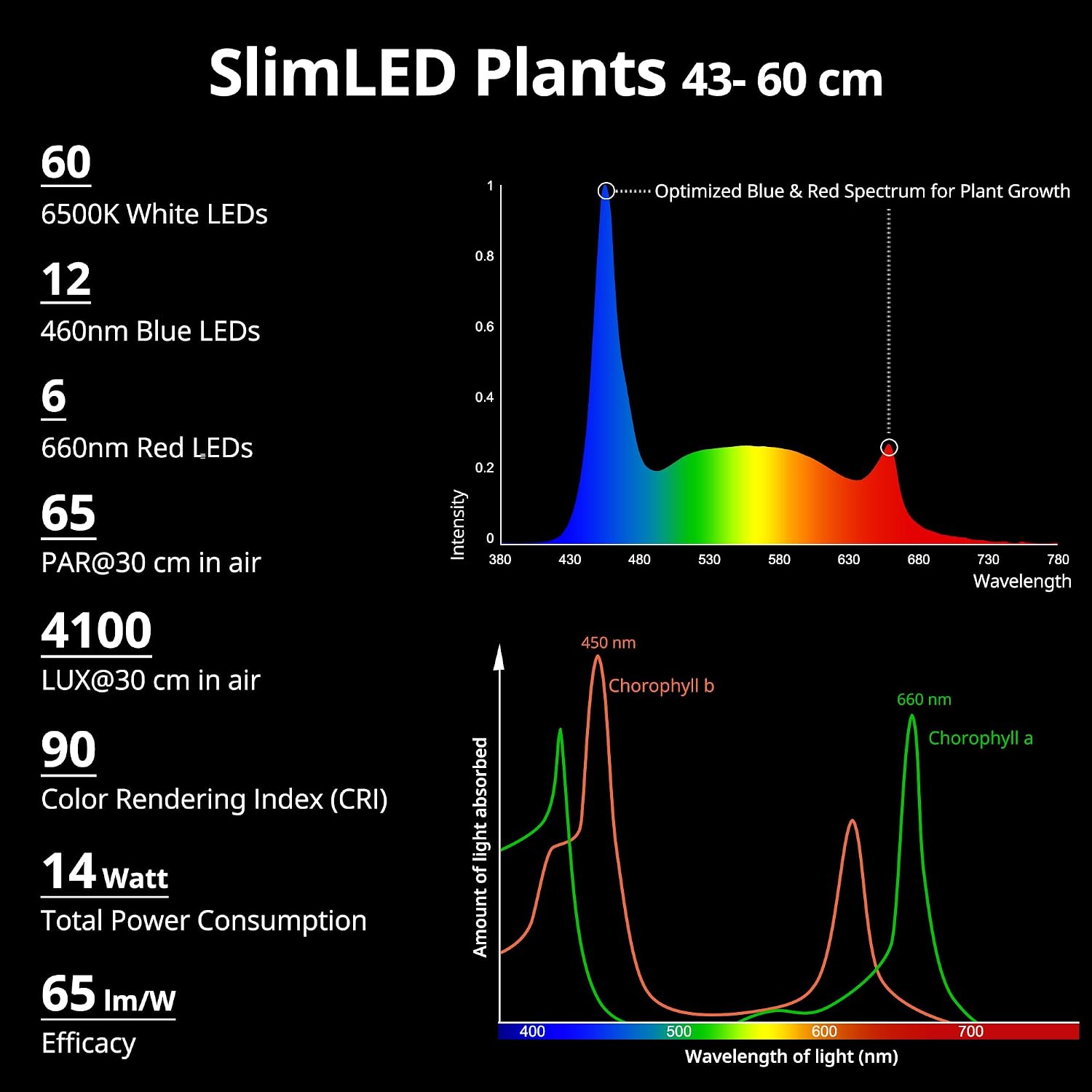
Image: Spectral distribution graph for the SlimLED Plants light (43-60 cm model), indicating optimized blue and red spectrums for aquatic plant growth, along with PAR and LUX values.

Image: The EU Energy Label for the NICREW SlimLED, model N18922, indicating an energy efficiency class of F and 14 kWh/1000h consumption.
Warranty and Support
Warranty Information:
Please refer to your purchase documentation or the product packaging for specific warranty terms and conditions. The warranty typically covers manufacturing defects for a specified period from the date of purchase. Keep your proof of purchase for warranty claims.
Customer Support:
For technical assistance, troubleshooting beyond this manual, or warranty inquiries, please contact the seller or NICREW customer service. Contact details can usually be found on the product packaging or the official NICREW website.

