
Introduction
This manual provides detailed instructions for the operation and maintenance of your Edifier MP230 Retro Wood Bluetooth Speaker. Please read this manual thoroughly before using the product to ensure proper function and longevity. The Edifier MP230 is a portable wireless speaker featuring a retro wood design, 20W stereo sound, and multiple input options including Bluetooth, AUX, USB Soundcard, and Micro SD card playback.
Package Contents
- Edifier MP230 Mini Bluetooth Speaker
- USB Charging Cable
- 3.5mm AUX Audio Cable
- Product Manual

Image: Edifier MP230 speaker and its included accessories, which are a USB charging cable, a 3.5mm AUX audio cable, and the product manual.
Product Overview
Front Panel Controls
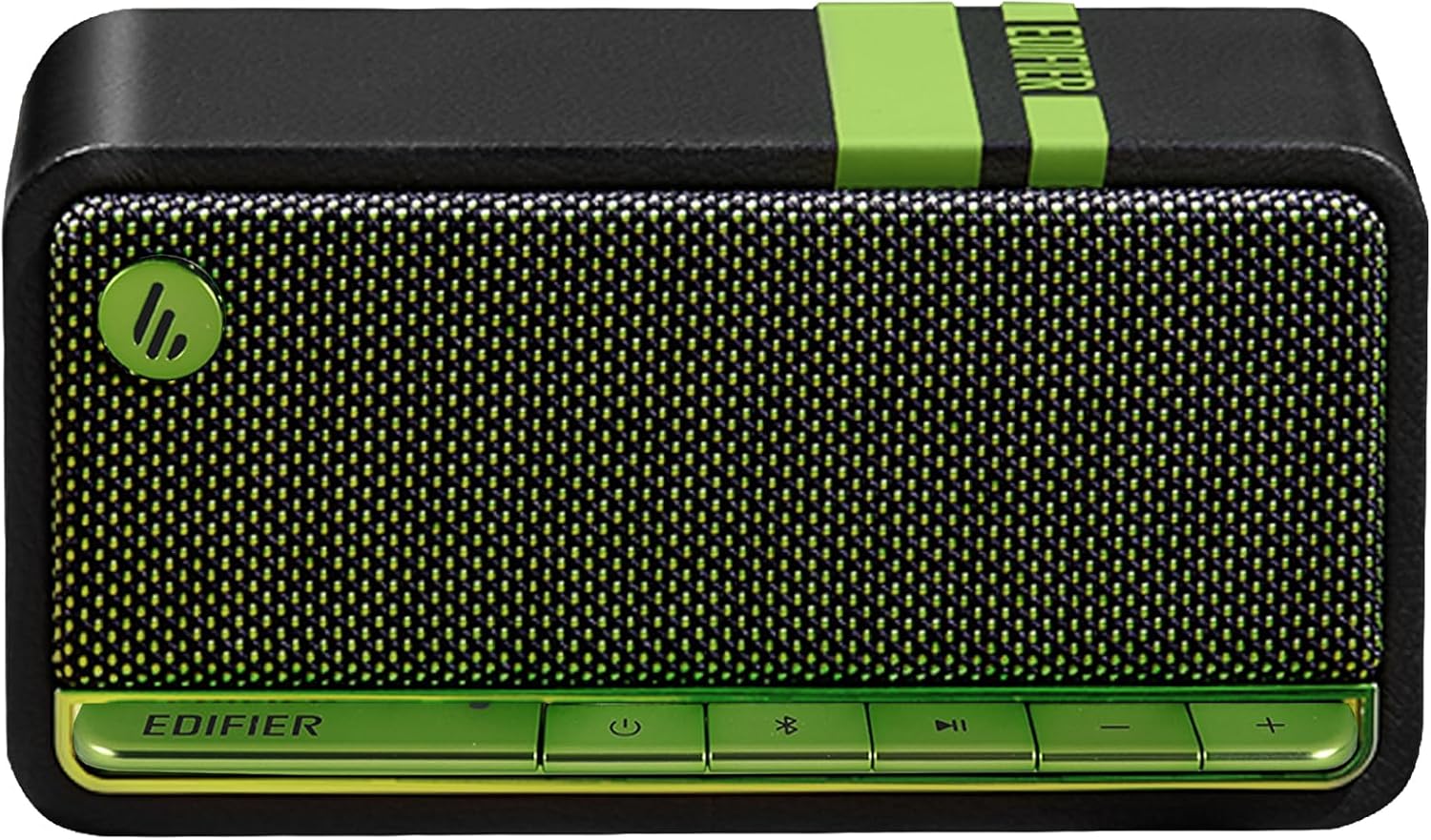
Image: Front view of the Edifier MP230 speaker, showcasing the control buttons located at the bottom front.
- Power Button: Press and hold to power on/off. Short press to switch input modes.
- Bluetooth Button: Press and hold to enter Bluetooth pairing mode. Short press to disconnect current Bluetooth device.
- Play/Pause Button: Play or pause audio playback.
- Volume Down Button: Decrease volume.
- Volume Up Button: Increase volume.
Rear Panel Ports

Image: Rear view of the Edifier MP230 speaker, showing the various input ports for connectivity.
- AUX Input: 3.5mm audio jack for wired connection.
- USB-C Port: For charging and USB Soundcard mode.
- Micro SD Card Slot: For playing audio files directly from a Micro SD card.
Setup
Initial Charging
Before first use, fully charge the speaker. Connect the provided USB charging cable to the USB-C port on the speaker and the other end to a USB power adapter (not included) or a computer's USB port. The charging indicator light will illuminate during charging and turn off when fully charged. A full charge typically takes approximately 3 hours.
Powering On/Off
- To Power On: Press and hold the Power Button until the indicator light turns on.
- To Power Off: Press and hold the Power Button until the indicator light turns off.
Operating Instructions
Bluetooth Pairing

Image: A smartphone displaying a successful Bluetooth connection to the Edifier MP230 speaker, ready for audio playback.
- Power on the speaker.
- Press and hold the Bluetooth Button until the Bluetooth indicator light flashes rapidly, indicating pairing mode.
- On your device (smartphone, tablet, computer), enable Bluetooth and search for available devices.
- Select "EDIFIER MP230" from the list.
- Once connected, the Bluetooth indicator light will remain solid.
- To disconnect or pair with a new device, press and hold the Bluetooth Button again.
AUX Input
Connect your audio source (e.g., MP3 player, computer) to the speaker's AUX port using the provided 3.5mm audio cable. Short press the Power Button to cycle through input modes until the AUX indicator light illuminates.
USB Soundcard Mode
Connect the speaker to your computer using the USB-C cable. The speaker will be recognized as an audio output device. Short press the Power Button to select USB input mode. You may need to select "EDIFIER MP230" as the output device in your computer's sound settings.
Micro SD Card Playback
Insert a Micro SD card (up to 32GB, FAT32 format) containing MP3/WMA/WAV audio files into the Micro SD card slot. Short press the Power Button to cycle through input modes until the Micro SD indicator light illuminates. Playback will begin automatically.

Image: A visual representation of the various connectivity options available on the Edifier MP230 speaker, including AUX, USB-C, TF Card, and Bluetooth 5.0.
Charging and Battery Life
The Edifier MP230 is equipped with a 2500 mAh Lithium-ion battery, providing up to 9-10 hours of continuous playback on a single charge. When the battery is low, the indicator light will flash. Connect the speaker to a USB power source using the USB-C cable to recharge.

Image: A graphic illustrating the Edifier MP230's battery specifications, highlighting 10 hours of playback and a 2500 mAh battery capacity.
Maintenance
- Clean the speaker with a soft, dry cloth. Do not use abrasive cleaners or solvents.
- Avoid exposing the speaker to extreme temperatures, humidity, or direct sunlight.
- Do not immerse the speaker in water. It is not waterproof.
- Store the speaker in a cool, dry place when not in use for extended periods.
Troubleshooting
| Problem | Solution |
|---|---|
| No power | Ensure the speaker is charged. Connect to a power source using the USB-C cable. |
| No sound |
|
| Bluetooth connection unstable |
|
| Micro SD card not playing |
|
Specifications

Image: The Edifier MP230 speaker shown with its physical dimensions indicated.
- Model: MP230
- Output Power: 20W (10W x 2)
- Frequency Response: 70Hz - 20kHz
- Audio Inputs: Bluetooth 5.0, AUX (3.5mm), USB-C (Soundcard), Micro SD Card
- Bluetooth Range: Up to 10 meters (33 feet)
- Battery Capacity: 2500 mAh Lithium-ion
- Playback Time: Up to 9-10 hours
- Dimensions (D x W x H): 3.3" x 6" x 3.5" (8.4cm x 15.2cm x 8.9cm)
- Weight: 2.3 lbs (1043g)
- Material: Wood (MDF)
- Control Method: Touch buttons
- Waterproof: No
Warranty and Support
The Edifier MP230 Retro Wood Bluetooth Speaker comes with a limited warranty. For detailed warranty information, please refer to the warranty card included in your package or visit the official Edifier website. For technical support, troubleshooting assistance, or service inquiries, please contact Edifier customer support through their official channels.
You can find more information and support at the Edifier Store on Amazon.


