
LENCENT S52-BB
LENCENT Bluetooth 5.3 Wireless Headphones User Manual
Model: S52-BB
Introduction
Thank you for choosing LENCENT Bluetooth 5.3 Wireless Headphones. These headphones are designed to provide a superior audio experience with advanced features such as Bluetooth 5.3 technology, long battery life, IPX5 water resistance, and intuitive touch controls. This manual will guide you through the setup, operation, and maintenance of your new headphones to ensure optimal performance and longevity.
Package Contents
- LENCENT Bluetooth 5.3 Wireless Headphones (Left and Right Earbuds)
- Charging Case
- USB Charging Cable
- Multiple Pairs of Ear Cushions (S, M, L)
- User Manual
Product Overview

Figure 1: LENCENT Bluetooth 5.3 Wireless Headphones in their charging case, displaying the LED battery indicator.
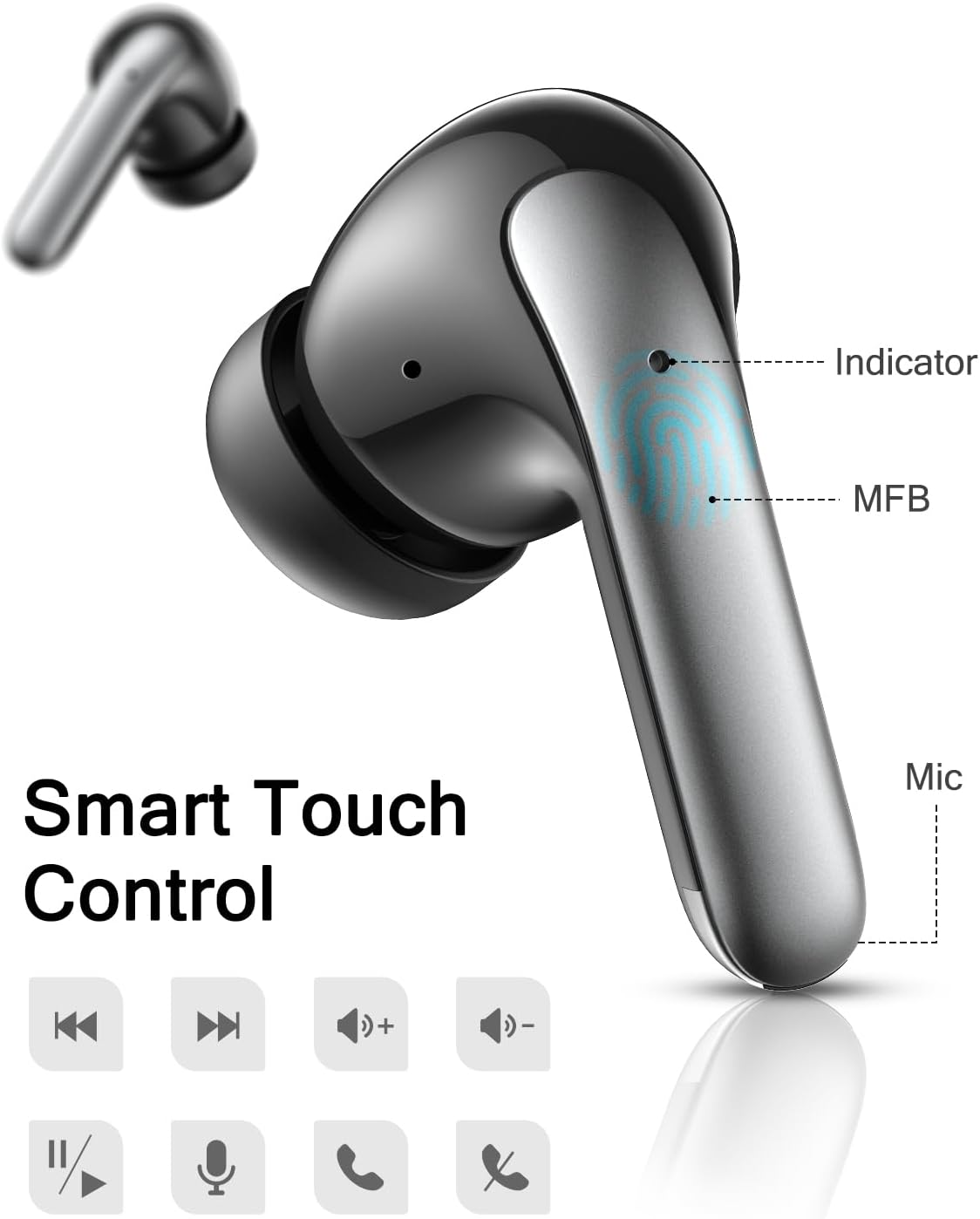
Figure 2: Detailed view of a single earbud highlighting the touch control area (MFB), indicator light, and microphone.
Components:
- Multi-Function Button (MFB): Touch-sensitive area for controlling playback, calls, and voice assistant.
- LED Indicator: Displays pairing status, charging status, and power.
- Microphone: For hands-free calls and voice commands.
- Charging Contacts: For charging the earbuds inside the case.
- Charging Case LED Display: Shows battery percentage of the case and individual earbud charging status.
Setup
1. Charging the Headphones and Case
Before first use, fully charge both the earbuds and the charging case. Place the earbuds into the charging case. Connect the USB charging cable to the charging port on the case and to a 5V/1A power source. The LED display on the case will show the charging progress.

Figure 3: The charging case provides up to 30 hours of total playtime, with earbuds offering 4-5 hours per charge.

Figure 4: The LED digital display on the charging case indicates the battery level of the case and each earbud.
- The earbuds fully recharge in approximately 1-2 hours.
- The 300mAh charging case supports 5-6 full recharge cycles for the earbuds.
2. Pairing with Your Device
- Ensure the earbuds are charged.
- Open the charging case. The earbuds will automatically power on and enter pairing mode. The LED indicator on the earbuds will flash.
- On your device (smartphone, tablet, computer), enable Bluetooth.
- Search for "LENCENT S52-BB" or similar in the list of available Bluetooth devices.
- Select "LENCENT S52-BB" to connect. Once connected, the LED indicator on the earbuds will stop flashing and remain solid or turn off, and you will hear a confirmation tone.
- If pairing fails, place the earbuds back into the case, close the lid, wait a few seconds, and then repeat the steps.
Operating Instructions
Power On/Off
- Power On: Open the charging case, and the earbuds will automatically power on. Alternatively, press and hold the MFB on both earbuds for 3 seconds.
- Power Off: Place the earbuds back into the charging case and close the lid. They will automatically power off and begin charging. Alternatively, press and hold the MFB on both earbuds for 5 seconds.
Touch Controls (MFB)
| Function | Action (Left Earbud) | Action (Right Earbud) |
|---|---|---|
| Play/Pause | Single tap | Single tap |
| Next Track | Triple tap | |
| Previous Track | Triple tap | |
| Volume Up | Double tap | |
| Volume Down | Double tap | |
| Answer/End Call | Single tap | Single tap |
| Reject Call | Press and hold for 2 seconds | Press and hold for 2 seconds |
| Activate Voice Assistant | Press and hold for 2 seconds | Press and hold for 2 seconds |
Wearing the Earbuds
The LENCENT headphones are designed for a lightweight and comfortable fit. Choose the ear cushions that best fit your ear canal for optimal sound quality and secure placement. Gently insert each earbud into your ear and rotate slightly until it feels snug and comfortable.

Figure 5: The ergonomic design ensures a comfortable and secure fit for extended wear.
Maintenance
Cleaning
- Regularly clean the earbuds, especially the ear tips and charging contacts, with a soft, dry, lint-free cloth.
- Do not use abrasive cleaners, alcohol, or chemical sprays.
- Remove ear tips and clean them separately with mild soap and water if necessary, ensuring they are completely dry before reattaching.
Water Resistance (IPX5)
The LENCENT headphones are IPX5 water-resistant, meaning they are protected against low-pressure water jets from any direction. This makes them suitable for workouts and light rain.

Figure 6: The IPX5 rating provides protection against sweat and splashes, ideal for sports and outdoor activities.
Important: IPX5 rating does not mean the headphones are waterproof for submersion. Do not immerse the headphones in water, swim, or shower with them.
Storage
When not in use, store the headphones in their charging case to protect them and keep them charged. Store in a cool, dry place away from extreme temperatures and direct sunlight.
Troubleshooting
| Problem | Possible Cause | Solution |
|---|---|---|
| Earbuds not pairing with device | Bluetooth off; earbuds not in pairing mode; interference; previously paired device. | Ensure Bluetooth is on. Place earbuds in case, close, then reopen to re-enter pairing mode. Turn off Bluetooth on other devices. Forget/delete previous pairing and re-pair. |
| Only one earbud working | Low battery; earbuds not properly connected to each other; individual earbud pairing issue. | Charge both earbuds fully. Place both earbuds back in the case, close the lid, wait 5 seconds, then open. This often resets the connection. Re-pair if necessary. |
| No sound or low volume | Device volume too low; earbud volume too low; improper fit; dirty ear tips. | Increase volume on both device and earbuds. Adjust earbud position for a secure fit. Clean ear tips and earbud mesh. |
| Charging case not charging | Faulty cable/adapter; dirty charging port. | Try a different USB cable and power adapter. Ensure the charging port is clean and free of debris. |
| Touch controls not responding | Improper touch; temporary software glitch. | Ensure you are touching the correct area (MFB). Try restarting the earbuds by placing them in the case and taking them out again. |
Specifications
| Feature | Detail |
|---|---|
| Model Number | S52-BB |
| Bluetooth Version | 5.3 |
| Earbud Playtime | 4-5 hours (at 70% volume) |
| Charging Case Battery | 300mAh |
| Total Playtime (with case) | Up to 30 hours |
| Charging Time (Earbuds) | 1-2 hours |
| Water Resistance Rating | IPX5 |
| Dimensions (Product) | 6.5 x 5 x 2.2 cm |
| Weight (Product) | 45.2 grams |
| Included Components | Cable, Charging Station, Ear Cushions, User Manual |
Warranty and Support
LENCENT products are designed and manufactured to the highest quality standards. For warranty information or technical support, please refer to the warranty card included in your package or visit the official LENCENT website. If you encounter any issues not covered in this manual, please contact LENCENT customer service for assistance.
Manufacturer: LENCENT Technology Co.,Ltd.
Ask a question about this manual
Ask about setup, troubleshooting, compatibility, parts, safety, or missing instructions. Manuals+ will review the question and use this page’s manual context to help answer it.