
1. Introduction
Thank you for choosing the QCY T27 ArcBuds Lite Bluetooth Earbuds. This manual provides detailed instructions on how to set up, operate, and maintain your new earbuds. Please read this manual carefully before use to ensure optimal performance and longevity of your device.
2. Package Contents
Ensure all items are present in your package:
- One (1) Pair of QCY T27 ArcBuds Lite Earbuds
- One (1) Charging Case
- One (1) Type-C Charging Cable
- One (1) User Manual
- Ear cushions (various sizes)
3. Product Overview
The QCY T27 ArcBuds Lite are true wireless stereo (TWS) earbuds designed for comfort and high-quality audio. They feature Bluetooth 5.3 for stable connectivity, Environmental Noise Cancellation (ENC) for clear calls, and a compact, lightweight design.
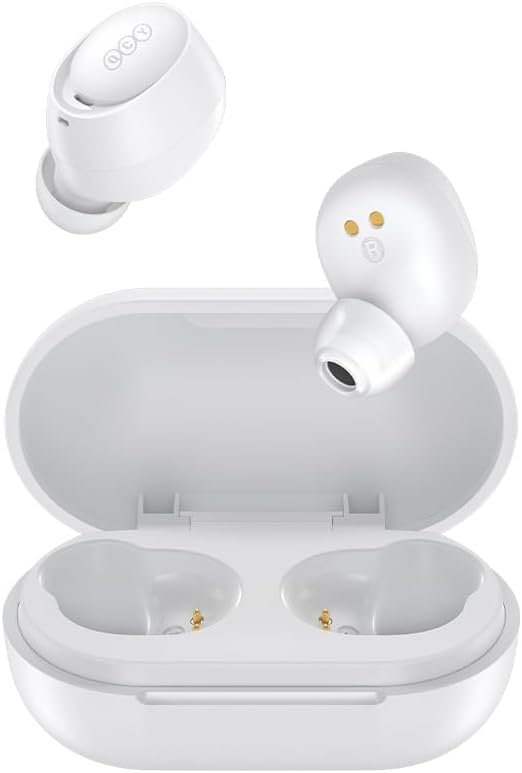
Image 1: QCY T27 ArcBuds Lite earbuds and charging case. The image shows both earbuds outside the open charging case, highlighting their design.
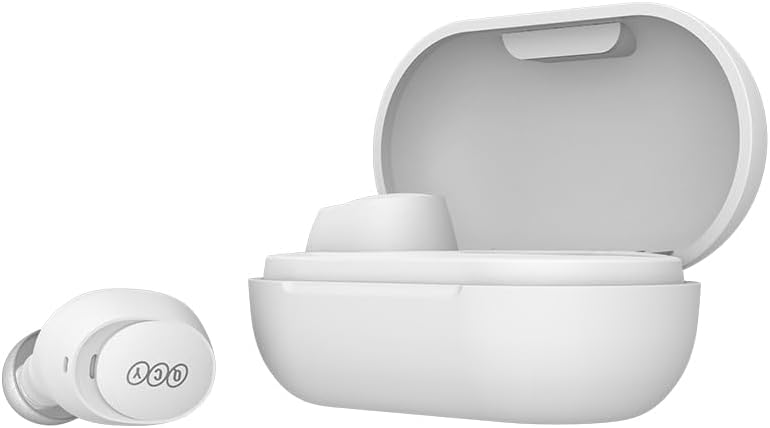
Image 2: A single QCY T27 ArcBuds Lite earbud positioned next to its open charging case, illustrating the compact size.

Image 3: Top-down view of both QCY T27 ArcBuds Lite earbuds securely placed inside their charging case.

Image 4: Visual representation of Environmental Noise Cancellation (ENC) technology, showing clear voice transmission even in noisy environments.

Image 5: A person wearing a QCY ArcBuds Lite earbud, highlighting its super light and ultra-compact fit within the ear.
4. Setup
4.1 Charging the Earbuds and Case
Before first use, fully charge the earbuds and the charging case.
- Connect the provided Type-C charging cable to the charging port on the case and a USB power source.
- The indicator light on the charging case will show the charging status.
- Once fully charged (approximately 1-2 hours), disconnect the cable.
- Place the earbuds into the charging case to charge them. The earbuds will automatically charge when placed correctly in the case.
4.2 Pairing with a Device
The earbuds support automatic pairing. Follow these steps for initial pairing:
- Open the charging case. The earbuds will automatically power on and enter pairing mode.
- On your device (smartphone, tablet, etc.), enable Bluetooth.
- Search for available Bluetooth devices and select "QCY T27 ArcBuds Lite" from the list.
- Once connected, a voice prompt will confirm successful pairing.
For subsequent use, the earbuds will automatically connect to the last paired device when taken out of the case.
5. Operating Instructions
The QCY T27 ArcBuds Lite feature touch controls on each earbud. The specific functions can often be customized via the QCY app.
5.1 Basic Controls
- Power On: Open the charging case or touch and hold the touch panel for 1.5 seconds.
- Power Off: Place earbuds back into the charging case and close the lid, or disconnect from Bluetooth and they will power off after 5 minutes.
- Play/Pause: Double-tap the touch panel on either earbud.
- Next Track: Triple-tap the right earbud.
- Previous Track: Triple-tap the left earbud.
- Volume Up: Touch and hold the right earbud.
- Volume Down: Touch and hold the left earbud.
5.2 Call Control
- Answer/End Call: Double-tap the touch panel on either earbud.
- Reject Call: Touch and hold the touch panel for 1.5 seconds.
5.3 Voice Assistant
- Activate Voice Assistant: Quadruple-tap the touch panel on either earbud.
5.4 Gaming Mode (Low Latency)
The earbuds feature a low-latency mode (68ms) for an optimized gaming experience.
- Toggle Gaming Mode: Consult the QCY app for specific controls to activate/deactivate gaming mode, as this function may be customizable.
6. Maintenance
Proper maintenance ensures the longevity and performance of your earbuds.
- Cleaning: Regularly clean the earbuds and charging case with a soft, dry, lint-free cloth. Do not use harsh chemicals or abrasive materials.
- Ear Tips: Remove and clean the ear tips periodically. Ensure they are completely dry before reattaching.
- Charging Contacts: Keep the charging contacts on both the earbuds and the case clean and dry to ensure proper charging.
- Storage: When not in use, store the earbuds in their charging case to protect them from dust and damage.
- Water Resistance: The earbuds are IPX4 rated, meaning they are resistant to splashes and sweat. Do not submerge them in water or expose them to heavy rain.
7. Troubleshooting
If you encounter issues, refer to the following common solutions:
- Earbuds not pairing: Ensure earbuds are charged. Turn off and on Bluetooth on your device. Try resetting the earbuds (refer to the QCY app or manufacturer's website for specific reset instructions).
- No sound from one earbud: Place both earbuds back into the charging case, close the lid, wait a few seconds, then take them out again. Re-pair if necessary.
- Charging issues: Ensure the charging cable is securely connected and the charging contacts on both earbuds and case are clean. Try a different charging cable or power adapter.
- Poor sound quality: Ensure earbuds are properly seated in your ears. Try different sized ear tips for a better seal. Check for obstructions in the earbud nozzles.
- Connection drops: Ensure your device is within the 10-meter Bluetooth range and there are no significant obstructions. Avoid environments with strong electromagnetic interference.
8. Specifications
| Feature | Specification |
|---|---|
| Brand | QCY |
| Model | T27 (BH23QT27A) |
| Bluetooth Version | 5.3 |
| Low Latency | 68 ms |
| Transmission Distance | Up to 10 meters (barrier-free) |
| Frequency Response | 20 Hz - 20000 Hz |
| Driver Size | 10 mm |
| Microphones | 4 (for ENC) |
| Noise Control | Environmental Noise Cancellation (ENC) for calls |
| Water Resistance | IPX4 (splash and dust resistant) |
| Charging Case Battery | 380 mAh |
| Earbud Battery (each) | 43 mAh, 3.7 V |
| Charging Time | Approx. 1-2 hours |
| Usage Time (Earbuds) | Up to 8 hours |
| Total Usage Time (with case) | Up to 32 hours |
| Standby Time | Up to 120 hours |
| Impedance | 32 ohms |
| Sensitivity | 108 dB |
| Material | Plastic, Polyurethane (PU) |
| Earbud Weight (each) | Approx. 4g |
| Total Product Weight | 50g |
| Certifications | CE, FCC, BQB, ANATEL: 12273-23-03372 |
9. Warranty and Support
The QCY T27 ArcBuds Lite comes with a 1-year manufacturer's warranty from the date of purchase. This warranty covers defects in materials and workmanship under normal use.
For warranty claims or technical support, please contact your retailer or visit the official QCY support website. Keep your proof of purchase for warranty validation.
Return Policy: This product is eligible for a refund/replacement within 31 days of purchase, subject to the retailer's return policy.
10. Safety Information
Please observe the following safety guidelines:
- Do not disassemble or modify the product.
- Keep the product away from extreme temperatures, direct sunlight, and open flames.
- Avoid exposing the product to excessive moisture or corrosive liquids.
- Do not use the earbuds at high volume for extended periods to prevent hearing damage.
- Keep out of reach of children and pets.
- Dispose of the product and its battery responsibly according to local regulations.


