
Introduction
This manual provides comprehensive instructions for the safe and efficient operation, maintenance, and troubleshooting of your Defy 34L Electronic Grill Microwave Oven, model DMO392. Please read this manual thoroughly before using the appliance and retain it for future reference.
Important Safety Instructions
Always follow basic safety precautions when using electrical appliances to reduce the risk of burns, electric shock, fire, or injury to persons.
- Read all instructions before using the appliance.
- Ensure the voltage matches the rating label.
- Do not operate the oven if the cord or plug is damaged.
- Do not heat liquids or other foods in sealed containers as they are liable to explode.
- Regularly inspect the oven for damage to the door, hinges, seals, and interior.
- Only allow qualified service personnel to service or repair the oven.
- Keep children away from the appliance.
- Use only microwave-safe cookware.
- Do not overcook food.
- Never operate the oven empty.
Product Overview
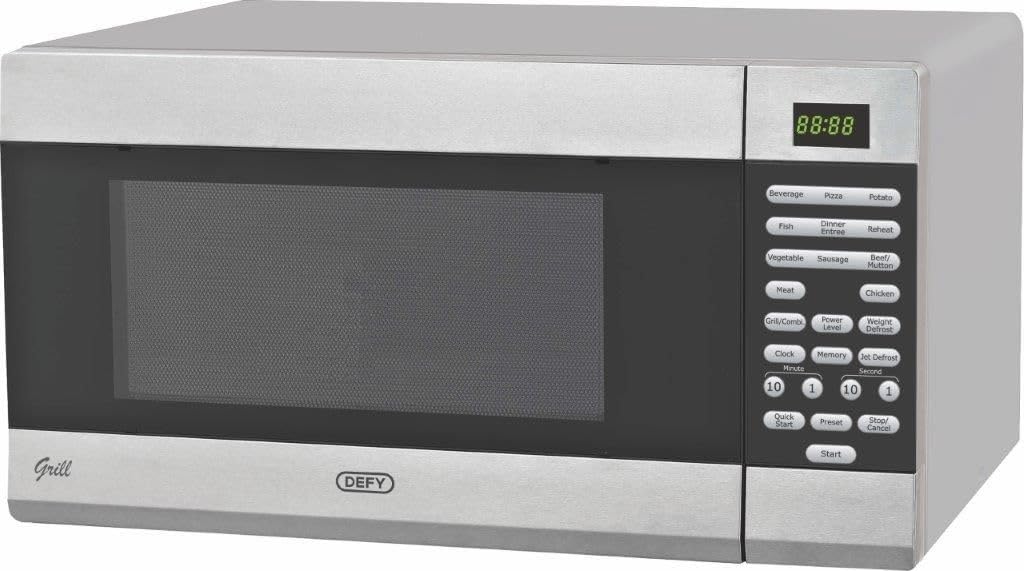
Image: The Defy 34L Electronic Grill Microwave Oven DMO392, featuring a silver exterior, a dark glass door, and a control panel with a digital display and various function buttons.
The Defy DMO392 is a 34-liter electronic microwave oven equipped with a grill function, offering versatile cooking options. It features a digital display for easy operation and monitoring, along with pre-set menu programs for various food types.
Setup and Installation
- Unpacking: Carefully remove the oven from its packaging. Retain packaging materials for future transport or storage if needed. Check for any damage.
- Placement: Place the oven on a flat, stable surface capable of supporting its weight. Ensure adequate ventilation around the oven (at least 10cm clearance at the back and sides, 20cm above). Do not block air vents.
- Power Connection: Plug the oven into a grounded electrical outlet. Ensure the power supply matches the specifications on the rating label.
- Turntable Assembly: Place the roller ring inside the oven cavity, then position the glass turntable securely on top of the roller ring.
Operating Instructions
Control Panel Overview
The control panel consists of a digital display, function buttons, and a dial for setting time and weight.
- Digital Display: Shows cooking time, power level, and various indicators.
- Function Buttons: Include options for Microwave, Grill, Combination, Defrost, and pre-set menus.
- Time/Weight Dial: Used to adjust cooking time, weight for defrosting, or select menu items.
- Start/Pause Button: Initiates or pauses cooking.
- Stop/Cancel Button: Stops cooking or clears settings.
Setting the Clock
- In standby mode, press the "Clock" button once.
- Use the time/weight dial to set the hour.
- Press "Clock" again to confirm the hour.
- Use the time/weight dial to set the minutes.
- Press "Clock" to confirm the minutes. The clock is now set.
Microwave Cooking
- Place food in a microwave-safe container inside the oven.
- Close the door.
- Press the "Microwave" button repeatedly to select the desired power level (e.g., P100 for 100% power).
- Use the time/weight dial to set the cooking time.
- Press "Start" to begin cooking.
Grill Cooking
- Place food on the grill rack (if provided) or a heat-resistant dish.
- Close the door.
- Press the "Grill" button.
- Use the time/weight dial to set the grilling time.
- Press "Start" to begin grilling.
Combination Cooking
This mode combines microwave and grill functions for faster cooking and browning.
- Place food in a suitable container.
- Press the "Combi" button repeatedly to select the desired combination mode (e.g., C-1 for 55% microwave, 45% grill).
- Use the time/weight dial to set the cooking time.
- Press "Start" to begin.
Auto Menu Programs
The oven features pre-set programs for common foods. Refer to the control panel for specific options like Beverage, Pizza, Potato, Fish, Dinner Entree, Reheat, Vegetable, Sausage, Beef/Mutton, Meat, Chicken.
- Place food in the oven.
- Press the corresponding auto menu button (e.g., "Pizza").
- Use the time/weight dial to select the weight or quantity.
- Press "Start".
Maintenance and Cleaning
Regular cleaning helps maintain the performance and longevity of your microwave oven.
- Before Cleaning: Always unplug the oven from the power outlet.
- Oven Interior: Wipe the interior cavity with a damp cloth after each use. For stubborn stains, use a mild detergent. Do not use abrasive cleaners or steel wool.
- Turntable and Roller Ring: These can be washed in warm soapy water or in a dishwasher.
- Oven Exterior: Clean the exterior with a soft, damp cloth. Avoid getting water into the ventilation openings.
- Door Seals: Keep the door seals clean to ensure proper closure and efficient operation.
Troubleshooting
| Problem | Possible Cause | Solution |
|---|---|---|
| Oven does not start | Power cord not plugged in; Door not closed properly; Fuse blown or circuit breaker tripped. | Ensure plug is firmly in outlet; Close door securely; Check household fuse/circuit breaker. |
| Food not cooking evenly | Food not stirred or turned; Incorrect power level or cooking time. | Stir or turn food during cooking; Adjust power level and time as needed. |
| Light not working | Bulb needs replacement. | Contact qualified service personnel for bulb replacement. |
| Excessive steam inside oven | High moisture content in food. | This is normal for high-moisture foods. Wipe interior after use. |
Specifications
| Feature | Detail |
|---|---|
| Brand | Defy |
| Model Number | DMO392 |
| Capacity | 34 Liters |
| Power / Wattage | 1000 Watts |
| Material | Stainless Steel |
| Colour | White |
| Item Weight | 17.3 kg |
| Product Dimensions (D x W x H) | 47.4D x 53.9W x 30H centimetres |
| Special Features | Temperature Control, Digital Display |
| Auto Shutoff | Yes |
Warranty and Support
For warranty information, service, or technical support, please refer to the warranty card included with your product or visit the official Defy website. Keep your purchase receipt as proof of purchase.
Defy Official Website: www.defy.co.za


