
1. Introduction
Thank you for choosing the Defy DMO383 Electronic Microwave Oven. This manual provides essential information for the safe and efficient operation of your new appliance. Please read these instructions thoroughly before use and retain them for future reference.
The Defy DMO383 is a 20-liter capacity electronic microwave oven designed for heating, cooking, and defrosting various food items. It features 700 watts of power, multiple power levels, and convenient preset functions to simplify your cooking experience.
2. Important Safety Instructions
When using electrical appliances, basic safety precautions should always be followed to reduce the risk of fire, electric shock, burns, or injury.
- Read all instructions before using the appliance.
- Ensure the appliance is properly grounded. Connect only to a properly installed and grounded outlet.
- Do not operate the oven empty. This can damage the appliance.
- Do not heat liquids or other foods in sealed containers as they are liable to explode.
- Do not use corrosive chemicals or vapors in this appliance.
- Close supervision is necessary when the appliance is used by or near children.
- Do not attempt to operate this oven if it is damaged, particularly the door, door seals, or interior. Contact qualified service personnel.
- Do not insert metal objects into the microwave oven.
- Only use utensils suitable for microwave ovens.
- Always ensure the turntable and roller ring are correctly positioned before operation.
- Do not use the microwave for deep-frying.
- Liquids heated in a microwave oven can boil over unexpectedly. Exercise caution when removing containers.
3. Product Overview
3.1. Components
- Microwave Oven Unit
- Glass Turntable
- Roller Ring
- Instruction Manual
3.2. Exterior View
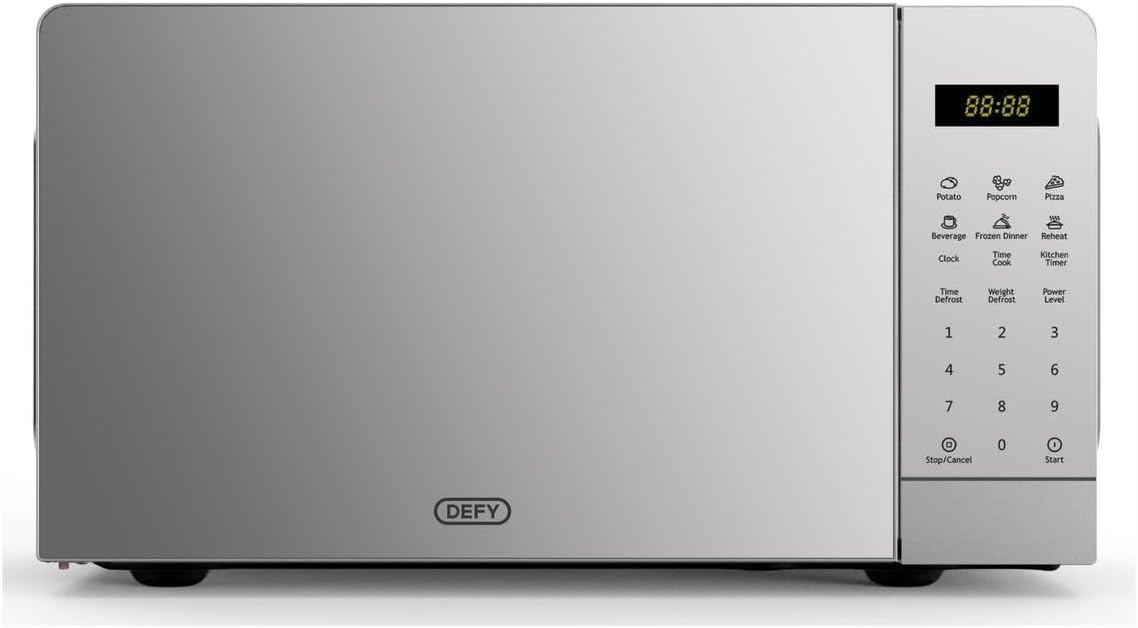
Image 1: Front view of the Defy DMO383 Electronic Microwave Oven. The image shows the silver mirror finish, the digital display on the right, and the control panel with various function buttons and a numeric keypad. The Defy logo is visible at the bottom center of the door.
3.3. Control Panel
The control panel features a digital display and various buttons for different functions:
- Digital Display: Shows time, cooking settings, and indicators.
- Preset Cooking Buttons: Potato, Popcorn, Pizza, Beverage, Frozen Dinner, Reheat.
- Time Cook: For manual cooking time input.
- Time Defrost: For defrosting based on time.
- Weight Defrost: For defrosting based on food weight.
- Power Level: To select desired cooking power.
- Clock: To set the current time.
- Kitchen Timer: Functions as a standalone timer.
- Number Pad (0-9): For entering time, weight, or other numerical values.
- Stop/Cancel: To stop cooking or clear settings.
- Start: To begin cooking or confirm settings.
4. Setup
4.1. Unpacking
- Remove all packaging materials from inside and outside the oven.
- Check the oven for any damage, such as dents or a misaligned door. Do not operate if damaged.
- Remove the protective film from the cabinet surface.
4.2. Placement
- Place the microwave oven on a stable, level surface strong enough to hold its weight.
- Ensure adequate ventilation. Leave a minimum of 10 cm (4 inches) clearance at the rear, 20 cm (8 inches) at the top, and 5 cm (2 inches) on both sides.
- Do not block any ventilation openings on the oven.
- Keep the oven away from heat sources, such as stoves or radiators, and away from water.
4.3. Turntable Installation
- Place the roller ring in the depression on the oven floor.
- Place the glass turntable on top of the roller ring, ensuring it sits securely.
4.4. Power Connection
- Plug the power cord into a standard 220V (DC) grounded electrical outlet.
- The oven display will show "0:00" or similar, indicating it is ready for use.
5. Operating Instructions
5.1. Setting the Clock
- Press the CLOCK button once.
- Use the number pad to enter the current time (e.g., 12:30 for 12:30 PM).
- Press the CLOCK button again to confirm.
5.2. Microwave Cooking
- Place food in a microwave-safe container on the turntable. Close the door.
- Press the TIME COOK button.
- Use the number pad to enter the desired cooking time.
- Press the POWER LEVEL button repeatedly to select the desired power level (e.g., P100 for 100% power, P50 for 50% power). The default is P100.
- Press START to begin cooking.
5.3. Quick Start Cooking
For quick cooking at 100% power:
- Press the START button repeatedly to add cooking time in 30-second increments (up to 99 minutes 59 seconds).
- The oven will start immediately.
5.4. Auto Cook Functions
The oven includes several pre-programmed settings for common foods:
- Place food in the oven.
- Press the desired auto-cook button (e.g., POTATO, POPCORN, PIZZA, BEVERAGE, FROZEN DINNER, REHEAT).
- Press the button repeatedly to select the quantity or weight if applicable (refer to the oven's internal guide or display for options).
- Press START to begin.
5.5. Defrosting
The Defy DMO383 offers two defrosting methods:
5.5.1. Time Defrost
- Press the TIME DEFROST button.
- Use the number pad to enter the desired defrosting time.
- Press START to begin.
5.5.2. Weight Defrost
- Press the WEIGHT DEFROST button.
- Use the number pad to enter the weight of the food in grams (e.g., 500 for 500g).
- Press START to begin. The oven will automatically calculate the defrosting time.
5.6. Child Lock Function
To prevent unsupervised operation by children:
- To Activate: Press and hold the STOP/CANCEL button for 3 seconds. A lock indicator will appear on the display.
- To Deactivate: Press and hold the STOP/CANCEL button for 3 seconds again. The lock indicator will disappear.
5.7. Kitchen Timer
The kitchen timer operates independently of the microwave cooking functions.
- Press the KITCHEN TIMER button.
- Use the number pad to enter the desired time.
- Press START to begin the countdown. An audible signal will sound when the timer expires.
6. Cleaning and Maintenance
Regular cleaning helps maintain the performance and longevity of your microwave oven.
- Before Cleaning: Always unplug the oven from the power outlet.
- Oven Interior: Wipe the interior cavity after each use with a damp cloth. For stubborn stains, use a mild detergent. Avoid abrasive cleaners or scouring pads.
- Oven Exterior: Clean the exterior with a soft, damp cloth. Do not allow water to enter the ventilation openings.
- Door and Door Seals: Wipe the door, door seals, and adjacent parts frequently with a damp cloth to remove spills and splatters.
- Glass Turntable and Roller Ring: These can be washed in warm soapy water or in a dishwasher. Ensure they are completely dry before placing them back in the oven.
- Odor Removal: To remove odors, combine a cup of water with the juice of one lemon in a microwave-safe bowl. Microwave on high for 5 minutes, then let it sit in the oven for another 5 minutes before wiping clean.
7. Troubleshooting
If you encounter issues with your microwave oven, refer to the following table for common problems and solutions.
| Problem | Possible Cause | Solution |
|---|---|---|
| Oven will not start | Power cord not plugged in; Door not closed properly; Fuse blown or circuit breaker tripped. | Ensure plug is securely in outlet; Close door firmly; Check household fuse or reset circuit breaker. |
| Food not heating | Incorrect cooking time or power level set; Door not closed properly. | Adjust cooking time/power; Ensure door is fully closed. |
| Turntable not rotating | Turntable or roller ring not correctly positioned; Obstruction under turntable. | Reposition turntable and roller ring; Remove any obstructions. |
| Display shows "E" or error code | Internal malfunction. | Unplug the oven for a few minutes, then plug it back in. If the error persists, contact customer service. |
If the problem persists after attempting these solutions, please contact Defy customer support. Do not attempt to repair the appliance yourself.
8. Specifications
| Brand | Defy |
| Model Number | DMO383 |
| Colour | Silver Mirror |
| Capacity | 20 Liters |
| Power / Wattage | 700 watts |
| Voltage | 220 Volts (DC) |
| Material | Stainless Steel |
| Auto Shutoff | Yes |
| Special Features | Temperature Control |
| Item Weight | 10.2 kg |
| Product Dimensions (D x W x H) | 36.2 x 26.8 x 46.6 cm |
9. Warranty and Support
Your Defy DMO383 Electronic Microwave Oven is covered by a manufacturer's warranty. Please refer to the warranty card included with your purchase for specific terms, conditions, and duration. Retain your proof of purchase for warranty claims.
For technical assistance, spare parts, or service inquiries, please contact Defy customer support. Contact details can typically be found on the Defy official website or on your warranty documentation.
Online Resources: For additional information and support, visit the official Defy website: www.defy.co.za
10. Product Videos
No official product videos from the seller were provided in the product data. Please refer to the written instructions for detailed guidance.


