
Introduction
The deleyCON Micro HDMI to HDMI Adapter (Model MK6093) is designed to connect devices with a Micro HDMI output to displays or cables with a standard HDMI input. This adapter supports high-resolution video and audio transmission, ensuring a reliable connection for various multimedia applications. It is built with an aluminum casing for enhanced durability and optimal signal integrity.
Product Features
- High Resolution Support: Supports impressive 4K resolutions (4096 x 2160) at 60Hz and 2K resolutions at 120Hz.
- HDMI 2.0 Standard: Compliant with HDMI 2.0, ensuring compatibility with current and future display technologies.
- High Data Rate: Capable of transmitting data up to 18 Gbit/s.
- Advanced Features: Supports Audio Return Channel (ARC), High Dynamic Range (HDR), 3D video, Variable Refresh Rate (VRR), Auto Low Latency Mode (ALLM), and High-bandwidth Digital Content Protection (HDCP).
- Durable Construction: Features a robust black aluminum casing for excellent signal transmission and long-lasting reliability.
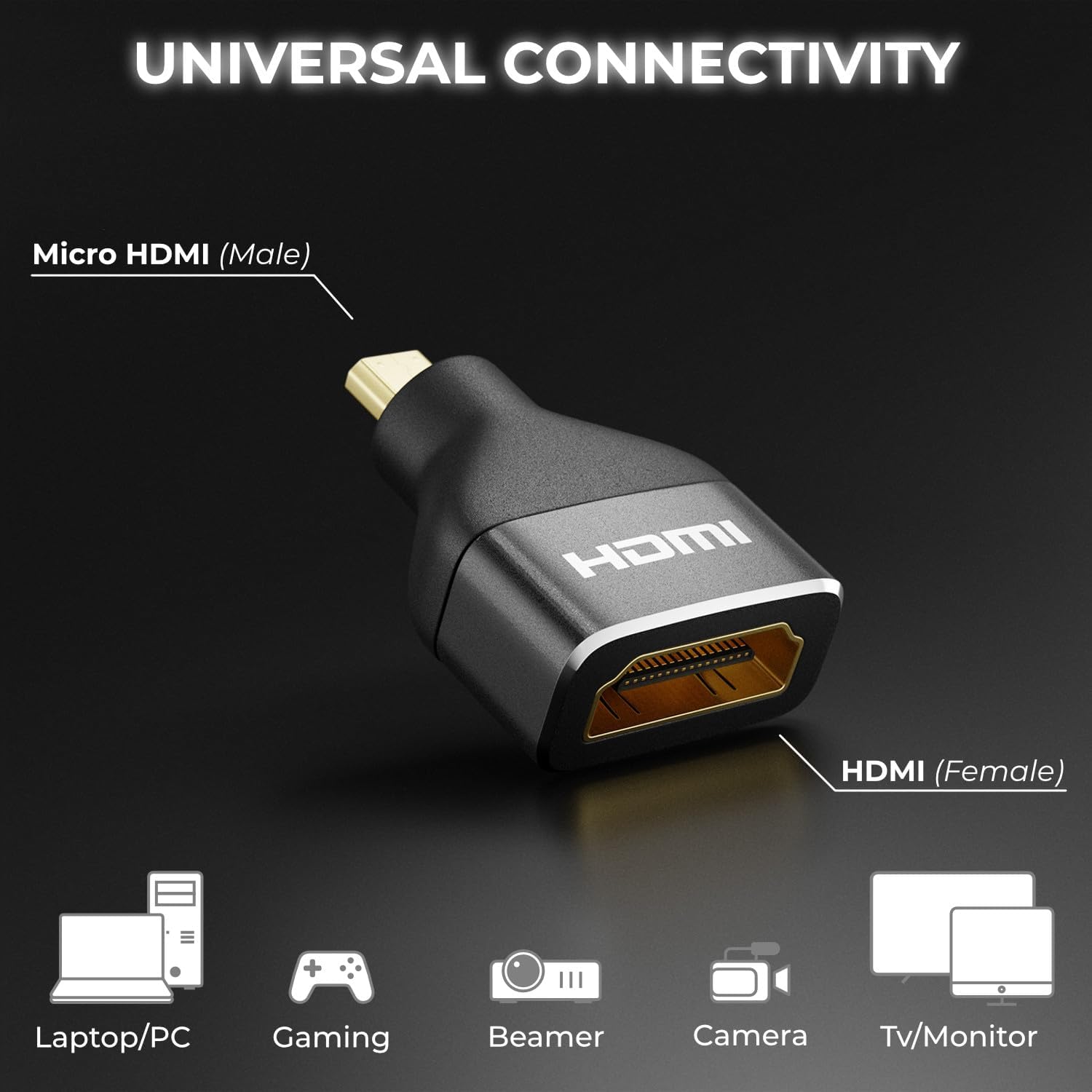
- Universal Connectivity: Connects Micro HDMI (male) to HDMI (female), compatible with a wide range of devices.

Package Contents
The deleyCON Micro HDMI to HDMI Adapter package includes:
- 1 x deleyCON Micro HDMI to HDMI Adapter (Model MK6093)
Safety Information
Please read and follow these safety guidelines to ensure proper use and prevent damage to the adapter or connected devices:
- Do not expose the adapter to water, moisture, or extreme temperatures.
- Avoid dropping or subjecting the adapter to strong impacts.
- Do not attempt to disassemble or modify the adapter. This will void the warranty.
- Keep out of reach of children.
- Use only with compatible devices and cables.
Setup
The deleyCON Micro HDMI to HDMI Adapter is designed for simple plug-and-play installation. Follow these steps to connect your devices:
- Identify the Micro HDMI output port on your source device (e.g., camera, tablet, laptop).
- Connect the Micro HDMI (male) end of the deleyCON adapter into the Micro HDMI output port of your source device.
- Take a standard HDMI cable (not included) and connect one end into the HDMI (female) port of the deleyCON adapter.
- Connect the other end of the standard HDMI cable to the HDMI input port of your display device (e.g., TV, monitor, projector).
- Ensure both your source device and display device are powered on.

Operating Instructions
Once the adapter is correctly connected as described in the Setup section, the deleyCON Micro HDMI to HDMI Adapter operates automatically. It functions as a passive converter, transmitting the audio and video signal from your Micro HDMI source device to your HDMI display device.
- Ensure your source device is configured to output video and audio through its Micro HDMI port.
- Select the correct HDMI input on your display device.
- The adapter will automatically negotiate the best possible resolution and refresh rate supported by both your source and display devices, up to its maximum capabilities (4K@60Hz, 2K@120Hz).
Troubleshooting
If you encounter issues while using the deleyCON Micro HDMI to HDMI Adapter, refer to the following common troubleshooting steps:
- No Signal on Display:
- Ensure all cables are securely connected to both the adapter and your devices.
- Verify that your display is set to the correct HDMI input source.
- Test with a different HDMI cable to rule out cable issues.
- Try connecting the source device directly to the display (if possible) to confirm the source device's output functionality.
- Restart both the source device and the display.
- Poor Picture Quality or Flickering:
- Check the resolution and refresh rate settings on your source device. Ensure they are within the adapter's supported specifications (e.g., 4K@60Hz, 2K@120Hz).
- Ensure the HDMI cable used is rated for the desired resolution and data rate (e.g., High-Speed HDMI for 4K).
- Minimize cable length if possible, especially for high-resolution signals.
- No Audio:
- Verify that the audio output settings on your source device are correctly configured for HDMI.
- Check the volume levels on both your source device and display.
- Ensure your display device supports audio via HDMI.
Specifications
| Feature | Detail |
|---|---|
| Model Number | MK6093 |
| Brand | deleyCON |
| Connector Type | Micro HDMI (Male) to HDMI (Female) |
| HDMI Standard | HDMI 2.0 |
| Max Resolution Support | 4K (4096x2160) @ 60Hz, 2K @ 120Hz, 1440p @ 120Hz, 1080p @ 120Hz |
| Data Rate | Up to 18 Gbit/s |
| Supported Technologies | ARC, HDR, 3D, VRR, ALLM, HDCP |
| Material | Aluminum (Metallic finish) |
| Color | Black |
| Item Weight | 7.99 Grams |
| Number of Ports | 2 |
| Power Supply | No external power required |
| Compatible Devices | TV box, recorder, monitor, DVD player, camera, video game console, PC, projector, TV |
| Country of Origin | China |

Maintenance
To ensure the longevity and optimal performance of your deleyCON Micro HDMI to HDMI Adapter, follow these maintenance guidelines:
- Cleaning: Use a soft, dry cloth to gently wipe the adapter. Do not use liquid cleaners or abrasive materials, as they may damage the surface or internal components.
- Storage: Store the adapter in a cool, dry place away from direct sunlight and extreme temperatures when not in use.
- Handling: Always grasp the connector housing when plugging or unplugging the adapter. Avoid pulling on the cable itself, as this can damage the internal wiring.
Warranty and Support
deleyCON products are designed for reliability and performance. For information regarding warranty coverage, technical support, or service inquiries, please refer to the documentation provided with your purchase or visit the official deleyCON website. Keep your proof of purchase for warranty claims.