
1. Introduction
This manual provides detailed instructions for the proper use and maintenance of your SMALLRIG Wireless Control Side Handle 4402B. Please read this manual thoroughly before use to ensure optimal performance and longevity of the product.
2. What's in the Box
- Rotating Quick Release Side Handle with Wireless Control x 1
- Rotatable Quick Release Adapter x 1
- Wireless Remote Control x 1
- User Manual x 1

Image: Components included in the product packaging.
3. Key Features
- Infinite Rotation: The handle offers 360-degree rotation, securely locking at any desired angle with dependable damping.
- Wireless Remote Control Module: Integrated module for controlling photo and video recording on most Android/iOS native camera apps within a 10-meter range.
- Quick Release System: Enables rapid attachment and detachment to compatible SMALLRIG quick release phone cages.
- Versatile Configuration: Can be switched between a side handle and a top handle by adjusting its connection to the phone cage.
- Built-in Cold Shoe: After removing the wireless remote module, a cold shoe mount becomes available for external accessories like microphones or LED lights.
- Ergonomic Grip: Designed for comfortable and stable handling across various shooting angles.
- Integrated Hex Wrench: A hex wrench is magnetically stored at the bottom of the handle for convenience.
4. Setup and Installation
4.1 Attaching to a Phone Cage
The side handle features a quick-release adapter for easy attachment to compatible SMALLRIG phone cages. Ensure the cage has a corresponding quick-release slot.
- Align the quick-release adapter on the handle with the quick-release slot on your SMALLRIG phone cage.
- Press the button on the adapter and slide it into the slot until it clicks securely into place.
- To detach, press the button again and slide the handle off.

Image: Quick release mechanism for attaching the handle to a phone cage.
4.2 Switching Between Side and Top Handle
The handle can be configured as either a side handle or a top handle, depending on your shooting requirements.
- For side handle use, attach the quick-release adapter to a vertical slot on the side of your phone cage.
- For top handle use, attach the quick-release adapter to a horizontal slot on the top of your phone cage.

Image: Handle configuration as side or top handle.
5. Operating Instructions
5.1 Using the Wireless Remote Control
The integrated wireless remote control module allows for remote photo and video capture.
- Ensure the wireless remote control module is inserted into the top of the handle.
- Activate Bluetooth on your smartphone.
- Pair your smartphone with the "SMALLRIG" Bluetooth device.
- Open your smartphone's native camera application.
- Press the button on the wireless remote control to trigger photo capture or start/stop video recording.

Image: Wireless remote control module features.
5.2 Adjusting Handle Rotation
The handle features infinite rotation for flexible positioning.
- Grip the handle and rotate it to your desired angle.
- The handle is designed with long-lasting damping to maintain its position securely once set.

Image: Infinite rotation capability of the handle.
5.3 Using the Built-in Cold Shoe
The handle includes a cold shoe mount for attaching accessories.
- Remove the wireless remote control module from the top of the handle.
- Slide your cold shoe compatible accessory (e.g., microphone, LED light) into the exposed cold shoe slot.

Image: Example of using the built-in cold shoe mount.
6. Maintenance
6.1 Replacing the Wireless Remote Control Battery
The wireless remote control module is powered by a CR2032 coin cell battery.
- Unscrew the four small screws located at the bottom of the Bluetooth module.
- Carefully remove the battery cover.
- Insert a new CR2032 battery with the "+" sign facing upwards.
- Replace the battery cover and secure it with the four screws.
Note: A CR2032 battery and screwdriver are not included and must be purchased separately.
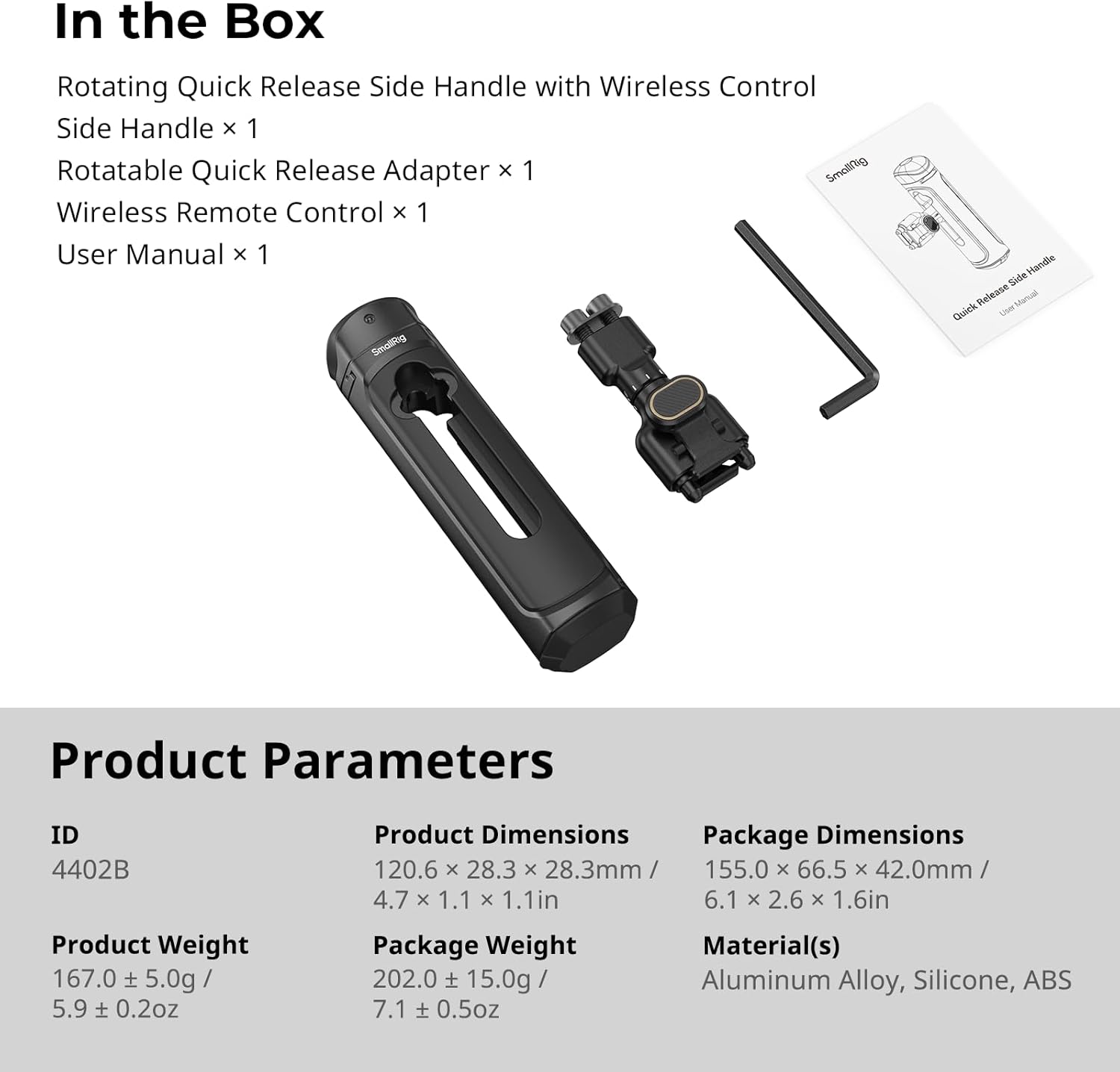
Image: Battery replacement steps for the wireless remote module.
6.2 Storing the Hex Wrench
A hex wrench is provided for adjustments and is stored within the handle.
- The hex wrench is magnetically fixed at the bottom of the handle.
- It is secured by a decorative cover to prevent loss and ensure portability.
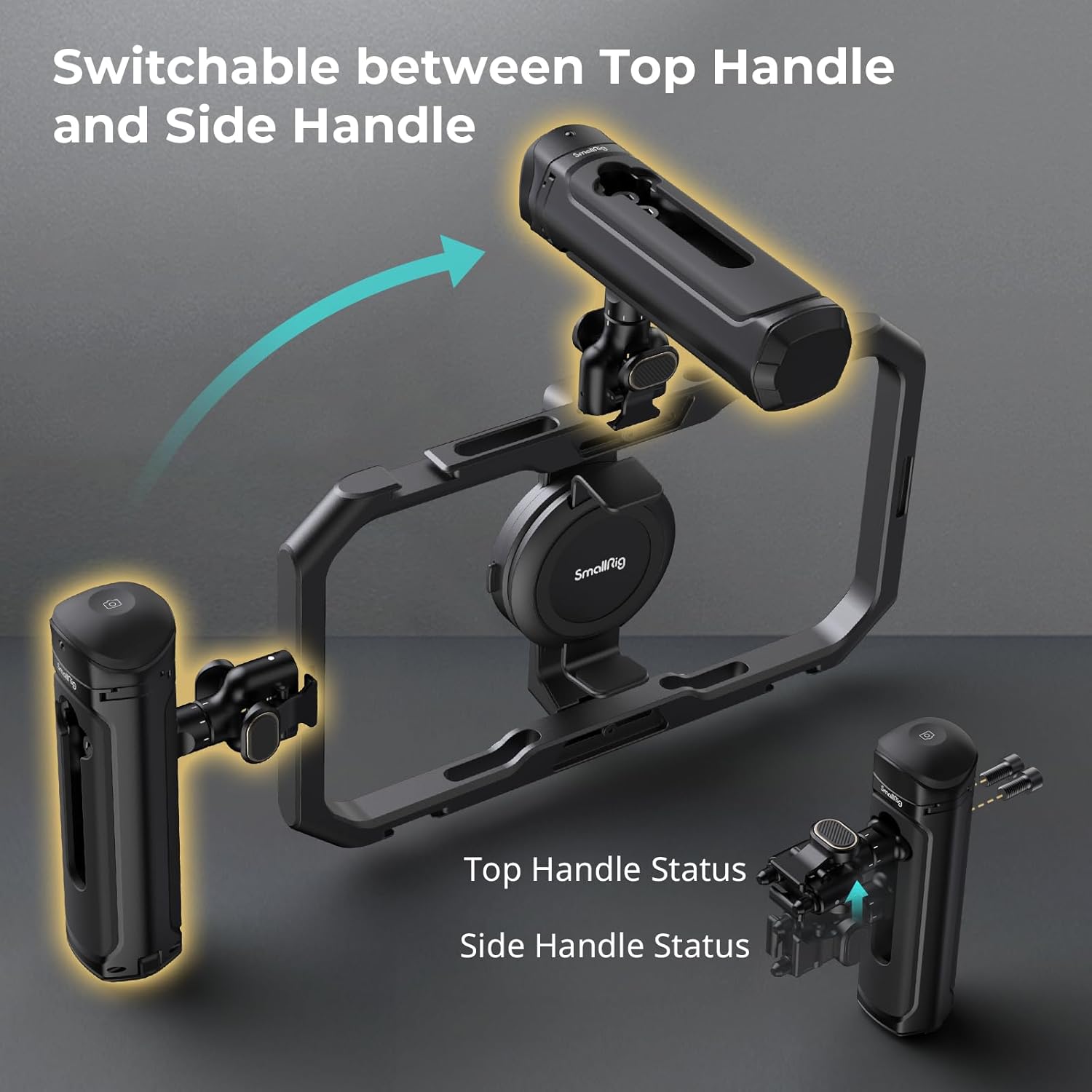
Image: Location of the integrated hex wrench.
7. Troubleshooting
| Problem | Possible Cause | Solution |
|---|---|---|
| Wireless remote not connecting. | Bluetooth not enabled on phone; remote battery low; remote not paired. | Ensure phone Bluetooth is on. Check and replace remote battery if needed. Re-pair the remote via phone's Bluetooth settings. |
| Handle feels loose or wobbly. | Quick-release adapter not fully engaged; mounting screws loose (if applicable to cage). | Press the quick-release button and re-insert until a secure click is heard. Ensure all cage mounting points are tightened. |
| Handle rotation is too stiff or too loose. | Normal damping mechanism; no user adjustment. | The handle's rotation damping is factory set for optimal performance. No user adjustment is typically required or possible. |
8. Specifications
| Parameter | Value |
|---|---|
| Model ID | 4402B |
| Product Dimensions | 120.6 x 28.3 x 28.3 mm / 4.7 x 1.1 x 1.1 inches |
| Item Weight | 167.0 ± 5.0g / 5.9 ± 0.2oz |
| Package Dimensions | 155.0 x 66.5 x 42.0 mm / 6.1 x 2.6 x 1.6 inches |
| Package Weight | 202.0 ± 15.0g / 7.1 ± 0.5oz |
| Materials | Aluminum Alloy, Silicone, ABS |
| Compatible Devices | Cellphone, Smartphone (with compatible SMALLRIG quick release cages) |
| Wireless Control Range | Up to 10 meters |
| Wireless Control Battery | CR2032 (not included) |
Image: Product parameters and contents.
9. Warranty and Support
SMALLRIG products are designed and manufactured to high-quality standards. For warranty information and technical support, please refer to the official SMALLRIG website or contact their customer service directly. Keep your purchase receipt as proof of purchase for warranty claims.
Official Website: www.smallrig.com


