
1. Introduction
Thank you for choosing the NEXPOW G17 S40 Jump Starter. This device is designed to provide a reliable solution for jump-starting vehicles, charging portable electronics, and offering emergency lighting. Please read this manual thoroughly before operating the device to ensure safe and efficient use. Keep this manual for future reference.
2. What's in the Box
Carefully unpack the contents and ensure all items are present and in good condition.
- NEXPOW G17 S40 Jump Starter
- Smart Jumper Cables with Protection System
- USB-A to USB-C Charging Cable
- USB-C to USB-C Charging Cable
- EVA Storage Case
- User Manual

3. Product Overview
The NEXPOW G17 S40 is a versatile portable power device. It features a high-capacity battery, multiple output ports, and an integrated LED light. Familiarize yourself with the components shown below.

Technical Specifications
| Feature | Specification |
|---|---|
| Model | G17 S40 |
| Peak Current | 4000 Amps |
| Engine Compatibility | All Gas Engines, up to 10.0L Diesel Engines |
| Battery Type | Lithium Ion (4 included) |
| USB Output 1 | 18W (5V/3A, 9V/2A, 12V/1.5A) |
| USB Output 2 | 12W (5V/2.1A) |
| Type-C In/Out | PD 60W Max |
| DC Output | 168W Max |
| LED Light | 400 Lumens (Flashlight, Strobe, SOS modes) |
| Dimensions (D x W x H) | 3.73" x 8.89" x 1.65" |
| Weight | 1.5 Pounds |
4. Charging the Jump Starter
Before initial use, fully charge the NEXPOW G17 S40. It is recommended to recharge the device every 2-3 months if not used for extended periods to maintain battery health.
Using a Wall Charger (PD60W)
- Connect the provided USB-C to USB-C cable to the Type-C In/Out port on the jump starter.
- Connect the other end of the cable to a 60W PD wall adapter (not included).
- Charging from 0% to 100% takes approximately 1.5 hours with a 60W adapter.

Using a Car Charger
- Connect the appropriate charging cable (e.g., USB-A to USB-C) to the jump starter and a car charger (not included).
- Charging from 0% to 100% takes approximately 4-5 hours using a car charger.

5. Setup
Before using the jump starter, ensure it is fully charged. Check the power indicator lights on the device to confirm its charge level.
6. Operating Instructions - Jump Starting a Vehicle
The NEXPOW G17 S40 can jump start 12V vehicles, including all gasoline engines and diesel engines up to 10.0L.

- Prepare the Vehicle: Ensure the vehicle's ignition is off and all accessories (lights, radio, AC) are turned off. Place the vehicle in park (automatic) or neutral (manual) and engage the parking brake.
- Connect Jumper Cables to Jump Starter: Insert the blue end of the smart jumper cable into the jump clamp port on the NEXPOW G17 S40. Ensure a secure connection.
- Connect Clamps to Car Battery:
- Connect the red (+) clamp to the positive (+) terminal of the vehicle's battery.
- Connect the black (-) clamp to the negative (-) terminal of the vehicle's battery.
The indicator light on the smart jumper cable will show the connection status. A solid green light indicates a correct and safe connection.
- Start the Vehicle: Once the smart cable indicator is solid green, start the vehicle's engine. If the vehicle does not start immediately, wait 30 seconds and try again. Do not crank for more than 3 seconds per attempt.
- Remove Clamps: Once the vehicle starts, immediately remove the black (-) clamp from the car battery, then remove the red (+) clamp. Disconnect the smart jumper cable from the jump starter.

7. Operating Instructions - Power Bank Function
The NEXPOW G17 S40 can also function as a portable power bank to charge various electronic devices.

- USB Outputs: Use the USB Output 1 (18W) or USB Output 2 (12W) ports to charge smartphones, tablets, Bluetooth headsets, and other USB-powered devices. Connect your device's charging cable to the appropriate USB port on the jump starter.
- Type-C In/Out (PD 60W): This port can also be used to quickly charge compatible devices that support Power Delivery (PD) up to 60W. Use a USB-C to USB-C cable for this function.
- DC Output (168W Max): This port can power 12V DC devices with a maximum output of 168W. Ensure your device is compatible with this output.
8. Operating Instructions - LED Light Function
The NEXPOW G17 S40 features a 400-lumen LED light with three modes for various emergency situations.
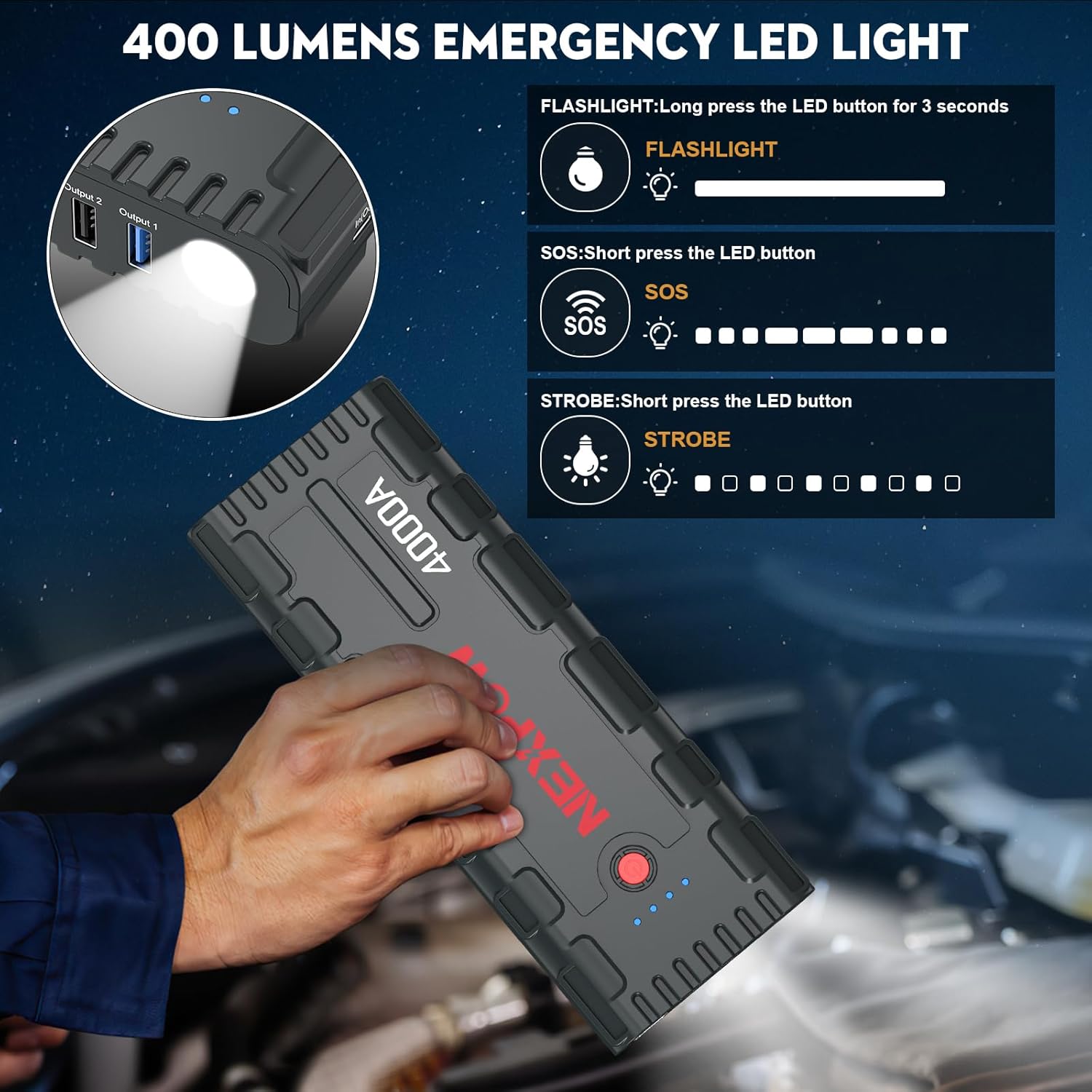
- Flashlight Mode: Long press the LED button for 3 seconds to turn on the flashlight.
- Strobe Mode: With the flashlight on, short press the LED button to switch to strobe mode.
- SOS Mode: From strobe mode, short press the LED button again to activate SOS signaling.
- To turn off the LED light, long press the LED button again from any mode.
9. Maintenance
Proper maintenance ensures the longevity and optimal performance of your jump starter.
- Storage: Store the jump starter in a cool, dry place away from direct sunlight, moisture, and flammable materials. The ideal storage temperature is between -4°F to 140°F (-20°C to 60°C).
- Recharging: If the device has not been used for a long time, it is recommended to charge it every 2-3 months to keep the internal battery in a healthy state and prevent deep discharge.
- Cleaning: Use a soft, dry cloth to clean the exterior of the device. Do not use harsh chemicals or abrasive cleaners.
- Cable Inspection: Regularly inspect the smart jumper cables for any signs of damage, such as frayed wires, cracked insulation, or corroded clamps. Replace damaged cables immediately.
10. Troubleshooting
If you encounter issues with your NEXPOW G17 S40, refer to the following table for common problems and solutions.
| Problem | Possible Cause | Solution |
|---|---|---|
| Jump starter does not turn on. | Battery is completely discharged. | Charge the jump starter fully before use. |
| Vehicle does not start after jump attempt. | Incorrect connection; Vehicle battery too severely discharged; Other vehicle issues. | Ensure clamps are connected correctly (red to +, black to -). Check smart cable indicator for solid green. Try again after 30 seconds. If still no start, vehicle may have other mechanical or electrical problems. |
| Smart jumper cable indicator light is red or flashing. | Reverse polarity connection; Short circuit; Over-temperature. | Disconnect clamps and reconnect correctly. Ensure clamps do not touch each other. Allow device to cool down if hot. Refer to smart cable manual for specific error codes. |
| Device not charging when plugged in. | Charging cable or adapter faulty; Charging port damaged. | Try a different charging cable and adapter. Ensure connections are secure. If problem persists, contact customer support. |
| LED light does not work. | Battery too low; Malfunction. | Charge the jump starter. If fully charged and light still fails, contact customer support. |
11. Safety Information
Adhere to these safety guidelines to prevent injury or damage to the device and vehicle.

- Read all instructions before using the product.
- Do not short-circuit the smart jumper clamps. Avoid connecting the red and black clamps together.
- Do not expose the device to rain, water, or extreme temperatures.
- Keep the device away from children.
- Use the device in a well-ventilated area.
- Do not attempt to jump start a frozen or visibly damaged battery.
- If the device becomes excessively hot during use, discontinue use immediately and allow it to cool down.
- Only use the provided smart jumper cables with the device.
- Do not disassemble or modify the device. This will void the warranty and may cause safety hazards.
12. Warranty and Support
NEXPOW products come with a standard warranty. For detailed warranty information, product support, or to report any issues, please refer to the warranty card included in your package or visit the official NEXPOW website. You may also contact NEXPOW customer service directly for assistance.


