
1. Introduction
The doinal Fardriver Controller is a 72V 80A programmable sine wave controller designed for brushless DC motors equipped with Hall sensors. It is suitable for 2-3KW brushless motors, including MY1020, QS Motors, and other compatible brands. This controller offers advanced features such as self-learning, flux weakening, and app-based programming for both Apple and Android devices.
Important Note: This is not a plug-and-play controller. Programming experience and compatibility setup (approximately 2-3 hours) are required for use with motors other than the pre-programmed MY1020 72V 3000W motor.

Image 1.1: The doinal Fardriver Controller, highlighting its key features like 48-72V rated voltage, 100A current, 260A phase current, IP67 waterproofing, and app programmability.

Image 1.2: Examples of electric vehicles compatible with the Fardriver Controller, such as electric dirt bikes, scooters, and ATVs.
2. Setup and Installation
2.1. Wiring Diagram
Refer to the following diagram for proper wiring connections. Ensure all connections are secure before powering on the controller.
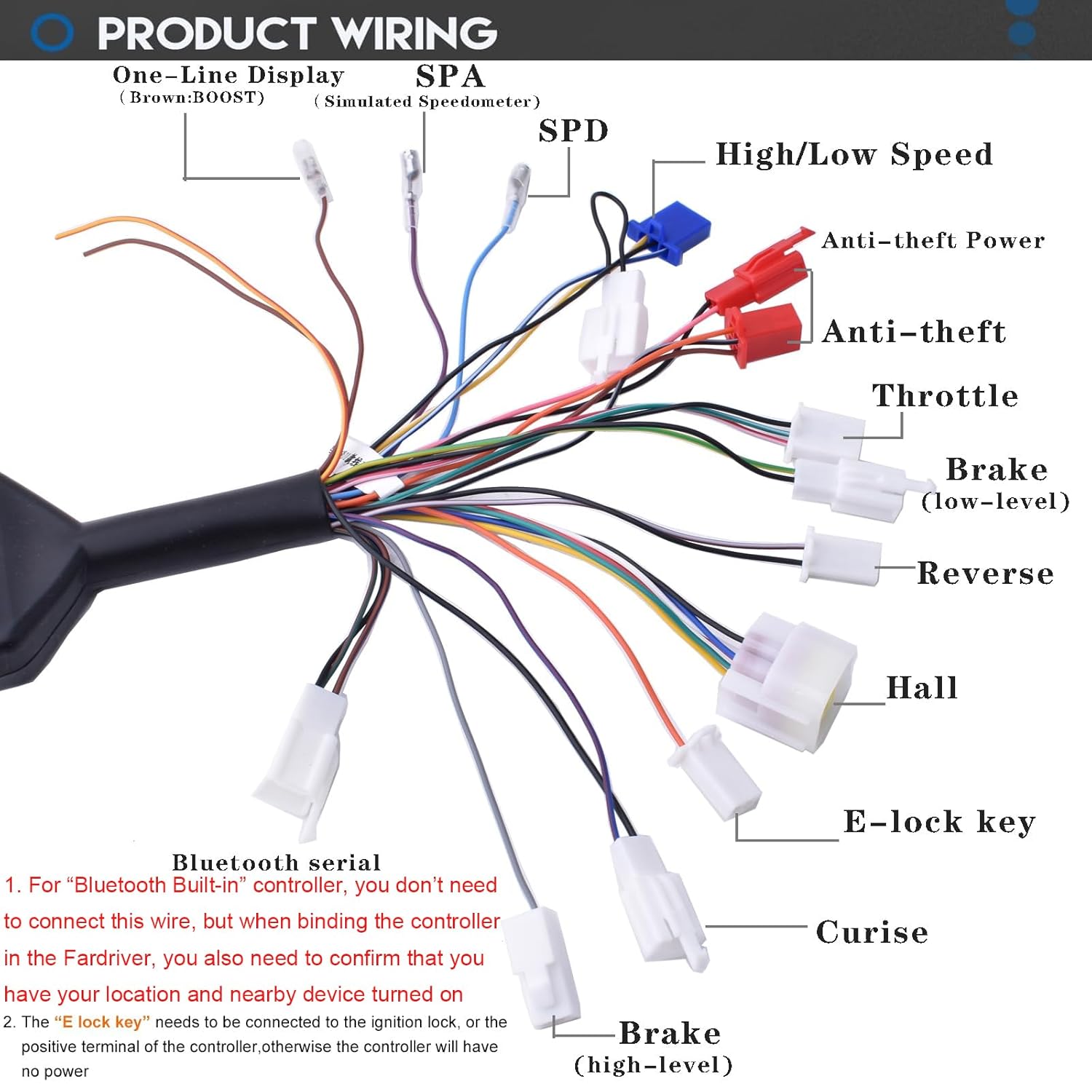
Image 2.1: Detailed wiring diagram for the Fardriver Controller, showing connections for throttle, brake, Hall sensors, anti-theft, high/low speed, reverse, E-lock key, cruise, and display.
2.2. Wiring Connections Table
| Pic | Describe | Functions |
|---|---|---|
| Black: GND, Orange: Lock, Black&White: Signal FW, Pink&Red: Power + 60VC, Brown&Red: Wheel Smove Signal U | Anti-Theft | |
| Black: GND, Blue&Red: Cruise XH | Cruise | |
| Yellow & White: High Speed, Blue & White: Low Speed | High / Low Speed | |
| Black: GND, Green & White: Throttle Signal SV, Red & White: Power+, ACC+ | Throttle | |
| Brown & White: Reverse RE, Black: GND | Reverse | |
| Yellow & Green: Low Level Braking BL, Black: GND | Brake (low-level) | |
| Red: Hall +, White: Temp, Green: Hall B, Black: GND, Yellow: Hall A | Hall | |
| Purple: Analog Speedometer SPA | Speedometer SPA | |
| Light Blue: LIN SPD | Speedometer SPD | |
| Grey: High Level Braking BH | Brake (High Level) | |
| Orange: Power Lock Key | E-Lock | |
| Bluetooth Serial Port | ||
| Brown | One-Line Display |
Note: For controllers with built-in Bluetooth, an external Bluetooth dongle is not required. The E-Lock orange wire must be connected to the positive pole (e.g., ignition lock) for power.
2.3. Fardriver App Download and Binding
The Fardriver app is essential for programming and monitoring the controller. It is compatible with both Apple and Android devices.
- Apple Users: Search for "Fardriver" in the App Store to download the application.
- Android Users: The app can be downloaded from http://182.92.233.85:6868/FarDriverSigned.apk.
- After installation, open Bluetooth on your phone and bind the controller within the Fardriver app.
- Set the necessary parameters for your motor.

Image 2.2: Instructions for downloading the Fardriver app and binding the controller, showing app store search results and the binding confirmation screen.
2.4. Initial Programming
The controller is pre-programmed for the MY1020 72V 3000W motor. For other motors, programming is required. This process involves setting parameters within the Fardriver app and may take 2-3 hours. Ensure you have programming experience or consult an experienced technician.
Video 2.1: An instructional video demonstrating the connection and basic operation of the Fardriver Controller with a motor.
3. Operating Instructions
Once the controller is installed and programmed, you can monitor its status and adjust settings via the Fardriver app.
3.1. App Monitoring
The Fardriver app provides real-time data on motor status, battery capacity, temperature, voltage, current, and other parameters. This allows for precise tuning and performance monitoring.

Image 3.1: Screenshot of the Fardriver app interface, showing various gauges and data points for monitoring motor and controller performance, including power, speed, battery capacity, and temperatures.
Before setting functions and parameters, download and bind the Fardriver app. Modifications will be saved successfully. For first-time login, registration may be required.
3.2. Controller Functions
- Throttle: Controls motor speed.
- Brake (Low/High Level): Activates braking.
- High/Low Speed: Switches between different speed modes.
- Reverse: Engages reverse motion.
- Anti-theft: Provides security features.
- Cruise: Maintains a set speed.
- E-Lock Key: Power ignition control.
- Hall Sensors: Provides motor position feedback for smooth operation.
4. Maintenance
The Fardriver Controller is designed for durability with an IP67 waterproofing grade. Regular maintenance is minimal but important for longevity:
- Keep Clean: Periodically clean the exterior of the controller to prevent dust and debris buildup, especially around cooling fins.
- Inspect Wiring: Regularly check all wiring connections for tightness and signs of wear or damage. Loose connections can lead to performance issues or component failure.
- Avoid Extreme Conditions: While waterproof, avoid prolonged submersion or exposure to harsh chemicals.
- Software Updates: Check the Fardriver app periodically for any available firmware updates for the controller to ensure optimal performance and access to new features.
5. Troubleshooting
5.1. Common Operational Issues
- Problem: Motor starts slowly despite full throttle.
Solution: Verify all wiring connections. Check if "push riding mode" (MTPA) is active in the Fardriver app, as this limits acceleration. Disable it if not required. - Problem: Controller has no power.
Solution: Ensure the E-Lock orange wire is connected to the positive pole, such as the ignition lock. This connection is necessary for power. - Problem: Motor occasionally fails to accelerate with throttle input.
Solution: This can occur if the "P function" is enabled, which may prevent acceleration when the vehicle is unbalanced (e.g., during parking). Connect via Bluetooth, open the Fardriver app, and disable this function.

Image 5.1: A visual guide detailing common operational issues and a comprehensive table for interpreting beep alarm codes from the Fardriver Controller.
5.2. Beep Alarm Codes and Solutions
The controller uses a buzzer to signal various states or faults. Interpret the beep patterns as follows:
| Beep Pattern | Problem / Solution |
|---|---|
| Single beep (normal startup) | Controller and motor are connected correctly. |
| Continuous beep |
|
| Two short beeps, one long beep (repeating) | Controller is in self-learning mode. Follow self-learning steps. |
| Two short beeps, brief pause, one short beep (repeating) | Controller program verification failure. Program upgrade required. |
| Four short beeps, one long beep, five short beeps (repeating) | Incompatible upgraded program. Verify program matches controller model label and upgrade if necessary. |
| 1 to 15 beeps (specific count) | Indicates specific faults such as current protection, phase current overflow, battery over/under voltage, anti-theft trigger, motor/controller temperature issues, phase current sudden change, zero point fault, motor coil fault, or short circuits in phase wires. Consult the Fardriver app for detailed fault codes. |
6. Specifications
Key technical specifications for the doinal Fardriver Controller ND72260:
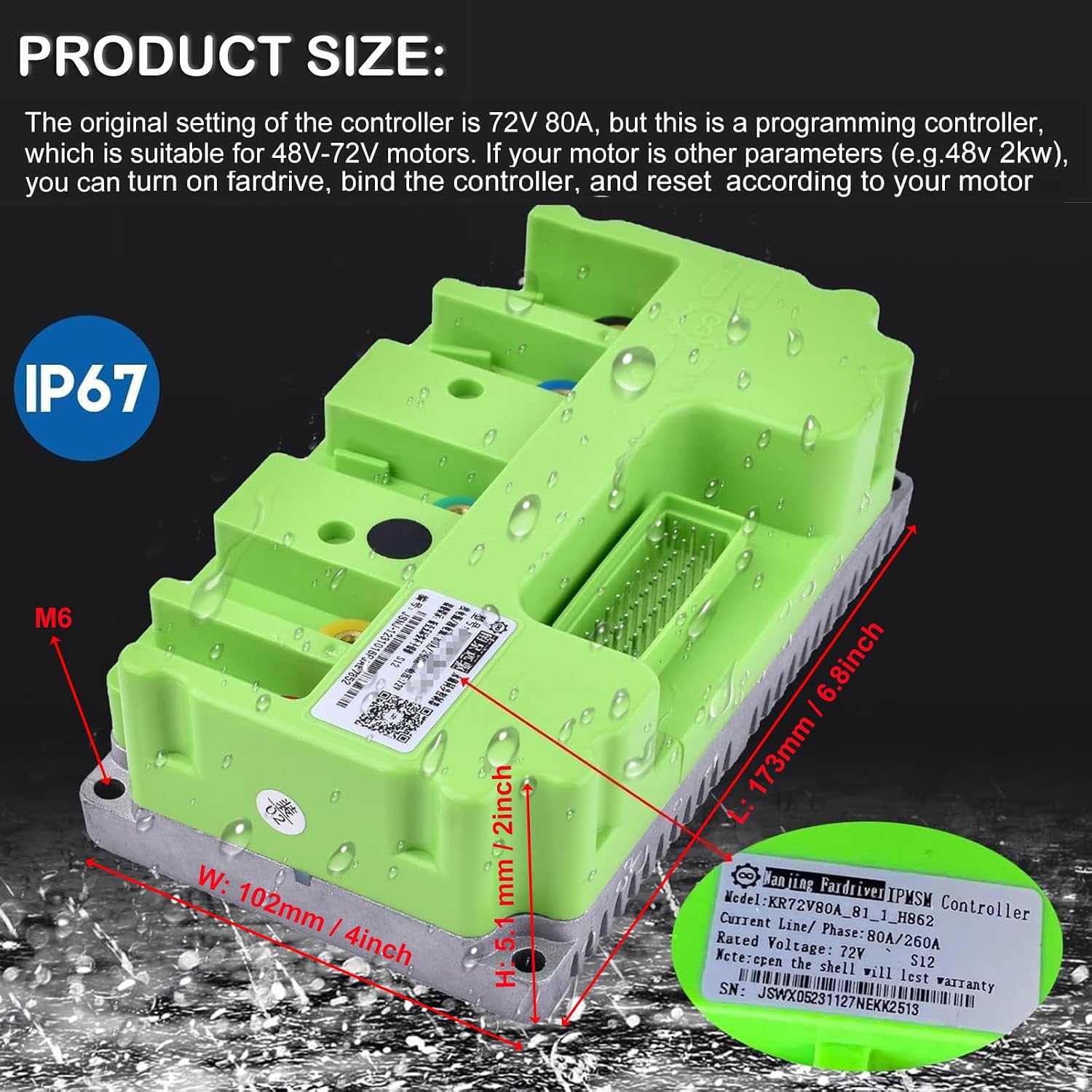
Image 6.1: Dimensions of the Fardriver Controller, showing length (173mm / 6.8inch), width (102mm / 4inch), and height (51mm / 2inch).
| Feature | Detail |
|---|---|
| Brand | doinal |
| Model | ND72260 |
| Rated Voltage | 72V (Suitable for 48V-72V systems) |
| Peak Voltage | 88V |
| Max DC Current | 80A |
| Phase Current | 260A |
| Rated Power | 2KW-3KW |
| Compatible Motors | 2-3KW Brushless motors (Hall sensor type) |
| Waterproofing Grade | IP67 |
| Material | Aluminum |
| Item Weight | 1KG (2.2 pounds) |
| Included Components | BLDC Controller |
7. What's in the Box
Upon opening the package, you should find the following items:
- 1 x Fardriver BLDC Controller
- 1 x Wiring Harness

Image 7.1: The Fardriver Controller as packaged, showing the controller and associated wiring harness within its protective box.
8. Warranty and Support
8.1. Return Policy
This product is eligible for a 30-day refund or replacement policy from the date of purchase.
8.2. Customer Support
If you encounter any issues with the product, please contact customer support. If you receive broken items or items that are not working, contact us immediately for solutions.
For further assistance, you may also refer to the official Fardriver tutorials available on platforms like YouTube.
