
1. Introduction
This instruction manual provides essential information for the safe and effective use of your Nikon D850 DSLR Camera. Please read this manual thoroughly before using the camera and keep it accessible for future reference. The Nikon D850 is a high-performance full-frame DSLR designed for professional photographers, featuring a 45.7MP BSI CMOS sensor, 4K UHD video recording, and a robust autofocus system.
This bundle includes the Nikon D850 camera body, a Nikon AF-S NIKKOR 24-120mm f/4G ED VR Lens, a Shot-Gun Microphone, a Photo Software Package, a camera case, 128GB memory, a slave flash, and a tripod.
2. Package Contents
Before proceeding with setup, verify that all items listed below are present in your package:
- Nikon D850 DSLR Camera Body
- Nikon AF-S NIKKOR 24-120mm f/4G ED VR Lens
- Nikon EN-EL15a Rechargeable Lithium-Ion Battery
- Extra High Capacity Battery
- Nikon MH-25A Battery Charger
- Nikon UC-E22 USB Cable
- Nikon AN-DC18 Camera Strap
- COMMANDER Deluxe Starter Kit (Mini Tripod, 5 Sensor Swabs, Cleaning Cloth, 2 Universal Screen Protectors, Memory Card Wallet, Lens Cap Keeper)
- COMMANDER 50 inch DSLR Tripod
- 2 x 64GB Sandisk Memory Cards (Total 128GB)
- USB Card Reader
- Camera Carrying Case
- 3PC Filter Kit (UV, CPL, FLD Filters) with Filter Case
- Shot-Gun Microphone
- Photo Software Package
- Lens Pen and Lens Blower
- Slave Flash
- Nikon DK-17F Eyepiece Cap
- Nikon DK-19 Rubber Eyecup
- Nikon BF-1B Body Cap
- Nikon Snap-On Lens Cap
- Nikon LF-4 Rear Lens Cap
3. Setup
3.1. Charging the Battery
- Insert the Nikon EN-EL15a battery into the MH-25A battery charger.
- Plug the charger into a power outlet. The charging lamp will blink during charging and turn off when charging is complete.
- A full charge typically takes approximately 2 hours.
3.2. Inserting the Battery and Memory Cards
Ensure the camera is turned off before inserting or removing batteries or memory cards.
- Open the battery chamber cover on the bottom of the camera.
- Insert the charged EN-EL15a battery with the contacts facing the correct direction until it clicks into place.
- Open the memory card slot cover on the side of the camera.
- Insert the 64GB Sandisk memory cards into the designated slots (one XQD/CFexpress slot and one SD card slot) until they click. Ensure the cards are oriented correctly.
- Close both covers securely.
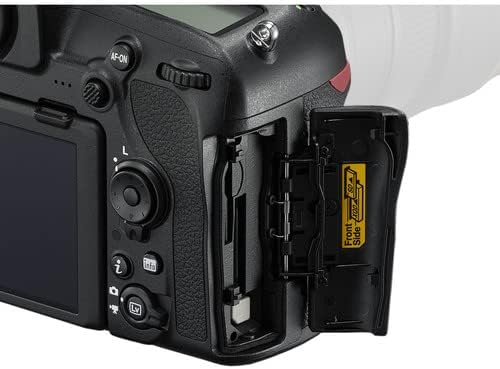
Image: Memory card and battery compartment access.
3.3. Attaching the Lens
- Remove the body cap from the camera and the rear lens cap from the NIKKOR 24-120mm lens.
- Align the mounting mark on the lens with the mounting mark on the camera body.
- Rotate the lens counter-clockwise until it clicks into place.

Image: Nikon AF-S NIKKOR 24-120mm f/4G ED VR Lens.
3.4. Initial Camera Settings
- Turn the camera on using the power switch.
- Follow the on-screen prompts to set the language, date, time, and time zone.
4. Operating the Camera
4.1. Basic Controls and Display
Familiarize yourself with the camera's buttons and dials. The D850 features a 3.2-inch tilting touchscreen LCD for intuitive control and review.

Image: Rear view of the Nikon D850 with its control layout.

Image: Nikon D850 with the tilting LCD screen in an extended position.
4.2. Taking Photographs
- Select a Shooting Mode: Rotate the mode dial (P, S, A, M) to choose your desired exposure mode.
- P (Programmed Auto): Camera sets shutter speed and aperture for optimal exposure.
- S (Shutter-Priority Auto): You set shutter speed, camera sets aperture.
- A (Aperture-Priority Auto): You set aperture, camera sets shutter speed.
- M (Manual): You control both shutter speed and aperture.
- Focus: Look through the viewfinder or use Live View on the LCD. Press the shutter-release button halfway to activate autofocus. The D850 features a 153-point AF system for precise focusing.
- Compose: Frame your shot.
- Shoot: Press the shutter-release button fully to take the picture. The camera can shoot at 7 frames per second (fps) or up to 9 fps with an optional battery grip.
4.3. Recording Videos
The Nikon D850 supports UHD 4K video recording at 30 fps.
- Switch to Live View mode using the Lv button.
- Press the red movie-record button to start recording.
- Press the button again to stop recording.
4.4. Connecting to Smart Devices (SnapBridge)
The D850 features SnapBridge Bluetooth and Wi-Fi connectivity for transferring images to smart devices and remote control.
- Install the SnapBridge app on your smartphone or tablet.
- Enable Bluetooth and Wi-Fi on both the camera and your smart device.
- Follow the instructions in the SnapBridge app to pair your devices.
5. Maintenance
5.1. Cleaning the Camera and Lens
- Use a soft, lint-free cloth to clean the camera body.
- For the lens, use the included lens pen and blower to remove dust. For smudges, use a specialized lens cleaning solution and cloth.
- Avoid touching the sensor directly. If sensor cleaning is required, it is recommended to have it performed by a professional Nikon service center.
5.2. Battery Care
- Store batteries in a cool, dry place when not in use.
- Do not expose batteries to extreme temperatures.
- Recharge batteries before long periods of storage to maintain their health.
5.3. Storage
- When storing the camera for extended periods, remove the battery.
- Store the camera and lens in a dry, well-ventilated area, preferably in the included camera case, to prevent mold and mildew.
6. Troubleshooting
If you encounter issues with your Nikon D850, refer to the following common solutions:
- Camera not powering on: Ensure the battery is fully charged and correctly inserted. Check the power switch position.
- Autofocus not working: Verify the lens is securely attached and the AF/M switch on the lens is set to AF. Check camera's focus mode settings.
- Images are blurry: Check shutter speed (too slow can cause blur), aperture (too wide can reduce depth of field), and focus. Ensure Vibration Reduction (VR) is enabled on the lens if needed.
- Memory card error: Reinsert the memory card. If the error persists, try a different card. Ensure the card is not locked.
- No image on LCD: Check if the display is turned off or if the camera is in viewfinder-only mode.
For more detailed troubleshooting or issues not covered here, please consult the official Nikon D850 reference manual or contact Nikon support.
7. Specifications
| Feature | Specification |
|---|---|
| Sensor Type | 45.7MP FX-Format BSI CMOS |
| Image Processor | EXPEED 5 |
| ISO Range | Native 64-25600, Extended 32-102400 |
| Video Recording | UHD 4K at 30 fps, 1080p |
| Autofocus System | Multi-CAM 20K 153-Point AF System |
| LCD Screen | 3.2" 2.36m-Dot Tilting Touchscreen LCD |
| Continuous Shooting | 7 fps (up to 9 fps with optional grip) |
| Lens Mount | Nikon F Mount |
| Included Lens | Nikon AF-S NIKKOR 24-120mm f/4G ED VR Lens |
| Connectivity | SnapBridge Bluetooth and Wi-Fi, HDMI, USB |
| Memory Storage | 128GB (2 x 64GB SD cards) |
| Weight | Approx. 1.05 Pounds (Body Only) |
8. Warranty and Support
8.1. Warranty Information
This Nikon D850 camera bundle comes with a 90-day limited warranty from the seller. Please retain your proof of purchase for any warranty claims. For specific details regarding coverage and terms, refer to the warranty documentation provided at the time of purchase or contact the seller directly.
8.2. Customer Support
For technical assistance, additional product information, or service inquiries, please visit the official Nikon support website or contact their customer service department. You can find contact information and detailed resources at Nikon USA Support.


