Product Overview
The HAPPYGRILL Full Length Jewelry Armoire is designed to provide organized storage for your jewelry and accessories, featuring a full-length mirror, LED lighting, and mobility. This manual provides instructions for assembly, operation, maintenance, and troubleshooting.
Key Features:
- Organized Storage Space: Includes 100 earring slots, 45 earring holes, 72 ring slots, 36 necklace hooks, 4 shelves, 2 drawers, 1 bracelet rod, and 1 storage pouch.
- Full-Length Mirror: Integrated mirror for convenient outfit checks.
- Secure & Portable: Equipped with 4 wheels for easy movement and a lockable design with 2 keys for security.
- Illuminated Display: 6 built-in LED lights automatically activate upon opening the door, powered by 3 AAA batteries (not included).
- Durable Construction: Made from high-density fiberboard with a soft velvet interior lining.

Image: The HAPPYGRILL Jewelry Armoire with its door open, revealing various compartments for earrings, rings, necklaces, and other accessories, illuminated by LED lights. The armoire is brown and stands on wheels.
Setup Instructions
1. Unboxing and Content Verification
Carefully remove all components from the packaging. Verify that all parts are present according to the included parts list. The main armoire body is pre-assembled.
2. Attaching the Wheels
Locate the four wheels and the necessary screws. Attach each wheel securely to the designated points on the bottom base of the armoire using a screwdriver. Ensure all screws are tightened to prevent wobbling.
3. Battery Installation for LED Lights
The LED lights require 3 AAA batteries (not included). Open the battery compartment, typically located near the LED strip inside the armoire. Insert the batteries, ensuring correct polarity (+/-). Close the compartment securely.
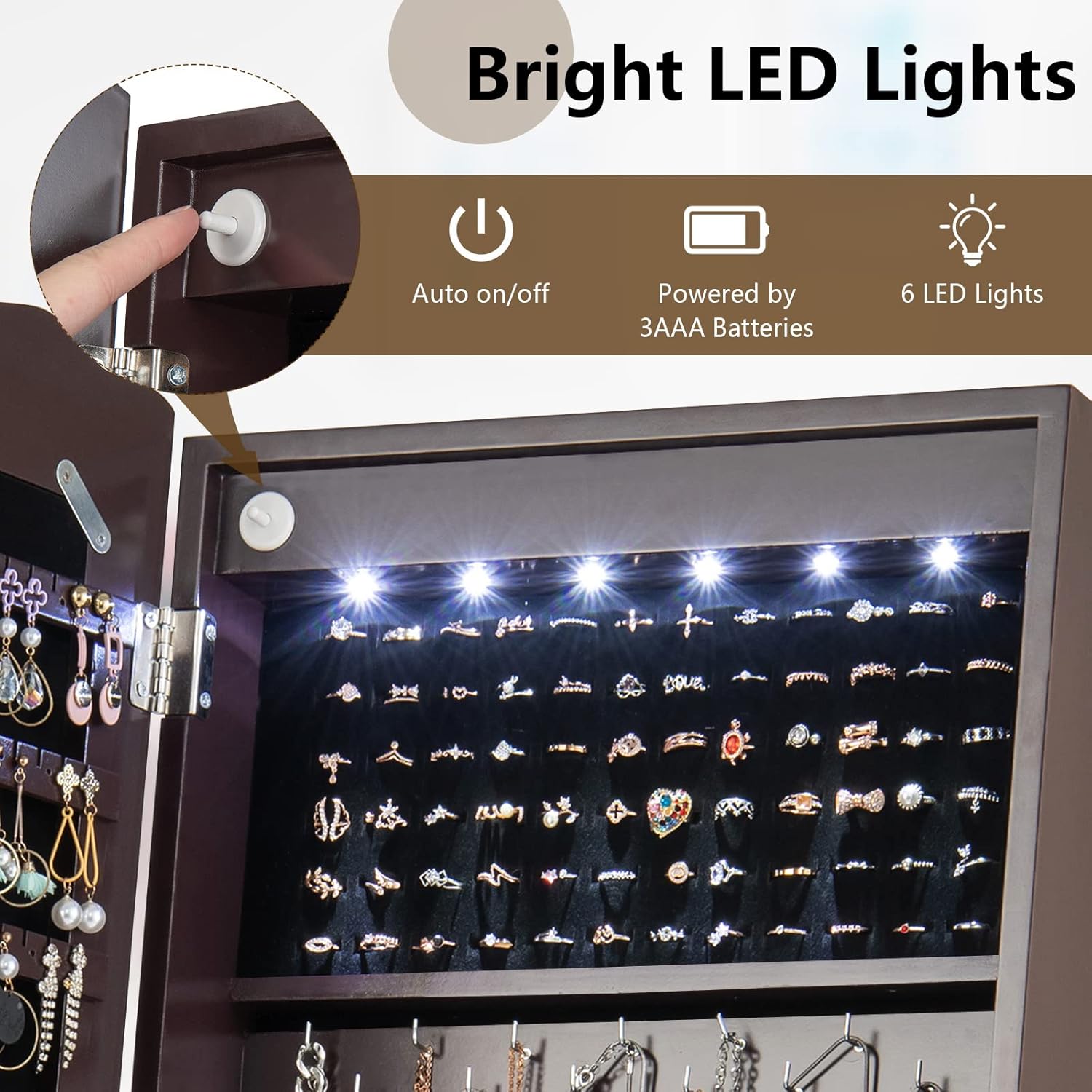
Image: A detailed view of the LED lights inside the armoire, highlighting the auto on/off sensor and indicating that the lights are powered by 3 AAA batteries.
4. Positioning the Armoire
Place the armoire on a flat, stable surface. Utilize the wheels to easily move it to your desired location. Ensure there is enough space for the door to open fully.
Operating Instructions
1. Using the Full-Length Mirror
The exterior of the armoire features a full-length mirror. Use it to check your appearance and accessories.
2. Adjusting the Mirror Angle
The armoire offers 3 adjustable tilt angles (98°, 102°, 106°). To adjust, gently tilt the mirror frame to the desired angle and secure it using the wooden peg on the side supports. Ensure the peg is firmly seated in one of the three holes to maintain stability.
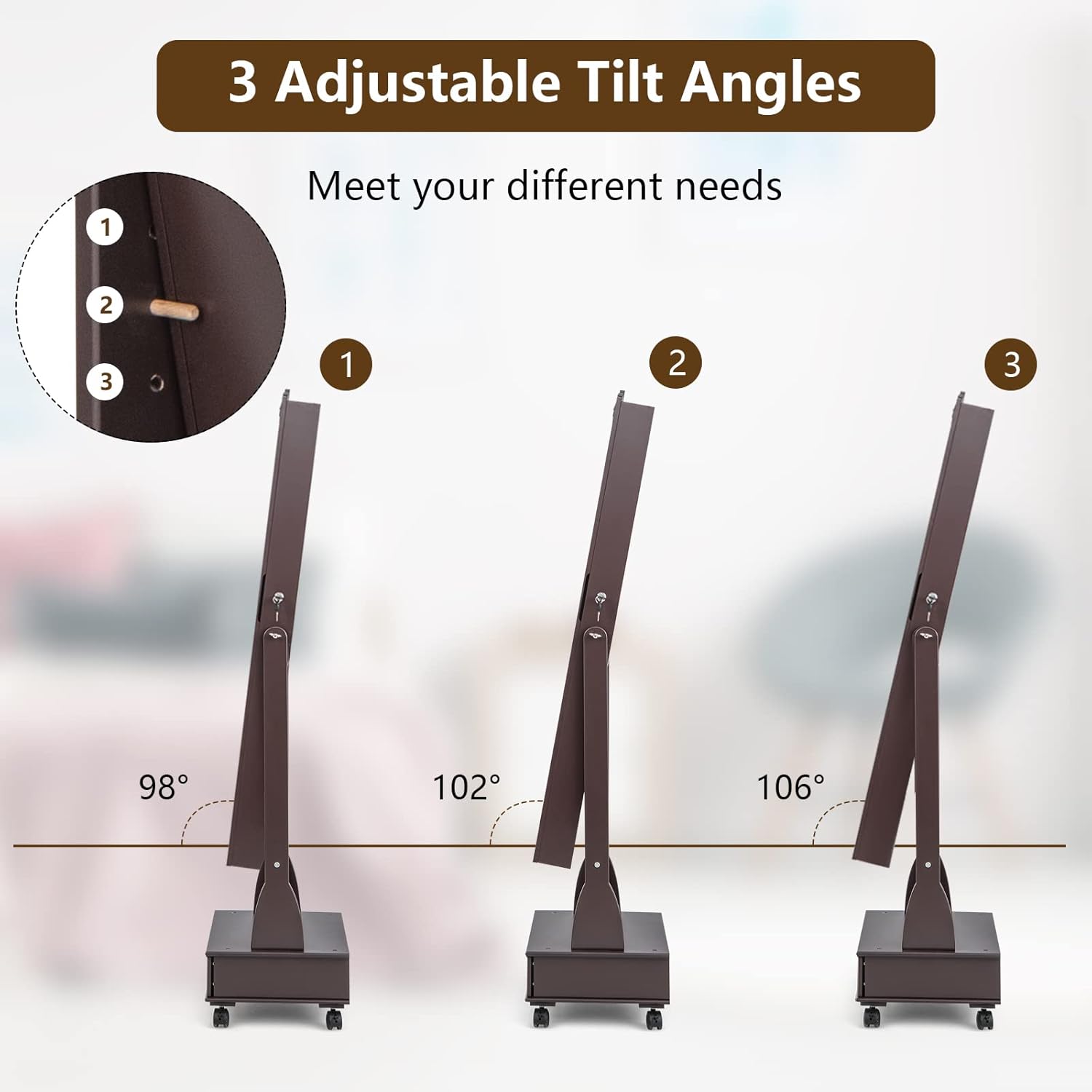
Image: A visual representation demonstrating the three possible tilt angles for the armoire's mirror, illustrating how to adjust it for different viewing preferences.
3. Accessing Internal Storage and LED Lights
Unlock the armoire door using one of the provided keys. As you open the door, the 6 LED lights inside will automatically turn on, illuminating the contents. The lights will turn off when the door is closed.
4. Organizing Your Jewelry
Utilize the various compartments for optimal organization:
- Earrings: Use the 100 earring slots and 45 earring holes.
- Rings: Place rings in the 72 ring slots.
- Necklaces: Hang necklaces on the 36 necklace hooks.
- Bracelets: Store bracelets on the 1 bracelet rod or use additional hooks.
- Other Accessories: Use the 4 shelves, 2 bottom drawers, and 1 storage pouch for watches, cosmetics, or other small items.
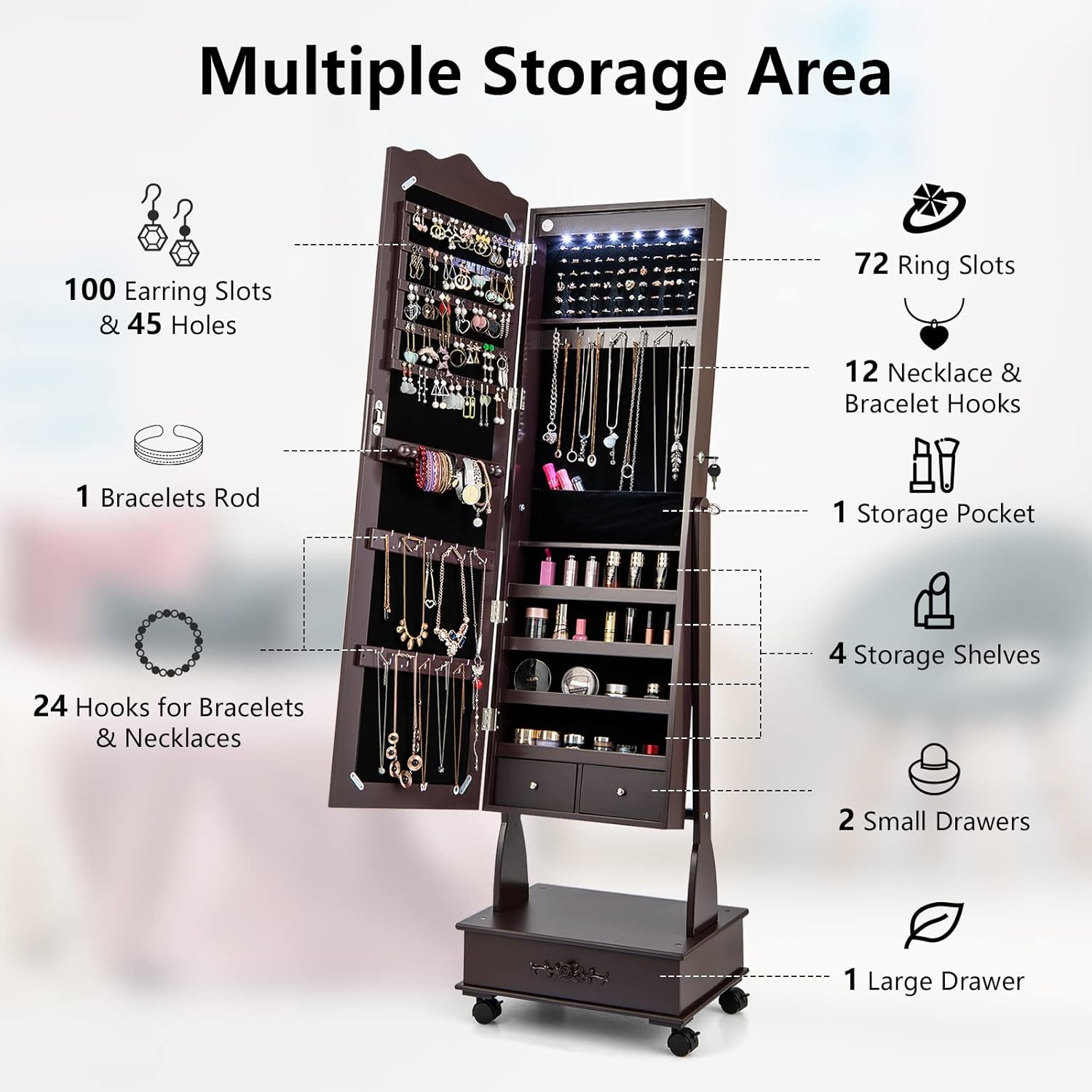
Image: An infographic detailing the extensive storage capacity of the armoire, showing the number of slots, hooks, shelves, and drawers available for different types of jewelry.
5. Locking the Armoire
To secure your valuables, close the armoire door and turn the key in the lock. Remove the key and store it in a safe place.
6. Moving the Armoire
The integrated wheels allow for easy relocation. Gently push or pull the armoire to move it. Ensure the path is clear of obstructions.
Maintenance
1. Cleaning the Exterior
Wipe the engineered wood and glass surfaces with a soft, damp cloth. Avoid abrasive cleaners or harsh chemicals that could damage the finish. Dry immediately with a clean, dry cloth.
2. Cleaning the Mirror
Use a standard glass cleaner and a lint-free cloth to clean the mirror surface. Spray cleaner onto the cloth, not directly onto the mirror, to prevent liquid from seeping into the edges.
3. Cleaning the Interior
The velvet lining can be gently vacuumed with a brush attachment or dabbed with a slightly damp cloth to remove dust or lint. Avoid excessive moisture.
4. Wheel Maintenance
Periodically check the wheels for any accumulated dust or hair and clean as needed to ensure smooth movement.
Troubleshooting
LED Lights Not Working
- Check Batteries: Ensure 3 AAA batteries are correctly installed with proper polarity and are not depleted. Replace if necessary.
- Door Sensor: Verify that the door sensor (small button near the hinge) is not obstructed and is making proper contact when the door is closed.
Door Not Closing/Locking Properly
- Obstruction: Check for any jewelry or items obstructing the door's path.
- Alignment: Ensure the armoire is on a level surface. If the door is misaligned, gently adjust the hinges if possible, or contact support.
- Lock Mechanism: Ensure the key is fully inserted and turned correctly. Do not force the lock.
Armoire Wobbles or Wheels Don't Roll Smoothly
- Level Surface: Ensure the armoire is placed on a completely flat and level surface.
- Tighten Screws: Check and tighten all screws, especially those securing the wheels and the main frame.
- Wheel Obstruction: Inspect wheels for any debris (hair, dust) that might be hindering movement. Clean as needed.
Specifications
| Model Number | CA-HG2280 |
| Brand | HAPPYGRILL |
| Color | Brown |
| Material | Engineered Wood, Glass |
| Style | Modern |
| Special Features | Jewelry Organizer, Large Capacity, LED Lights |
| Recommended Uses | Bracelet, Earring, Necklace, Ring |
| Product Dimensions (D x W x H) | 14" x 18" x 62" |
| Item Weight | 34 Pounds |
| Number of Drawers | 2 |
| Mounting Type | Freestanding |

Image: A technical drawing displaying the precise dimensions of the jewelry armoire, including overall height, width, depth, and internal compartment measurements.
Warranty and Support
For warranty information or technical support, please refer to the documentation included with your purchase or contact the seller directly. Keep your purchase receipt as proof of purchase for any warranty claims.


