
MOKKOM MK-173
MOKKOM Electric Dough and Stand Mixer User Manual
Model: MK-173 | Brand: MOKKOM
Introduction
Thank you for choosing the MOKKOM Electric Dough and Stand Mixer. This versatile appliance is designed to simplify your kitchen tasks, offering functions for kneading dough, whipping, and mixing. With its 5.2L capacity and robust 200W motor, it is ideal for preparing a variety of recipes, from bread and pasta to creams and batters. Please read this manual carefully before first use to ensure safe and optimal operation.
Product Components and Structure
Familiarize yourself with the various parts of your MOKKOM mixer for proper assembly and use.
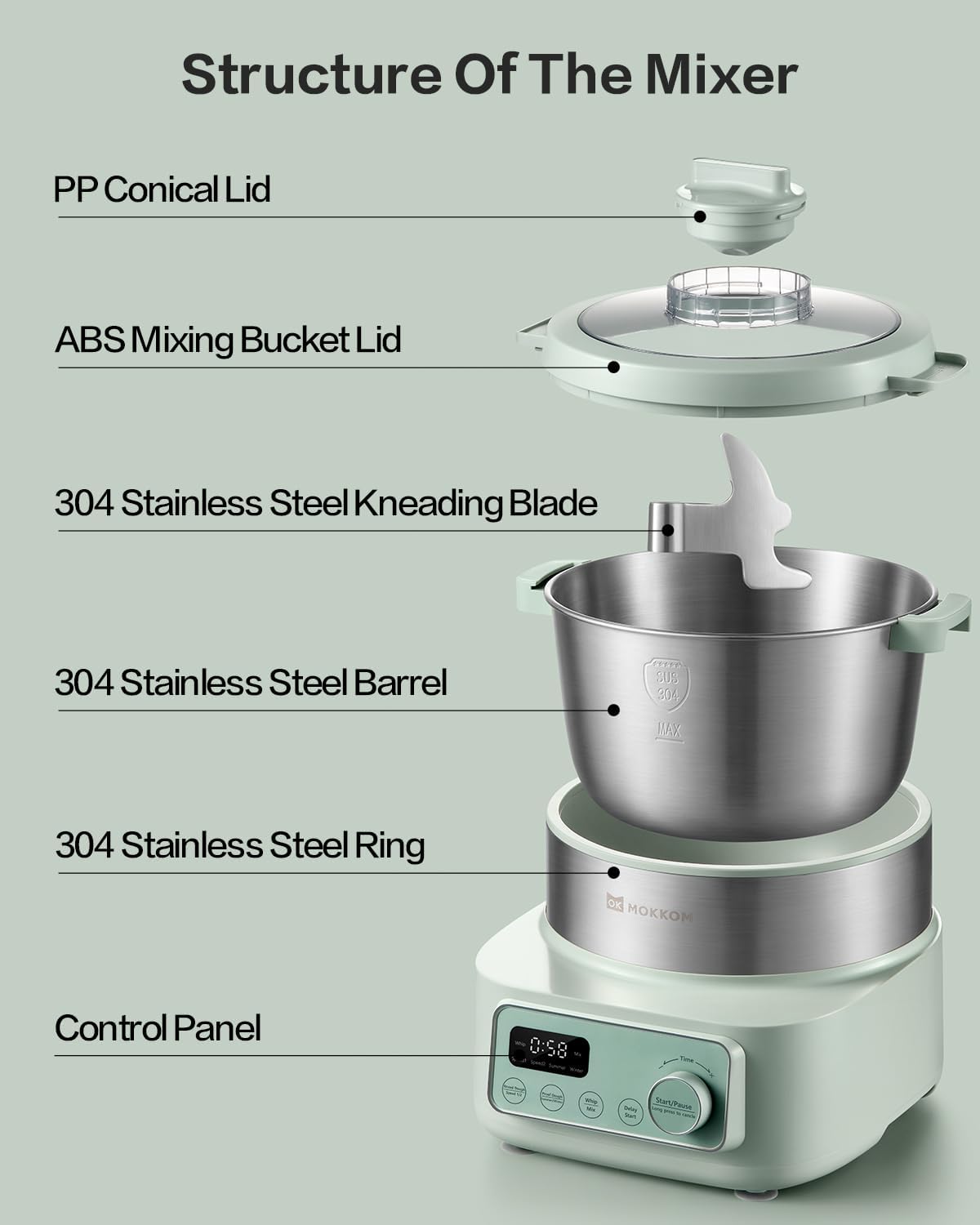
Image: Mixer Structure Diagram. This image illustrates the main components of the MOKKOM mixer, including the PP Conical Lid, ABS Mixing Bucket Lid, 304 Stainless Steel Kneading Blade, 304 Stainless Steel Barrel, 304 Stainless Steel Ring, and the Control Panel.

Image: Mixer and Included Accessories. This image displays the MOKKOM mixer along with its standard accessories: the Knead Dough Blade, Measuring Cup, Measuring Spoon, Egg Separator, Whisk, and Stuffing Blade.
Included Accessories:
- Knead Dough Blade: For kneading various types of dough, including bread, pizza, and pasta.
- Stuffing Blade: Ideal for mixing ingredients for salads, cookies, or crepes.
- Stainless Steel Whisk: Perfect for whipping butter, sauces, egg whites, and cake batters.
- Measuring Cup: For accurate measurement of liquid and dry ingredients.
- Measuring Spoon: For precise measurement of smaller quantities.
- Egg Separator: A convenient tool for separating egg yolks from whites.
Setup
- Unpacking: Carefully remove all components from the packaging. Retain packaging for future storage or transport.
- Initial Cleaning: Before first use, wash the stainless steel mixing bowl, kneading blade, stuffing blade, whisk, and lids with warm soapy water. Rinse thoroughly and dry completely. Wipe the main unit with a damp cloth. Do not immerse the main unit in water.
- Placement: Place the mixer on a stable, flat, and dry surface. Ensure there is adequate ventilation around the unit.
- Assemble Bowl: Place the 304 Stainless Steel Barrel securely into the base unit.
- Attach Blade/Whisk: Select the appropriate blade (Knead Dough Blade, Stuffing Blade, or Whisk) for your task and attach it firmly to the spindle inside the mixing bowl.
- Secure Lid: Place the ABS Mixing Bucket Lid and PP Conical Lid on top of the mixing bowl, ensuring they are properly aligned and secured.
- Power Connection: Plug the power cord into a suitable electrical outlet (120V).
Operating Instructions
The MOKKOM mixer offers various functions for different culinary needs. Always ensure the lid is securely in place before operating.
1. Kneading Dough
The mixer features an innovative 2-mode knead dough design, allowing for optimal results based on the type of dough.

Image: Knead Dough Speed Settings. This image highlights the control panel with options for Speed 1 and Speed 2 for kneading dough.
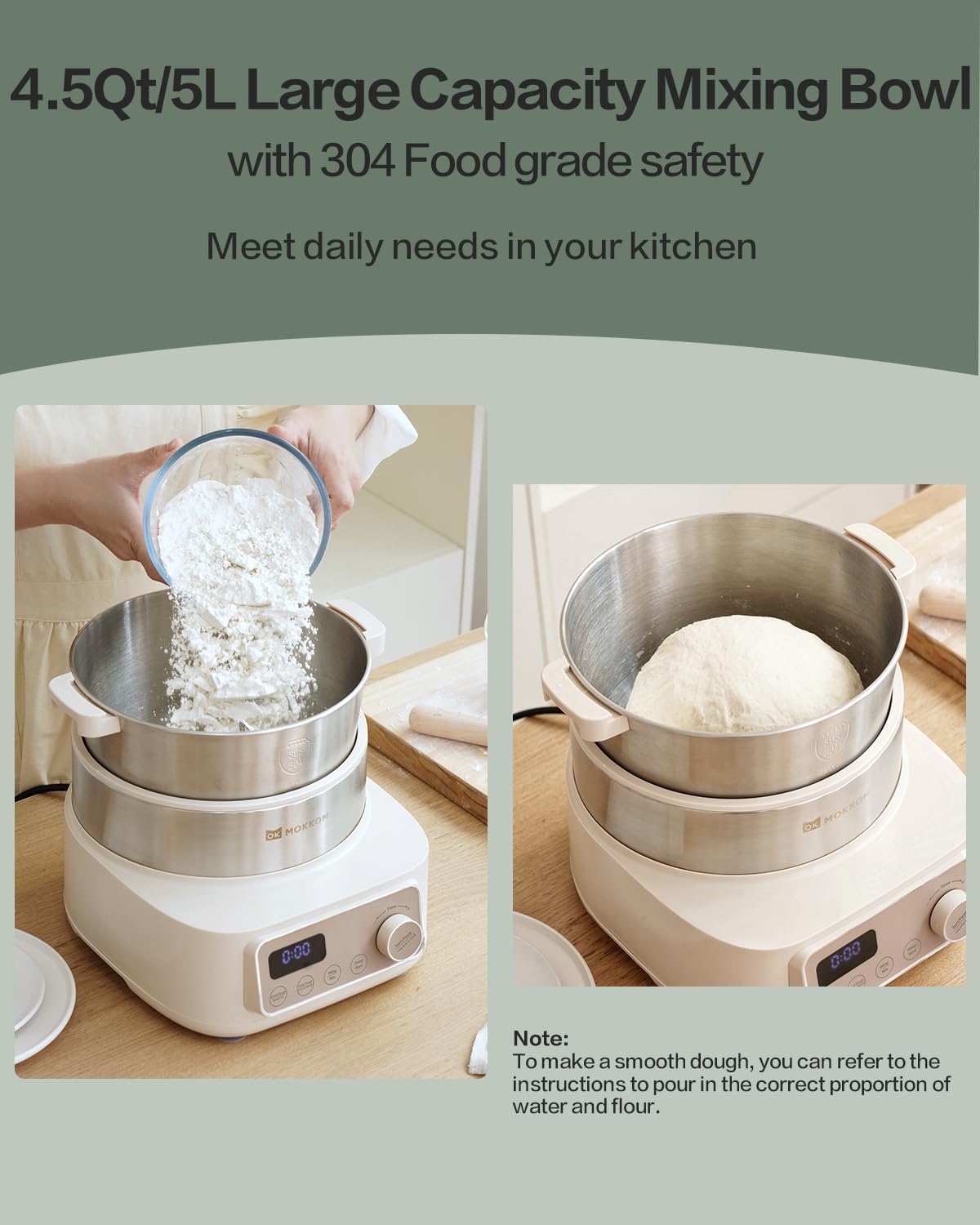
Image: Large Capacity Mixing Bowl. This image demonstrates the 5.2L mixing bowl, showing ingredients being added and a finished dough. Note: For smooth dough, refer to instructions for correct water and flour proportion.
- Speed 1: Ideal for making dough for noodles, dumplings, and Mantou.
- Speed 2: Recommended for making dough for bread, pizza, and toast.
- Procedure:
- Place the Knead Dough Blade in the bowl.
- Add your ingredients to the 5.2L stainless steel mixing bowl. Ensure the total weight of flour does not exceed 800g to prevent overflow and difficult cleaning.
- Secure the lid.
- Select the desired kneading speed (Speed 1 or Speed 2) using the 'Knead Dough Speed 1/2' button on the control panel.
- Set the kneading time using the 'Time' dial.
- Press 'Start/Pause' to begin kneading.
2. Dough Proofing
The mixer features an innovative 2-mode dough proofing design with integrated heating to quickly proof dough, especially useful in colder environments.
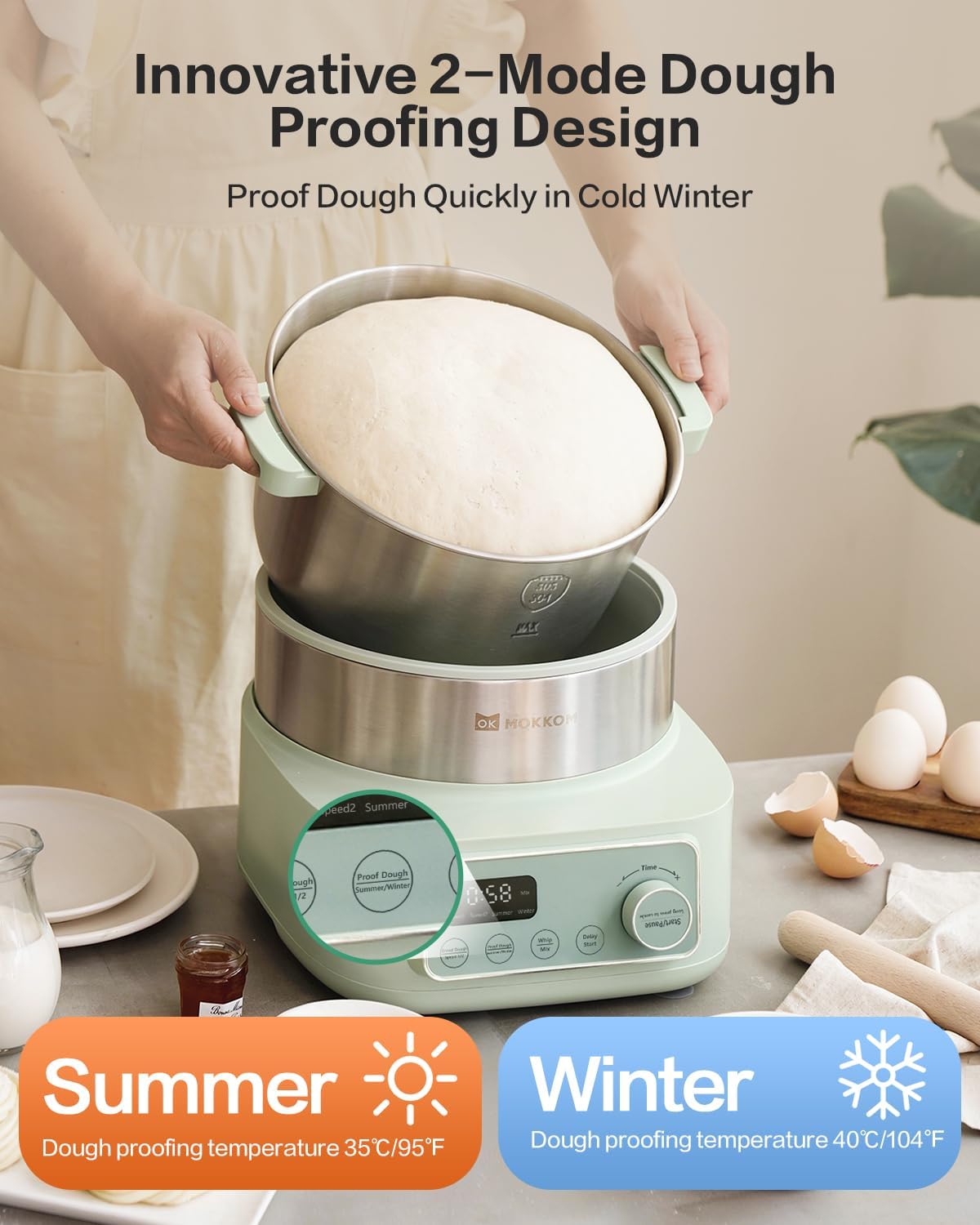
Image: Dough Proofing Modes. This image shows the two proofing modes: Summer (35°C/95°F) and Winter (40°C/104°F).

Image: 360° Three-dimensional Wrapped Heating. This image visually explains how the mixer provides even, all-around heating for optimal dough proofing.
- Summer Mode: Dough proofing temperature is 35°C (95°F).
- Winter Mode: Dough proofing temperature is 40°C (104°F).
- Procedure:
- After kneading, leave the dough in the mixing bowl.
- Secure the lid.
- Press the 'Proof Dough Summer/Winter' button to select the appropriate mode based on ambient temperature.
- Set the proofing time using the 'Time' dial.
- Press 'Start/Pause' to begin the proofing process. The heated bowl will maintain the selected temperature.
3. Whipping and Mixing
The MOKKOM mixer is a multi-functional appliance, capable of whipping and mixing various ingredients with specialized attachments.
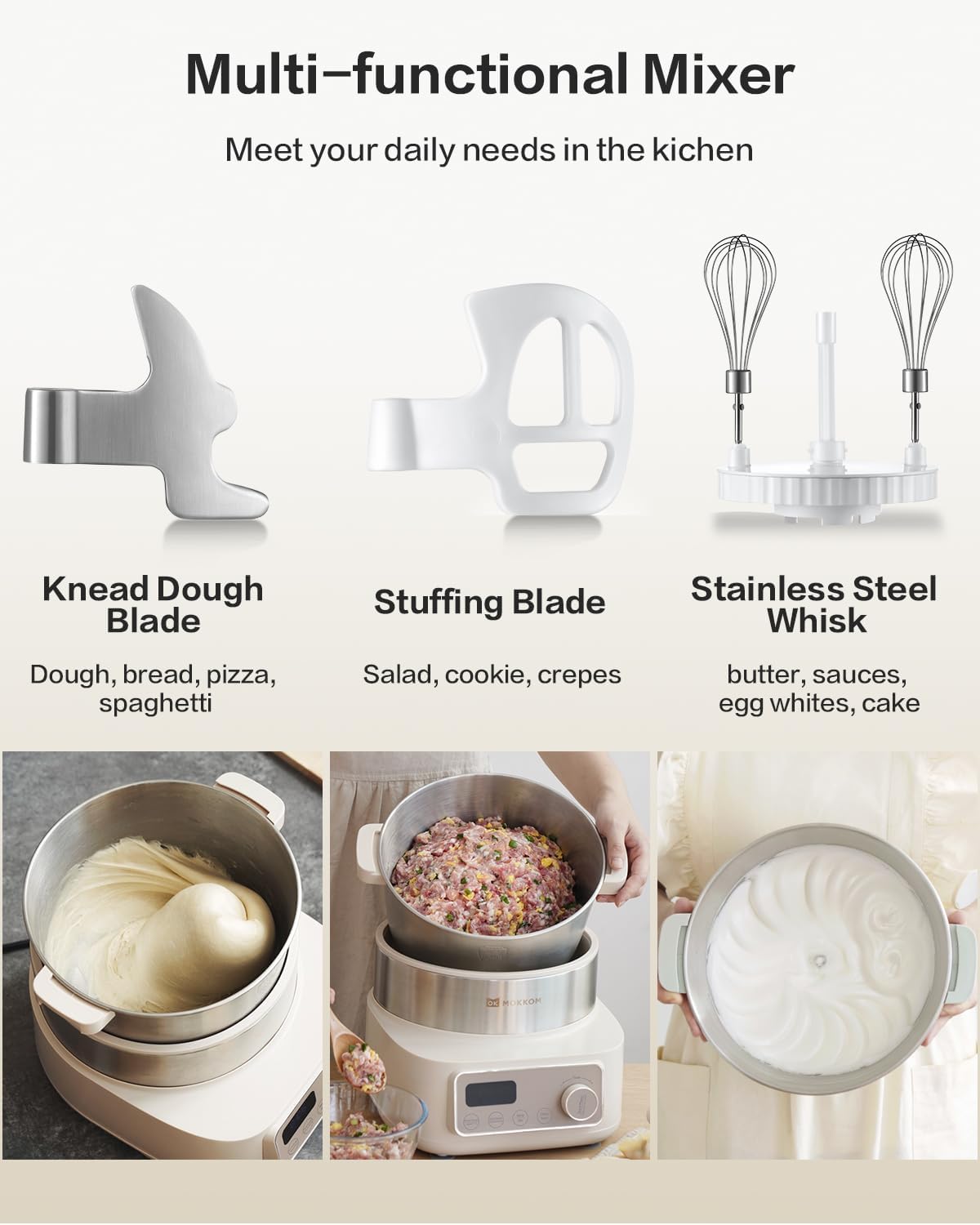
Image: Multi-functional Mixer Attachments. This image displays the three main attachments: Knead Dough Blade, Stuffing Blade, and Stainless Steel Whisk, along with examples of their uses.
- Using the Stuffing Blade: Ideal for mixing ingredients for salads, cookies, or crepes.
- Using the Stainless Steel Whisk: Perfect for whipping butter, sauces, egg whites, and cake batters.
- Procedure:
- Attach the appropriate blade (Stuffing Blade or Stainless Steel Whisk) to the spindle.
- Add your ingredients to the mixing bowl.
- Secure the lid.
- Press the 'Whip Mix' button on the control panel.
- Set the desired mixing time using the 'Time' dial.
- Press 'Start/Pause' to begin the whipping or mixing process.
4. Delay Start Function
The delay start function allows you to set a timer for the mixer to begin operation up to 24 hours in advance, perfect for preparing dough overnight.

Image: Delay Start Function. This image shows the 'Delay Start' button and the 'Time' dial used to set the delay duration.
- Procedure:
- Prepare your ingredients and place them in the mixing bowl with the appropriate attachment and lid secured.
- Select the desired function (Knead Dough, Proof Dough, or Whip Mix) and its settings (e.g., speed, proofing mode).
- Press the 'Delay Start' button.
- Use the 'Time' dial to set the desired delay duration (up to 24 hours).
- Press 'Start/Pause' to activate the delay timer. The mixer will begin operation after the set delay period.
- To cancel a delayed start, long press the 'Start/Pause' button.
Maintenance and Cleaning
Regular cleaning and maintenance will ensure the longevity and optimal performance of your MOKKOM mixer.
- Unplug Before Cleaning: Always unplug the mixer from the power outlet before cleaning.
- Detachable Parts: The stainless steel mixing bowl, kneading blade, stuffing blade, whisk, and lids are detachable and can be washed with warm soapy water. Rinse thoroughly and dry immediately to prevent water spots or corrosion. These parts are generally dishwasher safe, but hand washing is recommended for longevity.
- Main Unit: Wipe the exterior of the main unit and control panel with a soft, damp cloth. For stubborn stains, use a mild detergent. Do not use abrasive cleaners or scouring pads, as they may damage the surface.
- Do Not Immerse: Never immerse the main unit (motor base) in water or any other liquid.
- Drying: Ensure all parts are completely dry before reassembling or storing the mixer.
- Storage: Store the mixer and its accessories in a clean, dry place, away from direct sunlight and extreme temperatures.
Troubleshooting
If you encounter any issues with your MOKKOM mixer, please refer to the following common problems and solutions:
| Problem | Possible Cause | Solution |
|---|---|---|
| Mixer does not turn on. | Not plugged in; power outlet malfunction; unit not assembled correctly. | Ensure the power cord is securely plugged into a working outlet. Check if the bowl and lid are correctly seated. |
| Motor stops during operation. | Overload protection activated; ingredients too thick/heavy. | Unplug the unit, remove some ingredients, and let it cool down for 15-20 minutes before restarting. Ensure you are not exceeding the maximum flour capacity (800g). |
| Dough is not kneading properly. | Incorrect blade used; too much/too little liquid; exceeding capacity. | Ensure the Knead Dough Blade is used. Adjust liquid content as per recipe. Do not exceed 800g of flour. |
| Dough not proofing. | Incorrect temperature mode; yeast issue; lid not sealed. | Ensure the correct proofing mode (Summer/Winter) is selected. Check yeast activity. Ensure the lid is securely closed to maintain temperature. |
| Buttons on control panel unresponsive. | Minor sensitivity issue; temporary glitch. | Try tapping near the top of the button as some users have noted. Unplug and replug the unit to reset. |
If the problem persists after trying these solutions, please contact customer support.
Specifications
Detailed technical specifications for the MOKKOM Electric Dough and Stand Mixer.
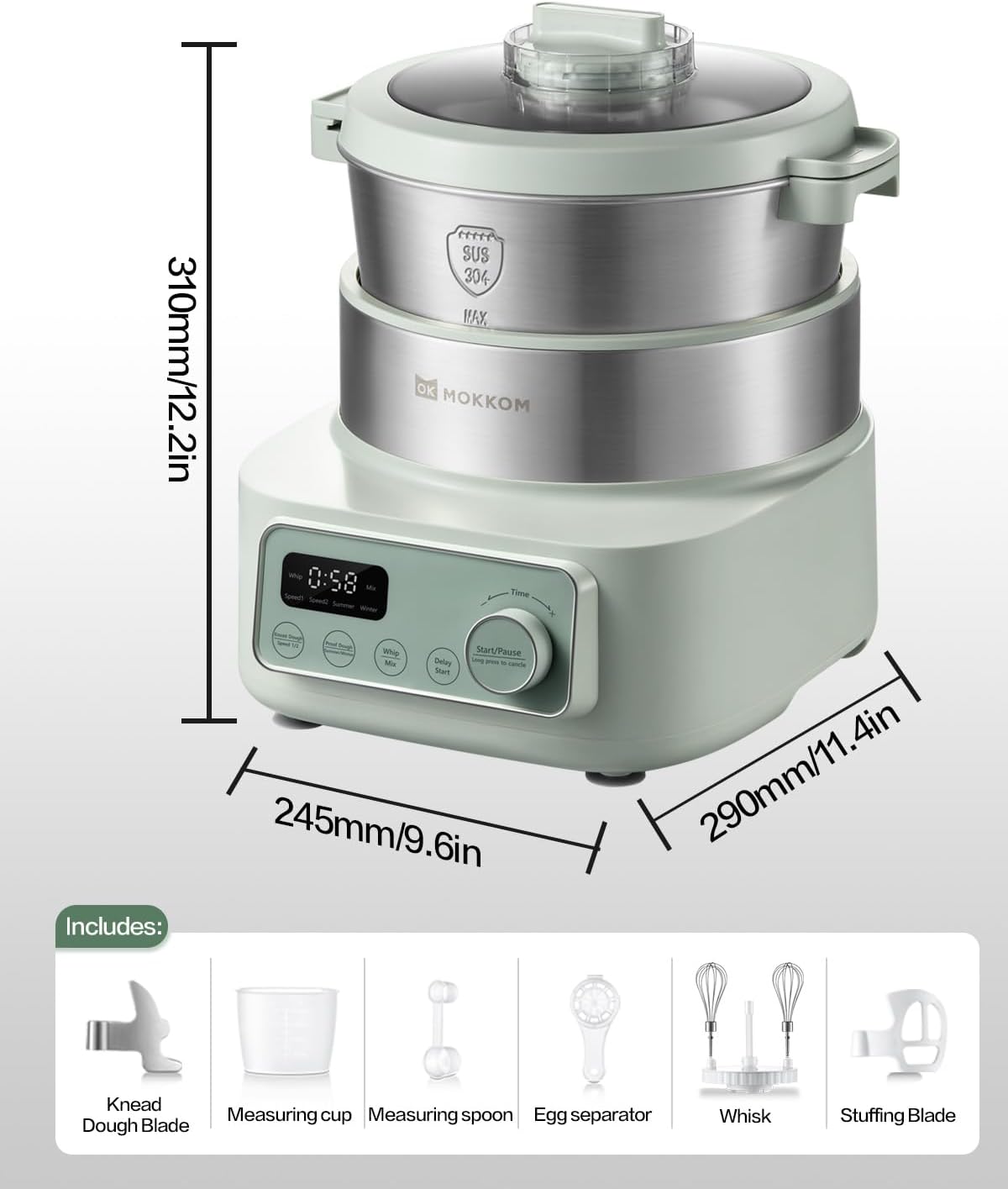
Image: Product Dimensions. This image provides the dimensions of the mixer: Height 310mm/12.2in, Width 245mm/9.6in, Depth 290mm/11.4in.
- Model Number: MK-173
- Brand: MOKKOM
- Color: Green
- Material: Stainless Steel (Bowl, Blade), ABS, PP
- Blade Material: Stainless Steel
- Capacity: 5.2 Liters (4.5 Quarts)
- Power: 200 Watts
- Voltage: 120V
- Number of Speeds: 2 (for kneading)
- Product Dimensions (L x W x H): 28.96 x 24.38 x 30.99 cm (11.4 x 9.6 x 12.2 inches)
- Item Weight: 5.08 Kilograms (11.2 lbs)
- Special Feature: Dough Proofing Function (Summer/Winter modes)
Warranty and Support
For warranty information, product support, or to purchase replacement parts, please refer to the documentation included with your purchase or visit the official MOKKOM website. Please note that specific warranty terms may vary by region and retailer.
For further assistance, you may contact MOKKOM customer service through their official channels. Keep your purchase receipt and model number (MK-173) handy when contacting support.
Ask a question about this manual
Ask about setup, troubleshooting, compatibility, parts, safety, or missing instructions. Manuals+ will review the question and use this page’s manual context to help answer it.