
VTOMAN PB-58
VTOMAN FlashSpeed 1500 Power Station & VS400 Solar Panel User Manual
Model: FlashSpeed 1500 (PB-58) + VS400
Brand: VTOMAN
1. Introduction
The VTOMAN FlashSpeed 1500 Power Station, paired with the VS400 Solar Panel, provides a reliable and versatile power solution for various needs, including home backup during blackouts, outdoor camping, RV/van travel, and emergency situations. This system features a durable LiFePO4 battery with a 1548Wh capacity and 1500W (3000W Peak) output, capable of powering up to 12 devices simultaneously. The included 400W solar panel offers efficient and eco-friendly recharging. This manual provides essential information for the safe and effective use of your VTOMAN power system.

Image: VTOMAN FlashSpeed 1500 Power Station and VS400 Solar Panel setup.
2. Key Features
- Versatile Output: Features up to 12 charging ports, including 3x 1500W (Peak 3000W) AC outlets, 2x 12V DC ports, 1x 12V car port, 4x USB-A ports, and 2x 100W USB-C ports.
- Fast Charging: Supports ultra-fast 1500W AC input, allowing the power station to recharge to full capacity in approximately one hour.
- Pass-Through Charging: Enables charging of connected devices while the power station itself is being recharged from a wall outlet or solar panels.
- Multiple Charging Methods: Can be recharged via wall outlet, solar panels (up to 400W), or car charger.
- Durable LiFePO4 Battery: Equipped with LiFePO4 batteries, offering over 3000 cycles to 80% capacity for extended lifespan and safety.
- Expandable Capacity: Capacity can be expanded up to 3096Wh with an additional battery (sold separately).
- Uninterrupted Power Supply (UPS): Provides seamless power transition in less than 20ms during power outages, protecting sensitive electronics.
- V-Beyond Technology: Allows the power station to power devices up to 3000W, suitable for resistive loads like space heaters and ovens.
- 12V Car Jump Starter: Capable of jump-starting vehicles, getting you back on the road quickly (jumper cable available individually).
- Portable & Foldable Solar Panel: The VS400 solar panel is designed for easy transport and setup, featuring IP67 waterproof rating and high energy conversion.
- Integrated LED Light: Features a 5-mode LED light for illumination in various situations (Low, Middle, High, Flash, SOS).

Image: Overview of FlashSpeed 1500 features including 1-hour full charge, LiFePO4 batteries, and expandable capacity.
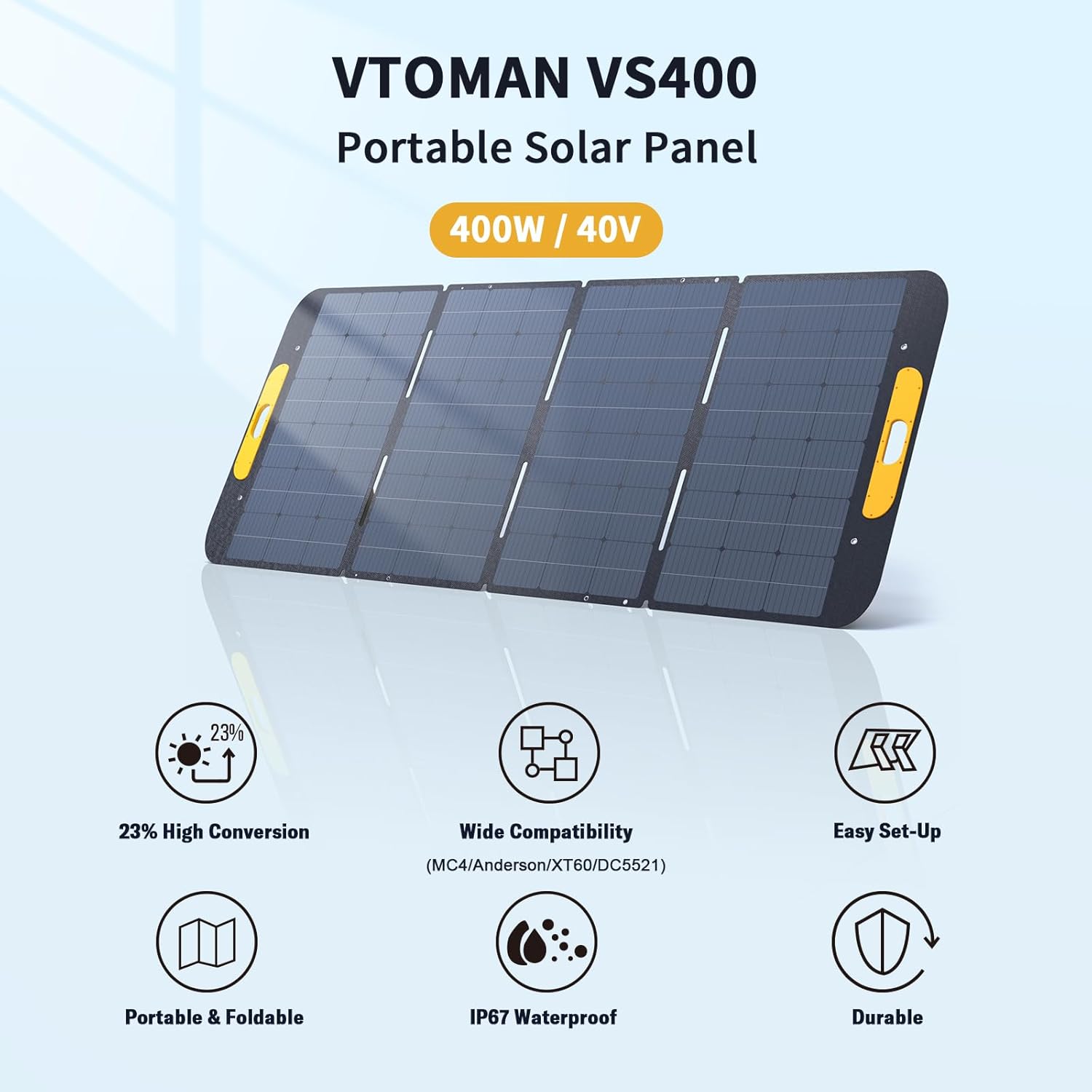
Image: Key features of the VS400 Portable Solar Panel, highlighting its 23% high conversion rate and IP67 waterproof design.

Image: Detailed diagram of the FlashSpeed 1500's output ports, including AC, DC, USB-A, and USB-C.

Image: Demonstration of the Uninterrupted Power Supply (UPS) feature, showing seamless power during an outage.

Image: The FlashSpeed 1500 being used as a 12V car jump starter.

Image: Close-up details of the solar panel, including adjustable kickstand, hanging hole, and magnetic design.
3. Setup Guide
3.1 Unpacking and Inspection
- Carefully remove all components from the packaging.
- Verify that all included items are present: 1x FlashSpeed 1500 Portable Power Station, 1x VS400 400W/40V Portable Solar Panel, and necessary charging cables.
- Inspect both the power station and solar panel for any visible damage. If damage is found, do not use and contact customer support.
3.2 Initial Charging (Power Station)
Before first use, fully charge the FlashSpeed 1500 Power Station using the AC wall outlet. This ensures optimal battery performance.
- Connect the AC charging cable to the AC input port on the power station.
- Plug the other end of the cable into a standard wall outlet (110V).
- The display will show the charging status. The power station will be fully charged in approximately 1 hour.

Image: The FlashSpeed 1500 being charged via an AC wall outlet, demonstrating its ultra-fast charging capability.
3.3 Solar Panel Setup (VS400)
The VS400 solar panel is designed for easy deployment and efficient solar charging.
- Unfold the VS400 solar panel and extend its adjustable kickstands.
- Position the panel in direct sunlight, ensuring no shadows fall on its surface. Adjust the angle for maximum sun exposure.
- Connect the solar panel's output cable to the solar input port on the FlashSpeed 1500 Power Station. The display will indicate solar charging.

Image: Various easy setup scenarios for the VS400 solar panel, including ground placement and hanging on a vehicle.
4. Operating Instructions
4.1 Powering On/Off
- To power on the unit, press and hold the main power button until the display illuminates.
- To power off, press and hold the main power button until the display turns off.
4.2 Using Output Ports
- AC Outlets: Press the AC button to enable AC output. Plug in your devices (e.g., laptops, small appliances). Ensure total wattage does not exceed 1500W (or 3000W with V-Beyond technology for resistive loads).
- DC Ports (12V): Press the DC button to enable DC output. Connect 12V devices.
- USB Ports (USB-A, USB-C): USB ports are typically always on when the unit is powered. Connect your USB-compatible devices for charging.
4.3 Charging the Power Station
The FlashSpeed 1500 supports multiple input methods:
- AC Wall Charging: As described in Section 3.2.
- Solar Charging: As described in Section 3.3.
- Car Charging: Connect the car charger cable to the power station's input port and plug it into your vehicle's 12V car outlet.

Image: Visual representation of the three primary charging methods: AC wall, solar panel, and 12V car charger.
4.4 Uninterrupted Power Supply (UPS) Function
When the power station is connected to an AC wall outlet and has devices plugged into its AC outputs, it can function as an Uninterrupted Power Supply (UPS). In case of a power outage, the power station will automatically switch to battery power within 20 milliseconds, ensuring continuous operation for connected devices.
4.5 LED Light Operation
The integrated LED light has 5 modes:
- Press the LED light button once for Low brightness.
- Press again for Middle brightness.
- Press again for High brightness.
- Press again for Flash mode.
- Press again for SOS mode.
- Press and hold to turn off the LED light from any mode.

Image: The FlashSpeed 1500's 5-mode LED light in use, providing illumination for various settings.
4.6 Car Jump Start Function
The FlashSpeed 1500 can be used to jump-start a 12V car battery. Ensure you have the appropriate jumper cables (sold separately).
- Connect the red (positive) clamp of the jumper cable to the positive (+) terminal of the car battery.
- Connect the black (negative) clamp to the negative (-) terminal of the car battery.
- Connect the other end of the jumper cable to the dedicated jump start port on the power station.
- Follow the instructions on the power station's display for initiating the jump start.
- Once the car starts, disconnect the jumper cables in reverse order.
5. Maintenance
5.1 Cleaning
- Wipe the power station and solar panel with a dry, soft cloth.
- Do not use abrasive cleaners or solvents.
- Keep ports free of dust and debris.
5.2 Storage
- Store the power station in a cool, dry place, away from direct sunlight and extreme temperatures.
- For long-term storage, it is recommended to charge the power station to 50-80% every 3-6 months to maintain battery health.
- Ensure the solar panel is clean and dry before folding and storing.
5.3 Battery Care
The FlashSpeed 1500 uses LiFePO4 batteries, known for their longevity. To maximize battery life:
- Avoid fully discharging the battery frequently.
- Avoid prolonged exposure to extreme heat or cold.
- Use only the provided or approved charging accessories.
6. Troubleshooting
| Problem | Possible Cause | Solution |
|---|---|---|
| Power station not turning on. | Battery fully discharged; power button not held long enough. | Charge the unit; press and hold the power button for 3-5 seconds. |
| AC output not working. | AC output not enabled; overload protection activated. | Press the AC button to enable; reduce connected load; restart unit. |
| Solar panel not charging. | Insufficient sunlight; incorrect connection; panel dirty. | Ensure direct sunlight; check cable connections; clean panel surface. |
| Unit overheating. | Poor ventilation; excessive load. | Ensure proper ventilation; reduce connected load. |
| Display shows error code. | Internal fault. | Refer to the full user manual or contact customer support. |
For more detailed troubleshooting or issues not listed, please refer to the complete user manual or contact VTOMAN customer support.
7. Specifications
| Feature | Detail |
|---|---|
| Brand | VTOMAN |
| Model Name | FlashSpeed 1500 + VS400 |
| Item Model Number | PB-58 |
| Wattage (Rated) | 1500 watts |
| Output Wattage (Peak) | 3000 watts |
| Battery Capacity | 1548Wh |
| Battery Type | LiFePO4 |
| Total Power Outlets | 12 |
| AC Output | 3x 110V/1500W Pure Sine Wave |
| DC Output | 2x 12V/10A DC5521, 1x 12V Car Cigarette Lighter Port |
| USB-A Output | 4x (1x 18W Quick Charge + 3x 5V/2.4A) |
| USB-C Output | 2x 100W Quick Charge Port (200W Total) |
| Power Source | Wall Outlet / Solar Panel / Car / Generator |
| AC Charging Time | Approx. 1 hour (0-100%) |
| Solar Panel (VS400) | 400W/40V, 23% High Energy Conversion Rate, IP67 Waterproof |
| Product Dimensions | 15.6"L x 10.4"W x 11.2"H |
| Item Weight | 41.7 pounds |
| Special Features | 400W Solar Charge, Durable LFP Batteries, Pass-Through Charging, One Hour to Full Charge, Uninterrupted Power Supply (UPS) |
8. Product Video
Video: Official product video demonstrating the VTOMAN FlashSpeed 1500 Power Station's features, including fast charging, portability for outdoor use, and UPS functionality for home backup.
9. Warranty & Support
VTOMAN provides a 2-year warranty for all VTOMAN portable power stations and solar panels. This warranty covers defects in materials and workmanship under normal use.
For any questions, technical assistance, warranty claims, or support needs, please contact VTOMAN customer support. You can typically find contact information on the VTOMAN official website or through your purchase platform.
Please have your product model number (FlashSpeed 1500 / PB-58) and proof of purchase ready when contacting support.
Related documentsPB-58


Ask a question about this manual
Ask about setup, troubleshooting, compatibility, parts, safety, or missing instructions. Manuals+ will review the question and use this page’s manual context to help answer it.