
USARMT Universal Remote Control
Universal Remote Control Instruction Manual
Model: Universal Remote Control (ASIN: B0CMPKRP6Z)
Introduction
This instruction manual provides essential information for the proper use and maintenance of your USARMT Universal Remote Control. Designed for compatibility with a wide range of Roku Smart TVs, this remote offers convenient access to your favorite streaming services and TV functions. Please read this manual thoroughly before use to ensure optimal performance and longevity of your device.
Product Overview
The USARMT Universal Remote Control is a pre-programmed device designed to work seamlessly with various Roku Smart TV brands. This product typically comes as a 2-pack, providing a convenient backup or an additional remote for another room.

Image: Two USARMT Universal Remote Controls, showcasing the typical 2-pack offering. Both remotes are black with a blue directional pad and dedicated buttons for Netflix, Prime Video, Hulu, and Disney+.
Key Features:
- Wide Compatibility: Compatible with Roku TVs from brands such as TCL, JVC, RCA, Philips, ONN, Element, LG, Westinghouse, Hisense, Sharp, Insignia, Toshiba, Sanyo, Magnavox, Hitachi, and Haier.
- Pre-programmed: No setup or programming is required. Simply insert batteries, and the remote is ready for use.
- Quick Access Buttons: Dedicated buttons for popular streaming services including Netflix, Prime Video, Hulu, and Disney+.
- Ergonomic Design: Designed for comfortable handling and ease of use.
Important Note: This remote control is NOT compatible with Roku Streaming Sticks or Roku Streaming Boxes.
Setup
Setting up your USARMT Universal Remote Control is a straightforward process as it comes pre-programmed for immediate use with compatible Roku TVs.
Battery Installation:
- Locate the battery compartment on the back of the remote control.
- Slide the battery cover downwards or press the latch to open the compartment.
- Insert two AAA batteries (not included) into the compartment, ensuring the positive (+) and negative (-) terminals align correctly with the indicators inside.
- Close the battery cover by sliding it back into place until it clicks securely.
Once batteries are installed, the remote is ready to operate your Roku Smart TV. No additional pairing or programming steps are required.
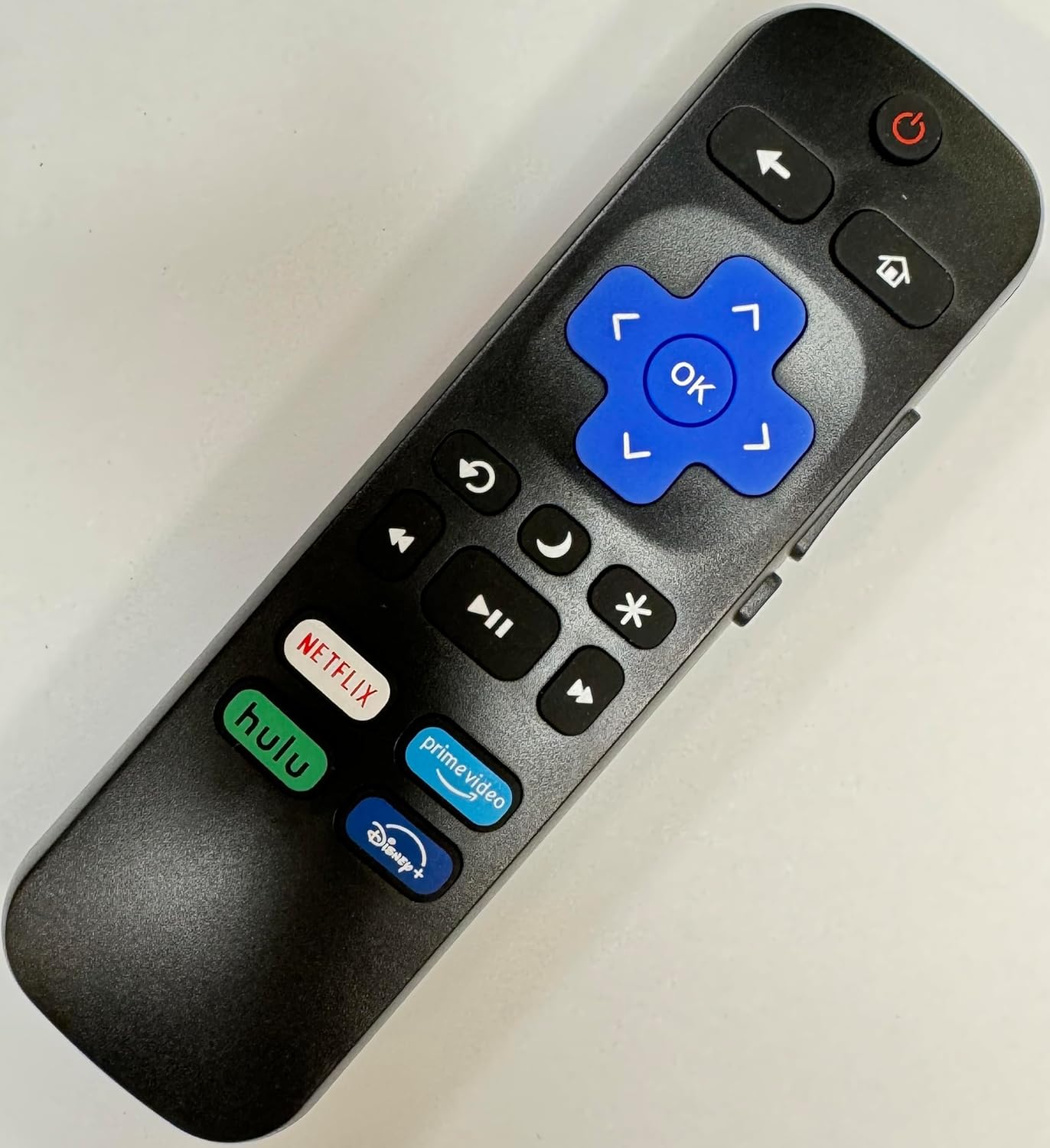
Image: Side view of the USARMT Universal Remote Control, illustrating its ergonomic design and the location of the battery compartment on the rear.
Operating Instructions
This section details the functions of the buttons on your USARMT Universal Remote Control.
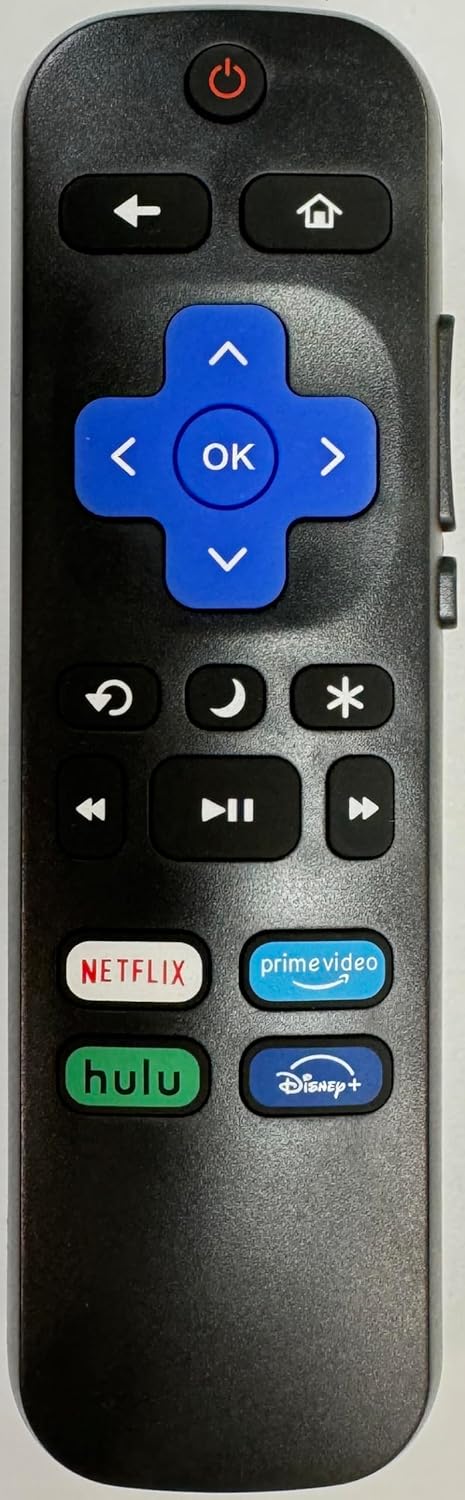
Image: Front view of the USARMT Universal Remote Control, providing a clear view of all buttons and their labels.
| Button | Function |
|---|---|
| Power (⏻) | Turns the TV on or off. |
| Back (←) | Returns to the previous screen or menu. |
| Home (⌂) | Navigates to the Roku Home screen. |
| Directional Pad (Up, Down, Left, Right) | Navigates through menus and options. |
| OK | Confirms a selection or opens an item. |
| Instant Replay (↺) | Replays the last few seconds of video. |
| Sleep (☽) | Activates the sleep timer function (if supported by TV). |
| Star (★) | Accesses options or settings within an app or menu. |
| Rewind (⏪) | Rewinds video playback. |
| Play/Pause (⏯) | Plays or pauses video playback. |
| Fast Forward (⏩) | Fast forwards video playback. |
| Netflix | Directly launches the Netflix application. |
| Prime Video | Directly launches the Prime Video application. |
| Hulu | Directly launches the Hulu application. |
| Disney+ | Directly launches the Disney+ application. |
To use the remote, point it directly at your Roku Smart TV. Ensure there are no obstructions between the remote and the TV's infrared receiver.
Maintenance
Proper care and maintenance will extend the life of your remote control.
- Cleaning: Use a soft, dry cloth to clean the surface of the remote. Do not use liquid cleaners or abrasive materials.
- Battery Replacement: Replace batteries when the remote's responsiveness decreases or it stops functioning. Always replace both batteries at the same time with new ones of the same type (AAA).
- Storage: When not in use for extended periods, store the remote in a cool, dry place. Remove batteries if storing for several months to prevent leakage.
- Avoid Damage: Do not drop the remote, expose it to extreme temperatures, or immerse it in water.
Troubleshooting
If you encounter issues with your remote control, try the following troubleshooting steps:
- Remote Not Responding:
- Check if the batteries are inserted correctly with the correct polarity (+/-).
- Replace old batteries with fresh AAA batteries.
- Ensure there are no obstructions between the remote and the TV's infrared sensor.
- Confirm that the remote is pointed directly at the TV.
- Specific Buttons Not Working:
- Clean the remote's surface, especially around the unresponsive buttons, to remove any dirt or debris.
- If only streaming service buttons (Netflix, Hulu, etc.) are not working, ensure your TV is connected to the internet and the apps are installed and updated.
- Remote Not Compatible:
- Verify that your TV is a Roku Smart TV and not a Roku Streaming Stick or Roku Streaming Box. This remote is designed for Roku TVs only.
- Check if your TV brand is listed among the compatible brands in the Product Overview section.
If issues persist after following these steps, please refer to the Warranty and Support section for further assistance.
Specifications
| Attribute | Detail |
|---|---|
| Brand | USARMT |
| Model | Universal Remote Control |
| Product Dimensions | 6 x 2 x 0.5 inches |
| Item Weight | 3 ounces |
| Color | Black |
| Special Feature | Ergonomic |
| Max Number of Supported Devices | 1 (Roku Smart TV) |
| Compatible Devices | Television (Roku Smart TVs) |
| Batteries Required | 2 x AAA (not included) |
Warranty and Support
Specific warranty information for the USARMT Universal Remote Control is typically provided by the manufacturer or seller at the time of purchase. Please refer to your purchase documentation or the product listing for details regarding warranty coverage and terms.
For technical support or further assistance, please contact the seller or manufacturer directly through the platform where the product was purchased. Have your product model (Universal Remote Control) and ASIN (B0CMPKRP6Z) ready when contacting support.
Ask a question about this manual
Ask about setup, troubleshooting, compatibility, parts, safety, or missing instructions. Manuals+ will review the question and use this page’s manual context to help answer it.