
Introduction
Thank you for choosing the Safewell SWF1818III2 Digital Safe. This safe is designed to provide secure storage for your valuable belongings. It features a robust construction and an electronic digital lock with a programmable code for enhanced security. Please read this manual carefully before setting up and operating your safe to ensure proper use and maximum security.
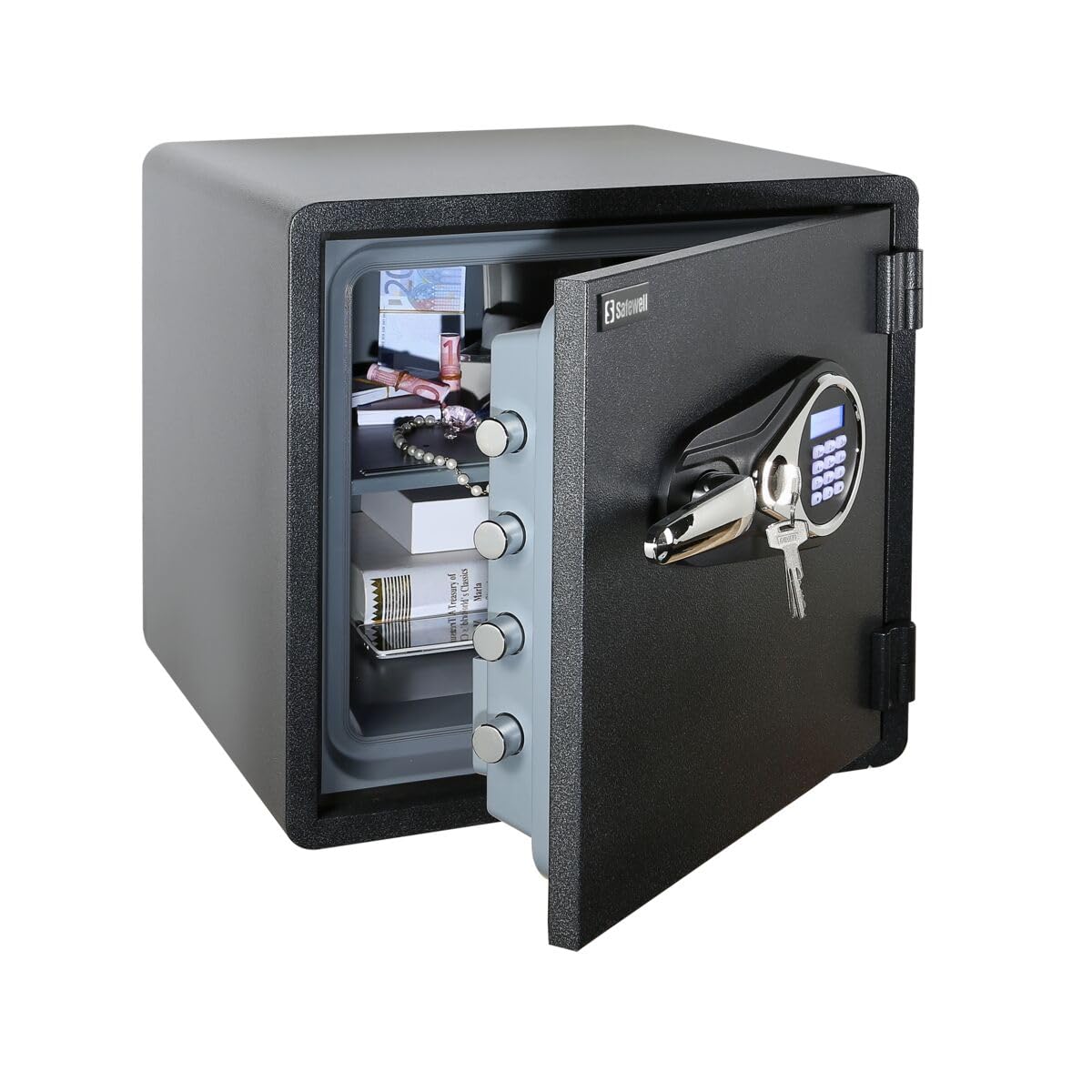
Image: Front view of the Safewell SWF1818III2 Digital Safe, showing the electronic keypad, handle, and overall black finish.
Safety Information
- Always keep your safe's code confidential and stored in a secure location away from the safe.
- Do not store the emergency override keys inside the safe. Keep them in a separate, secure location.
- Ensure the safe is installed on a stable, level surface. For added security, it is recommended to bolt the safe to the floor.
- This safe is fire resistant.
- This safe is NOT water resistant, as per detailed specifications. Avoid exposing it to water or high humidity.
- Keep children away from the safe and its contents.
Package Contents
Please check the package for the following items:
- Safewell SWF1818III2 Digital Safe Unit
- Emergency Override Keys (2 pcs)
- User Manual (this document)
- Mounting Hardware (bolts for floor installation)
- Batteries (if included, typically AA or AAA)
If any items are missing or damaged, please contact customer support immediately.
Setup
1. Unpacking and Placement
- Carefully remove the safe from its packaging.
- Place the safe in your desired location. Ensure the surface is flat and stable.
- Keep the safe away from direct sunlight, heat sources, and areas with high humidity.
2. Battery Installation
- Locate the battery compartment, usually on the inside of the safe door.
- Insert the required batteries (typically 4 x AA batteries, not always included) according to the polarity indicators (+/-).
- Close the battery compartment cover securely.
3. Securing the Safe (Optional but Recommended)
For enhanced security, it is highly recommended to bolt the safe to the floor.
- Mark the drilling points on the floor through the pre-drilled holes inside the safe.
- Move the safe and drill pilot holes in the marked locations.
- Position the safe back over the holes and secure it using the provided mounting hardware (bolts, washers).
- Tighten all bolts firmly.
Operating Instructions
1. Opening the Safe for the First Time (Using Emergency Key)
Before setting your personal code, you may need to open the safe using the emergency key.
- Locate the emergency keyhole, usually hidden behind a cover on the keypad panel.
- Insert the emergency key and turn it clockwise.
- While the key is turned, rotate the handle to open the safe door.
- Remove the key and store it in a safe place outside the safe.
2. Setting Your Personal Code
With the safe door open:
- Press the red or green reset button located on the inside of the safe door (near the hinge). You will hear a beep and the indicator light on the keypad will flash.
- Within 5 seconds, enter your desired 1 to 8 digit code on the keypad.
- Press the "#" or "B" button to confirm. You will hear a confirmation beep.
- Test your new code with the door open before closing it.
3. Opening the Safe (Using Personal Code)
- Enter your personal 1 to 8 digit code on the keypad.
- Press the "#" or "B" button. The green light will illuminate, and you will hear a beep.
- Within 5 seconds, turn the handle clockwise to open the safe door.
4. Closing and Locking the Safe
- Close the safe door firmly.
- Turn the handle counter-clockwise to lock the safe.
Maintenance
1. Battery Replacement
When the batteries are low, the indicator light may flash or the keypad may not respond. Replace batteries promptly.
- Open the safe using your code or the emergency key.
- Locate the battery compartment on the inside of the door.
- Remove the old batteries and insert new ones, ensuring correct polarity.
- Close the battery compartment. Your code should remain stored.
2. Cleaning
Wipe the safe's exterior with a soft, damp cloth. Do not use abrasive cleaners or solvents, as they may damage the finish or electronic components.
Troubleshooting
| Problem | Possible Cause | Solution |
|---|---|---|
| Safe does not open with code. | Incorrect code entered, low batteries, keypad malfunction. | Re-enter code carefully. Replace batteries. Use emergency key to open. |
| Keypad does not respond. | Dead batteries. | Replace batteries. |
| Forgotten code. | Code forgotten. | Use emergency key to open the safe, then reset the code. |
| Alarm sounds unexpectedly. | Tampering attempt, incorrect entries. | Ensure correct code entry. The safe has a visual alarm. |
Specifications
- Brand: Safewell
- Model Number: SWF1818III2
- ASIN: B0CMP8WM81
- Lock Type: Electronic Digital Lock
- Material: Solid Alloy Steel
- Color: Black
- Product Dimensions (Depth x Width x Height): 48.3 cm x 47 cm x 45.7 cm
- Internal Dimensions (Width x Depth x Height): 330 mm x 325 mm x 330 mm
- Installation Type: Floor Standing
- Fire Resistance: Yes
- Water Resistance: No (as per detailed specifications)
- Alarm: Visual Alarm
- Included Components: Safe
- Shipping Dimensions: 48 x 47 x 46 cm; 4 kg
- First Available Date: November 2, 2023
Warranty and Support
For warranty information or technical support, please refer to the warranty card included with your product or contact Safewell customer service. Keep your purchase receipt as proof of purchase.
For further assistance, please visit the official Safewell website or contact your local distributor.
