
Introduction
This manual provides instructions for the proper setup, operation, and maintenance of your Marvo MIC-05 USB Powered Microphone. Please read this manual thoroughly before use to ensure optimal performance and longevity of the device.
Package Contents
- 1 x Marvo MIC-05 USB Powered Microphone
Product Features
- Omnidirectional pickup pattern for versatile audio capture.
- Dual-function Mute-RGB button for microphone muting and backlight control.
- EQ button for quick access to voice-magic functions, including Boy, Girl, Older, and Baby voice modes.
- Flexible microphone boom for adjustable positioning.
- Integrated knob for precise volume control.
- Built-in 1-port USB hub for connecting additional devices.
- 3.5 mm AUX output interface for headphone monitoring.
- USB connectivity for easy plug-and-play setup.
Product Overview
Familiarize yourself with the components of your Marvo MIC-05 microphone:

Figure 1: Front View. Front view of the Marvo MIC-05 microphone base, highlighting the central volume control knob, the Mute-RGB button to its left, and the EQ button to its right. The flexible microphone boom extends upwards from the rear of the base.

Figure 2: Rear View. Rear view of the Marvo MIC-05 microphone base, showing the integrated USB hub port and the 3.5 mm AUX output interface. The main USB cable for power and data extends from the center.
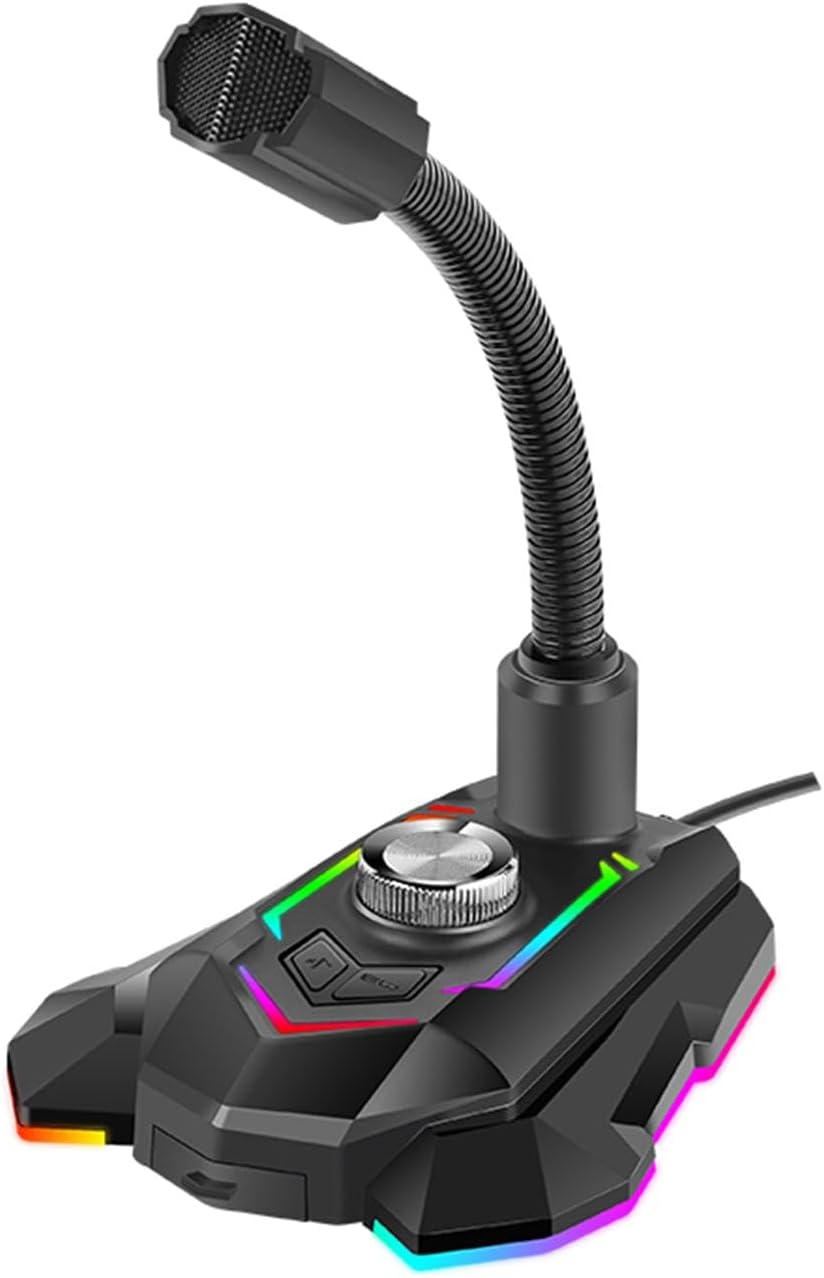
Figure 3: Side View. Side view of the Marvo MIC-05 microphone, illustrating the flexible microphone boom and the omnidirectional microphone head. The base features RGB lighting accents.
Setup Instructions
- Place the Marvo MIC-05 microphone on a stable, flat surface.
- Connect the microphone's integrated USB cable to an available USB port on your computer or laptop.
- The microphone is designed for plug-and-play operation and should be automatically recognized by your operating system (Windows, macOS, etc.).
- Navigate to your computer's sound settings and select "Marvo MIC-05" as your default audio input device.
- (Optional) If you wish to monitor your audio directly, connect your headphones to the 3.5 mm AUX output interface located at the rear of the microphone base.
Operating Instructions
Volume Control
Rotate the central knob on the microphone base clockwise to increase the microphone's output volume and counter-clockwise to decrease it.
Mute and RGB Lighting Control
- Mute/Unmute: Press the Mute-RGB button (located to the left of the volume knob) once to mute or unmute the microphone. An indicator light may change to show the mute status.
- RGB Lighting: Press and hold the Mute-RGB button for approximately 3 seconds to cycle through different RGB lighting modes or to turn the lighting off.
EQ Voice-Magic Functions
Press the EQ button (located to the right of the volume knob) to cycle through the available voice-magic functions. These include Boy, Girl, Older, and Baby voice modes, altering your voice output in real-time.
USB Hub Usage
The integrated USB port at the rear of the microphone base can be used to connect low-power USB devices such as a mouse, keyboard, or USB flash drive.
Maintenance
- Clean the microphone's exterior with a soft, dry, lint-free cloth. Do not use liquid cleaners or abrasive materials.
- Avoid exposing the microphone to excessive moisture, dust, or extreme temperatures.
- Do not attempt to disassemble or modify the microphone, as this will void the warranty and may cause damage.
- Store the microphone in a cool, dry place when not in use.
Troubleshooting
No Sound or Microphone Not Detected
- Ensure the USB cable is securely connected to both the microphone and your computer.
- Try connecting the microphone to a different USB port on your computer.
- Verify that "Marvo MIC-05" is selected as the default input device in your computer's sound settings.
- Check if the microphone is muted by pressing the Mute-RGB button.
- Restart your computer.
Distorted or Unclear Audio
- Adjust the microphone's volume knob to an appropriate level.
- Ensure the microphone is positioned at an optimal distance from the sound source (typically 6-12 inches).
- Check your computer's audio input levels and adjust them if they are too high or too low.
- Avoid speaking directly into the microphone head; speak across it.
RGB Lighting Not Functioning
- Ensure the microphone is properly connected and receiving power via USB.
- Press and hold the Mute-RGB button to cycle through lighting modes or to turn the lighting on.
Specifications
| Brand | MARVO |
| Model | MIC-05 |
| Polar Pattern | Omnidirectional |
| Connectivity Technology | USB |
| Connector Type | USB |
| Special Feature | Volume Control |
| Compatible Devices | Headphone, Laptop, Personal Computer, Smartphone |
| Microphone Form Factor | Table Array |
| Power Source | Corded Electric |
| Item Weight | 14.1 ounces |
| Package Dimensions | 6.69 x 5.31 x 4.92 inches |
Warranty and Support
For detailed warranty information, technical support, or service inquiries regarding your Marvo MIC-05 USB Powered Microphone, please refer to the official MARVO website or contact their customer service department directly. It is recommended to retain your purchase receipt as proof of purchase for any warranty claims.

