
Introduction
This manual provides comprehensive instructions for the NKF AKB76037002 Replacement Remote Control, designed for various RCA WebOS 4K UHD LCD LED Smart TV models. This remote control requires no programming or pairing; simply insert batteries for immediate use.
Setup
Battery Installation
To begin using your remote control, follow these steps to install the batteries:
- Locate the battery compartment on the back of the remote control.
- Slide the battery cover downwards and remove it.
- Insert two (2) new AAA 1.5V alkaline batteries, ensuring the positive (+) and negative (-) terminals align correctly with the markings inside the compartment.
- Replace the battery cover by sliding it back into position until it clicks securely.

This image shows the back of the remote control with the battery cover removed, illustrating how to correctly insert two AAA 1.5V alkaline batteries, indicating positive and negative terminals.
Note: Batteries are not included with the remote control.
Operating Instructions
Remote Control Functions
The NKF AKB76037002 remote control features a standard layout for intuitive operation of your RCA Smart TV. Refer to the diagram below for button identification and their primary functions:

This diagram provides a detailed overview of the NKF AKB76037002 remote control, with labels indicating the function of each button, including power, number keys, volume, channel, navigation, and dedicated app buttons like Netflix and Prime Video.
- Power Button (Red): Turns the TV on or off.
- Number Keys (0-9): Directly select channels.
- VOL +/-: Adjusts the volume level.
- CH PAGE +/-: Changes TV channels sequentially.
- Mute Button: Silences the TV audio.
- Navigation Pad (Up, Down, Left, Right, OK): Navigates through menus and selects options.
- BACK: Returns to the previous screen or menu.
- EXIT: Exits the current menu or application.
- HOME (House icon): Accesses the TV's main home screen.
- INFO: Displays information about the current program or input.
- Netflix / Prime Video Buttons: Direct access to these streaming applications.
- Play/Pause/Stop/Fast Forward/Rewind: Media playback controls.
General Operation
Once batteries are installed, point the remote control directly at your RCA TV. The remote operates using infrared (IR) technology. Ensure there are no obstructions between the remote and the TV's IR receiver. The effective remote distance is up to 10 meters (33 feet), though actual performance may vary based on environmental factors and TV model.

This image demonstrates the effective operating range of the remote control, showing it can function reliably up to 10 meters or 33 feet from the television, with actual distance depending on TV model and environmental factors.
Compatibility
This NKF AKB76037002 remote control is compatible with a range of RCA WebOS 4K UHD LCD LED Smart TV models. A partial list of compatible models includes:
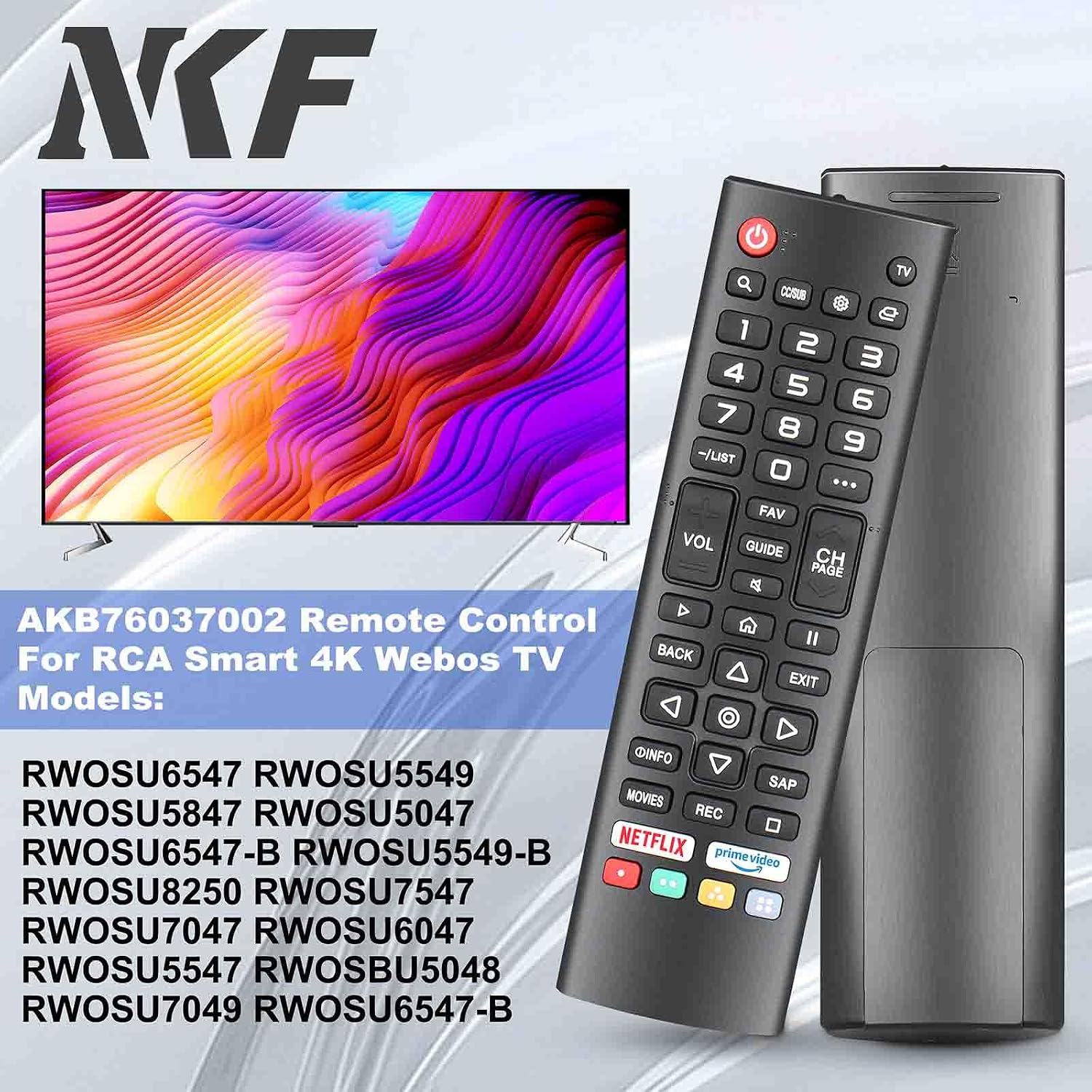
This image illustrates the NKF AKB76037002 remote control alongside a television, highlighting its compatibility with various RCA Smart 4K WebOS TV models.
- RWOSU6547
- RWOSU5549
- RWOSU5847
- RWOSU5047
- RWOSU6547-B
- RWOSU5549-B
- RWOSU8250
- RWOSU7547
- RWOSU7047
- RWOSU6047
- RWOSU5547
- RWOSBU5048
- RWOSU7049
If your RCA TV model is not listed but uses the AKB76037002 remote, this replacement should function correctly.
Maintenance
Care and Cleaning
- Keep the remote control dry. Avoid exposure to liquids, as this can damage internal components.
- Clean the remote control with a soft, dry cloth. Do not use abrasive cleaners or solvents.
- Avoid dropping the remote control or subjecting it to strong impacts.
- If the remote control will not be used for an extended period, remove the batteries to prevent leakage.
Troubleshooting
Common Issues and Solutions
| Problem | Solution |
|---|---|
| Remote is not responding. |
|
| Some buttons are not working. |
|
| TV does not respond to remote commands. |
|
Specifications
The following are the technical specifications for the NKF AKB76037002 Remote Control:

This diagram provides the physical dimensions of the remote control: approximately 6.96 inches in length, 1.85 inches in width, and 0.78 inches in thickness.
| Feature | Detail |
|---|---|
| Model Number | AKB76037002 |
| Brand | NKF |
| Compatibility | RCA WebOS 4K UHD LCD LED Smart TVs |
| Power Source | 2 x AAA 1.5V Alkaline Batteries (not included) |
| Operating Range | Up to 10 meters (33 feet) |
| Dimensions (L x W x H) | 6.69 x 2.76 x 0.91 inches (approx. 17 x 7 x 2.3 cm) |
| Item Weight | 2.08 ounces (approx. 59 grams) |
| Material | ABS |
| Special Feature | No Programming Required |
Customer Support
If you encounter any issues or have questions regarding your NKF AKB76037002 remote control, please contact the seller or manufacturer for assistance. Provide your product model number and a detailed description of the issue to facilitate a quicker resolution.
For general inquiries or to explore other NKF products, you may visit the NKF Store on Amazon.