
1. Introduction
Thank you for choosing the DEWIN 24V Solar Battery Equalizer. This device is designed to maintain the charge and discharge balance between series-connected batteries, significantly extending their lifespan and improving system efficiency. It features an intelligent voltage compensation system, real-time voltage display, and broad compatibility with various battery types.
This manual provides essential information for the safe and effective installation, operation, and maintenance of your battery equalizer. Please read it thoroughly before use.
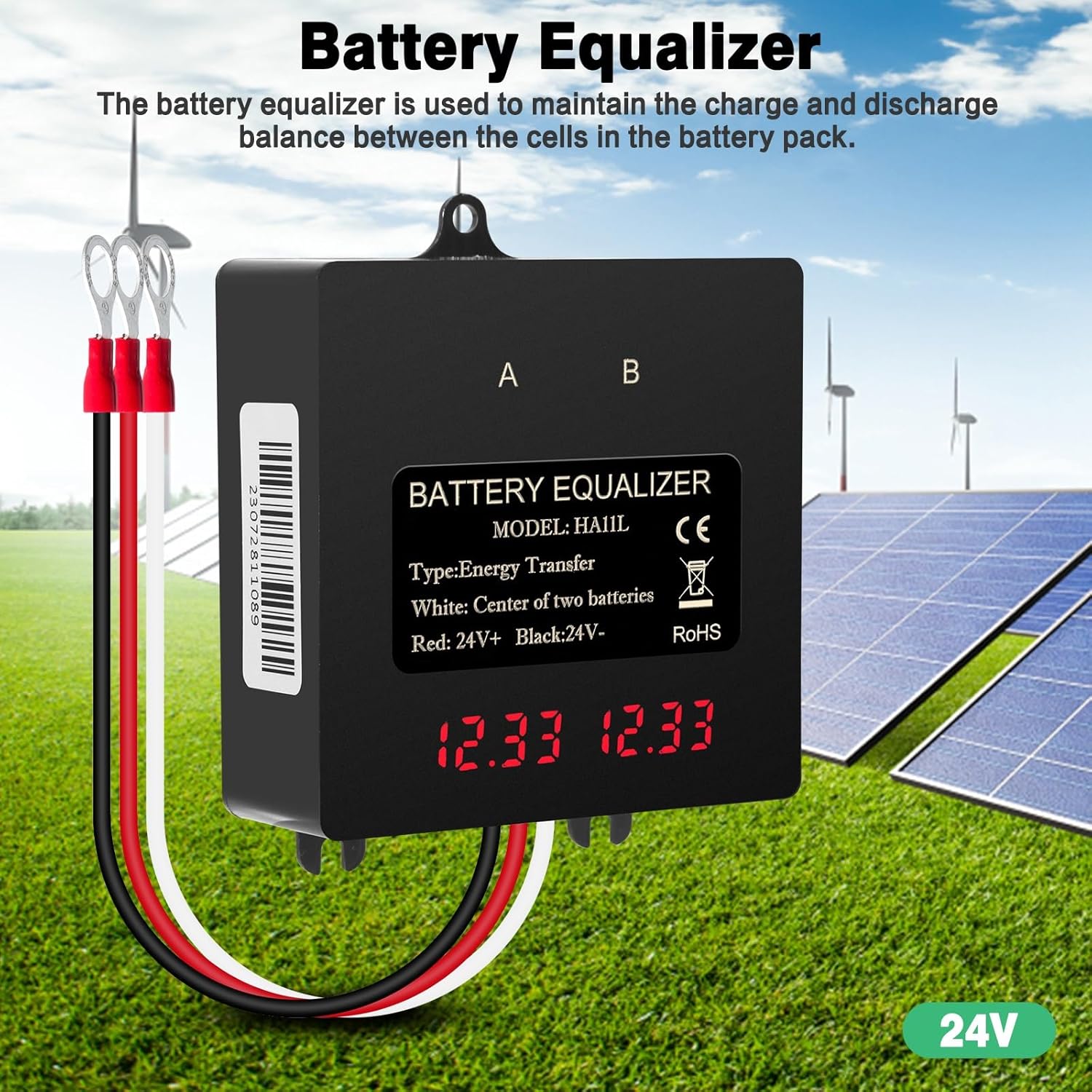
Figure 1: DEWIN 24V Solar Battery Equalizer (Barcode: 23072811089)
2. Safety Instructions
- Always disconnect power before installation or maintenance.
- Ensure correct polarity when connecting the equalizer to batteries. Incorrect connections can damage the device and batteries.
- Do not expose the device to extreme temperatures or direct sunlight for prolonged periods.
- Keep the device away from flammable materials and liquids.
- Do not attempt to open or repair the device yourself. Contact qualified personnel for service.
- Ensure adequate ventilation around the device during operation.
- This device is designed for 24V battery systems. Do not use it with other voltage systems.
3. Product Overview
The DEWIN 24V Solar Battery Equalizer is a compact and robust device designed for efficient battery management.
3.1 Key Features
- Intelligent Voltage Compensation: Maintains charge and discharge balance between series-connected batteries.
- Automatic Shutdown: Automatically powers off when battery voltage is insufficient, protecting batteries.
- Real-time LED Display: Shows individual battery voltages for monitoring.
- Wide Battery Compatibility: Suitable for lead-acid, lithium, nickel-metal hydride, and lithium iron phosphate batteries.
- Broad Application: Ideal for solar power systems, automotive, marine, and other 24V battery configurations.
- IP67 Protection Level: Made of PCB plastic, highly flame retardant and impact resistant, offering excellent protection against dust and water.

Figure 2: Key features of the Battery Equalizer
3.2 Dimensions

Figure 3: Product Dimensions (Approx. 68mm x 68mm x 22mm)
3.3 IP67 Protection
The equalizer boasts an IP67 protection level, indicating it is dust-tight and protected against immersion in water up to 1 meter for 30 minutes. This makes it suitable for various environments.

Figure 4: IP67 Protection Level
4. Setup and Installation
Follow these steps carefully to install the DEWIN 24V Solar Battery Equalizer.
4.1 Wiring Diagram
The equalizer is designed for 24V battery banks, typically consisting of two 12V batteries or four 6V batteries connected in series.

Figure 5: Wiring Diagrams for 24V Battery Banks
4.2 Connection Steps
- Identify Battery Terminals: Locate the positive (+) and negative (-) terminals of your series-connected batteries.
- Connect Red Wire: Connect the Red wire of the equalizer to the positive (+) terminal of the 24V battery bank (or the positive terminal of battery 'A' in a two-battery setup).
- Connect Black Wire: Connect the Black wire of the equalizer to the negative (-) terminal of the 24V battery bank (or the negative terminal of battery 'B' in a two-battery setup).
- Connect White Wire (Center Tap): Connect the White wire of the equalizer to the connection point between the two series-connected 12V batteries (the positive terminal of battery 'B' and the negative terminal of battery 'A'). For a four-battery setup, connect the white wire to the center point of the 24V series.
- Verify Connections: Double-check all connections for correct polarity and secure fastening.
- Power On: Once connected, the digital LED display will light up, showing the real-time voltage of each battery. The display will automatically turn off after approximately two minutes, accompanied by an audible sound, to conserve power.
Note: The digital screen has a hidden design and only lights up when the battery is connected. It will not display when the battery is not connected.
5. Operating Instructions
The DEWIN 24V Solar Battery Equalizer operates automatically once correctly installed.
- Automatic Balancing: The equalizer continuously monitors the voltage of individual batteries in the series. If a voltage difference is detected, it will automatically transfer current (up to 5A) between batteries to balance their charge levels.
- Real-time Monitoring: The LED display provides real-time voltage readings. This allows you to quickly assess the state of charge for each battery. The display will activate upon connection and then turn off to save power.
- Low Voltage Protection: The intelligent system will automatically shut down if the overall battery voltage drops below the standard undervoltage value (10V per 12V battery), preventing over-discharge and extending battery life.
Figure 6: Real-time Voltage Display
6. Maintenance
The DEWIN 24V Solar Battery Equalizer requires minimal maintenance.
- Regular Inspection: Periodically check all wiring connections to ensure they are secure and free from corrosion.
- Cleaning: Keep the device clean and free from dust and debris. Use a soft, dry cloth for cleaning. Do not use harsh chemicals or abrasive cleaners.
- Environmental Conditions: Ensure the operating environment remains within the recommended temperature and humidity ranges.
- Battery Health: Regularly monitor the overall health of your battery bank. While the equalizer helps maintain balance, it cannot fix severely damaged or aged batteries.
7. Troubleshooting
| Problem | Possible Cause | Solution |
|---|---|---|
| LED display does not light up. |
|
|
| Batteries remain unbalanced. |
|
|
| Device feels warm during operation. |
|
|
8. Specifications
| Feature | Value |
|---|---|
| Brand | DEWIN |
| Model Number | IRDCYRCIC-GS109706 |
| Material | Printed Circuit Board (PCB) |
| Standard Battery Voltage | 2 x 12V (for 24V systems) |
| Compensation Current | 0-5A |
| Standby Current | <3mA |
| Protection | Reverse Polarity Protection |
| Standard Undervoltage Value | 10V (per 12V battery) |
| Protection Level | IP67 |
| Connector Type | Terminal |
| Dimensions | Approx. 7 x 7 x 2.7 cm |
| Weight | Approx. 180g |
Figure 7: Product Features and Specifications Summary
9. Warranty and Support
For warranty information or technical support, please refer to the purchase platform or contact DEWIN customer service directly. Keep your purchase receipt as proof of purchase.