
YOER CleanSlide SMC01W
YOER CleanSlide SMC01W Steam Mop User Manual
Model: CleanSlide SMC01W | Brand: YOER
Introduction
Thank you for choosing the YOER CleanSlide SMC01W Steam Mop. This versatile device is designed to provide efficient and hygienic cleaning for various surfaces in your home. It functions as both a steam mop for floors and a handheld steam cleaner for detailed tasks. Please read this manual thoroughly before first use to ensure safe and optimal operation of your appliance.

Figure 1: YOER CleanSlide SMC01W Steam Mop with included accessories.
Important Safety Instructions
- Always ensure the power cord is fully unwound before use.
- Do not leave the steam mop unattended while it is plugged in or operating.
- Keep out of reach of children and pets.
- Do not direct steam at people, animals, or electrical appliances.
- Use only distilled or demineralized water to prevent mineral buildup and extend the life of the appliance.
- Unplug the appliance from the power outlet before filling with water, cleaning, or performing maintenance.
- Do not immerse the appliance in water or any other liquid.
- Do not use the appliance on unsealed hardwood floors or surfaces that are sensitive to heat or moisture.
Package Contents
Your YOER CleanSlide SMC01W Steam Mop comes with a rich accessory set to handle various cleaning tasks. Please check that all components are present:
- YOER CleanSlide SMC01W Steam Mop Unit
- Removable Water Tank
- Detergent Tank
- Replaceable Water Filter
- Steam Mop Handle
- Steam Mop Foot/Base
- 3 x Microfiber Pads
- Carpet Glider Attachment
- Handheld Steam Cleaner Hose
- Various Brushes (Nylon, Metal)
- Grout Nozzle
- Scraper Tool
- Window/Upholstery Tool with Cloth
- Small and Large Nylon Brushes
- Original Packaging

Figure 2: Detailed view of all included components and their names.
Product Overview
Familiarize yourself with the different parts of your steam mop for optimal use.
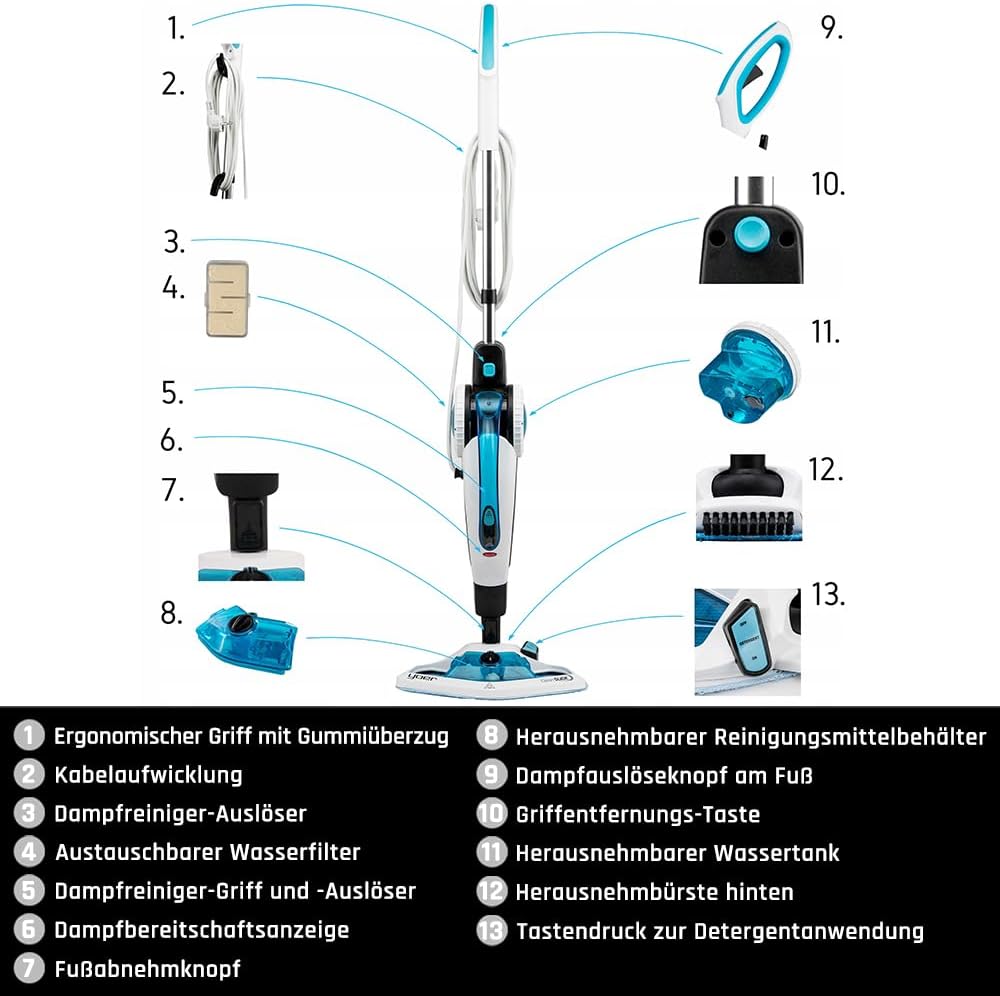
Figure 3: Key components of the YOER CleanSlide SMC01W.
- Ergonomic Handle with Rubber Coating
- Cable Winding
- Steam Cleaner Trigger
- Replaceable Water Filter
- Steam Cleaner Handle and Trigger
- Steam Ready Indicator
- Foot Release Button
- Removable Detergent Container
- Steam Release Button on Foot
- Handle Removal Button
- Removable Water Tank
- Rear Brush
- Button for Detergent Application
Setup
- Assembly: Insert the handle into the main body until it clicks into place. Ensure all connections are secure.
- Filling the Water Tank: Remove the water tank (11) from the main unit. Open the cap and fill with clean, distilled or demineralized water. Do not overfill. Close the cap securely and reinsert the tank into the unit.
- Filling the Detergent Tank (Optional): If desired, remove the detergent container (8) and fill with a suitable, non-foaming steam cleaner detergent. Reinsert the container.
- Attaching the Microfiber Pad: Place a clean microfiber pad onto the steam mop foot, ensuring it is securely attached with the hook-and-loop fasteners.
- Power Connection: Unwind the power cord completely and plug the appliance into a grounded electrical outlet (230V).
Operating Instructions
Steam Mop Mode
- After plugging in, the steam ready indicator (6) will illuminate. The device heats up quickly, typically within 15 seconds.
- Once the indicator shows it's ready, press the steam release button on the foot (9) to start steaming.
- Move the steam mop slowly and steadily across the floor surface. The 180° swivel foot allows for easy maneuverability around furniture and into corners.
- For stubborn stains, hold the mop over the area for a few seconds to allow the steam to penetrate.
- The device offers continuous steam generation for up to 25 minutes on a full tank.
- For carpeted surfaces, attach the carpet glider over the microfiber pad.
- To apply detergent, press the button for detergent application (13).
Handheld Steam Cleaner Mode
- To convert to handheld mode, press the foot release button (7) and the handle removal button (10) to detach the main unit from the mop foot and handle.
- Attach the flexible hose (10 from Figure 2) to the main unit.
- Select the appropriate accessory (e.g., brush, nozzle, scraper) for the cleaning task and attach it to the end of the hose.
- Press the steam cleaner trigger (3 or 5) to release steam.
- Use the handheld unit for cleaning countertops, tiles, grout, windows, upholstery, and other surfaces.

Figure 4: User demonstrating the steam mop in action.

Figure 5: Three primary usage modes: 1. Steam Mop, 2. Handheld Steam Cleaner, 3. Handheld Steam Cleaner with Hose. Also shows the 5.5m steam mop range and 6m steam cleaner range with hose.

Figure 6: Ideal for various surfaces and special tasks, including fabric, carpet, windows, upholstery, and specific nozzles for hose use (grout, crevice, scraper, nylon brushes, metal brush).

Figure 7: Additional features: 180° swivel mop foot for access to all corners, direct cleaning under furniture, cleaning with an additional brush for stubborn dirt, and convenient parking feature.
Maintenance
Cleaning the Microfiber Pads
The microfiber pads can be machine washed with mild detergent. Do not use bleach or fabric softeners, as these can damage the fibers. Air dry or tumble dry on low heat.
Emptying and Cleaning Tanks
After each use, empty any remaining water from the water tank and detergent from the detergent tank. Rinse both tanks with clean water and allow them to air dry before storage.
Replacing the Water Filter
The appliance features a replaceable water filter (4) to prevent limescale buildup. Replace the filter regularly, depending on water hardness and frequency of use, to maintain optimal steam performance and extend the life of your device. Replacement filters can be purchased from authorized YOER retailers.
General Cleaning
Wipe the exterior of the appliance with a damp cloth. Do not use abrasive cleaners or solvents. Ensure the appliance is completely dry before storing.
Storage
Store the steam mop in a cool, dry place, away from direct sunlight and extreme temperatures. Ensure the power cord is neatly wound around the cable winding hooks (2).
Troubleshooting
| Problem | Possible Cause | Solution |
|---|---|---|
| No steam or low steam output. | Water tank empty; Water filter clogged; Appliance not heated up; Limescale buildup. | Refill water tank; Replace water filter; Wait for steam ready indicator; Descale the appliance (refer to maintenance). |
| Water leaking from the unit. | Water tank cap not closed properly; Tank not inserted correctly; Overfilled tank. | Ensure tank cap is tight; Reinsert tank firmly; Do not overfill. |
| Mop leaves streaks on the floor. | Microfiber pad is dirty; Too much detergent used; Floor not suitable for steam cleaning. | Replace or clean microfiber pad; Use less detergent or none; Check floor type compatibility. |
| Appliance does not turn on. | Not plugged in; Power outlet faulty; Appliance malfunction. | Check power connection; Try a different outlet; Contact customer support if problem persists. |
Specifications
| Feature | Detail |
|---|---|
| Model Name | CleanSlide SMC01W |
| Brand | YOER |
| Color | White |
| Product Dimensions | 20 x 32 x 112 cm (7.9 x 12.6 x 44.1 inches) |
| Water Tank Capacity | 400 ml (13.5 fl oz) |
| Detergent Tank Capacity | 120 ml (4.1 fl oz) |
| Power | 1600 Watt |
| Voltage | 230V |
| Heat-up Time | Approx. 15 seconds |
| Operating Time | Up to 25 minutes (continuous steam) |
| Cord Length | 5.5 meters (18 feet) for mop, 6 meters (19.7 feet) with hose |
| Weight | 2.7 kg (6 lbs) |
| Special Features | Multifunctional (Mop & Handheld), Quick Heating, High Power, Swivel Foot, Replaceable Water Filter |
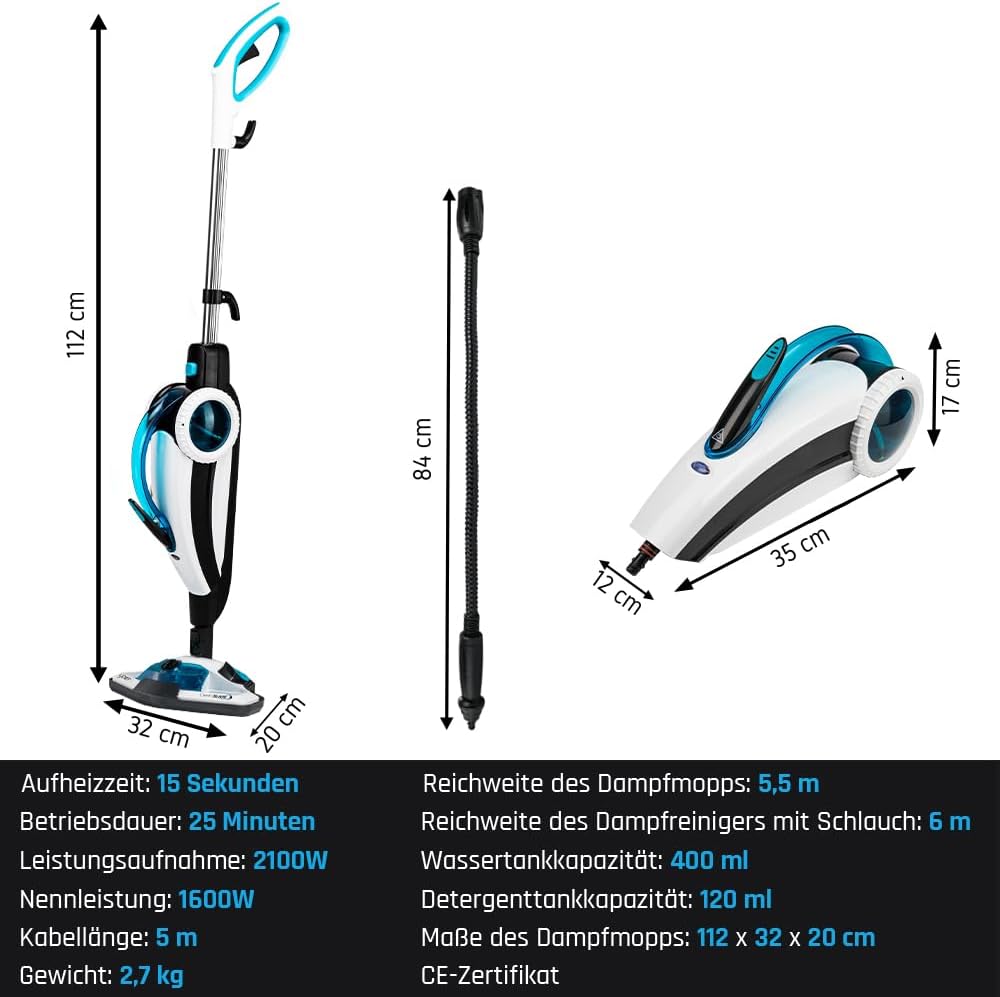
Figure 8: Visual representation of product dimensions and key specifications.
Warranty and Support
For warranty information and customer support, please refer to the warranty card included with your product or visit the official YOER website. If you encounter any issues not covered in the troubleshooting section, please contact YOER customer service for assistance.
YOER Official Store: Visit YOER Store on Amazon
Related documentsCleanSlide SMC01W

Ask a question about this manual
Ask about setup, troubleshooting, compatibility, parts, safety, or missing instructions. Manuals+ will review the question and use this page’s manual context to help answer it.