
1. Introduction
This manual provides essential information for the safe and effective use of your aonus A7 Battery Pack. Please read these instructions carefully before installation and operation to ensure optimal performance and longevity of the product. Keep this manual for future reference.
2. Safety Instructions
Always follow these safety guidelines to prevent damage to the battery pack, the vacuum cleaner, and to avoid personal injury.
- Charging: Use only the charger specified by the vacuum cleaner manufacturer. Do not use unauthorized chargers.
- Storage: Store the battery pack in a cool, dry place, away from direct sunlight, heat sources, and flammable materials.
- Handling: Do not disassemble, puncture, or modify the battery pack. Avoid dropping or subjecting the battery to strong impacts.
- Water Exposure: Do not expose the battery pack to water or other liquids.
- Temperature: Do not operate or charge the battery in extreme temperatures. Refer to your vacuum cleaner's manual for recommended operating temperatures.
- Disposal: Dispose of used battery packs according to local regulations. Do not dispose of with household waste.
- Children: Keep the battery pack out of reach of children.
3. Product Overview
The aonus A7 Battery Pack is designed to provide power to compatible vacuum cleaners. It features a robust design for reliable performance.
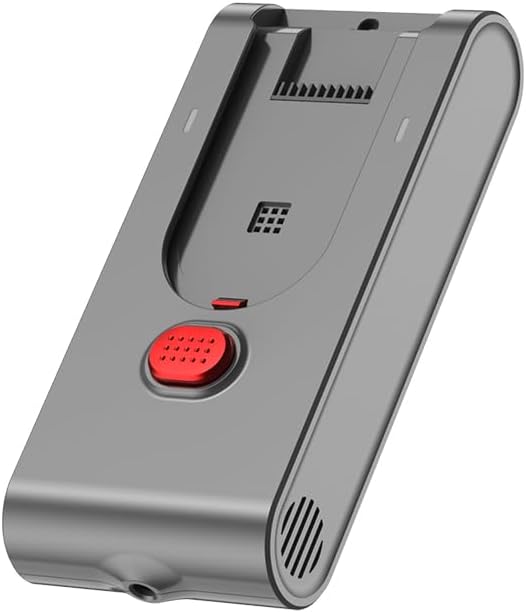
Image 3.1: aonus A7 Battery Pack. This image shows the grey battery pack with a red button and ventilation slots.
4. Compatibility
This battery pack is compatible with specific models of aonus cordless vacuum cleaners. To ensure compatibility, verify the identification plate on your vacuum cleaner's battery or motor block.
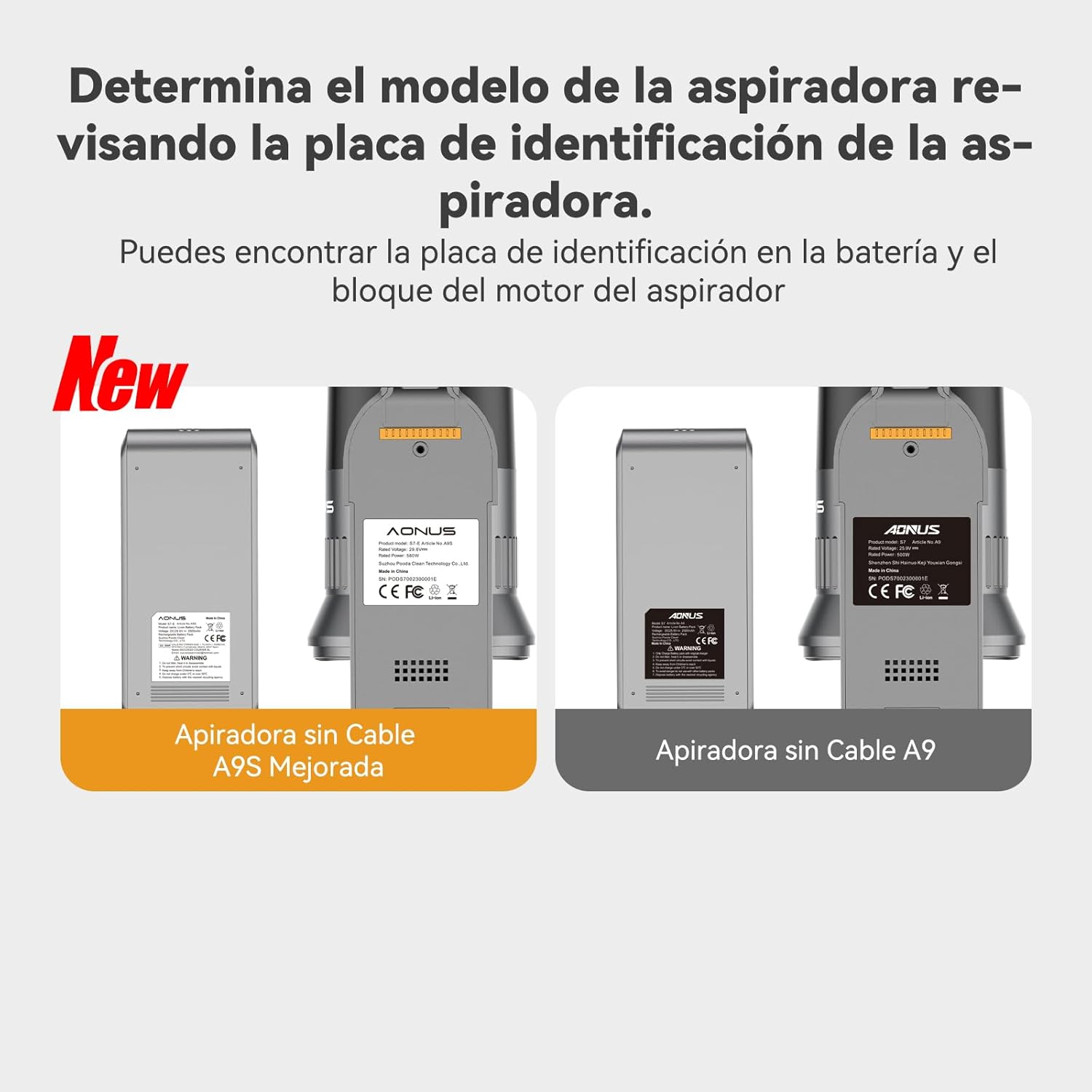
Image 4.1: Compatibility Guide. This image illustrates how to identify the vacuum cleaner model by checking the identification plate on the battery or motor block, showing examples for "Cordless Vacuum Cleaner A9S Improved" and "Cordless Vacuum Cleaner A9".
5. Setup and Installation
- Unpacking: Carefully remove the battery pack from its packaging. Inspect for any signs of damage.
- Initial Charge: Before first use, fully charge the battery pack. Connect the battery pack to your vacuum cleaner's charging station or directly to the charger (if applicable) and plug it into a power outlet. Refer to your vacuum cleaner's manual for specific charging instructions.
- Installation:
- Ensure the vacuum cleaner is turned off and unplugged from any power source.
- Locate the battery compartment on your vacuum cleaner.
- Align the battery pack with the compartment and slide it in until it clicks securely into place.
- Confirm the battery is firmly seated before operating the vacuum cleaner.
6. Operating the Battery Pack
- Usage: Once installed and fully charged, the battery pack will power your vacuum cleaner. Operate your vacuum cleaner as per its own instruction manual.
- Recharging: When the vacuum cleaner's power diminishes or the battery indicator shows low charge, recharge the battery pack promptly. Avoid completely draining the battery frequently, as this can reduce its lifespan.
- Charging Time: Charging time may vary depending on the remaining battery level and the charger used.
7. Maintenance
- Cleaning: Periodically clean the battery contacts on both the battery pack and the vacuum cleaner with a dry, clean cloth to ensure good electrical connection.
- Storage: If the battery pack will not be used for an extended period, store it partially charged (around 50%) in a cool, dry place. Avoid storing fully charged or fully discharged for long durations.
- Inspection: Regularly inspect the battery pack for any signs of damage, swelling, or leakage. Discontinue use immediately if any issues are observed.
8. Troubleshooting
| Problem | Possible Cause | Solution |
|---|---|---|
| Battery not charging |
|
|
| Short operating time |
|
|
| Battery pack feels hot during charging/use |
|
|
9. Specifications
- Brand: aonus
- Model Number: 1
- Voltage: 3.7 Volts
- Battery Type: Lithium Ion
- Quantity of Batteries: 1 (included)
- Product Weight: 490 g
- Package Dimensions: 18.4 x 8.5 x 4.5 cm
10. Warranty and Support
For warranty information, technical support, or service inquiries, please refer to the documentation provided with your original vacuum cleaner or contact the aonus customer support directly. You can also visit the official aonus Brand Store for more information.


