
1. Introduction
This manual provides detailed instructions for the installation, operation, and maintenance of your Kunray 72V 3000W Electric DC Motor Kit. Please read this manual thoroughly before attempting any installation or operation to ensure safe and efficient use of the product. Proper installation and adherence to these guidelines will help maximize the lifespan and performance of your motor kit.
2. Safety Information
WARNING: Failure to follow these safety instructions may result in fire, electric shock, serious injury, or property damage.
- Always disconnect power before performing any installation, maintenance, or troubleshooting.
- Ensure all wiring connections are secure and properly insulated to prevent short circuits.
- Wear appropriate personal protective equipment (PPE), including safety glasses and gloves, during installation.
- Do not operate the motor kit in wet conditions unless specifically designed for such environments. The controller has an IP67 waterproof rating, but other components may not.
- Keep hands and loose clothing away from moving parts, such as the sprocket and chain, during operation.
- This motor kit is designed for off-road use. Always check and comply with local laws and regulations regarding electric vehicle use.
- The motor can generate significant heat. Ensure adequate ventilation and do not touch the motor immediately after operation. The integrated temperature sensor helps monitor this.

Figure 2.1: Motor safety operation warning sign. Please read carefully before operation.
3. Package Contents
Verify that all items listed below are included in your package:
- 1x Electric DC Motor (72V 3000W)
- 1x Brushless Controller (FarDriver ND72260/KR72260)
- 1x Half Twist Throttle with Digital Display
Figure 3.1: Overview of the Kunray 72V 3000W Motor Kit components.
4. Specifications
| Feature | Specification |
|---|---|
| Brand | Kunray |
| Motor Type | Electric DC Motor |
| Rated Wattage | 3000W |
| Rated Speed | 4900 RPM |
| Maximum Speed (no-load) | 6700 RPM |
| Voltage | 72 Volts (Controller suitable for 48-72V) |
| Current | 45A (Motor), Max DC Current 80A (Controller) |
| Phase Current (Controller) | 260A |
| Sprocket Type | 25H/T8F 11T Sprocket Chainwheel |
| Temperature Sensor | KTY83-120 |
| Phase Wire | 6mm² |
| Magnet Poles | 8PCS (4-pair) |
| Controller Type | FarDriver Sine Wave Brushless DC Controller (ND72260/KR72260) |
| Controller Waterproof Grade | IP67 |
| Motor Material | Aluminum |
| Product Dimensions | 4.13"W x 4.13"H (Motor) |
| Item Weight | 5.5 Kilograms / 12.1 pounds |

Figure 4.1: Detailed motor dimensions and key specifications.
5. Setup & Installation
5.1 Motor Overview
The Kunray 72V 3000W DC motor features an aluminum body for efficient heat dissipation and durability. It includes a KTY83-120 temperature sensor to prevent overheating, 6mm² phase wires, and 8-piece magnet poles. The motor is designed for a 25H/T8F 11T sprocket chainwheel.

Figure 5.1: Motor with integrated heat sink for improved thermal management.

Figure 5.2: Internal view of the motor showing copper windings and magnet rotor.
5.2 Controller Overview
The FarDriver ND72260/KR72260 is a sine wave brushless DC controller with a waterproofing grade of IP67. It is suitable for 2-3kW brushless motors with Hall sensors and operates within a 48-72V range, with a peak voltage of 88V. The controller features a built-in Bluetooth module for wireless programming via the Fardriver app (as of April 2025 upgrade).
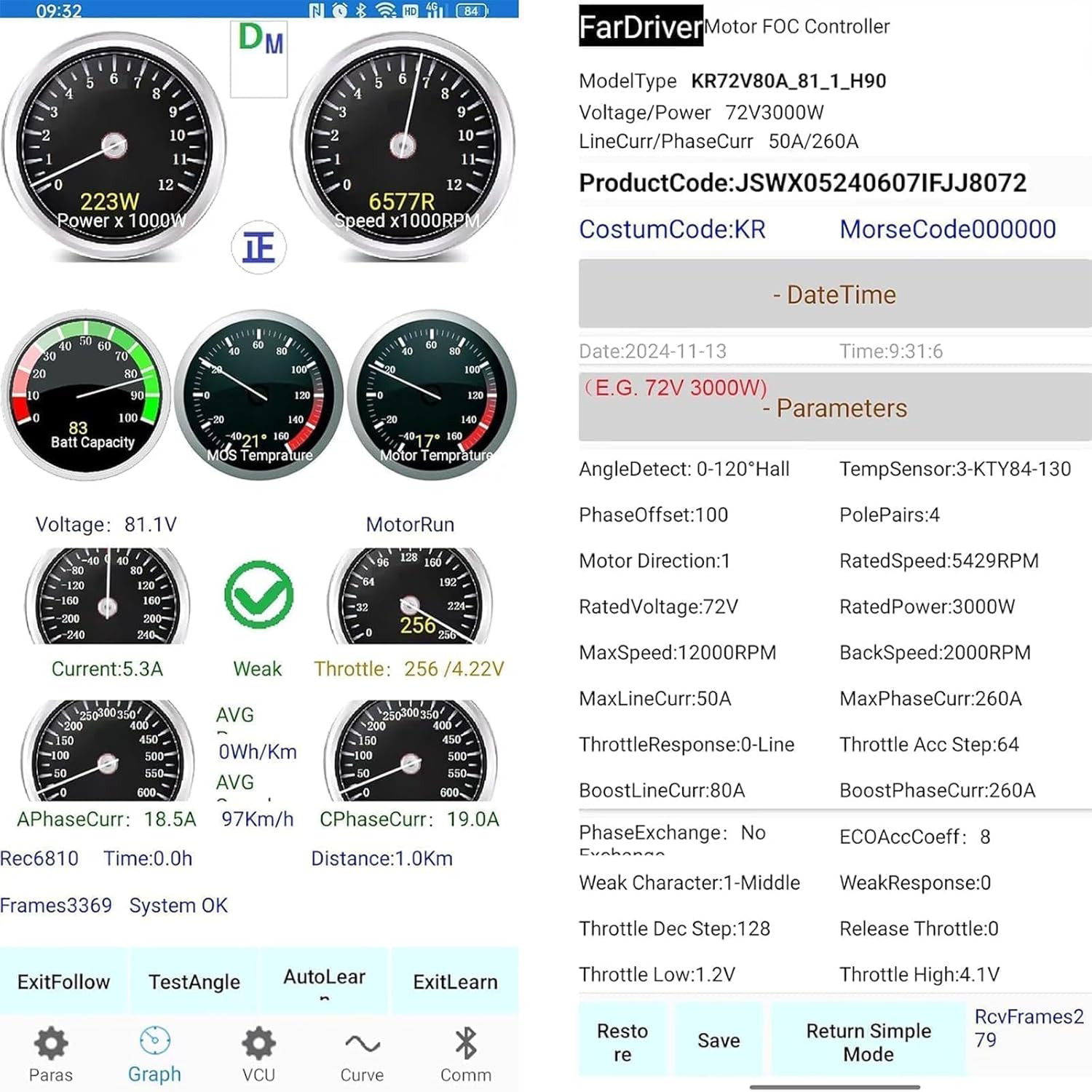
Figure 5.3: The FarDriver brushless controller with its various connections.

Figure 5.4: The controller's IP67 waterproof design.
5.3 Half Twist Throttle
The kit includes a half twist throttle with a digital data display. This display accurately shows the remaining power level and distance, and can indicate vehicle errors based on voltage readings. It is a universal throttle compatible with various electric vehicles.

Figure 5.5: Half twist throttle with integrated digital display.
5.4 Wiring Instructions
Careful wiring is essential for proper function and safety. Refer to the diagrams below for correct connections. If you have any questions, contact customer support.
- The "E lock wire" must be connected to the ignition lock or the positive terminal of the controller. Without this connection, the controller will not power on.
- For controllers with "Bluetooth Built-in", there is no need to connect a separate Bluetooth serial wire.

Figure 5.6: Detailed product wiring diagram for the motor kit.

Figure 5.7: Overall wiring reference for the Kunray 1020 Motor Kits.

Figure 5.8: FarDriver Controller wiring function table for specific connections.
5.5 Fardriver App and Programming
The FarDriver controller is programmable via a dedicated app. This allows for fine-tuning of motor parameters and enhanced protection through temperature settings.
- Download the App: Search for 'FARDRIVER' in your app store (Apple App Store) or download the Android app from the provided link (http://182.92.233.85:6868/FarDriverSigned.apk).
- Connect to Controller: Open the app and connect to the controller via Bluetooth.
- Set Parameters: Use the app to set various parameters, including temperature limits for motor protection.
- Auto-Learn Feature: It is recommended to run the auto-learn feature in the Fardriver app after installation to optimize throttle response and motor performance.
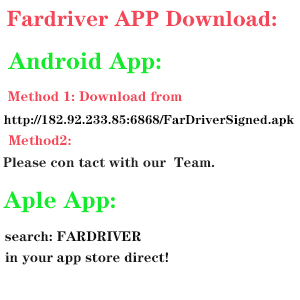
Figure 5.9: Instructions for downloading the Fardriver Controller App.
Figure 5.10: Guide on accessing detailed controller instructions.
5.6 Temperature Sensing Motor Introduction Video
Video 5.1: An official video from Kunray ebike kit introducing the temperature sensing feature of the motor. This video provides visual details on how the temperature sensor functions to protect the motor from overheating.
6. Operating Instructions
Once installed and configured, operate the motor kit as follows:
- Power On: Turn the ignition key (connected to the E lock wire) to the ON position. The digital display on the throttle should illuminate.
- Throttle Control: Gently twist the half twist throttle to engage the motor. The digital display will show real-time power levels and speed.
- Speed Modes: If configured, use the high/low speed switch to adjust between different performance modes.
- Temperature Monitoring: The motor's temperature sensor provides data that can be monitored via the Fardriver app. Ensure the motor operates within safe temperature limits set in the controller.
- Braking: Apply brakes as needed. The controller supports both high-level (BH) and low-level (BL) brake signals.
- Reverse Function: If the reverse function is wired and enabled, use the designated switch for backward movement.
7. Maintenance
Regular maintenance ensures the longevity and optimal performance of your Kunray motor kit.
- Cleaning: Keep the motor and controller free from dirt, dust, and debris. Use a dry cloth for cleaning. Avoid using water directly on electrical components.
- Connections: Periodically check all electrical connections for tightness and signs of corrosion. Secure any loose connections.
- Sprocket & Chain: Inspect the sprocket and chain for wear and proper tension. Lubricate the chain regularly.
- Wiring: Examine all wires for fraying, cuts, or damage. Replace any damaged wiring immediately.
- Software Updates: Check the Fardriver app for any available firmware updates for the controller to ensure you have the latest features and bug fixes.
8. Troubleshooting
This section addresses common issues you might encounter with your motor kit.
| Problem | Possible Cause | Solution |
|---|---|---|
| Motor does not power on. | E lock wire not connected or faulty ignition. | Ensure the E lock wire is correctly connected to the ignition or positive terminal. Check ignition switch functionality. |
| Weak or inconsistent throttle response. | Controller parameters not optimized; Hall sensor issue. | Run the auto-learn feature in the Fardriver app. Check Hall sensor connections. |
| Motor overheats quickly. | High current usage; insufficient cooling; incorrect temperature settings. | Monitor motor temperature via the app. Adjust controller settings to manage current. Ensure proper ventilation around the motor. |
| Digital throttle display shows error. | Voltage issue; internal throttle fault. | Check battery voltage. Consult the Fardriver app for specific error codes if available. |
| Controller Bluetooth not connecting. | App issue; controller not in pairing mode; older controller version. | Ensure the app is updated. For older controllers, a separate Bluetooth dongle might be required. Newer controllers have built-in Bluetooth. |
9. Multiple Applications
This DC Electric Motor Kit is versatile and suitable for a wide range of applications, including:
- Electric Go-karts
- E-scooters
- Light ATVs
- Mini Electric Motorcycles
- Mopeds
- Razor Upgrades/Replacements
- DIY Engine Projects

Figure 9.1: Examples of vehicles compatible with the Kunray motor kit, including cargo bikes, ATVs, and electric go-karts.
10. Warranty and Support
For any questions, technical assistance, or warranty claims, please contact Kunray customer support. Ensure you have your product model number and purchase details available when contacting support.
Kunray is committed to providing quality products and support. For additional resources, including detailed controller instructions and app usage guides, please refer to the official Kunray website or contact the seller directly.


