
1. Overview
The Deli Electric Pencil Sharpener VA5 is designed for efficient and precise sharpening of pencils with diameters between 6.9-8 mm. It supports various pencil types, including graphite and colored pencils, and accommodates round, triangular, and hexagonal shapes. This sharpener offers dual power options for convenience and features a durable alloy steel blade for consistent performance.

Image 1.1: Overview of the Deli Electric Pencil Sharpener VA5, highlighting its main features such as automatic broken core exclusion, faster sharpening speed, dual power supply, alloy steel blade, and suitability for various pencil types.
2. Setup
2.1 Powering the Sharpener
The Deli Electric Pencil Sharpener VA5 can be powered by two methods:
- USB Power: Connect the included USB cable to the sharpener's power input port and then to a compatible USB power source (e.g., wall adapter, computer USB port).
- Battery Power: Open the battery compartment at the bottom of the sharpener and insert four AA batteries (not included), ensuring correct polarity. Close the compartment securely.
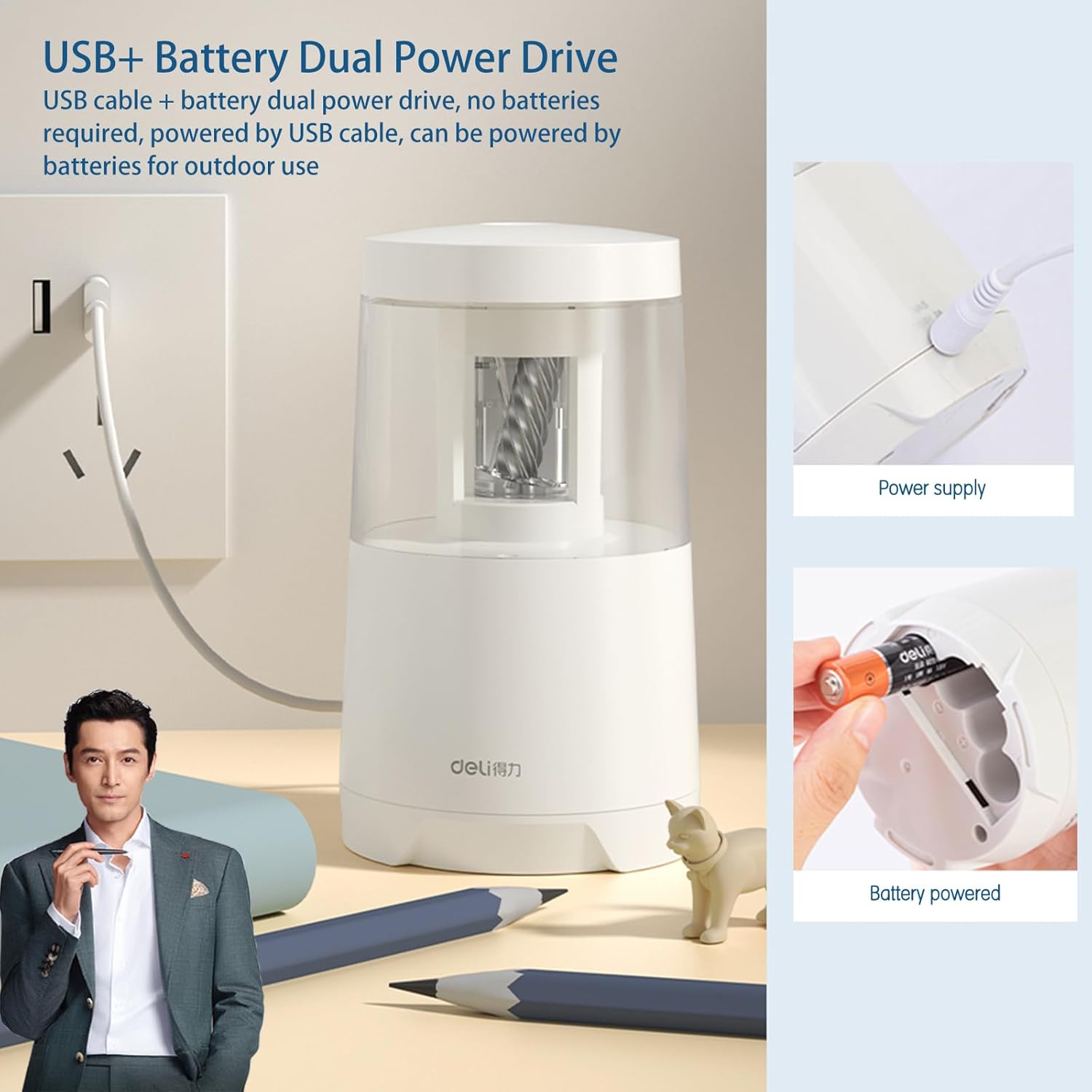
Image 2.1: The sharpener can be powered via a USB cable or by installing four AA batteries in the bottom compartment.
Video 2.1: This video demonstrates the dual power supply options, including how to install batteries and connect the USB cable.
2.2 Placement
Place the sharpener on a stable, flat surface. The integrated anti-slip pad on the base helps prevent movement during use.

Image 2.2: The sharpener features an anti-slip pad on its base for stability during operation.
3. Operating Instructions
3.1 Sharpening a Pencil
- Ensure the sharpener is powered on (either via USB or batteries).
- Insert the pencil into the sharpening hole on the top of the unit.
- Apply light, steady downward pressure. The sharpener will automatically start sharpening.
- Once the pencil is sharpened to a fine point, the sharpener will automatically stop. Remove the pencil.

Image 3.1: Visual guide demonstrating the steps to insert a pencil, sharpen it, and remove it from the sharpener.

Image 3.2: The sharpener is designed for quick sharpening, achieving a fine point in approximately 5 seconds.
Video 3.1: This video illustrates the quick and efficient sharpening process for various pencil types.
3.2 Pencil Compatibility
The sharpener is compatible with pencils having a diameter of 6.9-8 millimeters. It can sharpen pencils of various shapes, including:
- Round Rod pencils
- Hexagonal Rod pencils
- Triangular Rod pencils

Image 3.3: The sharpener is suitable for pencils with hexagonal, round, and triangular cross-sections.
4. Maintenance
4.1 Emptying Shavings
To maintain optimal performance and prevent blockages, regularly empty the pencil shaving reservoir:
- Twist the top cover of the sharpener counter-clockwise to unlock and remove it.
- Carefully lift the sharpening mechanism to access the shaving compartment.
- Empty the accumulated pencil shavings into a waste bin.
- Reassemble the sharpener by placing the sharpening mechanism back and twisting the top cover clockwise until it locks securely.

Image 4.1: The transparent shaving reservoir allows easy monitoring of fill level, and it can be easily opened for emptying.

Image 4.2: A hand demonstrates the process of emptying the pencil shavings from the sharpener's collection box.
4.2 Blade Care
The sharpener features a durable alloy steel blade designed for long-lasting use (3500-5000 sharpening cycles). The rolling blade design automatically eliminates broken cores, reducing jams. No special maintenance is required for the blade itself, beyond ensuring the shaving reservoir is clear.

Image 4.3: An internal diagram illustrating the alloy steel hobbing blade and automatic core row hole for broken core exclusion.
5. Troubleshooting
If you encounter issues with your Deli Electric Pencil Sharpener, please refer to the following common troubleshooting steps:
| Problem | Possible Cause | Solution |
|---|---|---|
| Sharpener does not turn on. | No power, or batteries are depleted/incorrectly installed. | Ensure USB cable is securely connected to a working power source, or replace AA batteries and check polarity. |
| Pencil is not sharpening or sharpens unevenly. | Pencil diameter is outside the 6.9-8mm range, or broken lead is stuck. | Verify pencil diameter. The sharpener has automatic broken core exclusion; if a piece is stuck, gently remove it after ensuring the power is off. Empty the shaving reservoir. |
| Sharpener stops during use. | Motor overheating protection activated, or power interruption. | Allow the unit to cool down for a few minutes. Check power connection or battery status. |
| Excessive noise during sharpening. | Shaving reservoir is full or internal obstruction. | Empty the shaving reservoir. Check for any foreign objects inside the sharpening mechanism. |
6. Specifications
| Feature | Detail |
|---|---|
| Brand | deli |
| Model Number | VA5 |
| Specific Uses For Product | Graphite Pencil, Colored Pencils |
| Color | White |
| Power Source | Corded Electric (USB) or 4x AA Batteries |
| Material | Alloy Steel (Blade) |
| Target Audience | Student, Teacher, Unisex Kids, Artist |
| Item Dimensions (D x W x H) | 3.15"D x 3.15"W x 5.31"H |
| Additional Features | Portable, Automatic Broken Core Exclusion, Anti-slip Pad, Motor Overheating Protection |
7. Warranty and Support
7.1 Warranty Information
This product comes with a warranty for free return and exchange within one month of purchase. Please retain your proof of purchase for warranty claims.
7.2 Customer Support
For any questions, concerns, or technical assistance not covered in this manual, please contact Deli customer support through the retailer's platform or the official Deli website. Provide your product model number (VA5) and purchase details for faster service.