
OUKITEL WP30 PRO
OUKITEL WP30 Pro 5G Rugged Smartphone User Manual
Model: WP30 PRO | Brand: OUKITEL
1. Introduction
This manual provides essential information for the safe and efficient operation of your OUKITEL WP30 Pro 5G Rugged Smartphone. Please read this manual thoroughly before using the device to ensure proper functionality and to prevent damage.
The OUKITEL WP30 Pro is a high-performance rugged smartphone designed for durability and advanced functionality. It features a MediaTek Dimensity 8050 Octa-Core processor, 24GB RAM, 512GB storage, a 6.78-inch FHD+ display with 120Hz refresh rate, and a unique 1.75-inch OLED secondary screen. Equipped with a 108MP primary camera, 32MP front camera, and 20MP night vision camera, it offers versatile photography options. Its robust design is IP68, IP69K, and MIL-STD-810H certified for water, dust, and drop resistance. A large 11000mAh battery with 120W fast charging ensures extended usage.

Figure 1: OUKITEL WP30 Pro 5G Rugged Smartphone, showcasing its front display and the unique rear design with the secondary screen and camera module.
Video 1: An overview of the OUKITEL WP30 Pro 5G Rugged Smartphone's key features and design.
2. Getting Started: Setup
2.1 Package Contents
Before beginning, verify that all items are present in the package:
- 1 x OUKITEL WP30 Pro Smartphone
- 1 x 120W Power Adapter
- 1 x Type-C Data Cable
- 1 x Card Needle (for SIM/eSIM tray access)
- 1 x User Manual (this document)
2.2 SIM Card and eSIM Setup
The OUKITEL WP30 Pro supports dual SIM cards and eSIM technology. Please ensure your SIM card is compatible with T-Mobile. It is not compatible with AT&T, Cricket, Verizon, Sprint, or US Cellular.
- Locate the SIM card tray on the side of the device.
- Insert the provided card needle into the small hole next to the tray to eject it.
- Place your Nano-SIM card(s) into the tray with the gold contacts facing down.
- Carefully reinsert the tray into the phone.
- For eSIM activation, navigate to Settings > Network & Internet > Mobile network > Advanced > Carrier settings > Add carrier and follow the on-screen instructions provided by your carrier.
Note: The phone's rugged design means the SIM tray is sealed. Use caution when opening and ensure it is properly closed to maintain water and dust resistance.
2.3 Initial Charge
It is recommended to fully charge your device before first use.
- Connect the Type-C data cable to the charging port at the bottom of the phone.
- Connect the other end of the data cable to the 120W power adapter.
- Plug the power adapter into a wall outlet.
- The charging indicator will appear on the screen. The device supports 120W fast charging, allowing it to reach 50% charge in approximately 15 minutes and a full charge in about 45 minutes.

Figure 2: Illustration of the 120W rapid charging capability and the 11000mAh battery life of the OUKITEL WP30 Pro.
Video 2: Demonstrating the fast charging speed of the OUKITEL WP30 Pro.
3. Operating Instructions
3.1 Power On/Off and Restart
- To power on: Press and hold the Power button (located on the right side) until the OUKITEL logo appears.
- To power off: Press and hold the Power button, then select "Power off" from the options.
- To restart: Press and hold the Power button, then select "Restart" from the options.
3.2 Main Screen and Navigation
The 6.78-inch FHD+ main screen offers a 120Hz refresh rate for smooth interaction.
- Home Screen: Swipe left or right to access different home screen panels.
- App Drawer: Swipe up from the bottom of the screen to open the app drawer.
- Notifications & Quick Settings: Swipe down from the top of the screen to access notifications and quick settings toggles.
- Navigation Gestures/Buttons: Configure navigation in Settings > System > Gestures or Settings > System > Navigation bar.
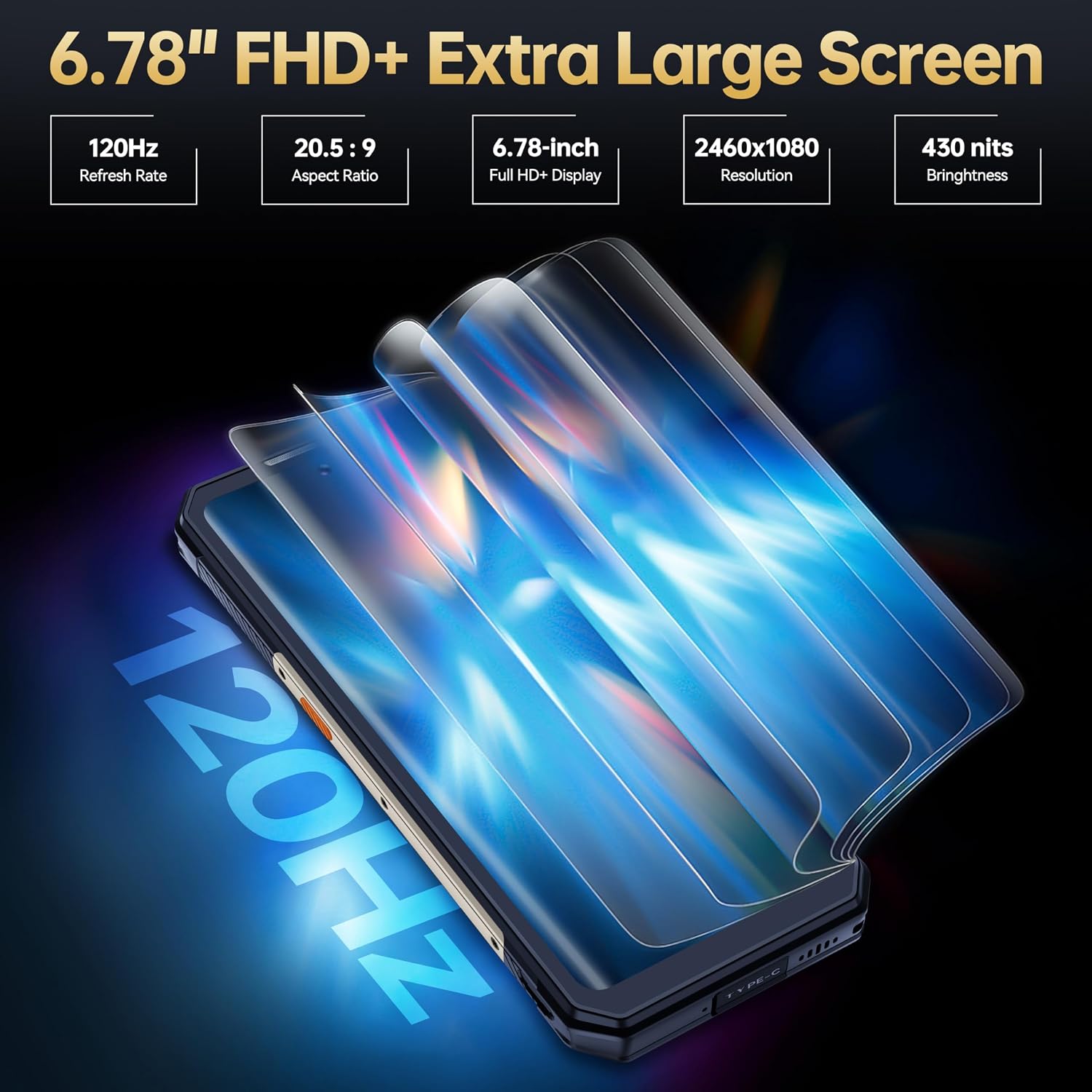
Figure 3: The 6.78-inch FHD+ display with a 120Hz refresh rate, providing a smooth visual experience.
3.3 Unique OLED Back Display
The 1.75-inch OLED secondary screen on the back provides quick access to various functions without needing to turn on the main display.
- Clock: Displays time with over 20 customizable UI interfaces.
- Camera Control: Use it as a viewfinder for rear camera selfies or quick photo capture.
- Music Control: Play, pause, skip tracks.
- Notifications: View incoming calls and message alerts.
- Battery Status: Check battery level at a glance.
- Compass/Step Count: Access utility features directly.

Figure 4: The unique 1.75-inch OLED back display showing various customizable watch faces and functions.
3.4 Camera Operation
The OUKITEL WP30 Pro features a 108MP primary camera, 32MP front camera, 20MP night vision camera, and a 5MP macro camera.
- Open the Camera application from the home screen or app drawer.
- Switch Cameras: Tap the camera switch icon to toggle between front and rear cameras.
- Modes: Select different modes such as Photo, Video, Portrait, Night Vision, Macro, etc.
- Capture: Tap the shutter button to take a photo or start/stop video recording.
- Night Vision: For optimal night vision results, ensure sufficient darkness and use the dedicated Night Vision mode.

Figure 5: Visual representation of the OUKITEL WP30 Pro's camera system, including the 108MP main camera, 32MP front camera, 20MP night vision camera, and 5MP macro camera.
3.5 Connectivity (5G, Wi-Fi, Bluetooth, NFC)
- 5G Network: The device supports 5G connectivity. Ensure your SIM card and plan support 5G for optimal speeds.
- Wi-Fi: Go to Settings > Network & Internet > Wi-Fi to connect to available Wi-Fi networks.
- Bluetooth: Go to Settings > Connected devices > Bluetooth to pair with Bluetooth accessories.
- NFC: For contactless payments and data transfer, enable NFC in Settings > Connected devices > Connection preferences > NFC.
4. Maintenance
To ensure the longevity and optimal performance of your OUKITEL WP30 Pro, follow these maintenance guidelines:
- Cleaning: Use a soft, lint-free cloth to clean the screen and body. For stubborn dirt, a slightly damp cloth can be used. Avoid harsh chemicals or abrasive materials.
- Water and Dust Resistance: While the phone is IP68 and IP69K rated, ensure all ports (charging port, SIM tray) are securely closed before exposing the device to water or dust. Do not intentionally submerge the phone in water beyond the specified depth (1.5 meters for 30 minutes) or expose it to high-pressure water jets.
- Temperature: Avoid exposing the phone to extreme temperatures (below -40°C or above 70°C) as this can affect battery life and internal components.
- Software Updates: Regularly check for and install system updates (Settings > System > System update) to ensure your device has the latest security patches and performance improvements.
- Storage Management: Periodically clear unnecessary files and apps to maintain optimal performance. Go to Settings > Storage to manage your device's storage.

Figure 6: The OUKITEL WP30 Pro demonstrating its IP68 water resistance, IP69K dust resistance, and MIL-STD-810H drop protection.
Video 3: Showcasing the ruggedness and durability of the OUKITEL WP30 Pro smartphone in various challenging environments.
5. Troubleshooting
This section addresses common issues you might encounter with your OUKITEL WP30 Pro. If the problem persists, please contact customer support.
5.1 Device Not Turning On
- Ensure the battery is charged. Connect the phone to the charger and wait a few minutes before attempting to power on.
- Press and hold the Power button for at least 10-15 seconds to force a restart.
5.2 Poor Network Signal
- Check if your SIM card is properly inserted.
- Verify that your mobile data is enabled (Settings > Network & Internet > Mobile network).
- Ensure you are within your carrier's network coverage area.
- Restart the phone.
- Confirm your SIM card's compatibility with the OUKITEL WP30 Pro (T-Mobile compatible only).
5.3 Apps Crashing or Freezing
- Close the problematic app and reopen it.
- Clear the app's cache and data (Settings > Apps > [App Name] > Storage & cache).
- Ensure the app is updated to its latest version from the Google Play Store.
- Restart the phone.
5.4 Battery Draining Quickly
- Reduce screen brightness.
- Disable unused features like Wi-Fi, Bluetooth, GPS, or NFC when not in use.
- Close background applications.
- Check battery usage in Settings > Battery to identify power-hungry apps.
- Ensure the device is running the latest software update.
6. Specifications
| Feature | Specification |
|---|---|
| Model Name | OUKITEL WP30 Pro |
| Processor | MediaTek Dimensity 8050 Octa-Core (2.2 GHz CPU Speed) |
| RAM | 24 GB (12GB physical + 12GB virtual) |
| Internal Storage | 512 GB |
| Main Display | 6.78 Inches FHD+ (1920 x 1080 Resolution), 120Hz Refresh Rate |
| Secondary Display | 1.75-inch OLED Back Display |
| Rear Camera | 108MP Primary + 20MP Night Vision + 5MP Macro |
| Front Camera | 32MP |
| Battery Capacity | 11000 mAh |
| Charging | 120W Fast Charging (45 minutes for full charge) |
| Operating System | Android 13.0 |
| Durability Ratings | IP68, IP69K, MIL-STD-810H |
| Connectivity | 5G, Wi-Fi, Bluetooth, NFC |
| Dimensions | 6.98 x 3.29 x 0.75 inches |
| Weight | 14.6 ounces |
7. Warranty and Support
OUKITEL offers a 1-year warranty for the WP30 Pro smartphone. For any questions, technical assistance, or warranty claims, please contact OUKITEL customer support through their official channels or the retailer where the product was purchased.
For more information, visit the OUKITEL Store on Amazon.
Related documentsWP30 PRO


Ask a question about this manual
Ask about setup, troubleshooting, compatibility, parts, safety, or missing instructions. Manuals+ will review the question and use this page’s manual context to help answer it.