
Introduction
This manual provides essential instructions for the safe and effective use of your DAYUDDRICAR 4D V2 Drone Lipo Battery and USB Charger Cable. This set is designed as a spare or replacement part for the 4D V2 Mini Quadcopter. Please read this manual thoroughly before use to ensure proper operation and longevity of your product.
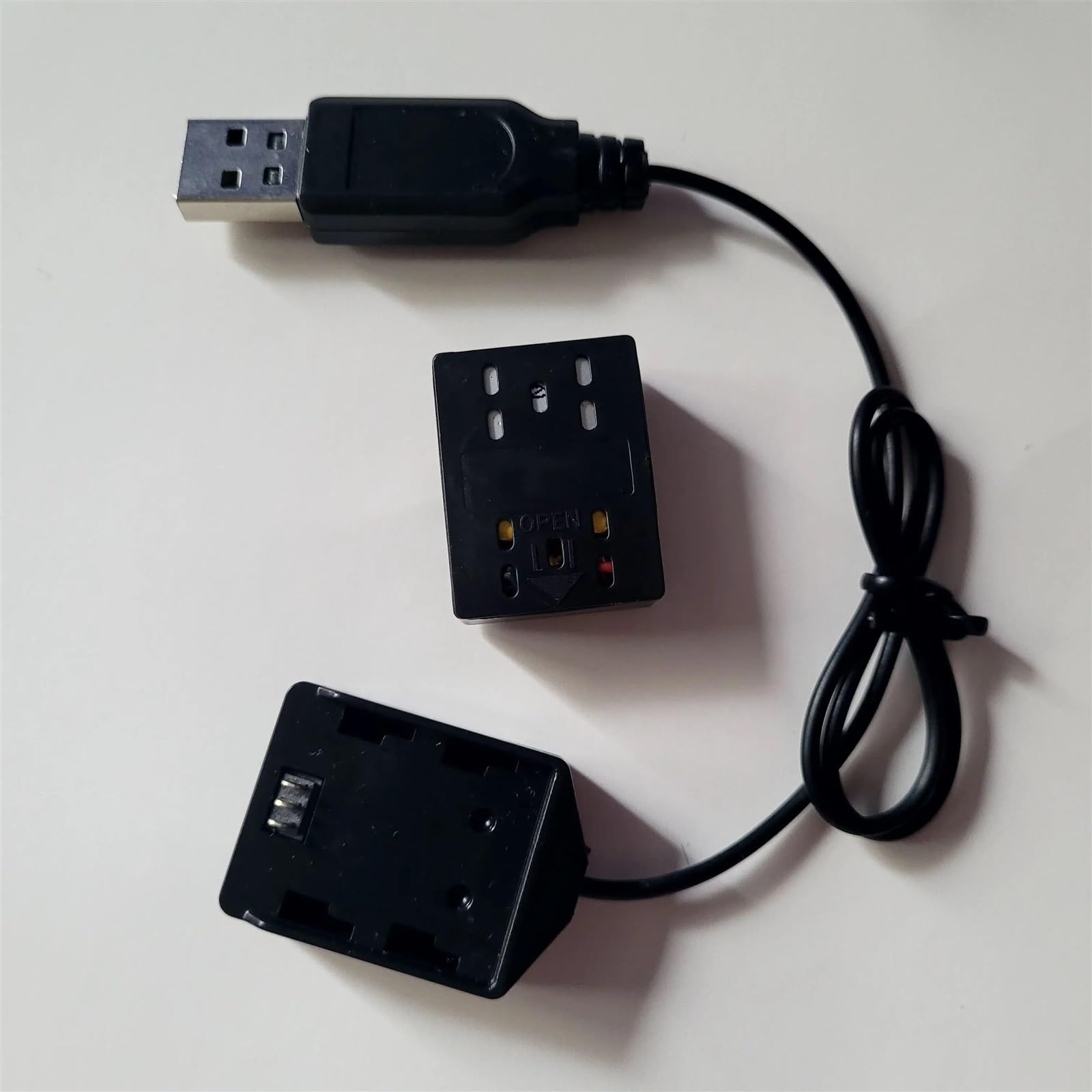
Image: The DAYUDDRICAR 4D V2 Drone Lipo Battery and USB Charger Cable set. This image shows one Lipo battery and one USB charging cable.
Setup
Before operating your 4D V2 drone, ensure the battery is properly installed and charged.
Battery Installation
- Locate the battery compartment on your 4D V2 drone. Refer to your drone's specific manual for exact location and opening instructions.
- Carefully insert the Lipo battery into the compartment, ensuring the connectors align correctly.
- Connect the battery's power cable to the drone's power port. Ensure a secure connection.
- Close the battery compartment cover.
Initial Charging
It is recommended to fully charge the battery before its first use.
- Connect the Lipo battery to the provided USB charger cable.
- Plug the USB end of the charger cable into a compatible USB power source (e.g., computer USB port, USB wall adapter, power bank). The input voltage for the charger is 240 Volts, but it adapts to standard USB output (typically 5V).
- Observe the indicator light on the USB charger (if present). Typically, a red light indicates charging, and it turns off or changes color when charging is complete.
- Allow the battery to charge until fully indicated. Charging times may vary.
Operating Instructions
Charging the Battery
Follow these steps to charge your 4D V2 Drone Lipo Battery:
- Ensure the battery is disconnected from the drone before charging.
- Connect the battery to the USB charger cable.
- Plug the USB charger cable into a standard USB power source.
- Monitor the charging indicator. Disconnect the battery once charging is complete to prevent overcharging.
Battery Safety Guidelines
- Do not leave charging batteries unattended.
- Do not charge batteries near flammable materials.
- Do not puncture, disassemble, or short-circuit the battery.
- If the battery becomes hot, swells, or shows any signs of damage during charging or use, discontinue use immediately and dispose of it properly.
- Use only the provided USB charger cable or a compatible charger specifically designed for Lipo batteries.
- Keep batteries out of reach of children and pets.
Maintenance
Battery Storage
- Store Lipo batteries in a cool, dry place, away from direct sunlight and extreme temperatures.
- For long-term storage, it is recommended to store Lipo batteries at a "storage charge" level (typically around 3.8V per cell), not fully charged or fully discharged.
- Store batteries in a fire-safe bag or container.
Cleaning
- Wipe the battery and charger cable with a clean, dry cloth if they become dirty.
- Do not use liquids or solvents for cleaning.
Disposal
Lipo batteries must be disposed of properly. Do not dispose of them in regular household waste. Consult your local regulations for proper battery recycling and disposal procedures.
Troubleshooting
| Problem | Possible Cause | Solution |
|---|---|---|
| Battery not charging. |
|
|
| Drone not powering on after battery installation. |
|
|
Specifications
- Brand: DAYUDDRICAR
- Model: 4D V2 Drone Lipo Battery / USB Charger Cable
- Input Voltage (Charger): 240 Volts (via USB, typically 5V from source)
- Output Voltage (Battery): 7.4 Volts
- Unit Count: 1.0 Count (for the "Set 01" which includes one battery and one charger cable)
- Compatibility: Specifically designed for 4D V2 Drone Mini Quadcopter
Warranty Information
This product is sold with No Warranty as per manufacturer specifications. Please inspect the product upon receipt for any defects.
Support
For further assistance or inquiries regarding your DAYUDDRICAR 4D V2 Drone Lipo Battery and USB Charger Cable, please contact the seller or refer to the original purchase platform for support options.