
Redi-Remote RTNC112UD
Redi-Remote Replacement Remote Control User Manual
Brand: Redi-Remote | Model: RTNC112UD
Compatible with Magnavox MBP110V/F7, NC112UD, MBP110VF7
1. Introduction
This user manual provides instructions for the Redi-Remote replacement remote control, designed for specific Magnavox Blu-Ray/VCR units. This remote is a custom replacement and is not an original Magnavox product. It is engineered to perform all functions of the original remote for the compatible models without requiring any programming.
Compatible Magnavox Models: MBP110V/F7, NC112UD, MBP110VF7
2. Safety Information
- Keep batteries out of reach of children.
- Do not mix old and new batteries, or different types of batteries.
- Remove batteries if the remote will not be used for an extended period.
- Dispose of used batteries according to local regulations.
- Avoid exposing the remote to extreme temperatures, direct sunlight, or moisture.
3. Package Contents
- 1 x Redi-Remote Replacement Remote Control (Model RTNC112UD)
4. Setup
4.1 Battery Installation
- Locate the battery compartment on the back of the remote control.
- Slide open the battery compartment cover.
- Insert four (4) AAA batteries, ensuring the correct polarity (+ and -) as indicated inside the compartment.
- Close the battery compartment cover securely.
Note: This remote control does not require any programming. It is ready to use once batteries are installed.
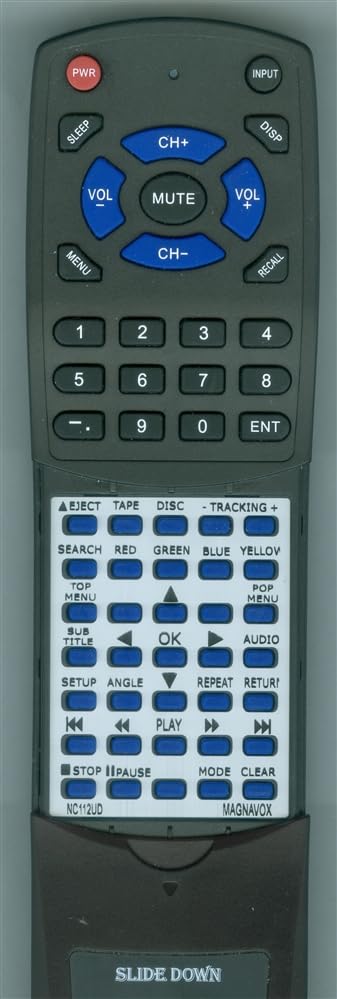
Figure 1: Redi-Remote Replacement Remote Control. This image shows the front view of the remote control, highlighting its compact design and button layout. The remote is black with clearly labeled buttons for various functions.
5. Operating Instructions
5.1 Basic Functions
Point the remote control directly at your Magnavox unit (MBP110V/F7, NC112UD, MBP110VF7) and press the desired function button. Ensure there are no obstructions between the remote and the unit.
- Power: Turns the unit on or off.
- Play/Pause: Controls media playback.
- Stop: Halts media playback.
- Rewind/Fast Forward: Navigates through media.
- Menu: Accesses the unit's main menu.
- Navigation Buttons (Up, Down, Left, Right, Enter): Used to navigate menus and confirm selections.
5.2 Advanced Functions (Sliding Cover)
The lower half of the remote control features a sliding cover. Slide this cover downwards to reveal additional, model-specific functions. These buttons provide access to advanced features of your Magnavox Blu-Ray/VCR unit.
Refer to your Magnavox unit's original manual for specific details on these advanced functions.
6. Maintenance
6.1 Cleaning
Wipe the remote control with a soft, dry cloth. Do not use liquid cleaners or abrasive materials, as they may damage the remote's surface or internal components.
6.2 Battery Replacement
If the remote control's range decreases or it becomes unresponsive, replace all four AAA batteries with new ones. Follow the battery installation steps outlined in Section 4.1.
7. Troubleshooting
- Remote not responding:
- Check if the batteries are installed correctly with the correct polarity.
- Replace old batteries with new ones.
- Ensure there are no obstructions between the remote and the Magnavox unit.
- Confirm you are within the effective operating range (up to 20 feet).
- Specific functions not working:
- Ensure the sliding cover is positioned correctly to access the desired buttons.
- Verify that your Magnavox unit supports the specific function you are trying to use.
- Remote controls other devices:
This Redi-Remote is designed specifically for the listed Magnavox models and cannot be programmed to control auxiliary devices.
- If issues persist, please contact the seller for assistance.
8. Specifications
| Brand | Redi-Remote |
| Model Number | RTNC112UD |
| Compatible Devices | Magnavox MBP110V/F7, NC112UD, MBP110VF7 (Blu-Ray/VCR) |
| Connectivity Technology | Infrared |
| Special Feature | No Programming Required |
| Power Source | 4 x AAA Batteries (not included) |
| Maximum Range | 20 Feet |
| Dimensions | 7 1/2" x 2 1/4" x 3/4" |
| Item Weight | 5 Ounces |
9. Warranty and Support
This product is a replacement remote control provided by Redi-Remote. Specific warranty details are not provided in the product information. However, if you have any concerns with the remote after purchase, please contact the seller, RemotesPro, directly for assistance.
For further support or inquiries, please refer to the seller's contact information on the platform where the purchase was made.
Ask a question about this manual
Ask about setup, troubleshooting, compatibility, parts, safety, or missing instructions. Manuals+ will review the question and use this page’s manual context to help answer it.