
1. Introduction
Thank you for choosing the 3-Link TB2 Wireless Outdoor Battery Security Camera. This manual provides essential information for the proper installation, operation, and maintenance of your security camera. Please read this manual thoroughly before use and retain it for future reference.
Package Contents
- 3-Link TB2 Security Camera
- Wall Mount
- Power Cable
- Mounting Screws and Anchors
- User Manual
2. Important Safety Information
- Ensure the camera is installed in a location that provides a clear view and stable Wi-Fi signal.
- Use only the provided power cable for charging.
- Do not expose the camera to extreme temperatures outside its operating range.
- Avoid placing the camera near strong electromagnetic fields.
- Keep the camera and accessories out of reach of children.
- Do not attempt to disassemble or modify the camera. This will void the warranty.
3. Product Overview
The 3-Link TB2 is a wireless outdoor battery-powered security camera designed for home surveillance. It features motion detection, night vision, a motion-activated spotlight, and compatibility with Amazon Alexa. The camera operates on 2.4G Wi-Fi networks and supports event-based recording to an SD card or cloud storage.
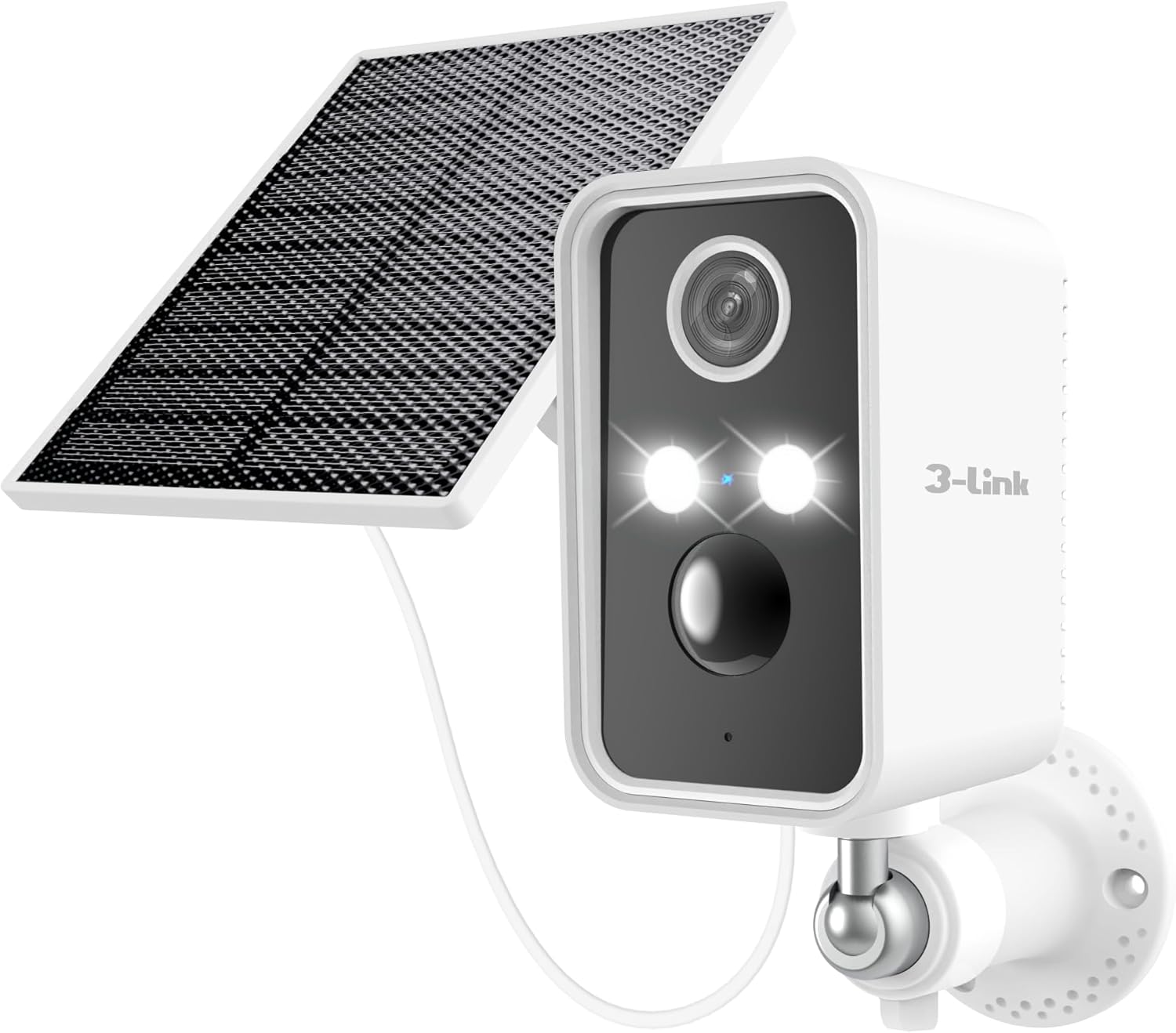
Figure 3.1: 3-Link TB2 Wireless Outdoor Battery Security Camera with optional solar panel.
Key Features
- Wireless & Battery Powered: Easy installation without complex wiring.
- Motion-Activated Spotlight: Deters intruders and provides color night vision.
- Motion Detection Alerts: Real-time notifications to your smartphone.
- Night Vision: Clear surveillance even in low-light conditions.
- Alexa Compatibility: Voice control for live view and arm/disarm functions.
- Event Recording: Records clips upon motion detection to SD card or cloud.
- IP65 Weatherproof: Designed to withstand outdoor elements.
4. Setup Guide
4.1. Charging the Camera
Before initial use, fully charge the camera battery using the provided power cable. Connect the cable to the camera's charging port and a standard USB power adapter (not included). The charging indicator light will show the charging status.
4.2. App Installation
- Download the companion app from your smartphone's app store (search for "3-Link" or refer to the QR code in the quick start guide).
- Register for a new account or log in if you already have one.
4.3. Connecting to Wi-Fi
The 3-Link TB2 camera supports 2.4GHz Wi-Fi networks only. It is not compatible with 5GHz Wi-Fi.
- Ensure your smartphone is connected to a 2.4GHz Wi-Fi network.
- Open the app and follow the on-screen instructions to add a new device.
- Power on the camera. The camera will enter pairing mode (indicated by a flashing LED).
- Scan the QR code displayed on your phone with the camera lens, or follow alternative pairing methods provided in the app.
- Once connected, the camera's LED indicator will change to a solid color, and you will receive a confirmation in the app.
4.4. Mounting the Camera
Choose a suitable outdoor location for mounting, ensuring a clear field of view and good Wi-Fi signal strength. The camera is IP65 weatherproof.

Figure 4.1: The 3-Link TB2 camera is designed for outdoor use and is IP65 weatherproof, functioning reliably in rain, snow, and heat.
- Mark the desired drilling spots using the wall mount as a template.
- Drill pilot holes and insert wall anchors if necessary.
- Secure the wall mount to the surface using the provided screws.
- Attach the camera to the wall mount and adjust the angle for optimal coverage.
- If using a solar panel (sold separately), connect it to the camera's charging port and mount it in a location with direct sunlight.
5. Operating Instructions
5.1. Live View
Open the app and select your camera to access the live video feed. From here, you can monitor your property in real-time.
5.2. Motion Detection and Alerts
The camera is equipped with motion detection capabilities. When motion is detected, the camera will record a short video clip and send an alert to your smartphone.

Figure 5.1: The camera features AI motion detection to identify human movement and reduce false alerts.
- Adjust motion sensitivity and detection zones within the app settings.
- Review recorded event clips in the app's playback section.
5.3. Night Vision and Spotlight
The camera automatically switches to night vision in low-light conditions. The built-in motion-activated spotlight can illuminate the area and deter unwanted visitors.

Figure 5.2: The motion-activated spotlight provides illumination and can act as a deterrent at night.
- Configure spotlight behavior (e.g., always on, motion-activated) in the app settings.
5.4. Storage Options
The camera supports local storage via an SD card (not included) and cloud storage (subscription may be required).
- Insert a compatible microSD card (up to 128GB, Class 10 or higher) into the camera's SD card slot.
- Access cloud storage options and subscription details within the app.
5.5. Alexa Integration
Connect your 3-Link TB2 camera to Amazon Alexa for voice control.

Figure 5.3: The camera is compatible with Amazon Alexa, allowing voice commands for live view on compatible devices.
- Enable the "3-Link" skill in the Alexa app.
- Link your 3-Link account with Alexa.
- Use commands like "Alexa, show me the [camera name]" to view the live feed on compatible Alexa devices.
5.6. Sharing Camera Access
You can share access to your camera's live feed and recordings with family members or trusted individuals through the app.

Figure 5.4: Share camera access with family members through the app.
- Navigate to the camera settings in the app and look for the "Share Device" or similar option.
- Follow the prompts to invite others to view your camera.
6. Maintenance
- Cleaning: Gently wipe the camera lens and body with a soft, damp cloth. Do not use harsh chemicals or abrasive cleaners.
- Battery Care: For optimal battery life, avoid fully discharging the camera frequently. If using a solar panel, ensure it is clean and receives adequate sunlight.
- Firmware Updates: Regularly check the app for available firmware updates to ensure your camera has the latest features and security enhancements.
- Wi-Fi Connection: Periodically check your Wi-Fi signal strength at the camera's location to ensure stable performance.
7. Troubleshooting
| Issue | Possible Solution |
|---|---|
| Camera won't power on. | Ensure the battery is fully charged. Connect to power and check the charging indicator. |
| Unable to connect to Wi-Fi. |
|
| Motion alerts are not received. |
|
| Poor video quality. |
|
| SD card not recording. |
|
8. Product Specifications
| Feature | Detail |
|---|---|
| Model Number | TB2 |
| Indoor/Outdoor Usage | Outdoor |
| Power Source | Battery Powered (5200 mAh Lithium Ion) |
| Connectivity Protocol | Wi-Fi (2.4GHz Only) |
| Video Capture Resolution | 1080p |
| Night Vision Range | 30 Feet |
| Water Resistance Level | IP65 |
| Control Method | App, Voice (Amazon Alexa) |
| Item Weight | 11.7 ounces |
| Material | Acrylonitrile Butadiene Styrene (ABS) |
| Special Feature | Rechargeable Battery, Motion-Activated Spotlight |
9. Warranty and Support
For warranty information and technical support, please refer to the warranty card included with your product or visit the official 3-Link website. You can also contact customer service through the contact information provided in the app or on the product packaging.
Please have your model number (TB2) and purchase details ready when contacting support.